BoldSign's Data Center in Canada: What You Need to Know
 BoldSign Team
TL;DR: BoldSign has a Canada region, and we keep its documents in Toronto. You pick the region when you sign up, and it comes with every plan at no extra cost. Our page on electronic signatures for Canadian businesses covers the details.
A law firm in Calgary sends a retainer agreement for signature. The client asks a fair question: where will you keep my signed copy and my personal details?
With the Canada region, the answer is short. Your documents and signer data stay in Canada. This post explains what that means, who it helps and how to set it up.
What is the BoldSign data center in Canada?
The BoldSign Canada region keeps your documents and signer data in a data center in Toronto. You choose it once, when you create your account.
Think of it like picking a bank branch for a safe deposit box. You choose the branch when you open the box, and your papers stay there.
We run on Microsoft Azure and Google Cloud Platform servers in the US East, EU, Canada and Australia. Our security policy explains how we host and protect data.
What are the benefits of Canadian data residency?
Data residency means your records stay in the country you choose. For Canadian teams, it gives a clear answer to clients, auditors and buyers who ask where data lives.
- You can tell clients that signed documents stay in Canada.
- You get a simple answer for procurement and security forms that ask about data location.
- Documents in Toronto get the same encryption and audits as every other region.
- The Canada region comes with every plan, including the free one.
Public bodies, schools, law firms and clinics often face these questions first. A local region makes the answer easy to give.
How does BoldSign protect data in the Canada region?
We encrypt every document twice with Advanced Encryption Standard (AES) 256-bit encryption, once at the service level and once at the infrastructure level. An independent auditor has checked our controls for System and Organization Controls (SOC) 2 Type 2.
Data also moves between our app and our servers in encrypted form. Our in-house experts run regular penetration tests, and outside security firms review our code.
A Canadian region supports your privacy work but does not replace it. The Personal Information Protection and Electronic Documents Act (PIPEDA) covers how you collect and use personal information, wherever you store it.
Who should choose the Canada region?
Pick the Canada region when your clients, contracts or internal rules expect records to stay in Canada. Teams outside Canada with Canadian customers can choose it too.
- Canadian firms that handle client records, contracts or health forms.
- Global companies with staff or customers in Canada.
- IT and security teams that must answer data location questions in reviews.
How do you select the Canada region in BoldSign?
You select the region on the sign-up form, before your account exists. Choose with care, as our Canada page states that you cannot change the region later.
- Go to account.boldsign.com and select Sign Up.
- Enter your email address in the Email field.
- In the Data Residency field, choose the Canada region.
- Finish the sign-up steps to create your account.
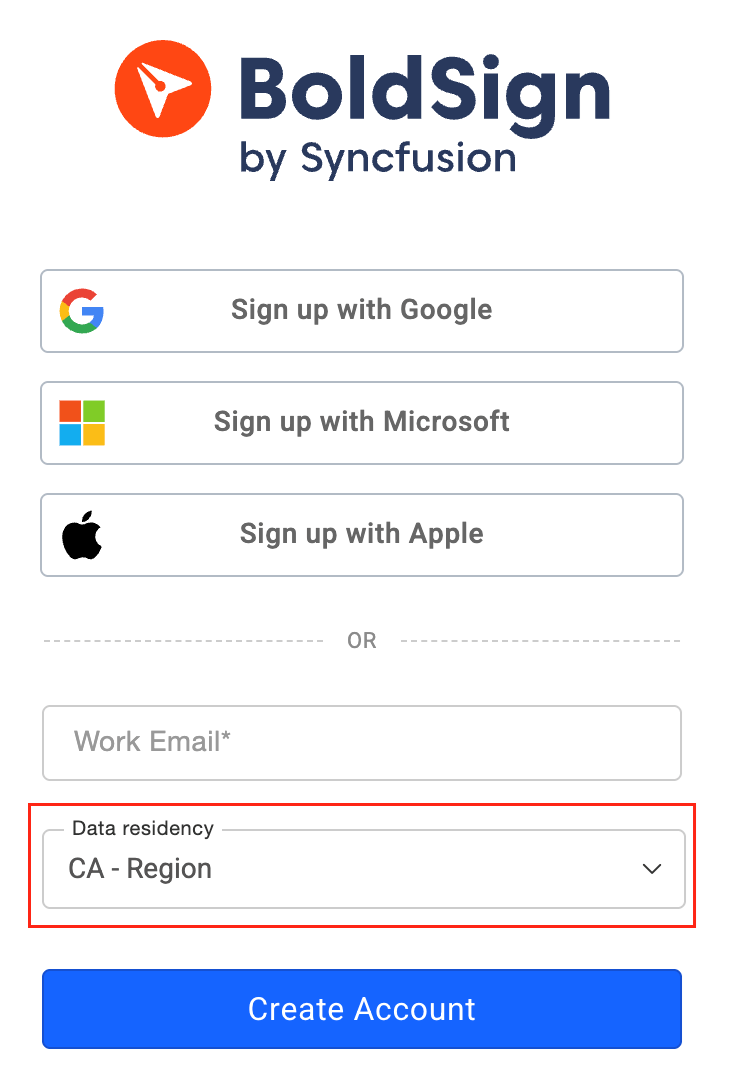
Our help article on data residency region selection shows each step.
Which BoldSign plan includes the Canada region, and what does it cost?
Every plan includes data residency in the US, EU, Canada and Australia. Storing data in Canada adds nothing to the price.
The Essential plan is free, and the Growth plan is $5 per user a month. The Business plan is $15 per user a month, and the Premium plan is $99 a month for unlimited users. All prices are in USD and billed yearly, and our pricing page lists what each plan includes.
Ready to keep your documents in Canada?
Start with a free account and choose the Canada region at sign-up. Our support team can answer questions before you decide.
- Start your 30-day free trial and pick the Canada region.
- Request a demo to see BoldSign with your own documents.
- Read how BoldSign works for Canadian businesses.
Frequently asked questions
Does BoldSign have a dedicated data centre in Canada?
Yes. We offer a Canada region, and we store documents in that region in Toronto. You pick it when you create your account.
Where are BoldSign documents stored in Canada?
We store documents in the Canada region in Toronto. We run on Microsoft Azure and Google Cloud Platform servers rather than our own buildings.
Can I change my BoldSign data region later?
No. You choose the data region at sign-up, and our Canada page states that you cannot change it later. Pick the region your clients expect before you finish signing up.
Does the Canada region cost extra?
No. Storing data in Canada carries no added cost, and every plan includes it, from the free Essential plan up.
Which data regions does BoldSign offer?
We offer four regions: the US, the EU, Canada and Australia. Your documents and signer data stay in the region you choose.
Is an electronic signature legal in Canada?
Yes, when it meets the federal or provincial law that covers the document. PIPEDA covers federal matters, and each province and territory has its own electronic commerce law.
Does the Canada region cover all my PIPEDA duties?
No. A Canadian region helps with data residency. How you collect and use personal information under the Personal Information Protection and Electronic Documents Act (PIPEDA) is still yours to check.
How does BoldSign protect documents in the Canada region?
We encrypt every document twice with Advanced Encryption Standard (AES) 256-bit encryption. An independent auditor has checked our controls for System and Organization Controls (SOC) 2 Type 2.

BoldSign Team
The official team behind BoldSign—the simple, secure eSignature solution trusted by businesses worldwide. Our platform helps individuals and teams create, sign, and manage documents effortlessly while maintaining full compliance. Experience BoldSign yourself with a free trial or request a personalized demo to see it in action.
More posts by BoldSign Team