Mastering Long-Running Tasks in ASP.NET Core Without Blocking Requests
 Priya Vinayagam
TL;DR: A long-running task is work that takes longer than a web request should wait, such as building a report. Put the work on a queue, return 202 Accepted with a job ID, and let a background worker finish it. Our eSignature API uses the same idea, with webhooks that report each document’s progress.
Active Server Pages (ASP) and .NET (pronounced dot net) give ASP.NET Core, Microsoft’s web framework, its name. This guide covers how to keep slow work out of its requests.
Say a user clicks “Generate report” and your controller builds a large PDF inside the Hypertext Transfer Protocol (HTTP) request. The browser spins, a proxy cuts the connection at its time limit, and the user clicks again. Now two reports are building, and neither user gets an answer.
What is a long-running task in ASP.NET Core?
A long-running task is any work slow enough to risk a timeout, hold server resources or be cut off by a restart. The test is simple: when the response does not need the result, the work belongs somewhere else.
Think of a dry cleaner. You hand over your coat, get a ticket and leave. You come back later, or the shop texts you when the coat is ready.
Common long running tasks in a web app include:
- Sending a large batch of emails
- Building PDF or Excel reports
- Scanning, resizing or converting uploaded files
- Calling a slow outside service, such as a payment or customer relationship management (CRM) system
- Retrying failed webhook deliveries or running scheduled callbacks
Why is a long running HTTP request a problem?
A long running HTTP request ties up the connection and the server until the work ends. Clients, proxies and load balancers all give up after a set time.
Holding a request open for heavy work causes four problems:
- A client or proxy times out and closes the connection before the work ends.
- Throughput drops, because each slow request holds server resources for longer.
- A deploy or restart stops whatever was still running.
- Timed-out clients retry, which adds load and causes more timeouts.
How do I handle long-running tasks without timeouts?
Accept the request, hand the work to a queue and answer at once. The client then checks back for the result, so no request has to wait.
- Accept the request and check its input.
- Put the job on a queue.
- Return 202 Accepted with a job ID and a status URL.
- Run the job in a background worker.
- Let the client poll the status URL, or notify it through a webhook.
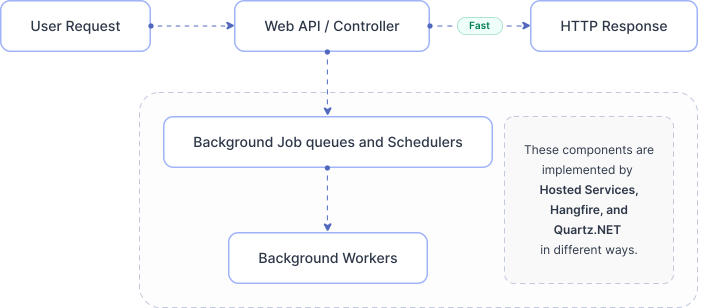
The slow way is controller, then long work, while the client waits. The pattern above is controller, then queue, then worker, while the client moves on. The same shape works with BackgroundService, Hangfire or a message broker.
When is fire-and-forget safe in ASP.NET Core?
Fire-and-forget is safe only for work you can afford to lose. A crash or restart wipes out in-memory work, and an exception nobody awaits can go unseen.
Where fire-and-forget is fine
- Extra detail added to non-critical telemetry
- Optional cache warm-ups
- Small tasks you are happy to skip now and then
Where you need a queue or job system
- Billing, compliance and anything else that must happen
- Emails users expect to receive
- Reports users rely on
- Data sync that must stay consistent
Which background approach fits your use case?
Pick the simplest option that meets your needs for durability and scale. The table maps common needs to a starting point.
| Use case | Starting point |
|---|---|
| Small, non-critical background work | BackgroundService |
| Background work with backpressure inside the API | BackgroundService and an in-memory queue (Channel) |
| Work that keeps the processor busy | A separate worker service or process |
| Jobs that must survive restarts | A durable queue (RabbitMQ, Amazon SQS, Azure Service Bus) and a worker |
| Scheduled or recurring jobs | Hangfire or Quartz.NET |
| Dashboard, retries and storage with little setup | Hangfire |
What is the difference between IHostedService and BackgroundService?
Both are hosted services, the built-in way to run background code next to your web app. IHostedService is the low-level interface, and BackgroundService is a base class built on it.
IHostedService asks you to write StartAsync and StopAsync yourself. BackgroundService handles start and stop for you and gives you one ExecuteAsync(CancellationToken) method for your loop.
For a worker loop, BackgroundService is usually the easier place to start. The worker below runs a loop, stops when the app shuts down and pauses briefly after an error. That pause keeps a fault from turning into a tight loop of failures.
using Microsoft.Extensions.Hosting;
using Microsoft.Extensions.Logging;
public sealed class ExampleWorker : BackgroundService
{
    private readonly ILogger<ExampleWorker> _logger;
    public ExampleWorker(ILogger<ExampleWorker> logger) => _logger = logger;
    protected override async Task ExecuteAsync(CancellationToken stoppingToken)
    {
        _logger.LogInformation("Worker started");
        while (!stoppingToken.IsCancellationRequested)
        {
            try
            {
                // Do one bounded unit of work per loop iteration
                await Task.Delay(TimeSpan.FromSeconds(5), stoppingToken);
                _logger.LogInformation("Worker heartbeat at {Time}", DateTimeOffset.UtcNow);
            }
            catch (OperationCanceledException) when (stoppingToken.IsCancellationRequested)
            {
                // graceful shutdown
            }
            catch (Exception ex)
            {
                _logger.LogError(ex, "Unhandled exception in worker loop");
                await Task.Delay(TimeSpan.FromSeconds(2), stoppingToken);
            }
        }
        _logger.LogInformation("Worker stopping");
    }
}
// Register it:
builder.Services.AddHostedService<ExampleWorker>();
How do you build a queue and a BackgroundService worker?
Use a producer and a consumer. Controllers produce jobs by adding them to a queue, and a worker consumes the jobs and runs them.
For a queue inside one process, System.Threading.Channels fits well. Channels work with async code, run fast and support a size limit, which gives you backpressure.
Step 1: Define a job contract
Keep each job message small. Pass IDs, not large payloads, and keep large data in a database or blob storage.
public sealed record WorkItem(
    string JobId,
    Func<CancellationToken, ValueTask> Handler
);
Step 2: Create a bounded Channel-based queue
A size limit stops your API from accepting endless work during a spike. When the queue is full, new writes wait for space.
using System.Threading.Channels;
public interface IBackgroundTaskQueue
{
    ValueTask EnqueueAsync(WorkItem item, CancellationToken ct = default);
    ValueTask<WorkItem> DequeueAsync(CancellationToken ct);
}
public sealed class ChannelBackgroundTaskQueue : IBackgroundTaskQueue
{
    private readonly Channel<WorkItem> _channel;
    public ChannelBackgroundTaskQueue(int capacity = 1000)
    {
        _channel = Channel.CreateBounded<WorkItem>(
            new BoundedChannelOptions(capacity)
            {
                FullMode = BoundedChannelFullMode.Wait
            });
    }
    public ValueTask EnqueueAsync(WorkItem item, CancellationToken ct = default)
        => _channel.Writer.WriteAsync(item, ct);
    public ValueTask<WorkItem> DequeueAsync(CancellationToken ct)
        => _channel.Reader.ReadAsync(ct);
}
Step 3: Build a worker that consumes the queue
The worker reads one job at a time and logs how each one ends. During shutdown, it stops cleanly.
using Microsoft.Extensions.Hosting;
using Microsoft.Extensions.Logging;
public sealed class QueuedWorker : BackgroundService
{
    private readonly IBackgroundTaskQueue _queue;
    private readonly ILogger<QueuedWorker> _logger;
    public QueuedWorker(IBackgroundTaskQueue queue, ILogger<QueuedWorker> logger)
    {
        _queue = queue;
        _logger = logger;
    }
    protected override async Task ExecuteAsync(CancellationToken stoppingToken)
    {
        while (!stoppingToken.IsCancellationRequested)
        {
            WorkItem item;
            try
            {
                item = await _queue.DequeueAsync(stoppingToken);
            }
            catch (OperationCanceledException) when (stoppingToken.IsCancellationRequested)
            {
                break; // graceful shutdown
            }
            try
            {
                _logger.LogInformation("Job {JobId} started", item.JobId);
                await item.Handler(stoppingToken);
                _logger.LogInformation("Job {JobId} completed", item.JobId);
            }
            catch (OperationCanceledException) when (stoppingToken.IsCancellationRequested)
            {
                _logger.LogWarning("Job {JobId} cancelled during shutdown", item.JobId);
            }
            catch (Exception ex)
            {
                _logger.LogError(ex, "Job {JobId} failed", item.JobId);
            }
        }
    }
}
Step 4: Enqueue from a controller and return 202 Accepted
The controller stays fast, and the background worker does the heavy work. The response carries the job ID and the address to check.
using Microsoft.AspNetCore.Mvc;
[ApiController]
[Route("api/reports")]
public sealed class ReportsController : ControllerBase
{
    private readonly IBackgroundTaskQueue _queue;
    public ReportsController(IBackgroundTaskQueue queue) => _queue = queue;
    [HttpPost("{reportId}:generate")]
    public async Task<IActionResult> Generate(string reportId, CancellationToken ct)
    {
        var jobId = Guid.NewGuid().ToString("n");
        await _queue.EnqueueAsync(
            new WorkItem(jobId, async token =>
            {
                // Example: generate report, store it, update job status in DB
                await Task.Delay(TimeSpan.FromSeconds(10), token);
            }),
            ct);
        return Accepted(new { jobId, statusUrl = $"/api/jobs/{jobId}" });
    }
}
Step 5: Wire everything up with dependency injection
Register the queue as a single shared instance and the worker as a hosted service. Dependency injection (DI) then hands the same queue to the controller and the worker.
builder.Services.AddSingleton<IBackgroundTaskQueue>(_ =>
    new ChannelBackgroundTaskQueue(capacity: 500));
builder.Services.AddHostedService<QueuedWorker>();
How do clients follow job status: polling, webhooks or server-sent events?
A 202 response is only half the job, because clients still need to learn the result. Give them a status endpoint to poll, and add push updates where waiting matters.
A simple contract looks like this:
POST /reports/{id}:generatereturns 202 Accepted with the job ID and status URL.GET /jobs/{jobId}returns queued, running, completed or failed, plus a result link.- A webhook or a server-sent events (SSE) stream pushes each change as it happens.
Webhooks suit other servers, and SSE suits browsers that keep one connection open. With parallel jobs, put the job ID in every update so the client can match it.
public enum JobState { Queued, Running, Completed, Failed }
public sealed record JobStatus(
    string JobId,
    JobState State,
    string? ResultUrl = null,
    string? Error = null
);
Tip: Store job state in a durable store, such as a database or Redis, even when the queue lives in memory. You can then see and debug every job from the start.
Our webhook events work the same way for signature requests. Events such as Sent, SendFailed and Completed tell your app when a document changes state, so the app has no need to poll.
When are in-memory queues not enough?
An in-memory queue is a good place to start, but it lives and dies with the process. Move job storage outside the web app once the work must survive restarts.
An in-memory queue can lose work in three ways:
- The process crashes and the queued jobs are gone.
- You scale down and jobs in progress stop.
- You deploy and running work is cut off.
Durable options keep each job outside the web process:
- A message broker, such as Azure Service Bus, RabbitMQ or Amazon Simple Queue Service (SQS)
- A job system such as Hangfire, with stored jobs, retries and a dashboard
- A separate worker service that scales on its own
How do you consume jobs using Azure Service Bus in ASP.NET Core?
The worker below shows the general durable queue and worker pattern. Production code should also handle idempotency, poison messages and backoff.
using Azure.Messaging.ServiceBus;
using Microsoft.Extensions.Hosting;
using Microsoft.Extensions.Logging;
public sealed class ServiceBusWorker : BackgroundService
{
    private readonly ServiceBusProcessor _processor;

    private readonly ILogger<ServiceBusWorker> _logger;
    public ServiceBusWorker(ServiceBusClient client, ILogger<ServiceBusWorker> logger)
    {
        _logger = logger;
        _processor = client.CreateProcessor("report-jobs", new ServiceBusProcessorOptions
        {
            MaxConcurrentCalls = 4,
            AutoCompleteMessages = false
        });
        _processor.ProcessMessageAsync += OnMessageAsync;
        _processor.ProcessErrorAsync += OnErrorAsync;
    }
    protected override async Task ExecuteAsync(CancellationToken stoppingToken)
    {
        await _processor.StartProcessingAsync(stoppingToken);
        await Task.Delay(Timeout.InfiniteTimeSpan, stoppingToken);
    }
    public override async Task StopAsync(CancellationToken cancellationToken)
    {
        await _processor.StopProcessingAsync(cancellationToken);
        await _processor.DisposeAsync();
        await base.StopAsync(cancellationToken);
    }
    private async Task OnMessageAsync(ProcessMessageEventArgs args)
    {
        var body = args.Message.Body.ToString();
        _logger.LogInformation("Received job: {Body}", body);
        try
        {
            // Do work (make it idempotent)
            await Task.Delay(TimeSpan.FromSeconds(5), args.CancellationToken);
            await args.CompleteMessageAsync(args.Message, args.CancellationToken);
        }
        catch (Exception ex)
        {
            _logger.LogError(ex, "Job failed; abandoning message");
            await args.AbandonMessageAsync(args.Message, cancellationToken: args.CancellationToken);
        }
    }
    private Task OnErrorAsync(ProcessErrorEventArgs args)
    {
        _logger.LogError(args.Exception, "Service Bus error: {Entity}", args.EntityPath);
        return Task.CompletedTask;
    }
}
When should you pick Hangfire over BackgroundService?
Pick Hangfire when you want stored jobs and retries without writing the plumbing yourself. A plain BackgroundService gives you a loop, and Hangfire gives you a job system.
Hangfire brings these out of the box:
- Jobs stored in a database, so they survive restarts
- Automatic retries
- Delayed and recurring jobs
- A dashboard that shows every job
The example below enqueues a Hangfire job from an API controller and returns the job ID.
using Hangfire;
using Microsoft.AspNetCore.Mvc;
[ApiController]
[Route("api/emails")]
public sealed class EmailsController : ControllerBase
{
    [HttpPost("send")]
    public IActionResult SendEmail([FromBody] SendEmailRequest request)
    {
        var jobId = BackgroundJob.Enqueue(() =>
            EmailJobs.SendAsync(request.To, request.Subject, request.Body));
        return Accepted(new { jobId });
    }
}
public sealed record SendEmailRequest(string To, string Subject, string Body);
public static class EmailJobs
{
    public static Task SendAsync(string to, string subject, string body)
    {
        // real email sender here
        return Task.CompletedTask;
    }
}
When does Quartz.NET make more sense?
Quartz.NET fits when your main need is a schedule rather than a backlog of jobs. Choose it for work that runs at set times.
Quartz.NET suits you in these cases:
- You need cron-style schedules, such as every weekday at 6 a.m.
- Jobs follow the clock and are easy to predict.
- A queue is not the core of your design.
Many teams choose Hangfire when they need both schedules and durable jobs with retries.
What does background work need in production?
Background work needs four things in production: clean shutdown, idempotency, load control and visibility. Each one below has a short checklist.
Graceful shutdown
- Always pass the
CancellationTokenthrough and honor it. - Stop taking new work once shutdown starts.
- Make sure workers exit cleanly.
Idempotency, so retries don’t repeat work
Retries will happen, so design for them. A job that runs twice should leave the same result as a job that runs once.
- Use a job ID or request ID as the idempotency key.
- Store each state change: queued, running, then completed or failed.
- Make handlers safe to run twice, or have them detect duplicates.
Backpressure and load control
- Prefer bounded queues.
- Limit how many jobs run at once, based on processor and input/output (I/O) load.
- Add backoff so failures don’t trigger rapid retry storms.
Observability
You can only fix what you can see. At a minimum, track these numbers:
- How fast jobs join the queue, and how deep the queue gets
- Job duration, split into queue time and processing time
- Success and failure counts
- Retry and dead-letter counts, when you use a broker
What are the common mistakes with long-running tasks?
Most problems come from running important work inside the request, or from queues without limits. Watch for these five when you review a long running task in your own code.
- Calling
Task.Run()in a controller for important work, where it can be lost or fail unseen. - Blocking async code with
.Resultor.Wait(), which starves the thread pool under load. - Using queues with no size limit, which leads to memory pressure and cascading failures.
- Skipping idempotency keys and status endpoints, so retries duplicate work and clients retry blindly.
- Running processor-heavy jobs inside the web process, which slows unrelated requests.
What should you check before you ship background processing?
Run through two short checklists before the code goes to production. One covers the request path, and one covers the worker.
The request path
- The controller returns quickly, with no long work in the request.
- Work goes onto a bounded queue for a background worker.
- Every job has a job ID that doubles as an idempotency key.
- Job status is stored and can be read at
/jobs/{jobId}.
The worker
- The worker honors the
CancellationTokenand stops cleanly. - Retries have a cap and backoff, plus dead-letter handling on a durable queue.
- Side effects are idempotent, so no email or charge happens twice.
- Logs and metrics cover queue depth, delay, duration and failures.
- Processor-heavy work runs outside the web process.
Which BoldSign plan do you need to use the API in production?
Live API calls and webhooks need the Enterprise API plan. It starts at $30 a month with 40 envelopes, as listed on the BoldSign pricing page in November 2026.
Each extra envelope costs $0.75, and prices are in USD. Every other plan gives you sandbox access to the API only, and the sandbox is free.
How do you try this pattern with a real API?
The quickest way to learn the pattern is to build it against an API that sends real webhooks. Start in a sandbox, where mistakes cost nothing.
- Create a free API sandbox account and test your queue and webhook handler.
- Book a demo to talk through your integration with our team.
- Read our guide to ASP.NET Core background jobs with hosted services, Hangfire and Quartz.NET.
Stuck on something specific? Open a ticket on our support portal for help.
Frequently asked questions
What is the right way to run long-running tasks in ASP.NET Core?
Queue the work and answer the request at once with 202 Accepted and a job ID. A background worker then runs the job, and the client checks its status or waits for a callback.
How do I handle long-running tasks without server timeouts?
Move the work out of the request so the server answers in well under its time limit. Return a job ID, run the job in a worker, and report progress through a status endpoint, a webhook or server-sent events.
How should I handle webhooks and SSE updates for long-running parallel task jobs?
Give every job its own ID and include that ID in each update. Use webhooks for other servers and server-sent events for browsers, and make every handler safe to run twice.
Is it okay to use Task.Run inside an ASP.NET Core controller?
Only for work you can afford to lose. A restart drops the task, errors go unseen, and heavy use can starve the thread pool under load.
What's the difference between IHostedService and BackgroundService?
IHostedService is the interface with StartAsync and StopAsync methods. BackgroundService is a base class that implements it for you, so you write one ExecuteAsync loop.
When should I use a message queue instead of BackgroundService?
Use a message queue once jobs must survive a restart, absorb traffic spikes or scale apart from the web app. A broker keeps each message until a worker confirms the job.
How do I avoid duplicate processing when retries happen?
Give each job an idempotency key and record each state change. Before a handler acts, it checks whether that key already finished, so a second run does nothing.
Should I use Hangfire or Quartz.NET?
Pick Hangfire for stored jobs with retries and a dashboard. Pick Quartz.NET when the main need is running jobs on a time schedule, such as every night at 2 a.m.

Priya Vinayagam
Priya Vinayagam is a Product Manager at BoldSign and an active full-stack developer at Syncfusion, with four years of hands-on experience across .NET and JavaScript. She writes practical, performance-focused technical articles that help developers tackle real-world challenges. Known for looking beyond the obvious, Priya brings a builder’s mindset to every post—breaking down complex problems into clear, actionable solutions. Connect with her on LinkedIn.
More posts by Priya Vinayagam