Quartz.NET in Production: Advanced Job Scheduling for High-Traffic .NET APIs
 Priya Vinayagam
TL;DR: Quartz.NET is an open-source job scheduler for .NET (Microsoft’s developer platform) that runs work at set times, through restarts and across servers. For production, keep schedules in a database, set a misfire policy for each critical trigger, and block unsafe overlap with
[DisallowConcurrentExecution]. Pair it with our .NET software development kit (SDK) to send documents for signature from a scheduled job.
Your API sends renewal reminders every night at 01:00. One night a deploy restarts the app at 00:58, and the run never happens. The next week you scale to three instances, and every customer gets three reminders.
Timers and Task.Delay loops fail in exactly these ways. This guide shows how the Quartz.NET scheduler handles them in ASP.NET Core, Microsoft’s web framework named after Active Server Pages (ASP).
What is Quartz.NET?
Quartz.NET is a free, open-source library that runs jobs on a schedule inside your .NET app. In short, it is the Quartz scheduler .NET teams use when a missed or doubled run would cost money.
Think of a railway timetable. The timetable says when each train leaves, and a dispatcher sends the trains out on time.
In Quartz.NET, a trigger is the timetable entry and a job is the train. The scheduler is the dispatcher, and the whole system has five parts:
- A scheduler that fires jobs at the right time.
- Jobs, the classes that do the work.
- Triggers, the rules that say when a job runs.
- Job stores, where jobs and triggers are saved.
- A thread pool that runs jobs side by side.
The Quartz.NET official website holds the docs. The code lives in the quartznet repository on GitHub, under the Apache License 2.0.
Why do timers and cron scripts fail in production?
Simple timers work on one server that never restarts. Real apps restart, scale out and change clocks, so the schedule breaks in a few common ways.
- A timer lives in memory, so a restart or deploy drops the schedule.
- With several instances, every instance’s timer fires, and jobs run twice or more.
- Clock changes, daylight saving and container time zones make “every X minutes” logic drift.
- Cron scripts sit outside your app, often with no structured logs, retries or health checks.
Hosted services in ASP.NET Core are fine for long-running loops, but you still own the timing logic. Microsoft’s guide to background tasks with hosted services shows that they give you a loop, not a scheduler.
Which scheduling habits should .NET teams avoid?
A few habits cause most production incidents with scheduled work.
- Starting a job from the first web request after 02:00, which ties timing to traffic.
- Calling
Task.Runin a controller to “kick off” later work, which dies on recycle. - Keeping schedules only in memory, so runs missed during downtime are lost.
- Leaving misfire and overlap rules undefined, so jobs run at odd times after an outage.
- Assuming one scheduler in Kubernetes, Azure App Service or behind a load balancer.
When should you use Quartz.NET instead of a timer?
Use Quartz.NET with a database job store when a missed or doubled run would cause a support ticket, a money problem or bad data. A plain timer is fine for low-stakes tasks in a single worker.
| Choice | Pick this | Fits |
|---|---|---|
| One-time job | A simple trigger with a start time | “Run 10 minutes from now” |
| Fixed interval | A simple schedule | Polling every 5 minutes |
| Calendar time | A cron trigger | Every weekday at 07:00 |
| One instance | The in-memory job store | Tests and low-stakes tasks |
| Several instances | A database job store with clustering | Billing, invoices, reminders |
Quartz.NET supports both simple triggers for intervals and cron triggers for calendar times.
How does the Quartz.NET scheduler work?
You register jobs and triggers, and the scheduler runs a loop that decides what to fire next. In ASP.NET Core, it starts and stops with your app.
- You set up the scheduler through configuration or dependency injection.
- You register jobs and the triggers that point to them.
- The scheduler works out each trigger’s next fire time.
- When a trigger is due, the scheduler runs its job on a thread-pool thread.
What are jobs and JobDetail?
A job class implements IJob and holds the work. A JobDetail describes one job instance: its identity, whether it is durable, and its data map. Several triggers can point to the same JobDetail, as the Quartz.NET jobs tutorial explains.
What are simple and cron triggers?
A simple trigger starts at a given time and can repeat at a fixed gap, such as every 10 minutes. A cron trigger uses a cron expression, such as 0 0 1 * * ? for 01:00 every day. The cron trigger tutorial lists every field.
What is a job store?
Here is a short definition: job store means the place where Quartz.NET keeps jobs, triggers and their state. The default, RAMJobStore, keeps everything in memory, so it is fast but lost on restart.
AdoJobStore saves the same data in a relational database, which makes schedules durable and allows clustering. The job stores tutorial covers both.
How do you set up a .NET Quartz scheduler in ASP.NET Core?
Add the packages, register jobs and triggers with AddQuartz, and run the scheduler as a hosted service with AddQuartzServer.
The steps below use the Quartz.NET 3.x package layout. In Quartz.NET 4, dependency injection and hosting ship inside the main Quartz package, and version 4 targets .NET 10 only.
Step 1: Install the NuGet packages
Install the core, hosting and dependency injection packages:
dotnet add package Quartz
dotnet add package Quartz.Extensions.Hosting
dotnet add package Quartz.Extensions.DependencyInjection
Step 2: Register Quartz in Program.cs (.NET 8 style)
var builder = WebApplication.CreateBuilder(args);
builder.Services.AddQuartz(q =>
{
    // Use Microsoft DI for job creation.
    q.UseMicrosoftDependencyInjectionScopedJobFactory();

    // Example job + trigger registration.
    var jobKey = new JobKey("NightlyDataSync");

    q.AddJob(opts => opts
        .WithIdentity(jobKey)
        .StoreDurably());

    q.AddTrigger(opts => opts
        .ForJob(jobKey)
        .WithIdentity("NightlyDataSync-trigger")
        .WithCronSchedule("0 0 1 * * ?", x => x
            .WithMisfireHandlingInstructionDoNothing())); // discussed later
});

// Add Quartz as a hosted service (starts/stops with ASP.NET Core).
builder.Services.AddQuartzServer(options =>
{
    options.WaitForJobsToComplete = true;
});

var app = builder.Build();
app.MapControllers();
app.Run();
AddQuartz sets up the scheduler, jobs and triggers. AddQuartzServer hooks the scheduler into the host, so it starts and stops with the app. The ASP.NET Core integration guide lists every option.
Step 3: Implement a job with dependency injection
using Quartz;
using Microsoft.Extensions.Logging;

[DisallowConcurrentExecution] // explained later
public class NightlyDataSyncJob : IJob
{
    private readonly ILogger _logger;
    private readonly IRemoteSyncService _syncService;

    public NightlyDataSyncJob(
        ILogger<NightlyDataSyncJob> logger,
        IRemoteSyncService syncService)
    {
        _logger = logger;
        _syncService = syncService;
    }

    public async Task Execute(IJobExecutionContext context)
    {
        _logger.LogInformation("NightlyDataSyncJob started at {Time}", DateTimeOffset.UtcNow);
        await _syncService.SyncAsync(context.CancellationToken);
        _logger.LogInformation("NightlyDataSyncJob completed at {Time}", DateTimeOffset.UtcNow);
    }
}
The job gets its services, logging and cancellation token from the host, like any other class you register.
How do you control concurrency in Quartz.NET jobs?
Make jobs stateless and idempotent, so running one twice with the same input does no harm. Then block overlap where it would still be unsafe.
Stateless or stateful jobs?
Jobs are stateless by default and keep nothing between runs. A stateful job saves data between runs in its job data map, using PersistJobDataAfterExecution, as the Quartz.NET guide to jobs and job details describes. Aim for stateless jobs in production.
How do you prevent concurrent execution?
Put [DisallowConcurrentExecution] on the job class. Quartz.NET then never runs two copies of the same job definition, the same JobKey, at once. The Quartz.NET DisallowConcurrentExecution official documentation is in the jobs guide linked above.
[DisallowConcurrentExecution]
public class BillingJob : IJob
{
    public async Task Execute(IJobExecutionContext context)
    {
        // Only one instance per JobKey at a time.
    }
}
Use it for jobs that touch shared records, such as billing, financial records or stock levels. Use it for jobs that can take longer than their interval, too.
How do you handle long-running jobs?
A job can run past its next fire time. Three habits keep that safe:
- Add
[DisallowConcurrentExecution]so a new run waits for the old one. - Check the cancellation token often, so the job stops cleanly on shutdown.
- Split heavy work into smaller tasks or hand it to a queue.
How do Quartz.NET cron expressions work?
A Quartz.NET cron expression has six required fields and an optional seventh: seconds, minutes, hours, day of month, month, day of week and year. Fields are separated by spaces.
Three examples from the cron trigger tutorial:
0 0 1 * * ?runs every day at 01:00.0 0/5 * * * ?runs every 5 minutes.0 30 9 ? * MON-FRIruns on weekdays at 09:30.
You can also build a schedule with a helper instead of a string:
.WithSchedule(CronScheduleBuilder.DailyAtHourAndMinute(1, 0))Use a simple schedule, such as WithSimpleSchedule(x => x.WithIntervalInMinutes(5).RepeatForever()), for even gaps. Use a cron schedule, such as WithCronSchedule("0 0 1 * * ?"), for calendar dates and times of day.
What are misfires and how should you handle them?
A misfire is a run the scheduler missed, because the app was down or every thread was busy. The misfire policy tells Quartz.NET what to do once it notices.
For a cron trigger, the common choices are:
- Do nothing: skip the missed runs and wait for the next fire time.
- Fire once now: run once straight away, then follow the schedule.
- Smart policy: the default, which depends on the trigger type.
In code, you call WithMisfireHandlingInstructionDoNothing on the cron schedule:
q.AddTrigger(opts => opts
    .ForJob(jobKey)
    .WithCronSchedule("0 0 1 * * ?", x => x
        .WithMisfireHandlingInstructionDoNothing()));
Choose a policy for every critical trigger. A nightly billing job should usually skip missed runs, so each customer pays once. A metrics job might fire once now to catch up.
How do you persist schedules and run Quartz.NET in a cluster?
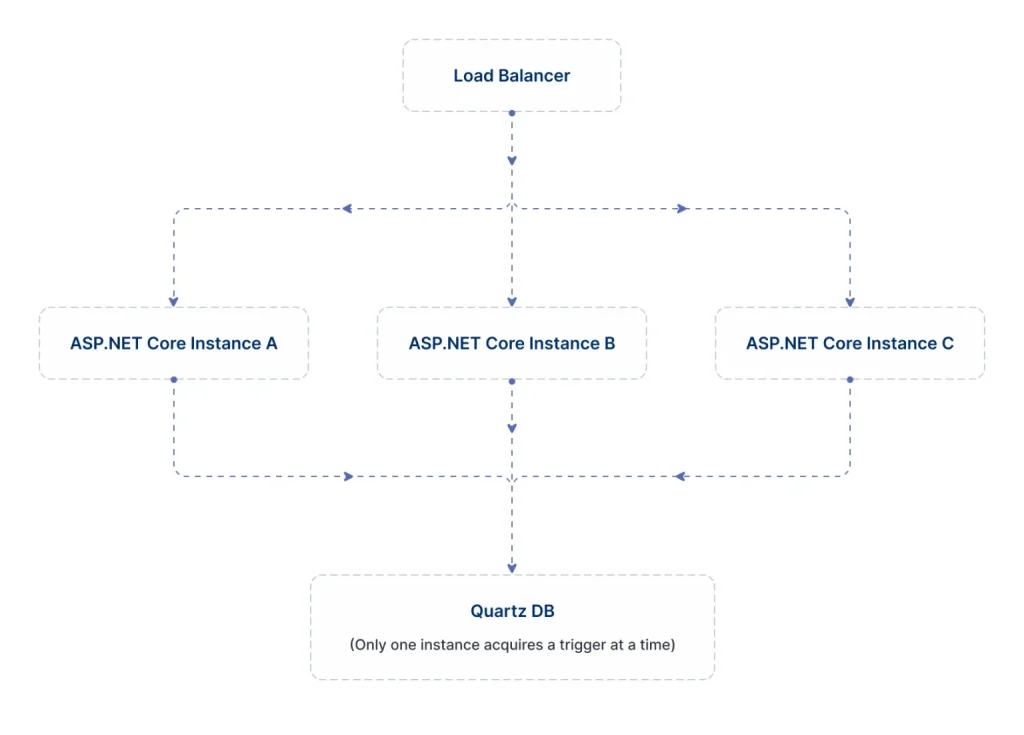
Store jobs and triggers in a database, and set the job store to clustered. Then schedules survive restarts, and another instance picks up the work when one fails.
Without a database job store, a restart drops in-memory jobs, misfires go unseen and failover loses the schedule. Here is a sample appsettings.json section:
"Quartz": {
  "quartz.scheduler.instanceName": "MainScheduler",
  "quartz.jobStore.type": "Quartz.Impl.AdoJobStore.JobStoreTX, Quartz",
  "quartz.jobStore.useProperties": "true",
  "quartz.jobStore.tablePrefix": "QRTZ_",
  "quartz.jobStore.dataSource": "default",
  "quartz.dataSource.default.provider": "SqlServer",
  "quartz.dataSource.default.connectionString": "Server=...;Database=Quartz;Trusted_Connection=True;",
  "quartz.jobStore.clustered": "true"
}
The clustered setting lets several app instances share one set of schedules. A trigger fires on one instance at a time, and any instance can take over when another goes down. For very many short jobs, the Quartz clustering guide suggests splitting work across separate schedulers.
How do you keep Quartz.NET jobs reliable when things fail?
Catch the failures you expect, log the rest, and alert when a job has not succeeded in time. A job should finish, recover, or fail loudly.
How should jobs handle exceptions and retries?
Catch brief failures, such as a timeout from a database or a 503 error from a web service. Retry them with a growing delay, or hand them to a queue.
For other errors, listeners such as IJobListener and ITriggerListener let you react to failed runs. Our guide to API retry mechanisms covers backoff in more depth.
What happens when a node dies mid-run?
A job can ask for recovery when you build it. Then a clustered scheduler can run it again on another node, after the first node stops.
How do you avoid silent job failures?
- Log when each job starts, ends and fails.
- Count successes, failures and run times as metrics.
- Alert when a job has not succeeded within its expected window.
How do you tune the Quartz.NET thread pool?
Quartz.NET runs jobs on a thread pool, and its size sets how many jobs run at once. Too few threads delay jobs, and too many can swamp your servers.
- Jobs that wait on web calls or database queries can run more at once.
- Jobs that do heavy computing need fewer threads.
- Set the size with
quartz.threadPool.threadCount, for example10, and adjust per workload.
Start low, measure run times and queue delays, then raise the count step by step. Give urgent triggers a higher priority, and add a queue when one job could overload a downstream system. The configuration reference lists the thread pool settings.
How do you secure scheduled jobs?
Treat anything that creates or changes a job like any other admin action. A scheduler that anyone can feed becomes a way into your system.
- Validate every
JobDataMapvalue that comes from an API or a form. - Protect admin endpoints that change schedules with role-based access control.
- Rate-limit endpoints that create triggers, so nobody can schedule thousands of jobs.
- Keep secrets in a key vault or environment variables, never in
JobDataMapor logs.
How do you monitor Quartz.NET jobs?
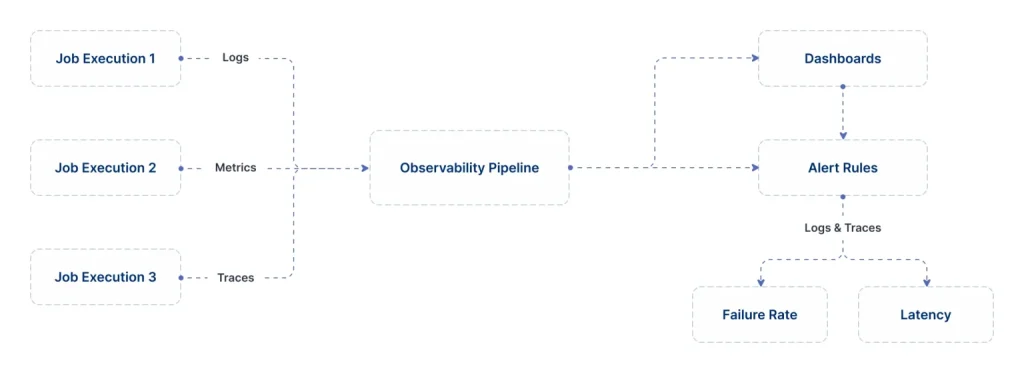
Log each run, record metrics, and trace calls with OpenTelemetry. Then you know when jobs run, how long they take and why they fail.
Log through ILogger<TJob>, with the start time, a correlation ID, the main inputs, the duration and the result. Treat each run as a trace, with a span for the job and child spans for outside calls. Track run counts, durations and error rates as metrics.
Microsoft’s guide to .NET observability with OpenTelemetry shows the setup. Standard exporters send the data to Application Insights or another back end.
Is there a Quartz.NET dashboard?
The packages in this guide include no web dashboard. Most teams that want a Quartz.NET UI (user interface) build a small admin page on top of the scheduler.
The IScheduler interface can list jobs and triggers, pause and resume them, and fire a job now. Put that page behind the same access control as your other admin tools. Pair it with the metrics and alerts above, so the page shows what ran and what failed.
How do you test Quartz.NET jobs?
Keep jobs thin and test the logic behind them on its own. Then add a few tests that run a real scheduler.
Unit tests
Make each job a thin wrapper that calls your domain services. Unit test those services directly. For the job, inject mock services and pass a fake IJobExecutionContext, then check that it reads JobDataMap and honours cancellation.
Integration tests
Point a test scheduler at a test database with AdoJobStore. Schedule a job, wait for it to fire, and check its side effects.
To test misfires, pause the scheduler past a fire time, then check what runs. Make downstream calls fail too, and confirm that retries, logs and alerts behave.
How does Quartz.NET compare with BackgroundService, Hangfire and cron?
Use BackgroundService for continuous work and Quartz.NET for work tied to the clock. Hangfire and cron scripts sit in between.
| Approach | Strengths | Trade-offs | Use it for |
|---|---|---|---|
| BackgroundService | Built in and simple | No persistence, misfire rules or clustering | Queue readers and continuous loops |
| Cron scripts | Familiar for simple commands | Outside the app, with manual coordination | Legacy or very small tasks |
| Hangfire | Dashboard, delayed and recurring jobs | Different model for calendar rules and clustering | Background jobs with a built-in dashboard |
| Quartz.NET | Misfire rules, cron, job stores, clustering | More parts to run, such as a database | Time-based jobs across several servers |
Our guide to ASP.NET Core background jobs with hosted services, Hangfire and Quartz compares them in more detail.
How do you build a reliable nightly data sync with Quartz.NET?
Combine the pieces above: a job that cannot overlap, a cron trigger with a clear misfire policy, a clustered database job store and good telemetry. Typical uses include syncing customer records, billing runs and nightly cleanup.
Step 1: Define the job
[DisallowConcurrentExecution]
public class NightlyDataSyncJob : IJob
{
    private readonly IRemoteSyncService _syncService;
    private readonly ILogger _logger;

    public NightlyDataSyncJob(
        IRemoteSyncService syncService,
        ILogger<NightlyDataSyncJob> logger)
    {
        _syncService = syncService;
        _logger = logger;
    }

    public async Task Execute(IJobExecutionContext context)
    {
        using var activity = JobTracing.StartActivity("NightlyDataSync");

        _logger.LogInformation("Nightly data sync started.");

        try
        {
            await _syncService.SyncAsync(context.CancellationToken);
            _logger.LogInformation("Nightly data sync completed successfully.");
        }
        catch (TransientException ex)
        {
            _logger.LogWarning(ex, "Transient error during nightly sync. Will rely on next run.");
            // Optional: push to a queue for retries.
        }
        catch (Exception ex)
        {
            _logger.LogError(ex, "Nightly data sync failed.");
            // Raise alerts / metrics.
            throw;
        }
    }
}
Step 2: Register the job and trigger
builder.Services.AddQuartz(q =>
{
    q.UseMicrosoftDependencyInjectionScopedJobFactory();

    var jobKey = new JobKey("NightlyDataSync");

    q.AddJob(opts => opts
        .WithIdentity(jobKey)
        .StoreDurably());

    q.AddTrigger(opts => opts
        .ForJob(jobKey)
        .WithIdentity("NightlyDataSync-trigger")
        .WithCronSchedule("0 0 1 * * ?", x => x
            .WithMisfireHandlingInstructionDoNothing()));
});

builder.Services.AddQuartzServer(options => options.WaitForJobsToComplete = true);
Step 3: Turn on AdoJobStore and clustering
Use the database job store and clustered setting from the cluster section. One instance then runs the sync, even when you scale out.
Step 4: Add observability
Send logs, metrics and traces through OpenTelemetry, so failed and slow runs show up at once.
What should a production Quartz.NET checklist cover?
Check the setup before launch, then check that people can run it day to day. Each line below matches a section of this guide.
Setup
- Quartz.NET runs as a hosted service with
AddQuartzandAddQuartzServer. - A database job store holds every critical schedule.
-
quartz.jobStore.clusteredistruewherever several instances run. - Every critical trigger has a chosen misfire policy.
- Jobs are idempotent and use
[DisallowConcurrentExecution]where overlap is unsafe.
Operations
- The thread pool size fits the workload.
- Logs, metrics and traces cover every job run.
- Alerts fire on failures and on jobs that miss their window.
- A runbook explains how to replay jobs and scale out safely.
How do scheduled jobs send documents for eSignature?
A Quartz.NET job can call the BoldSign API to send documents for signature on a schedule. A nightly job might find contracts due for renewal and send each one out.
For a single document, you may not need a job at all. Our send document endpoint accepts a ScheduledSendTime value, a Unix timestamp for a later send. It must be at least 30 minutes ahead and before the document expires, as our send document reference explains.
Use Quartz.NET when the job decides what to send, such as a list built from your database each night. Keep the call inside a job with [DisallowConcurrentExecution], so a slow run never sends twice.
What does the BoldSign API cost?
You can build and test against the BoldSign API for free in a sandbox. Live API sending uses the Enterprise API plan, from $30 a month with 40 envelopes.
Extra envelopes cost $0.75 each. Prices are in USD, from the BoldSign pricing page as read on 2 November 2026.
How do you start scheduling eSignature work with Quartz.NET?
Begin with one job in the sandbox, then move it to a clustered job store before it goes live.
- Create a free API sandbox account and send a test document from a Quartz.NET job.
- Request a demo to see how our API fits your scheduled workflows.
- Visit our support portal for help with a job you already run.
Frequently asked questions
How is Quartz.NET different from BackgroundService?
BackgroundService gives you a long-running task, and you write the timing, storage and coordination yourself. Quartz.NET adds a scheduler, triggers, job stores and clustering on top. You can then ask for "run this at 01:00 every day" and trust it across restarts and servers.
Do I need a database to use Quartz.NET?
Not for a first test. Quartz.NET keeps jobs in memory by default. For critical jobs, use the database job store, AdoJobStore, so schedules survive restarts and several app instances can share them.
How do I stop the same Quartz.NET job running on several servers?
Point every app instance at the same database job store and set quartz.jobStore.clustered to true. The instances then share one schedule, and each trigger fires on one node at a time.
Which misfire policy suits a billing job?
The do-nothing policy usually suits billing. After an outage, it skips the missed run and waits for the next one, so nobody pays twice. Deal with the missed window in a separate, checked step.
How do I stop a long-running Quartz.NET job when the app shuts down?
Read context.CancellationToken inside the job and stop work once it is cancelled. Set WaitForJobsToComplete = true in AddQuartzServer so running jobs can finish before the host stops.
Can I run Quartz.NET in a worker service instead of the web app?
Yes. Quartz.NET works with any .NET generic host, worker services included. The same AddQuartz and AddQuartzServer setup applies, as the hosted services integration guide shows.
Does Quartz.NET work with .NET Core?
Yes. Quartz.NET 3.x supports .NET Standard 2.0 and .NET Framework 4.6.2 and later, so it runs in .NET Core apps. Quartz.NET 4 targets .NET 10 only.
Why does my job ignore DisallowConcurrentExecution?
The attribute works per job key, not per class. Check that every trigger points to the same JobKey, and that the job is not registered twice under different names.

Priya Vinayagam
Priya Vinayagam is a Product Manager at BoldSign and an active full-stack developer at Syncfusion, with four years of hands-on experience across .NET and JavaScript. She writes practical, performance-focused technical articles that help developers tackle real-world challenges. Known for looking beyond the obvious, Priya brings a builder’s mindset to every post—breaking down complex problems into clear, actionable solutions. Connect with her on LinkedIn.
More posts by Priya Vinayagam