EF Core vs. Dapper: Which .NET Data Access Tool Should You Use
 Priya Vinayagam
TL;DR: Use Entity Framework (EF) Core when you want a full object-relational mapper (ORM) that tracks changes and manages your schema. Use Dapper when you want to write the Structured Query Language (SQL) yourself and keep overhead low. Many teams use both, a split that also suits apps built on our eSignature API.
Your .NET (Microsoft’s developer platform) app has to save orders, load customer lists and run reports. The data access library you pick decides how much SQL you write and how much the framework writes for you.
This Entity Framework Core vs Dapper guide compares the full ORM EF Core with the micro ORM Dapper. You get side-by-side code, the real causes of speed gaps, and a setup for an EF Core Dapper hybrid.
EF Core vs Dapper: which should you use?
Use EF Core for create, read, update and delete (CRUD) features, where change tracking and migrations save you code. Use Dapper for read-heavy or reporting endpoints, where you want full control of the SQL.
The Dapper vs Entity Framework Core choice is rarely all or nothing. In short, the EF vs Dapper question is about who writes the SQL: the framework or you.
When should you choose EF Core?
Choose EF Core when most of these are true:
- You build CRUD-heavy business features.
- You want Language Integrated Query (LINQ) with strongly typed queries.
- You want change tracking and a unit-of-work pattern.
- You want migrations to evolve your schema with your code.
- You want to switch between database providers with little code change.
When should you choose Dapper?
Choose Dapper when most of these are true:
- You need handwritten SQL for complex joins, common table expressions (CTEs) or reports.
- You are tuning a hot path where every bit of overhead counts.
- Your queries return data transfer objects (DTOs) or projections, not full entities.
- You want SQL that is easy to read, debug and tune.
When should you choose Dapper or EF Core together?
Use both when these are true:
- Writes gain from EF Core tracking and transactions.
- Reads need quick projections for dashboards, search or reports.
- You already split commands from queries, even informally.
Is EF Core an ORM?
Yes. Microsoft describes Entity Framework Core as an open-source, cross-platform ORM that lets you work with a database through .NET objects.
Microsoft also says the EF Core ORM removes most of the data access code you would otherwise write. You build a model from entity classes and a context object, and EF Core handles the rest.
That idea is older than EF Core. Microsoft’s guide to data access technology options says Entity Framework was designed so developers program against a conceptual model, not the raw database schema.
What is the Dapper ORM?
Dapper is a micro ORM: a small library that runs your SQL and maps each result row to an object. Its GitHub project calls it “a simple object mapper for .NET”.
Dapper adds extension methods to connections from ActiveX Data Objects (ADO) for .NET, known as ADO.NET, so you keep full control of the SQL. Dapper has no change tracking or schema model, so the library stays thin and easy to predict.
What does ORM vs micro ORM mean in practice?
A full ORM handles queries, relationships, change tracking and schema changes for you. A micro ORM only runs SQL and maps the results.
Think of a restaurant and your own kitchen. With EF Core, you place an order in LINQ, and the restaurant cooks the SQL, serves the objects and clears up by tracking changes. With Dapper, you cook the SQL yourself, and Dapper plates it for you.
What is the Entity Framework vs Dapper difference, feature by feature?
The biggest gap is who writes the SQL. The table sums up the Dapper ORM vs Entity Framework differences that shape daily work.
| Area | EF Core (full ORM) | Dapper (micro ORM) |
|---|---|---|
| Query style | LINQ, translated to SQL by the provider | SQL you write |
| Change tracking | On by default for entity queries | None |
| Migrations | Built-in workflow | None, use another tool |
| Related data | Eager, explicit or lazy loading | Manual joins and multi-mapping |
| Database support | Provider packages for many engines | Any ADO.NET provider, with your SQL dialect |
| Debugging SQL | Turn on logging to see the SQL | The SQL is already in your code |
| Fits | CRUD and domain models | Read-heavy work and complex SQL |
How does EF Core map data and track changes?
EF Core passes a representation of your LINQ query to the database provider, which translates it into SQL. Queries that return entities are tracked by default, so your edits are saved when you call SaveChanges.
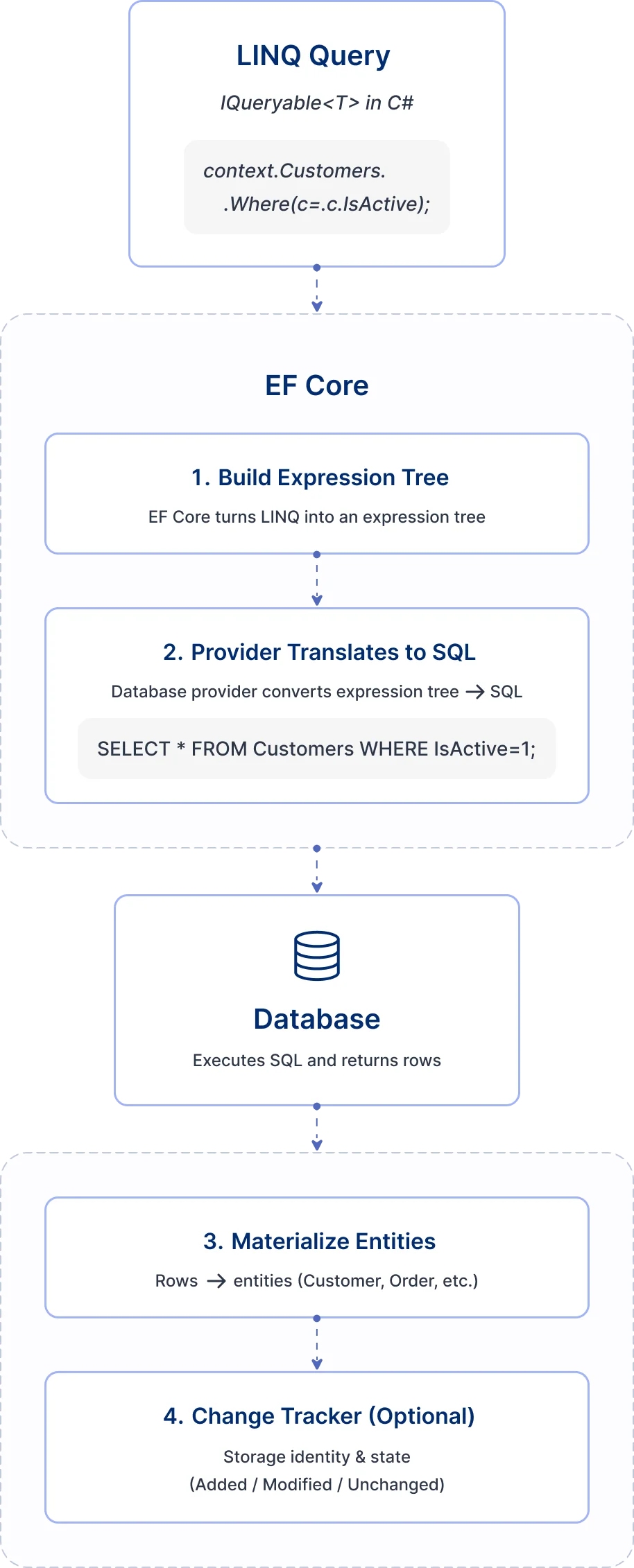
A DbContext is a session with the database. Each instance tracks the entities it loads, and those tracked entities drive the inserts, updates and deletes when you save.
How does Dapper map query results to objects?
Dapper runs your SQL through ADO.NET and maps each row to an object by matching column names to property names. Very little sits between your SQL and the result.
The flow has three steps:
- You write the SQL.
- Dapper runs it on your ADO.NET connection.
- Dapper maps each row to an object or DTO.
Dapper can also map one row to several objects, a feature its readme calls multi-mapping. You can use it to load a post and its author in a single query.
Which EF Core features matter in real systems?
The context object, migrations and the loading strategy shape most EF Core projects. Each one also adds a cost you should know about.
How do DbContext and DbSet shape your architecture?
Each DbContext instance is one session, and each DbSet is a table you can query and save. The design fits a few common patterns:
- Unit-of-work patterns, where one save commits a batch of changes.
- Domain models built around aggregates.
- Write workflows that run inside a transaction.
Why do migrations change how teams manage schema?
EF Core compares your current model to a snapshot of the old one and generates a migration file. It then records each applied migration in a history table.
Schema changes become part of normal code review, not a separate manual task.
How do lazy loading and eager loading affect performance?
Lazy loading can cause extra database round trips, the so-called N+1 problem. Microsoft’s docs warn you to take care to avoid it.
Many teams turn lazy loading off and load related data on purpose with Include. The query shape then stays the same under load.
Which Dapper features matter in real systems?
Dapper’s value comes from owning the SQL. The same choice also moves work to you on the write side.
Why does SQL-first data access help debugging and tuning?
You own the SQL, so what runs is exactly what you wrote. That gives you a few habits that are hard with generated SQL:
- Paste a query into your database console as it is.
- Tune indexes and query plans directly.
- Use database features such as CTEs, window functions and query hints.
What does writing without change tracking mean?
Dapper does not track entity state, so every write is a SQL statement you write. You take on a few jobs:
- Decide when to run each insert and update.
- Handle concurrency, for example with a row version column.
- Build your own unit of work, if you need one.
What drives EF Core vs Dapper performance?
Speed gaps come from framework overhead, query shape and the database itself. Switching libraries fixes only the first of the three.
When does EF Core overhead matter?
Tracking costs time and memory. Microsoft notes that no-tracking queries are generally quicker for read-only work, since EF Core skips setting up change tracking.
EF Core overhead tends to show up when:
- You load many entities into memory.
- You run frequent read paths with tracking left on.
- You rely on lazy loading and trigger many round trips.
When does Dapper help, and when is it irrelevant?
Dapper helps most when your app spends its time in .NET code, not waiting on the database. It does well with light DTO projections and many short queries per second.
Switching libraries will not help when the bottleneck is one of these:
- Network latency between the app and the database.
- Slow queries or missing indexes.
- Lock contention in the database.
How does a simple read look in Dapper vs EF Core?
The same read takes a LINQ chain in EF Core and a SQL string in Dapper. Seeing them side by side makes the gap in abstraction clear.
EF Core (LINQ and optional no-tracking)
// Entities: User { Id, FirstName, LastName, IsActive }

var users = await db.Users
    .AsNoTracking() // best default for read-only lists
    .Where(u => u.IsActive)
    .OrderBy(u => u.LastName)
    .Select(u => new { u.Id, u.FirstName, u.LastName }) //projection helps performance
    .ToListAsync();
AsNoTracking is the switch to reach for on read-only lists. Selecting only the columns you need cuts the work further.
Dapper (SQL and parameters)
const string sql = """
SELECT Id, FirstName, LastName
FROM Users
WHERE IsActive = @IsActive
ORDER BY LastName;
""";
var users = await connection.QueryAsync<UserListItem>(
    sql,
    new { IsActive = true }
);

public sealed record UserListItem(int Id, string FirstName, string LastName);
How do inserts and updates differ in EF Core vs Dapper?
Writes are where EF Core’s unit of work saves the most code. Dapper asks you to write each statement.
EF Core (Tracked entity + SaveChanges)
db.Users.Add(new User
{
    FirstName = "John",
    LastName = "V",
    IsActive = true
});

await db.SaveChangesAsync();
Dapper (explicit SQL)
const string insertSql = """
INSERT INTO Users (FirstName, LastName, IsActive)
VALUES (@FirstName, @LastName, @IsActive);
""";

await connection.ExecuteAsync(insertSql, new
{
    FirstName = "John",
    LastName = "V",
    IsActive = true
});
Which query patterns speed up hot paths?
Compiled queries in EF Core and tight, parameterized SQL in Dapper often help more than switching libraries. Both patterns are short to add.
How do you speed up hot EF Core read paths with compiled queries?
EF.CompileAsyncQuery turns a LINQ query into a .NET delegate. EF Core then skips its query cache lookup each time you run it.
private static readonly Func<AppDbContext, bool, IAsyncEnumerable<UserListItem>> ActiveUsersQuery =
    EF.CompileAsyncQuery((AppDbContext db, bool isActive) =>
        db.Users
            .AsNoTracking()
            .Where(u => u.IsActive == isActive)
            .OrderBy(u => u.LastName)
            .Select(u => new UserListItem(u.Id, u.FirstName, u.LastName)));

public async Task<List<UserListItem>> GetActiveUsersAsync(bool isActive, CancellationToken ct)
{
    var result = new List<UserListItem>();
    await foreach (var item in ActiveUsersQuery(db, isActive).WithCancellation(ct))
    result.Add(item);

    return result;
}
How do you keep Dapper fast and safe for hot endpoints?
Pass every value as a parameter and select only the columns you need. Paging with a fixed page size keeps each result small.
const string sql = """
SELECT Id, FirstName, LastName
FROM Users
WHERE IsActive = @IsActive AND LastName >= @Start
ORDER BY LastName
OFFSET @Skip ROWS FETCH NEXT @Take ROWS ONLY;
""";

var page = await connection.QueryAsync<UserListItem>(sql, new
{
    IsActive = true,
    Start = "M",
    Skip = 0,
    Take = 50
});
Which tool fits common .NET application types?
Match the tool to the workload, not to the whole company. You can use the table in a design review.
| Workload | EF Core fit | Dapper fit | Why |
|---|---|---|---|
| CRUD-heavy business apps | Strong | Limited | Tracking and migrations cut repeated code |
| Read-heavy APIs | Good | Strong | Quick projections and full SQL control |
| Reporting and analytics | Limited | Strong | Hand-tuned SQL and CTEs matter more than entities |
| Long-lived enterprise apps | Strong | Good | EF Core keeps code consistent, with Dapper for heavy reads |
| Microservices | Good | Good | Choose per service: EF Core for writes, Dapper for query services |
When does an EF Core Dapper hybrid make sense?
A hybrid fits larger systems that need safe transactional writes and quick, predictable reads. EF Core handles the writes and Dapper handles the reads.
The idea comes from command query responsibility segregation (CQRS), which separates commands that change data from queries that read it. The hybrid keeps the idea but skips the heavy parts:
- No handler pipelines for commands and queries.
- No message bus.
- No separate read and write models or event sourcing.
Simplified data access flow (CQRS-inspired)
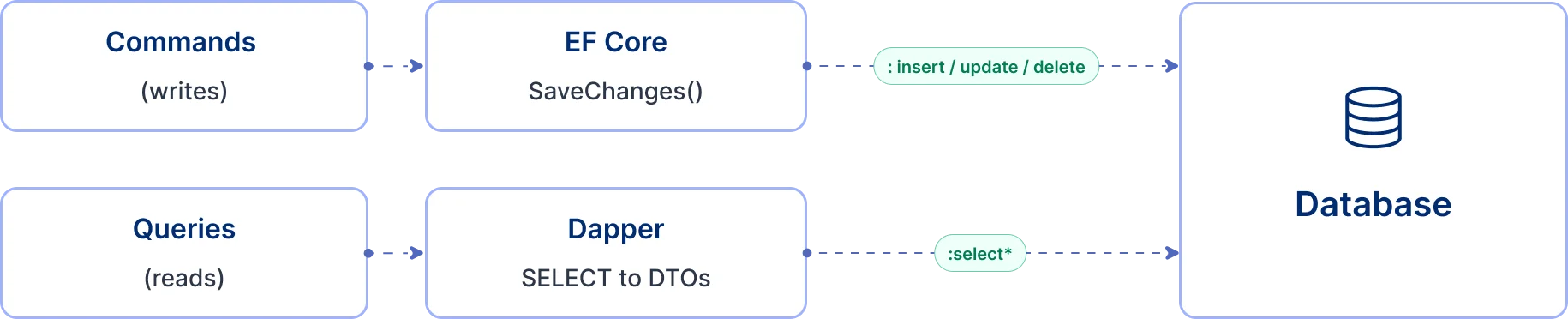
The diagram shows one database with two paths into it:
- EF Core handles writes, where tracking and transactions help.
- Dapper handles reads, where plain SQL keeps overhead low.
- EF Core migrations still own the schema for both paths.
How do you use the Dapper ORM in .NET Core with EF Core?
Keep EF Core for writes and the schema, then add a Dapper query service that reuses the EF Core connection. The steps below work in any .NET web app.
Step 1: Keep EF Core as your primary unit of work
Use the DbContext for write workflows and schema changes:
- Keep writes in an application service or command handler.
- Call SaveChanges once per unit of work.
- Use migrations for every schema change.
Step 2: Add a query service that uses Dapper for projections
Make reads explicit and shaped as DTOs with Dapper. EF Core lends it the connection, as the service below shows.
public sealed class UserReadService
{
    private readonly AppDbContext _db;

    public UserReadService(AppDbContext db) => _db = db;

    public async Task<IReadOnlyList<UserListItem>> SearchUsersAsync(string term, CancellationToken ct)
    {
        var conn = _db.Database.GetDbConnection();
        const string sql = """
        SELECT TOP (50) Id, FirstName, LastName
        FROM Users
        WHERE LastName LIKE @Term OR FirstName LIKE @Term
        ORDER BY LastName;
        """;

        // Ensure connection is open (EF opens it for its own operations; be explicit here)
        if (conn.State != System.Data.ConnectionState.Open)
            await conn.OpenAsync(ct);

        var rows = await conn.QueryAsync<UserListItem>(sql, new { Term = $"%{term}%" });
        return rows.AsList();
    }
}
Step 3: Share a transaction when you need to read your own writes
Start a transaction with Database.BeginTransactionAsync on the DbContext. Pass GetDbTransaction() to the transaction argument of Dapper’s QueryAsync or ExecuteAsync, on the same connection.
Microsoft documents sharing one transaction between EF Core and other ADO.NET code on a relational database. Do this only when a read must see an uncommitted write; otherwise keep reads and writes apart.
How do you run EF Core and Dapper safely in production?
Guardrails matter more than the library you pick. A few habits for each tool prevent most incidents.
How do you keep EF Core predictable under load?
Give EF Core clear limits on read paths:
- Return projections from read endpoints, not full entities.
- Use no-tracking for read-only queries.
- Keep lazy loading out of request paths.
- Log SQL and timings, and mask sensitive parameter values.
How do you keep Dapper safe and maintainable?
Most Dapper problems come from loose SQL habits, not from speed. Keep these rules:
- Always pass values as parameters, never joined into the SQL string.
- Store SQL in named constants or files that go through code review.
- List columns by name instead of using a wildcard select.
- Write integration tests for complex queries to catch schema drift.
EF Core’s own raw SQL methods follow the same rule. FromSql turns interpolated values into SQL parameters.
What should you monitor regardless of ORM choice?
Measure before you change libraries. Watch these numbers:
- Query duration at the median and the slowest 5% and 1%.
- Database processor load, locks, deadlocks and slow query logs.
- Connection pool use and timeouts.
- Error rates at the API layer.
What mistakes do developers make with EF Core and Dapper?
Most mistakes are easy to catch in code review. Look out for these:
- Leaving tracking on for read-only endpoints.
- Allowing lazy loading in busy code paths, which adds round trips.
- Blaming the ORM before checking indexes and the query plan.
- Using Dapper for complex writes and rebuilding unit of work by hand.
- Letting SQL strings spread with no naming or storage rules.
What can you use instead of EF Core or Dapper?
Within .NET, the usual EF Core alternatives and Dapper alternatives are each other, EF Core’s raw SQL methods and plain ADO.NET. Most EF alternatives trade convenience for control, and each Dapper alternative adds more framework.
- Plain ADO.NET gives you commands and data readers with no mapping, and Dapper builds on it.
- EF Core raw SQL, through SqlQuery, runs SQL for non-entity types without lower-level APIs.
- Dapper.Rainbow, listed in the Dapper project, is a micro ORM with CRUD helpers built on Dapper.
How does this choice fit a BoldSign integration?
Apps built on our eSignature API often store document IDs and signing status in their own database. The same split works well there.
Save each new document record and its status changes with EF Core. Show a dashboard of thousands of documents with a Dapper query that returns only the columns on screen.
Which BoldSign plan do you need to use the API?
Live calls to the BoldSign API need the Enterprise API plan, which starts at $30 a month with 40 envelopes. Each extra envelope costs $0.75, as listed on the BoldSign pricing page in November 2026.
Prices are in USD. Every other plan gives you sandbox access to the API only, and the sandbox is free while you build.
Where do you go next with your .NET data layer?
Profile your slowest endpoints first, then decide which ones need Dapper. For help with an existing integration, visit our support portal.
- Create a free API sandbox account and store test documents with EF Core or Dapper.
- Book a demo to talk through your integration with our team.
- Read the Dapper readme for multi-mapping and multiple result sets.
Frequently asked questions
Is Dapper an ORM?
Dapper is a micro ORM. It runs the SQL you write and maps each row to an object, but it has no change tracking, relationship handling or migrations.
What is the difference between Dapper and Entity Framework?
Entity Framework writes the SQL for you from LINQ and tracks changes to your objects. Dapper runs SQL you write yourself and only maps the results.
Entity Framework vs Dapper: which is better for a new project?
Start with EF Core for most business apps, since it saves code on writes and schema changes. Add Dapper later for reads that profiling shows are slow.
Can EF Core run raw SQL when needed?
Yes. FromSql runs SQL for entity types, and SqlQuery runs it for other types. Both turn interpolated values into SQL parameters.
Should I turn off EF Core tracking for read-only queries?
Yes, for data you only display. Add AsNoTracking to the query, or change the default for the whole context and turn tracking back on where you save.
Can I use EF Core migrations even if I use Dapper for queries?
Yes. Migrations only manage the schema, so Dapper can query the same tables.
How do I keep Dapper queries safe from SQL injection?
Pass every value as a parameter, such as @LastName with an object that holds it. Never build SQL by joining strings with user input, and give the app a database account with only the rights it needs.
When should I move a query from EF Core to Dapper?
Move it when profiling shows that EF Core overhead is a real share of the time. Check indexes and the query plan first, since those cause most slow queries.

Priya Vinayagam
Priya Vinayagam is a Product Manager at BoldSign and an active full-stack developer at Syncfusion, with four years of hands-on experience across .NET and JavaScript. She writes practical, performance-focused technical articles that help developers tackle real-world challenges. Known for looking beyond the obvious, Priya brings a builder’s mindset to every post—breaking down complex problems into clear, actionable solutions. Connect with her on LinkedIn.
More posts by Priya Vinayagam