ASP.NET Core Rate Limiting: Built-In Middleware, Policies, and Production Tips
 BoldSign Team
TL;DR: ASP.NET Core, the .NET (Microsoft’s developer platform) web framework named after Active Server Pages (ASP), has had rate limiting built in since .NET 7. You add a policy with AddRateLimiter, turn it on with UseRateLimiter and pick one of four algorithms. Cap your outbound calls too when your app calls a limited service such as our eSignature API.
One busy caller can slow an API for everyone else. Think of a partner that polls a status endpoint every second, a retry loop that never backs off, or a large import at peak time.
None of these are attacks, but each one uses up capacity that real requests need.
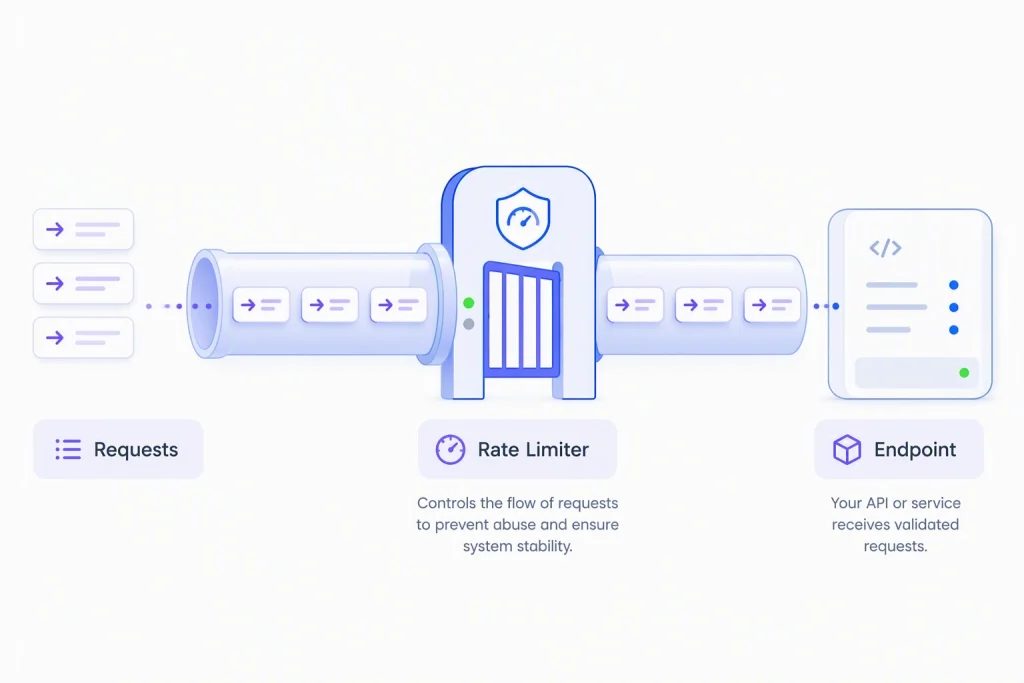
Rate limiting sets a ceiling on how many requests one caller can make in a given time. It does not fix the caller, but it keeps the damage small while you find the cause.
What does ASP.NET Core give you for rate limiting out of the box?
You get a rate limiting middleware in the shared framework, so there is no third-party package to add. It works with controllers, Razor Pages, Minimal APIs and routable Razor components in server-side Blazor.
On a single server, the middleware keeps its counts in memory. You need no Redis or other shared cache for that case. It comes with four algorithms:
- Fixed window, for simple request quotas.
- Sliding window, for smoother traffic control.
- Token bucket, for clients that send bursts.
- Concurrency, for capping slow work that is running at the same time.
Microsoft’s rate limiting middleware documentation asks you to load test before you deploy. Tools such as Apache JMeter and Azure Load Testing help you check your limits under real traffic.
How do you set up rate limiting in Program.cs?
Two calls do the work. AddRateLimiter defines the rule, and UseRateLimiter enforces it.
using Microsoft.AspNetCore.RateLimiting;
using System.Threading.RateLimiting;
var builder = WebApplication.CreateBuilder(args);
builder.Services.AddRateLimiter(options =>
{
    options.RejectionStatusCode = StatusCodes.Status429TooManyRequests;
    options.AddFixedWindowLimiter("fixed", opt =>
    {
        opt.PermitLimit = 100;
        opt.Window = TimeSpan.FromMinutes(1);
        opt.QueueLimit = 0;
    });
});
var app = builder.Build();
app.UseRateLimiter();
app.MapGet("/api/documents", () => Results.Ok(new { message = "ok" }))
    .RequireRateLimiting("fixed");
app.Run();
Set RejectionStatusCode yourself. The default is 503, which tells the client your service is down, while 429 tells it to slow down.
RequireRateLimiting(“fixed”) attaches the rule to one endpoint, a group or a page. Call UseRateLimiter after UseRouting when you use endpoint rules such as RequireRateLimiting or [EnableRateLimiting]. ASP.NET Core adds routing for you in a Minimal API app like this one.
Why is QueueLimit set to 0?
With QueueLimit at 0, requests over the limit get a 429 straight away. Most APIs should reject at once rather than make callers wait. A small queue can soak up short bursts, but a large one mostly adds delay and memory use.
How does a global limiter differ from an endpoint policy?
A named policy checks only the endpoints you attach it to. A global limiter, set through options.GlobalLimiter, checks every request.
The two work together. The global limiter runs first, and an endpoint with a named policy is checked against both. Use the global limiter for a broad baseline, and add stricter named policies on heavy endpoints.
options.GlobalLimiter = PartitionedRateLimiter.Create<HttpContext, string>(context =>
    RateLimitPartition.GetFixedWindowLimiter(
        partitionKey: context.User.Identity?.Name ?? "anonymous",
        factory: _ => new FixedWindowRateLimiterOptions
        {
            PermitLimit = 200,
            Window = TimeSpan.FromMinutes(1),
            AutoReplenishment = true
        }));
Use DisableRateLimiting() or [DisableRateLimiting] to exempt an endpoint, such as an internal health check. Microsoft’s documentation says this overrides both named and global limiters.
A public webhook receiver is a different case. It can still get abusive traffic, so give it its own policy and check the payload signature.
Which rate limiting algorithm should you choose?
Each algorithm counts in a different way. Pick one based on what the endpoint costs to run and how its traffic arrives.
| Algorithm | Good fit | Trade-off |
|---|---|---|
| Fixed window | Simple quotas on low-stakes endpoints | Can allow double the intended rate at the reset |
| Sliding window | Traffic where the burst at the reset is a problem | More bookkeeping to reduce that burst |
| Token bucket | Bursty but well-behaved clients, such as webhooks and batch jobs | Needs tuning of bucket size and refill rate |
| Concurrency | Heavy endpoints where work in progress is the real load | Gives no Retry-After estimate |
Cost matters as much as traffic. A cached lookup and a report generator should not share a rule.
How does the fixed window limiter work?
It counts requests in a window, then resets the count all at once. It is the simplest of the four.
builder.Services.AddRateLimiter(_ => _
    .AddFixedWindowLimiter(policyName: "fixed", options =>
    {
        options.PermitLimit = 100;
        options.Window = TimeSpan.FromSeconds(30);
        options.QueueProcessingOrder = QueueProcessingOrder.OldestFirst;
        options.QueueLimit = 10;
    }));
Each partition’s window starts when its limiter is created, not on a clock boundary. The reset allows a burst: a client can send a full batch just before the reset and another just after. Fixed window is a practical choice for quotas when those short bursts are acceptable.
How does the sliding window limiter work?
It splits the window into segments and gives permits back one segment at a time. That makes it a smoother version of fixed window.
builder.Services.AddRateLimiter(_ => _
    .AddSlidingWindowLimiter(policyName: "sliding", options =>
    {
        options.PermitLimit = 100;
        options.Window = TimeSpan.FromSeconds(30);
        options.SegmentsPerWindow = 3;
        options.QueueProcessingOrder = QueueProcessingOrder.OldestFirst;
        options.QueueLimit = 10;
    }));
The burst at the reset gets smaller, but it does not go away. Reach for sliding window when fixed window proves too coarse.
How does the token bucket limiter work?
Tokens refill on a schedule up to a ceiling, and each request spends one. It suits clients that send bursts but behave well overall, such as webhook consumers and batch jobs.
builder.Services.AddRateLimiter(_ => _
    .AddTokenBucketLimiter(policyName: "token", options =>
    {
        options.TokenLimit = 100;
        options.TokensPerPeriod = 20;
        options.ReplenishmentPeriod = TimeSpan.FromSeconds(10);
        options.AutoReplenishment = true;
        options.QueueProcessingOrder = QueueProcessingOrder.OldestFirst;
        options.QueueLimit = 2;
    }));
A quiet client saves tokens and spends them in a burst. A busy client empties the bucket and waits. Like the two window limiters, it can estimate a Retry-After time.
How does the concurrency limiter work?
It caps how many requests run at the same time, not how many arrive over time. Each request holds a permit until it finishes.
builder.Services.AddRateLimiter(_ => _
    .AddConcurrencyLimiter(policyName: "concurrency", options =>
    {
        options.PermitLimit = 10;
        options.QueueProcessingOrder = QueueProcessingOrder.OldestFirst;
        options.QueueLimit = 5;
    }));
Ten slow report jobs fill this limit, while ten fast lookups barely touch it. Use it where the real limit is processor time, memory, database connections or a downstream service. It tracks only work in progress, so it cannot estimate a retry time for a rejected caller.
How do you partition limits by Internet Protocol (IP) address, user, tenant or API key?
Use PartitionedRateLimiter to give each caller its own bucket. One shared rule lets a single heavy caller use up the allowance meant for everyone.
options.GlobalLimiter = PartitionedRateLimiter.Create<HttpContext, string>(httpContext =>
{
    // Authenticated users get their own generous bucket.
    // API keys must first be validated and mapped to an authenticated principal
    // so that User.Identity.Name is available here.
    var user = httpContext.User.Identity?.Name;
    if (!string.IsNullOrEmpty(user))
    {
        return RateLimitPartition.GetTokenBucketLimiter(
            partitionKey: $"user:{user}",
            factory: _ => new TokenBucketRateLimiterOptions
            {
                TokenLimit = 300,
                TokensPerPeriod = 300,
                ReplenishmentPeriod = TimeSpan.FromMinutes(1),
                AutoReplenishment = true
            });
    }

    // Everything unauthenticated shares a tighter pool.
    return RateLimitPartition.GetFixedWindowLimiter(
        partitionKey: "anonymous",
        factory: _ => new FixedWindowRateLimiterOptions
        {
            PermitLimit = 30,
            Window = TimeSpan.FromMinutes(1),
            AutoReplenishment = true
        });
});
Key each partition on a checked identity, such as the signed-in user or tenant ID. A raw API key header is weaker, since a caller can fake or rotate it. Run your authentication middleware before rate limiting, so the identity is ready when the key is chosen.
Why is partitioning by IP address risky?
Microsoft’s documentation warns that partitions built from user input leave your app open to denial-of-service (DoS) attacks. It names client IP addresses as one example, because an attacker can fake the source address.
Each fake address creates a new partition, and memory becomes the problem. The same risk applies to any request value you have not checked, such as raw headers.
Read the value from a trusted proxy header when you must use request data. Then check it and cap how many partitions you track.
How do you return a useful 429 response?
Use OnRejected. It controls both the status code and the Retry-After header the caller gets.
options.OnRejected = async (context, cancellationToken) =>
{
    if (context.Lease.TryGetMetadata(MetadataName.RetryAfter, out var retryAfter))
    {
        context.HttpContext.Response.Headers.RetryAfter =
            ((int)retryAfter.TotalSeconds).ToString();
    }
    context.HttpContext.Response.StatusCode = StatusCodes.Status429TooManyRequests;
    await context.HttpContext.Response.WriteAsync(
        "Rate limit exceeded. Please retry after the indicated delay.", cancellationToken);
};
The fixed window, sliding window and token bucket limiters estimate the wait through the lease’s RetryAfter metadata. A well-behaved client reads it and waits, instead of retrying into another rejection. Microsoft’s rate limiting samples show fuller versions, with logging and limits read from configuration.
What should you check before going to production?
Test with bursts, watch the numbers and plan for more than one server. These details only show up once real traffic arrives.
How do you test and watch your limits?
- Load test with bursty traffic, not a steady trickle. Microsoft asks you to stress test before you deploy.
- Collect the built-in metrics from the Microsoft.AspNetCore.RateLimiting meter with a tool such as OpenTelemetry.
- Tune your limits from that data, not from guesses.
Why is rate limiting not DDoS protection?
Rate limiting slows down heavy callers, but it cannot stop a distributed denial-of-service (DDoS) attack from many machines. Put a web application firewall (WAF), a content delivery network (CDN) or a DDoS protection service in front of your app.
How do you plan for more than one server?
- Counts live in each process, so three servers with a 100-a-minute rule can allow 300.
- A shared limit needs one central gate or a limiter backed by a shared store such as Redis.
- Give bulk exports and report jobs their own policy, apart from cheap reads.
Can a gateway enforce the limits instead?
Yes. A gateway such as YARP (Yet Another Reverse Proxy) can apply rate limiting policies per route before requests reach your apps. YARP uses the same in-memory ASP.NET Core middleware, so two YARP processes still keep two sets of counts.
How should your app handle third-party API rate limits?
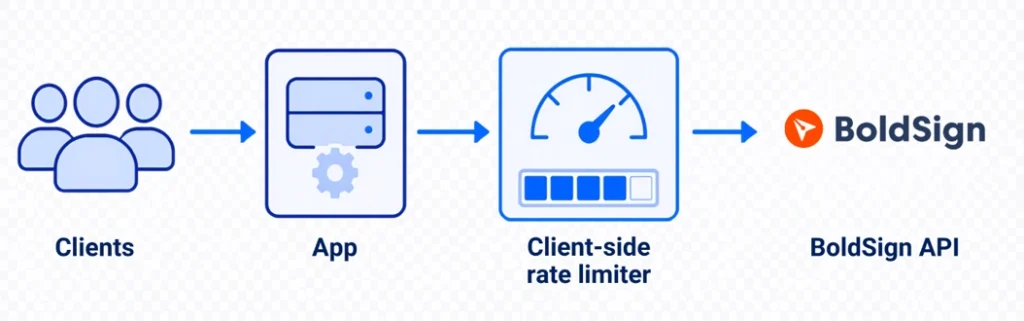
Treat your own app as a caller that must stay under someone else’s limit. Cap your outbound calls, wait when you get a 429 and swap polling for webhooks.
What are the BoldSign API rate limits?
Our rate limit documentation sets 2,000 requests an hour per account in production and 50 an hour in the sandbox. API key and OAuth calls share the same limit, which applies to the whole account rather than to each app or user.
Past the limit, calls return 429 Too Many Requests, and the response headers show your usage. Our guide to managing API rate limits suggests an internal limit in your app. It also suggests putting essential calls first and watching your usage.
How do webhooks cut down on polling?
Polling a document’s status on a timer spends your hourly budget whether or not anything changed. Our webhooks send a request to your endpoint when a document event happens, so most polling goes away.
Your endpoint must answer with a 200 status within 10 seconds. We retry failed deliveries with growing gaps, and events can also be resent by hand. That means the same event can arrive twice.
- Answer with 200 quickly and do the heavy work afterwards.
- Store processed event IDs and skip repeats.
- Verify the X-BoldSign-Signature header before you trust a payload.
- Keep an occasional sync job as a backstop.
How do you limit outbound calls to BoldSign from .NET?
Register one token bucket for the whole process and inject it into the service that calls us. The same System.Threading.RateLimiting types that guard your inbound endpoints work for outbound calls.
The example below is a document status sync service. It uses the BoldSign .NET SDK (software development kit) and its DocumentClient.
// Roughly 720 calls an hour, well inside BoldSign's 2,000/hour account limit,
// leaving room for the rest of the app.
builder.Services.AddSingleton<RateLimiter>(_ =>
    new TokenBucketRateLimiter(new TokenBucketRateLimiterOptions
    {
        TokenLimit = 10,
        TokensPerPeriod = 2,
        ReplenishmentPeriod = TimeSpan.FromSeconds(10),
        AutoReplenishment = true,
        QueueLimit = 0
    }));
public class BoldSignStatusSyncService
{
    private readonly DocumentClient _documentClient;
    private readonly RateLimiter _outboundLimiter;
    private readonly ILogger<BoldSignStatusSyncService> _logger;

    public BoldSignStatusSyncService(DocumentClient documentClient,
        RateLimiter outboundLimiter,
        ILogger<BoldSignStatusSyncService> logger)
    {
        _documentClient = documentClient;
        _outboundLimiter = outboundLimiter;
        _logger = logger;
    }

    public async Task<bool> TrySyncStatusAsync(string documentId,
        CancellationToken cancellationToken = default)
    {
        using var lease = await _outboundLimiter.AcquireAsync(1, cancellationToken);
        if (!lease.IsAcquired)
        {
            _logger.LogWarning("Local throttle refused a BoldSign call for {DocumentId}. The caller must retry later.",
                documentId);
            return false;
        }
        try
        {
            var properties = await _documentClient.GetPropertiesAsync(documentId);
            // Persist properties.Status here.
            return true;
        }
        catch (ApiException ex) when (ex.ErrorCode == StatusCodes.Status429TooManyRequests)
        {
            // Returning false signals the caller to retry later.
            // The caller is responsible for implementing a backoff policy,
            // for example exponential backoff with jitter, before retrying.
            // The response headers show the account's rate limit usage.
            _logger.LogWarning(ex, "BoldSign returned 429 for {DocumentId}. The caller must retry later.",
                documentId);
            return false;
        }
    }
}
The limiter is registered once as a singleton and injected. A limiter created in the constructor, or registered as scoped or transient, gives each instance its own bucket. That quietly multiplies your real ceiling.
QueueLimit is 0, so calls over the local budget fail at once with IsAcquired set to false. With a queue, AcquireAsync waits for a permit while the queue has room.
What does the local limiter leave out?
The cancellation token reaches AcquireAsync, so a queued wait can be cancelled. The SDK’s GetPropertiesAsync takes only the document ID, so add a timeout around it when cancellation matters.
The bucket only sees calls from its own process. Other servers, other services and restarts each get a fresh bucket, so two servers can make twice the calls. Your code must still handle our 429 replies.
ASP.NET Core apps on .NET 7 or later already include System.Threading.RateLimiting. Other targets, such as .NET Standard 2.0 or .NET Framework, add the System.Threading.RateLimiting NuGet package.
How do you test this against real limits?
Run your client against a free sandbox and watch what happens at 50 requests an hour. The getting started guide covers authentication. The API Explorer lets you send test requests from your browser.
What are the common rate limiting mistakes?
Most mistakes only show up under real traffic, so they are easy to ship by accident. These are the ones to check first.
Which mistakes hurt your own API?
- One shared bucket for every client: split by API key, user or tenant instead.
- A strict sign-in limit, which can lock out a whole office behind one shared network address.
- A tight callback limit, which drops events you needed. Give callbacks a generous limit and check signatures.
- Leaving the rejection status at 503, which tells clients your service is broken.
Which mistakes hurt your outbound calls?
- Retrying straight away after a 429. Wait for the time the provider gives you.
- Polling where a webhook exists, which spends the provider’s quota for nothing.
- Testing with one server, then deploying several. Counts are per process.
Which BoldSign plan do you need for live API calls, and what does it cost?
Live calls to the BoldSign API, including webhooks, need the Enterprise API plan. It starts at $30 a month with 40 envelopes, and each extra envelope costs $0.75.
Prices are in USD, as listed on the BoldSign pricing page in November 2026. You can build and test first in the free sandbox, which allows 50 requests an hour.
Where do you go next with rate limiting in ASP.NET Core?
Start with one global baseline, add named policies for heavy endpoints, and cap your own outbound calls. Then test both sides against real limits.
- Create a free API sandbox account and test your retry and webhook handling.
- Request a demo to talk through your integration with our team.
- Read about our eSignature API and the webhook events it sends.
Frequently asked questions
How do I implement rate limiting in ASP.NET Core?
Register a policy with AddRateLimiter and call UseRateLimiter in the pipeline. Then attach the policy to an endpoint with RequireRateLimiting or the [EnableRateLimiting] attribute.
Does ASP.NET Core have built-in rate limiting?
Yes. It has shipped with ASP.NET Core since .NET 7, with four algorithms. A single server needs no extra package.
What is the difference between fixed window and sliding window rate limiting?
A fixed window resets its whole count at the end of each window, so a client can burst across the reset. A sliding window splits the window into segments and gives permits back one segment at a time.
How do I return 429 Too Many Requests in ASP.NET Core?
Set options.RejectionStatusCode to 429, since the default is 503. For more control, use OnRejected to write the status, a Retry-After header and a short message.
Can I apply rate limiting per user or per API key?
Yes. Use PartitionedRateLimiter and key each partition on a checked identity, such as the signed-in user or a validated API key, rather than a raw header.
How do I add a global rate limiter in ASP.NET Core?
Set options.GlobalLimiter inside AddRateLimiter. It runs on every request, ahead of any named policy, unless the endpoint opts out with [DisableRateLimiting].
Is rate limiting enough to stop a distributed denial-of-service (DDoS) attack?
No. Rate limiting slows down single heavy callers, but a large attack from many machines needs a firewall or a DDoS protection service in front of your app.
How should an ASP.NET Core app handle third-party API rate limits?
Keep your outbound calls under the provider's limit, catch its 429 replies and wait before you retry. Use webhooks instead of polling where the provider offers them.

BoldSign Team
The official team behind BoldSign—the simple, secure eSignature solution trusted by businesses worldwide. Our platform helps individuals and teams create, sign, and manage documents effortlessly while maintaining full compliance. Experience BoldSign yourself with a free trial or request a personalized demo to see it in action.
More posts by BoldSign Team