Embedded Signing vs Redirect Signing: Which Fits Your App?
 Evans Omondi Otieno
TL;DR: In-app embedded signing keeps the signer inside your own screens from start to finish. Redirect signing opens the same page in a new tab or window and is quicker to build. Our embedded signing page shows how both start from one signing link.
Your app reaches the point where a customer has to sign. You can show the document right there on your screen. Or you can send them to a signing page in a new tab and bring them back when they finish.
Both paths end with a signed document. They differ in build effort, in how much of the screen you control, and in how the signer feels along the way. This guide compares the two and helps you choose.
What is embedded signing in BoldSign?
Embedded signing means your app asks us for a signing link for one signer and opens it from your app. The signer does not need to find an email or log in to BoldSign.
Think of a hotel check-in. You can sign the form at the front desk, or the clerk can send you to a side office and call you back after. You sign the same form either way.
Our get embedded signing link endpoint returns this link. You can show it in two main ways:
- In-app signing loads the link in an iframe on the web or a WebView in a mobile app.
- Redirect signing opens the link in a new tab or window, outside your app.
- In both cases, a redirect URL can send the signer to a page you pick after signing.
Do signers still get email invitations?
Yes, by default. Embedded signing does not turn off our emails on its own.
Set the DisableEmails property to true in the send request when signers should sign only in your app. Our help article on how to disable email notifications lists every request that supports it.
What does in-app embedded signing mean?
In-app signing shows the page in an iframe or WebView. The signer stays in your app from start to finish.
How does the in-app flow work?
- The user selects a start signing button in your app.
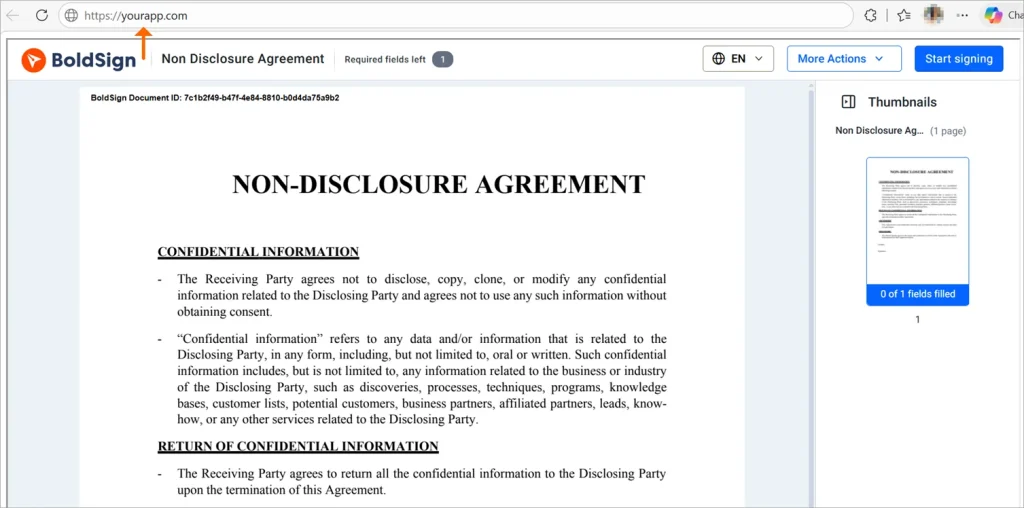
- Your app gets an embedded signing link and loads it in an iframe or WebView.
- The signer reviews the document and signs it on that page.
- Your app hears that signing is done and moves the user to the next step.
The signing page sends events to the parent window, such as onDocumentSigned and onDocumentDeclined. Your page listens for them and reacts.
What do you gain and what does it take?
You keep the signer in one guided flow on your own screens. You also control the app around the signing page, such as the header and navigation.
The cost is more front-end work. You handle the API calls, the iframe or WebView, and the events that tell you signing is done.
When does in-app embedded signing fit?
In-app signing fits when users are logged in and signing is one step in a longer task. Common cases:
- Software as a service (SaaS) apps where users already have an account.
- Internal portals for HR, finance, buying or approvals.
- Employee onboarding and policy sign-off flows.
- Multi-step journeys where signing is one step, not the end point.
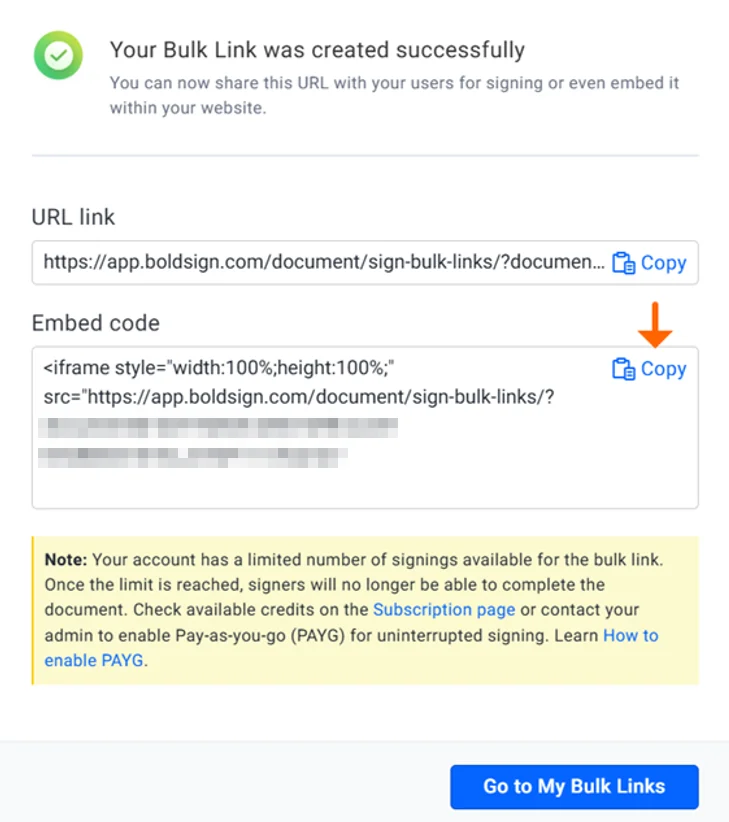
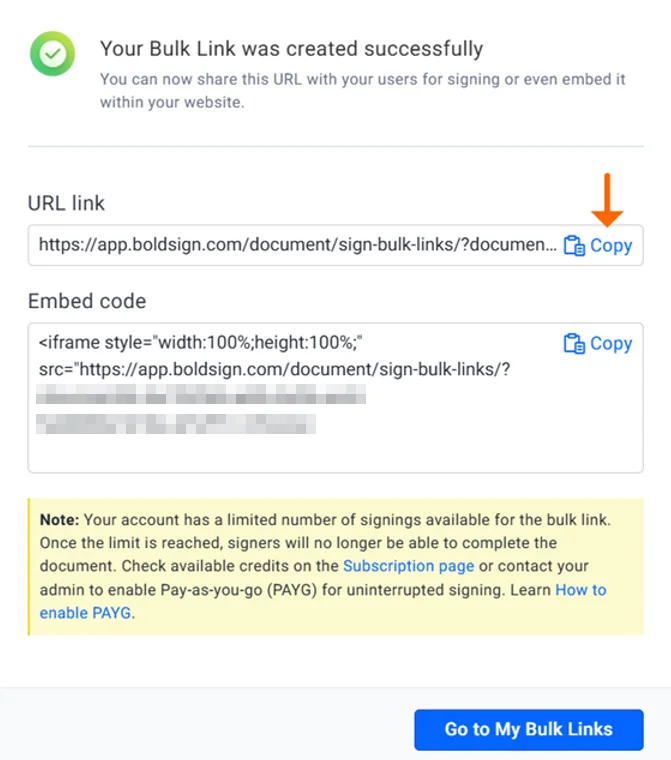
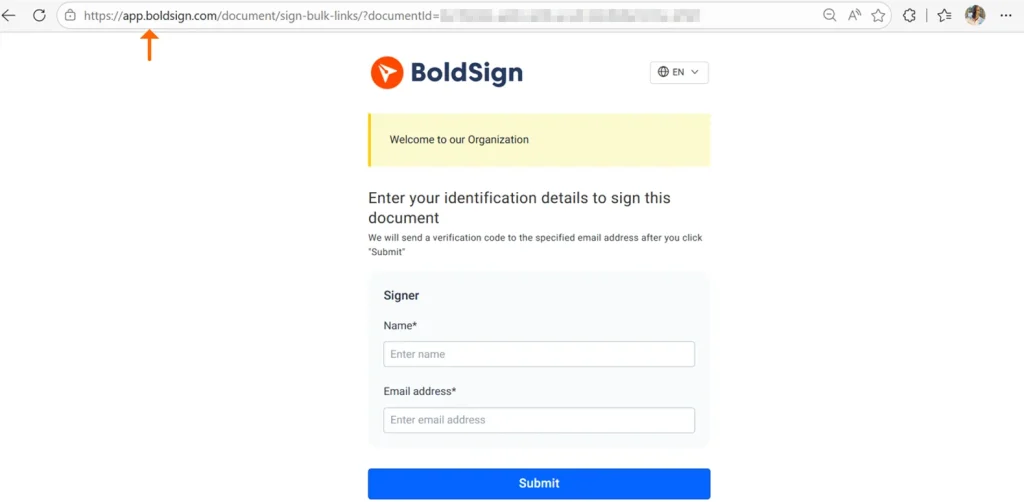
Our web app can also make a link for you without code. A bulk link comes with a URL and an embed code that you can place in your own page.
What does redirect-based embedded signing mean?
Redirect signing opens the signing page outside your app, in a new browser tab or window. After signing, a redirect URL can bring the signer back to your app.
How does the redirect flow work?
- The user starts signing from your app, or from wherever you shared the link.
- The signing link opens in a new browser tab or window.
- The signer reviews and signs the document on our hosted page.
- With a redirect URL set, we send the signer back to your app.
What do you gain and what does it take?
Redirect signing is the simpler build. You get a link and open it, with no iframe or WebView to manage.
The trade-off is that signers leave your app while they sign. You also have less say over the screen they see during that time.
When is redirect signing the better option?
Redirect signing suits signers who come once and do not log in to your app. Common cases:
- Customers, vendors or partners who sign from outside your app.
- One-time or rare signing, not part of a daily task.
- A quick launch with little front-end work.
- Demos, proofs of concept and early tests.
To share a link without code, our help article on how to create bulk links walks through each setting.
How do embedded signing and redirect signing compare side by side?
The two patterns use the same link, so the gap is in the experience and the build.
| Factor | In-app embedded signing | Redirect-based signing |
|---|---|---|
| Where signing happens | Inside your app’s screen | Hosted page in a new tab or window |
| Build effort | Higher, with iframe or WebView work | Lower, get the link and open it |
| Control of the screen | You control the app around the page | Less control while on the hosted page |
| Navigation | The user stays in your product | The user leaves and returns by redirect URL |
| Good fit | SaaS apps, internal flows, guided journeys | Outside signers, quick launch, one-off contracts |
How do you decide between in-app and redirect signing?
Start with who signs and how often. Then weigh the time you can spend on the front end.
Choose in-app embedded signing when
- Users log in to your app before they sign.
- Signing is one step in a longer guided task.
- You want signing to look like part of your product.
- You can build the iframe or WebView and handle its events.
Choose redirect-based signing when
- Signers come from outside and do not log in.
- You want to launch soon with little front-end work.
- Signers use many kinds of devices and browsers.
- A hosted page with a return step is enough for you.
What should you plan for when you build either flow?
Both patterns need the same few decisions before launch. Settle them early so the flow behaves the way you expect.
- Decide how your app learns that signing is done: the iframe events, a status check on return, or webhook events.
- Set the redirectUrl value in the link request, so each signer lands on the right next screen.
- Set the signLinkValidTill value to control how long a signer can use the link.
- Set DisableEmails to true when your app should be the one place to sign.
- Check who the signer is before you show the link, since anyone with it can open the page.
The guide on full-stack embedded signing shows a working build from start to end. Questions about your own setup can go to our support portal.
Why use BoldSign for embedded signing?
We give you one signing link that works in an iframe, a popup window or a new tab. You pick the pattern for each flow without a second build.
- Each link belongs to one signer, and you can set when it stops working.
- Your logo, colors and signer disclaimer can appear on the signing page.
- The audit trail notes that the document was signed through an embedded link.
- Request settings let you turn our emails off, so your app runs the conversation.
Which BoldSign plan do you need for embedded signing, and what does it cost?
Embedded signing and live API access come with the Enterprise API plan. It starts at $30 a month with 40 envelopes, then $0.75 per extra envelope, as listed on the BoldSign pricing page in November 2026.
You can test first in a free sandbox with full API access and no credit card. Sandbox documents carry a test watermark and are deleted after 14 days.
Bulk links and unlimited brands also come with the Enterprise API plan. Prices are in USD.
For no-code bulk links alone, the Business plan costs $15 per user a month and the Premium plan $99 a month for unlimited users. Both are billed yearly and use the API in the sandbox only.
Ready to try embedded or redirect signing in your app?
Try both patterns against the same document and see which one your users prefer.
- Create a free API sandbox account and request your first embedded signing link.
- Start a 30-day free trial of the web app to try a bulk link without code.
- Book a demo to see both signing flows set up for your app.
Frequently asked questions
What is embedded signing?
Embedded signing lets a signer review and sign a document from inside your app. Your app asks us for a signing link for that signer and shows it in an iframe, a popup or a new tab.
What is redirect signing?
Redirect signing opens the signing page outside your app, in a new browser tab or window. After the signer finishes, a redirect URL can send them back to a page you choose.
What is the main difference between embedded and redirect signing?
The main difference is where the signer is while they sign. In-app signing keeps them on your screen, and redirect signing moves them to our hosted page for a short time.
Does BoldSign support both embedded and redirect signing?
Yes. The same embedded signing link works in an iframe, a popup window or a new tab. You choose the pattern that suits each flow in your app.
Which endpoint creates an embedded signing link?
The getEmbeddedSignLink endpoint returns a signing link for one signer on one document. You pass the document ID and the signer's email or phone number, plus an optional expiry date and redirect URL.
Can signers return to my app after they sign?
Yes. Set the redirectUrl value when you request the signing link. We send the signer to that address once they finish signing.
Which option suits a software as a service (SaaS) app?
In-app signing usually suits a SaaS app where users are already logged in. Signing then stays one step inside a longer flow on your own screens.
Does embedded signing work on phones?
Yes. Our signing page is responsive and works in a mobile web view, a mobile browser or a desktop iframe.

Evans Omondi Otieno
Evans Omondi Otieno is a customer support representative and writer at BoldSign, specializing in creating clear, insightful content to help users navigate eSignature solutions. As a blog author, Evans writes well-researched articles that simplify technical concepts, helping businesses and professionals understand how to use BoldSign effectively. With expertise in technical support and content creation, he ensures users have a seamless experience and gain valuable knowledge from his articles.
More posts by Evans Omondi Otieno