How to Integrate eSignatures into Your PHP Laravel Application
 Ramesh Thangaraj
TL;DR: You can add electronic signatures to a Laravel app with a few controller methods and our software development kit (SDK) for PHP: Hypertext Preprocessor (PHP). Send a document from a template, show the signing page inside your app, then download the signed PDF. Our eSignature API page lists everything the API covers.
Say your company hires a new employee who must sign a non-disclosure agreement (NDA) on day one. Your HR portal is a Laravel app. You want the new hire to sign inside that portal, without a trip to another website.
This guide shows how to build that flow in PHP. You set up the project, send the NDA from a template, embed the signing page, and download the signed copy.
What do you need before you start?
You need three things: a BoldSign account with an API key, a Laravel project, and the BoldSign PHP SDK. Each takes a few minutes to set up.
Set up your BoldSign account and API key
Any BoldSign account can call the API in sandbox mode, a test space for your code. Create a free API sandbox account if you don’t have one yet.
Next, create an API key on the API Key page in the BoldSign web app. Your PHP code sends this key with every request. Our API key guide explains each setting.
Install PHP, Composer and Laravel
Use an existing Laravel project, or create a new one with the steps below. Both need PHP, Composer and the Laravel installer on your machine.
- Download PHP from the official PHP website and follow its install steps.
- Download Composer for your operating system from the official Composer website.
- Install the Laravel installer globally with this command in your terminal.
composer global require laravel/installerCreate a new Laravel project
Open the folder where your project should live. Then run this command with your own project name.
laravel new project-nameHow do you install the BoldSign PHP SDK?
Run one Composer command in your project folder. The SDK runs on PHP 7.4 and later, including PHP 8.
composer require boldsign/boldsign-phpThe package is boldsign/boldsign-php on Packagist. Our BoldSign PHP SDK documentation covers setup and every method in detail.
Add your API key to the .env file
Store the key in your environment file, not in your code. Look for a .env file in your project root.
- Copy .env.example to .env when your project has no .env file yet.
- Open .env and add your API key in this format.
- Save the file.
BOLDSIGN_API_KEY=<Your API Key>Start the development server
Run the server from your project folder to check that the app loads.
php artisan serveOpen http://localhost:8000 in your browser to see your Laravel app. The project is now ready for the signing code.
How does the eSignature flow work in a Laravel app?
The flow has three steps: send the document, let the signer sign in your app, and download the result. Each step is one controller method.
We give you several ways to send a request. You can send a document straight from the API, send from a template, or embed our document sending screen in your app.
This guide sends from a template, because the NDA is the same for every new hire. Create the template with the Create Template API or in the BoldSign web app, as our help article on how to create a template shows.
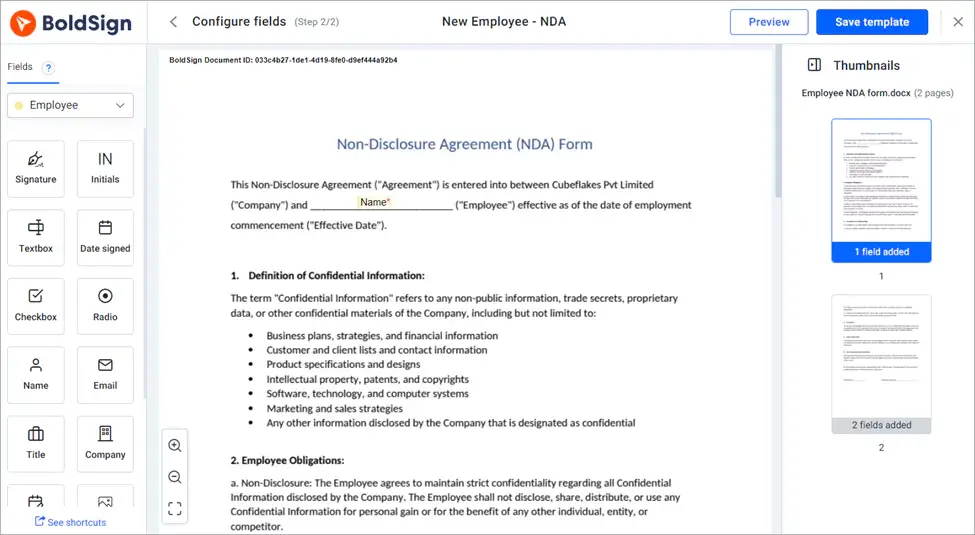
Write down the template ID once the template is saved. Your PHP code uses it to send the NDA.
How do you send a document for signature from PHP?
Call sendUsingTemplate with your template ID and the signer’s details. The send document from template API lists every option.
Add this method to a Laravel controller. It reads the new hire’s name and email from the request, fills the template’s first role, and sends the NDA.
public function createDocumentFromTemplate(Request $request)
{
    $templateId = '***Your Template Id***';
    $employeeName = $request->input('name');
    $employeeEmail = $request->input('email');

    $config = new \BoldSign\Configuration();
    $config->setApiKey(env('BOLDSIGN_API_KEY'));

    $templateApi = new \BoldSign\Api\TemplateApi($config);

    $role = new \BoldSign\Model\Role();
    $role->setRoleIndex(1);
    $role->setSignerName($employeeName);
    $role->setSignerEmail($employeeEmail);

    $sendFromTemplate = new \BoldSign\Model\SendForSignFromTemplateForm();
    $sendFromTemplate->setRoles([$role]);

    $result = $templateApi->sendUsingTemplate($templateId, $sendFromTemplate);
    return $result->getDocumentId();

}
The response holds the document ID of the new request. You need that ID for the next step.
How do you embed the signing page in your app?
Ask for an embedded signing link, then load it in an iframe on your page. The embedded signing link API takes the document ID and the signer’s email address.
The method below also passes a redirect URL. We send the signer to that address after they sign, so they land back in your app.
public function generateEmbedSignLink($documentId, $email)
{
    $config = new \BoldSign\Configuration();
    $config->setApiKey(env('BOLDSIGN_API_KEY'));
    $documentApi = new \BoldSign\Api\DocumentApi($config);
    $redirectUrl = 'YOUR_REDIRECT_URL';
    $result = $documentApi->getEmbeddedSignLink($documentId, $email, null, null, null, $redirectUrl);
    return response()->json(['signLink' => $result->getSignLink()]);
}
The three null values skip the optional country code, phone number and link expiry. Set the expiry when a link should stop working after a set date.
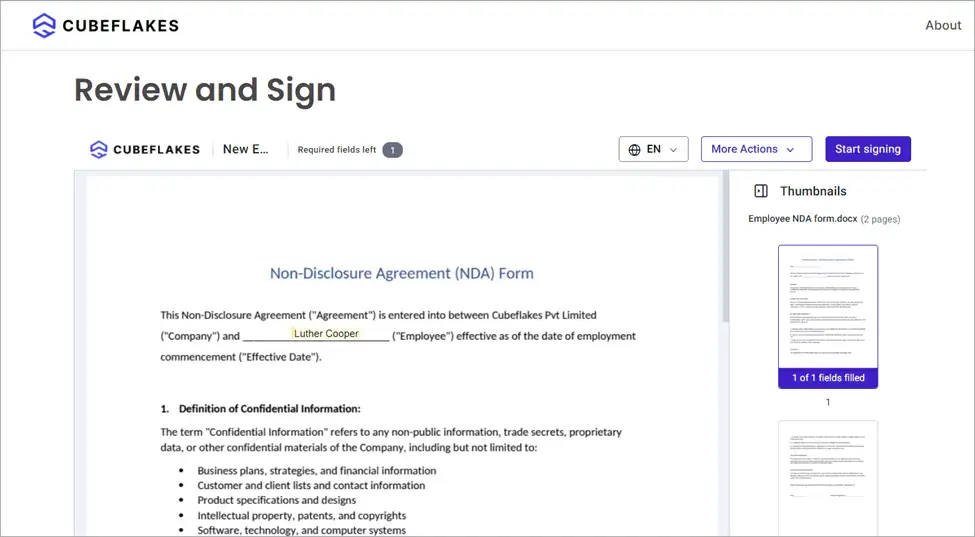
Check the signer’s identity in your app before you show the link. Our audit trail records that the document was signed through an embedded link, so keep your own record of that check.
How do you download the signed document?
Call downloadDocument with the document ID once everyone has signed. The download document API returns the signed PDF as a file stream.
This method streams the PDF straight to the browser as a download.
public function downloadDocument($documentId)
{
    $config = new \BoldSign\Configuration();
    $config->setApiKey(env('BOLDSIGN_API_KEY'));

    $documentApi = new \BoldSign\Api\DocumentApi($config);
    $file = $documentApi->downloadDocument($documentId);
    return response()->streamDownload(function () use ($file) {
        while (!$file->eof()) {
            echo $file->fgets();

        }
    }, 'document.pdf', ['Content-Type' => 'application/pdf']);
}
Signers finish in their own time, so your app can’t know in advance when the PDF is ready. Listen for the Completed webhook event and download the file when it arrives.
Our webhooks documentation shows how to set one up. The guide to verify webhook events shows how to confirm each event came from us.
Which BoldSign plan do you need for PHP eSignature API calls?
Every BoldSign plan, including the free one, gives you sandbox API access for testing. Live API calls, embedded signing and webhooks need the Enterprise API plan, from $30 a month with 40 envelopes, billed yearly.
Extra API requests on the Enterprise API plan cost $0.75 each. Prices are in USD, as of November 2026, and the pricing page lists every plan.
What can you build next with the BoldSign API?
The same steps work for any PHP app that needs signatures, not only an HR portal. Our API documentation covers status tracking and more, and our live API demos show other scenarios.
- Create a free API sandbox account and run the NDA flow with your own template.
- Book a demo to talk through your Laravel integration with our team.
- Browse the sample code in our GitHub repository, or contact our support team with a question.
Frequently asked questions
How do I add electronic signatures to a PHP Laravel app?
Install the BoldSign PHP SDK with Composer and keep your API key in the .env file. Then call the SDK from a controller to send a document, show the signing page and download the signed PDF.
Is there a PHP SDK for electronic signatures?
Yes. We publish the boldsign/boldsign-php package on Packagist. It runs on PHP 7.4 and PHP 8.
Can I test the BoldSign API for free?
Yes. A free API sandbox account gives you a sandbox API key, so you can test your PHP code before you send real documents.
Are documents signed through the BoldSign API legally binding?
Yes, when the signing meets the electronic signature laws that apply to the document. API documents go through the same signing steps and audit trail as documents sent from the BoldSign web app.
How do I show the signing page inside my Laravel app?
Ask for an embedded signing link with getEmbeddedSignLink and load it in an iframe. A redirect URL sends the signer back to your app when they finish.
Do I need to check who the signer is before embedded signing?
Yes. You hand the link to the signer yourself, so confirm their identity in your app first. Keep a record of that check, since the audit trail notes the embedded link.
How do I know when a signed document is ready to download?
Listen for the Completed webhook event. Signers finish in their own time, and the webhook tells your app the moment the signed PDF is ready.
How much does the BoldSign API cost?
Sandbox testing is free on every plan. Live API calls need the Enterprise API plan, from $30 a month with 40 envelopes, billed yearly in USD.

Ramesh Thangaraj
Ramesh is a passionate Product Manager at BoldSign with 6+ years of hands-on experience in software development. He excels in web technologies, mastering .NET and harnessing Vue.js. His full-stack expertise enables him to deliver innovative solutions. Ramesh thrives in cross-functional teams, driving projects forward with his strategic mindset. Connect with him on LinkedIn.
More posts by Ramesh Thangaraj