What to Look for in a Secure PDF Signing Solution
 Preethi Loganathan
TL;DR: A secure PDF signing solution proves who signed, how each signer was checked, and that the file has not changed since. The way to know is to test it: send a real document in a trial and read the audit trail it produces. Our signer authentication page shows the checks you can set for each signer.
Most teams pick a PDF signing tool because the demo looked clean and the price worked. The security page had the right badges, so nobody looked further.
The gaps show up later. A client disputes a contract, and the record holds only an email address and a time. Or a signing link gets forwarded, and the wrong person opens the file.
What is a secure PDF signing solution?
A secure PDF signing solution is a tool that checks who signs and keeps proof of every step. The signed file also carries a seal that shows any later change.
Think of a parcel sent with signed delivery. The courier checks the name, records the time, and keeps the receipt. A secure signing tool does the same for your document, and the audit trail is the receipt.
What does weak PDF signing security cost you?
Weak security rarely looks like a hack. It looks like a dispute you lose, because the tool never captured the proof you need.
- Someone says they never signed, and your record shows only an email address and a time.
- A forwarded link that stays open lets someone else view or sign the document.
- A reviewer asks how you check signers, and the vendor’s marketing line is your only answer.
- A valid signature still fails you if you cannot find or reproduce the file years later.
Forwarded links matter because attackers already target inboxes. Business email compromise, where someone takes over an email account, puts any signing link inside it at risk.
How do you test whether a PDF signing solution is secure?
Make the tool do the work, then read what it produces. Every vendor page says encrypted and compliant, so a trial shows you what it really records.
- Ask each vendor for a sample audit trail from a completed document.
- Send a real document to a second person, with the signer check you would use for real.
- Read the audit trail and look for the check used, the Internet Protocol (IP) address, device and times.
- Forward the signing link to another device and see whether it still opens.
- A week later, find the document again by searching for the signer’s name.
Before step 2, confirm that your chosen check, such as ID verification, works on the trial. Otherwise the test stops halfway.
What does the law expect from a stored record?
The Electronic Signatures in Global and National Commerce (ESIGN) Act sets the US rule for keeping records. Under 15 U.S.C. 7001(d), a stored record must accurately reflect the original.
It must also stay available to everyone entitled to it, in a form you can reproduce later. A vendor that stores the file meets only part of that standard.
What should a secure PDF signing checklist include?
Score every vendor on the same seven checks after your trial. Count a missing answer as a fail.
| Check | What a pass looks like |
|---|---|
| Per-signer checks | You can give each recipient on one document a different signer check. |
| Full audit trail | The record names the check used, plus identity, times, IP address and device for each action. |
| Tamper evidence | The signed PDF carries a coded seal, so a later edit shows up even outside the vendor’s app. |
| Link control | Signing links can expire, and you can cancel a request at any time. |
| Testable retention | You can find a document and its audit trail by signer name months later. |
| API parity | A document sent through the API gets the same audit trail as one sent from the web app. |
| Legal record support | The vendor names the laws its records are built to meet, such as ESIGN. |
Which questions should you ask on the vendor call?
Take the checklist into each call and ask the same questions. Clear, specific answers count for more than a security badge.
- Which signer checks can we set for each person on the same document?
- What does the audit trail record for each signer?
- Does the signed PDF carry a tamper-evident seal?
- Can signing links expire, and can we cancel a request?
- Which laws and standards does your documentation say your records meet?
Then ask the vendor to show each answer live in the trial.
How does BoldSign meet each check?
We built BoldSign to pass these checks in a trial you run yourself. Here is what you will find at each step.
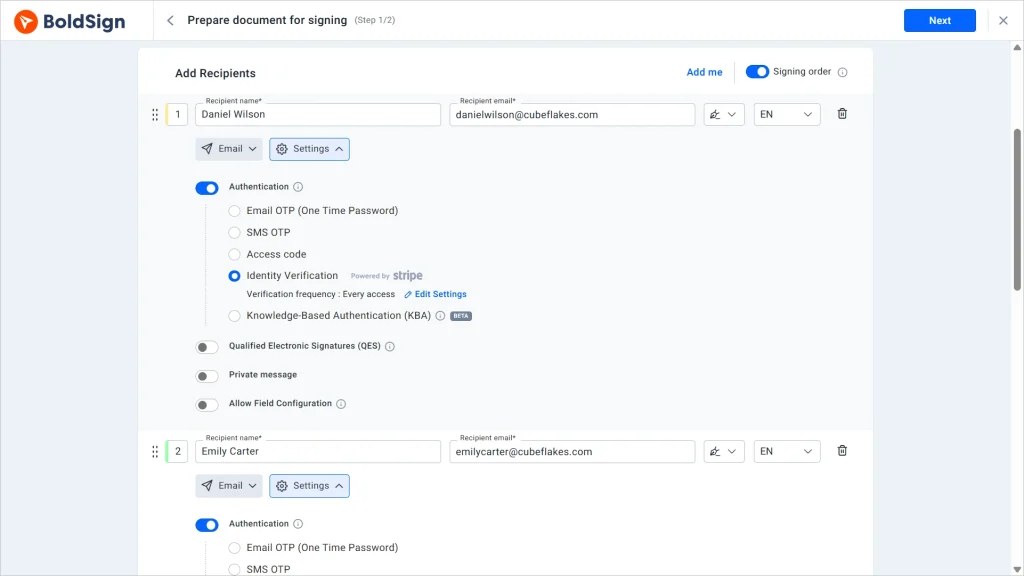
Signer checks for each person
You set a check for each signer, so one document can ask two people for different proof. Our signer authentication options are:
- Email one-time passcode (OTP) or SMS OTP
- An access code you share outside BoldSign
- Knowledge-based authentication (KBA), for US signers
- ID verification, which checks a government ID against a live selfie
An audit trail that names each check
Every completed document gets an audit trail. Along with document details and an activity history with times, it records:
- Names, emails, IP addresses and devices for everyone involved
- How each signer was verified before signing
- Whether each signature was typed, drawn or uploaded
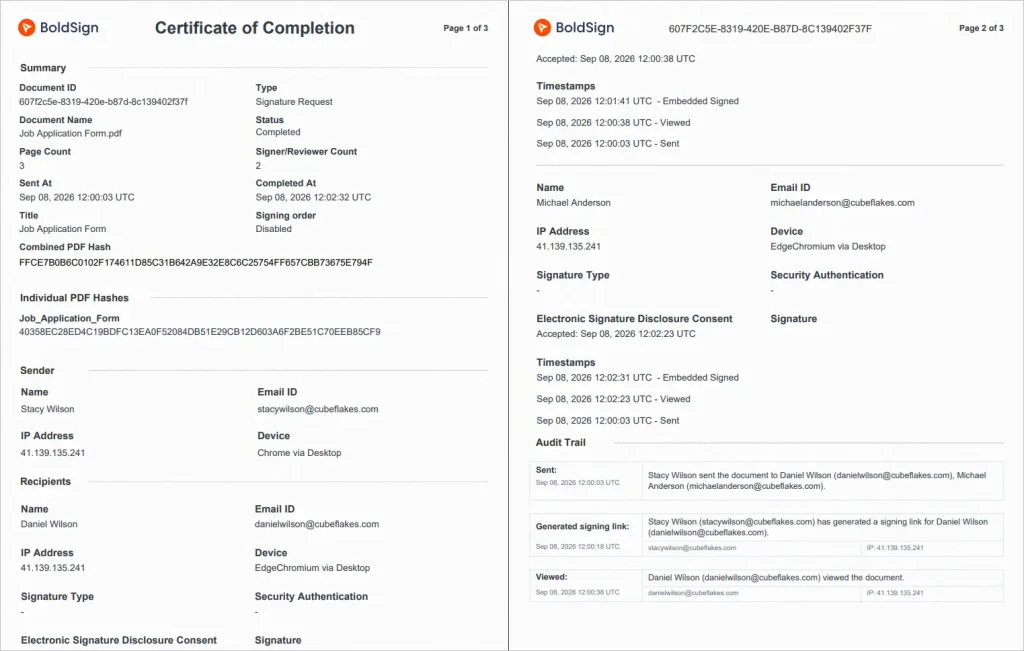
You can download the audit trail once everyone signs. You can also combine it with the signed PDF, so the proof travels with the file.
Tamper seals and link expiry
A cryptographic hash and a tamper-evident seal show any change made after signing. We also sign the final file and audit trail with a certificate, so changes show up outside our app.
You choose when an unsigned request expires, and nobody can sign it after that date. You can also cancel a request at any time.
Legal and security standards
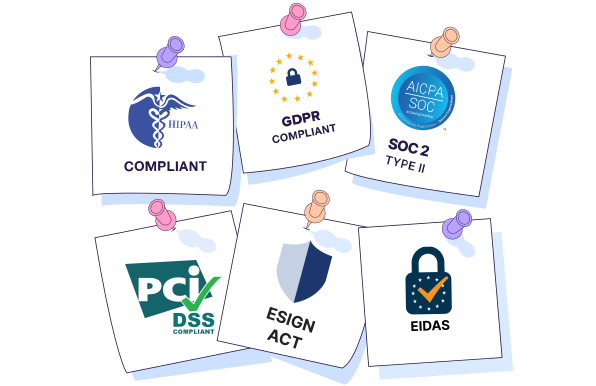
Our signatures follow the ESIGN Act and the Uniform Electronic Transactions Act (UETA) in the US. For the EU, they follow electronic identification, authentication and trust services (eIDAS) rules.
We hold System and Organization Controls (SOC) 2 Type 2 compliance. We also cover the General Data Protection Regulation (GDPR) and the Health Insurance Portability and Accountability Act (HIPAA).
Which BoldSign plan do you need, and what does it cost?
Email codes and access codes come with every plan, including the free Essential plan. SMS codes, KBA, ID verification and HIPAA support start on the Business plan, at $15 per user a month, billed yearly.
SMS codes cost $0.20 per message, KBA costs $1.50 per attempt, and ID verification costs $2 per attempt. The Premium plan costs $99 a month for unlimited users, billed yearly. Sending through the API needs the Enterprise API plan, from $30 a month with 40 envelopes.
All prices are in USD, as listed on our pricing page in November 2026.
How do you start testing a secure PDF signing solution?
Run the five test steps on a document that would cost you something if it went wrong. Then score the result against the checklist.
- Start a 30-day free trial and send a real document to a second signer.
- Book a demo to see signer checks and the audit trail for your documents.
- Read our guide to why eSignature audit trails matter before your vendor calls.
Frequently asked questions
What security features should a PDF signing solution have?
Look for signer checks you can set for each person, an audit trail that names each check, and a tamper seal on the signed file. Signing links should also expire, and you should be able to cancel a request.
How do I choose secure eSignature software?
Test it in a trial instead of reading the security page. Send a real document to a second person, download the audit trail, and check that it names how that person proved who they were.
Is an audit trail necessary for PDF signing?
Yes, for any document that someone might later question. The audit trail is the record that shows who signed, how they were checked, and when each step happened.
What is the safest way to sign PDFs online?
Match the signer check to the risk of the document. A high-value contract may call for a government ID check, while an email code suits a routine internal form.
How can I verify who signed a PDF?
Open the audit trail for the completed document. Look for the check each signer passed, the Internet Protocol (IP) address and device, and the time of each action.
What is the difference between electronic signatures and digital signatures?
An electronic signature is the signer's act of agreeing to a document electronically. A digital signature is a coded seal applied to the file, so any later change shows up. Most business signing tools use both.
Are signed PDFs legally valid in the United States?
Yes, when the signer intends to sign, agrees to do business electronically, and the record stays accurate and available. Federal and state electronic signature laws set these rules, and a few document types, such as wills, are left out.
Which tool can I use to sign business PDFs securely?
We built BoldSign for this. You can set a signer check for each person, download a detailed audit trail, and every signed file carries a tamper-evident seal.

Preethi Loganathan
Preethi is a Digital Marketing Executive at BoldSign who develops precise, research-driven content on eSignatures, compliance, and digital signing workflows. She works closely with product and engineering teams to ensure every article is accurate, validated, and aligned with industry best practices. Connect with her on LinkedIn.
More posts by Preethi Loganathan