What Is an E-Signature Audit Trail? What It Records and Why It Matters
 Rachael Chilson Arwa Olang
TL;DR: An e-signature audit trail is a time-stamped log of everything that happens to a document sent for signature. It shows who sent, viewed and signed it, from which device, and any change to the file after signing. We create one for every document on every plan, as shown on what our audit trail records.
A signed contract can close a deal, hire a new person or approve a loan. Months later, someone says, “I never signed that.” Or they say the document changed after they signed it.
At that point the signature alone proves little. You need a record of what happened, step by step. That record is the audit trail.
What is an e-signature audit trail?
An e-signature audit trail is a time-stamped record of every action on a document, from sending to completion. Some teams call these records signature logs.
Think of a parcel tracking page. It shows when the parcel left, every stop on the way and who signed for it at the door. An audit trail does the same for a contract.
A good audit trail answers five plain questions:
- Who took part in the signing?
- Which document did they sign?
- When did each step happen?
- How did each signer prove who they are?
- Has anyone changed the file since?
Our help center has a full audit trail section with guides for each task.
How do audit trails capture every step of the signing process?
The eSignature platform writes a new entry each time someone acts on the document. You never type an entry yourself, so the log stays complete and hard to dispute.
Here is what a typical log shows for one contract:
- The sender sends the document, with a time and an internet protocol (IP) address.
- The signer opens it, and the view is stamped with their email and IP address.
- The signer passes any identity check the sender asked for.
- The signer signs, and the method is logged: typed, drawn or uploaded.
- The last signature completes the document, and the file is sealed.
A reassignment to another signer is logged too, with its own time.
What does the BoldSign audit trail record?
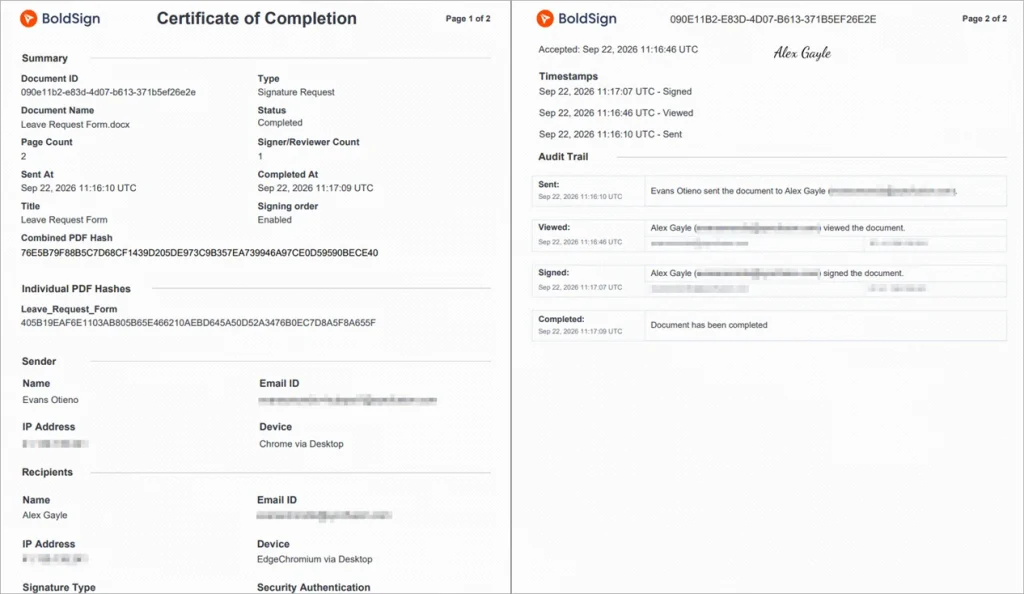
Our audit trail arrives as a PDF called the Certificate of Completion. The table below lists what it holds, as described on our eSignature audit trail page.
| Part | What it records |
|---|---|
| Document details | Document ID, type, title, status, signing order, page count, sent and completed times |
| People | Names, email addresses, IP addresses and devices for the sender and every recipient |
| Activity | Every view, signature, reassignment and completion, each with a timestamp |
| Verification | The check each signer passed, such as an ID check, and when |
| Signature method | Whether each signature was typed, drawn or uploaded as an image |
| Consent | Whether electronic consent was on, and when each signer accepted it |
| Integrity | A combined PDF hash, a code that changes if the file changes |
Timestamps follow the time zone you choose. The example below is a standard certificate with names, emails and IP addresses hidden.
Why do you need a digital signature audit trail for legal defensibility?
An audit trail turns a dispute about memory into a dispute about facts. Without one, it is your word against the signer’s.
The record helps you in four ways:
- It ties a signature to a named person, a device and a time.
- It shows which identity check the signer passed.
- It shows the file has not changed since signing.
- It gives auditors one document to review instead of a pile of emails.
A tamper-evident seal and a cryptographic hash show any change made after signing. The digital signature on the completed PDF does the same job for the file itself.
Read our guide to electronic signature evidence in litigation and arbitration to see what a court asks for.
How do electronic signatures support compliance and document audit requirements?
Laws in the US and EU accept electronic signatures, but they expect you to keep good records. An audit trail is how you show those records exist.
What do US eSignature laws ask for?
The Electronic Signatures in Global and National Commerce (ESIGN) Act says a contract cannot lose legal effect just for being electronic. A retained electronic record must also stay accurate and accessible for the period the law requires.
The Uniform Electronic Transactions Act (UETA) covers transactions within a state. Our UETA and ESIGN Act compliance page notes that 49 US states have adopted it. The page also explains why the signature must link to the signed record.
What does US health privacy law ask for?
The Health Insurance Portability and Accountability Act (HIPAA) Security Rule has an audit controls standard. The rule sits in the Code of Federal Regulations (CFR) at 45 CFR 164.312(b). Covered entities must record and examine activity in systems that hold electronic protected health information (PHI).
The same section asks you to protect that data from improper change. A sealed document with a full activity log supports both duties. Our HIPAA overview explains our safeguards.
What does EU law ask for?
The EU electronic identification and trust services (eIDAS) Regulation sets rules for electronic signatures across member states. Our eIDAS compliance page explains how simple electronic signatures fit, and an audit trail is the evidence behind them.
How do businesses maintain an audit trail for signed contracts?
Businesses use an eSignature tool that logs each step on its own. With us, every contract gets its audit trail automatically, and you can store it in the same PDF as the signed copy.
Look for a document signing platform with audit trails and templates. Templates keep each contract the same, and the audit trail proves how each copy was signed. Our templates feature shows how that works.
Keep both files together for as long as your records policy says. Our guide to document retention for signed agreements covers how to set that period.
How to build an audit trail for e-signature that satisfies a regulator
A regulator wants a record that is complete, tied to real people and hard to change. You can set most of that up before you send the first document.
- Send every agreement through one eSignature platform, not by email attachment.
- Turn on a signer identity check that fits the risk of each document.
- Switch on electronic consent, so the log shows when each signer agreed to sign electronically.
- Store each audit trail with its signed document, in one PDF or one folder.
- Write down how long you keep records, and who can open them.
How do you get the audit trail in BoldSign?
You can download the audit trail on its own, or have it added to the signed PDF. Either way, it becomes ready once every signer has finished.
Download the audit trail
Follow the steps in our help article to download an audit trail:
- Go to Documents, then My Documents.
- Select the document to open its overview page.
- Select More actions, then Download audit trail.
You can download audit trails for documents you sent or received.
Add the audit trail to the signed PDF
An admin can turn on Combine Audit Trail for a brand. Every completed document under that brand then carries its audit trail inside the signed PDF.
- Open Settings, then Branding.
- Select Create New Brand, or edit an existing brand.
- Turn on Combine Audit Trail, then select Save.
With this option on, the separate Download audit trail option no longer shows for that document.
Get the audit trail in a signer’s language
An account admin can turn on Generate Multilingual Audit Trail under Settings, then Business Profile. The downloaded audit trail then holds English and the signer’s language, as our localization guide explains.
Developers can fetch the same file with one request. Our developer post shows how to download audit trails in code.
How to audit who has accessed or changed a contract after signing
Open the document’s audit trail and read the activity list from top to bottom. Each view and signature shows a time, an email address and an IP address.
To check for changes, look at the seal. A tamper-evident seal and the digital signature on the completed PDF show any change made after signing.
See activity you do not recognize? Contact our support team by chat or ticket. Then void the document and resend it with signer verification turned on.
What should you watch out for with audit trails?
An audit trail holds personal details, so treat it like the contract itself. A few habits keep it useful and safe.
- Share it only with people who need it, such as auditors or your legal team.
- Back it up before you delete a document, since deletion removes the trail for good.
- Keep signer details out of document titles, since titles appear in emails.
- Match the identity check to the risk: an email code for a form, an ID check for a loan.
Which BoldSign plan includes the audit trail, and what does it cost?
Every plan includes the audit trail and Certificate of Completion, as listed on the BoldSign pricing page in November 2026. That includes our free Essential plan, and prices are in USD.
Our Growth plan costs $5 per user a month, billed yearly. It adds more envelopes and templates, with the same audit trail.
Our Business plan costs $15 per user a month, billed yearly. It adds ID verification, text message codes, automatic cloud backup and HIPAA support. Unlimited brands come with it too.
Our Premium plan includes the same for $99 a month with unlimited users, billed yearly.
How do you start keeping audit trails for your contracts?
Every document you send with us gets its audit trail from the first signature. Pick the next step that suits you.
- Start a 30-day free trial and send a test document to see its certificate.
- Book a demo and walk through the audit trail with our team.
- Contact our support team with a question about your records.
Frequently asked questions
What is an e-signature audit trail?
It is a time-stamped record of every action on a signed document, from sending to the last signature. It names each person, their device and their internet protocol (IP) address.
How do I keep an audit trail of process sign offs and is it worth it for a small team?
Send each sign off through an eSignature tool, and the record builds itself. The record costs a small team no extra work. It also gives you a quick answer when someone asks who approved what.
What product categories handle contract templates, esign, and audit trails?
eSignature software handles all three in one place. Some contract management tools do too, often by connecting to an eSignature service.
What solutions provide audit trails and identity verification for compliant digital agreements?
Look for an eSignature platform that checks signers and stamps each check in the record. We offer email codes, text codes, access codes, knowledge-based questions and ID checks.
Who offers secure esign services with audit trail features?
We do, on every plan, including our free plan. Each document gets a tamper-evident seal and a Certificate of Completion at no extra cost.
What types of e-signature services let customers sign online documents from a phone with an audit trail?
Browser-based eSignature services work on a phone with no app to install. With us, a signature made on a phone lands in the same audit trail, with the device recorded.
Can signers without a BoldSign account get the audit trail?
Yes. When everyone has signed, each signer gets an email with the signed document and its audit trail.
How long does BoldSign keep audit trails?
We keep each audit trail for as long as its document stays in your account. Deleting a document removes its audit trail for good, so back up anything your records policy needs.

Rachael Chilson Arwa Olang
Rachael works in Regulatory Compliance Team and enjoys writing blogs about data protection. Knowledge gained from data security helps users gain knowledge on the protection of personal and organization data.
More posts by Rachael Chilson Arwa Olang