How to Send eSignature Requests with a Custom Signing Link
 Karthick Ramasamy
TL;DR: You can send eSignature requests with a signing link on your own domain. Turn off our emails when you send the document, get an embedded signing link for each signer, and swap our host for yours. Your page then loads our signing page inside an iframe.
Each time you send a document, we email the signer a secure link to review and sign it. By default, that link points to app.boldsign.com, like this one.
https://app.boldsign.com/document/sign/?documentId=...Your app may need signers to see your own brand from the first click. This guide shows how to send the request through our API and hand out a link like the one below.
https://app.cubeflakes.com/document/sign/?documentId=...What is a custom signing link?
A custom signing link is a signing address on your domain that leads to our signing page. Signers click your link, and your page shows the document inside an iframe.
Think of a shop that sells another maker’s goods under its own sign. The goods are the same, but customers walk through the shop’s front door. Here, your domain is the front door and our signing page is the counter inside.
How do you send a document for signature from your app?
Call the send document API with DisableEmails set to true. We then skip the emails, so you can send your own message with your custom link.
The curl example below sends one file to one signer with a signature field. Our send document reference lists every property.
curl -X 'POST' \
  'https://api.boldsign.com/v1/document/send' \
  -H 'accept: application/json' \
  -H 'X-API-KEY: {your API key}' \
  -H 'Content-Type: multipart/form-data' \
  -F 'DisableEmails= true' \
  -F 'Message=' \
  -F 'Signers={
  "name": "Hanky",
  "emailAddress": "hankyWhites@cubeflakes.com",
  "signerType": "Signer",
  "formFields": [
    {
      "id": "string",
      "name": "string",
      "fieldType": "Signature",
      "pageNumber": 1,
      "bounds": {
        "x": 50,
        "y": 50,
        "width": 150,
        "height": 25
      },
      "isRequired": true
    }
  ],
  "locale": "EN"
}' \
  -F 'Files=@{your file}' \
  -F 'Title={title}'
How do you get the embedded signing link?
Call GET /v1/document/getEmbeddedSignLink with the document ID from the send call. Add the signer’s email address, and the API returns that signer’s link.
curl -X GET \
  'https://api.boldsign.com/v1/document/getEmbeddedSignLink?documentId=17882g56-xxxx-xxxx-xxxx-ce5737751234&signerEmail=alexgayle@cubeflakes.com&signLinkValidTill=10/14/2022' \
  -H 'X-API-KEY: {your API-KEY}'
Use the same email address you gave when you created the document. The signLinkValidTill value sets how long the link works, and redirectUrl sends the signer to your page after signing.
Note: We create documents in the background. You get the document ID at once, but the file may still be processing. Our guide on how to know whether a document is ready for eSignature shows how a webhook tells you.
How do you customize the signing link?
Swap our host and path for your own page, then send the new link in your own email. Your page swaps them back before it shows the document.
Our guide to custom email notifications with Amazon Simple Email Service (SES) shows one way to send that email.
- Take the link the API returned, such as the one below.
- Replace
app.boldsign.com/document/sign/with your own host and page. - Keep the
documentIdvalue exactly as it is. - Put the new link in your email or message to the signer.
The standard link:
https://app.boldsign.com/document/sign/?documentId=68f32820-123a-4a3e-a6gh-c06cfdbb1da9s_ALyNe%3B722f4d42-2244-4ec8-b5e4-7dd2f2481ed9The custom link on your domain:
https://app.cubeflakes.com/form/sign/?documentId=68f32820-123a-4a3e-a6gh-c06cfdbb1da9s_ALyNe%3B722f4d42-2244-4ec8-b5e4-7dd2f2481ed9How does your custom signing handler load the document?
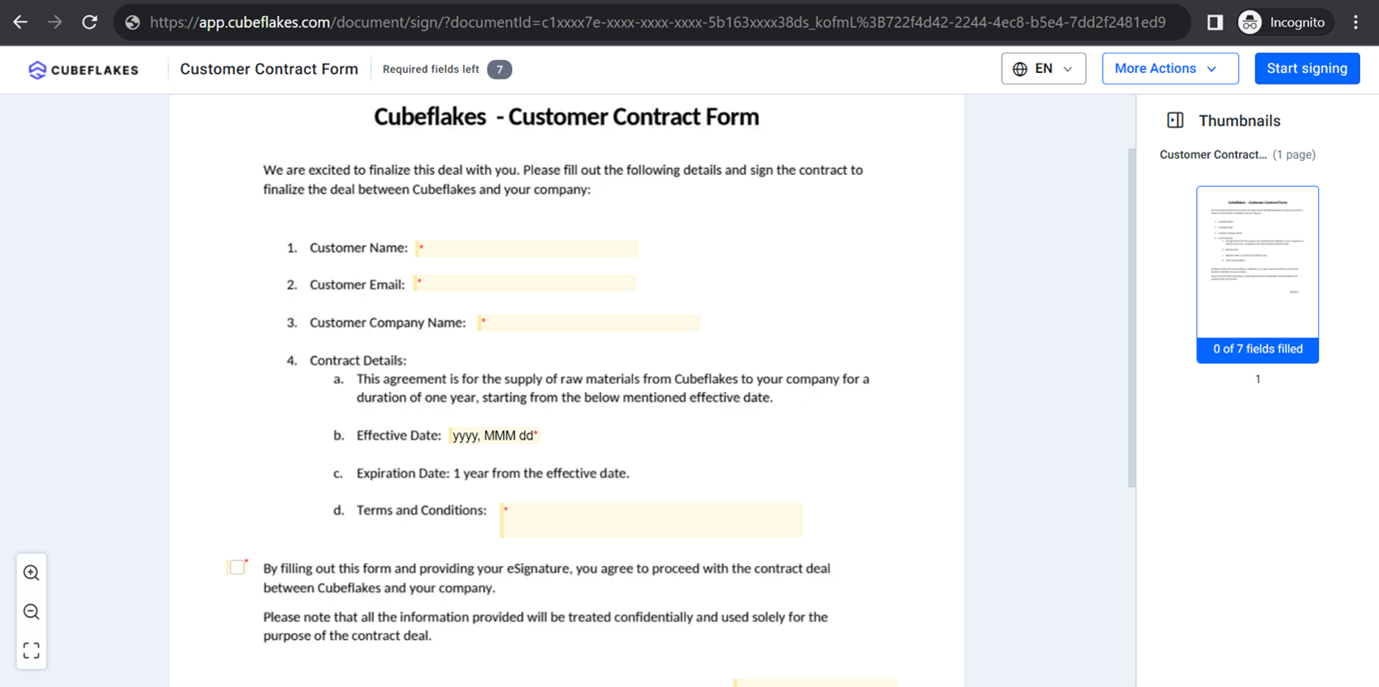
Your signing page acts as a custom signing handler. It turns the custom link back into our address and loads that address in an iframe.
- Read the
documentIdvalue from the link the signer opened. - Rebuild the address with
app.boldsign.com/document/sign/as the host and path. - Set that address as the
srcof an iframe on your page.
https://app.boldsign.com/document/sign/?documentId=68f32820-123a-4a3e-a6gh-c06cfdbb1da9s_ALyNe%3B722f4d42-2244-4ec8-b5e4-7dd2f2481ed9Signers then review any prefilled details and sign on your domain. Our guide to embedding the signing link in an iframe covers the page code.
How do you know when the document is signed?
The iframe posts an onDocumentSigned message to your page when the signer finishes. For the signed PDF, subscribe your server to the Completed webhook event.
The Completed event fires once every recipient has signed. Your endpoint can then send the signer an email with the completed PDF attached.
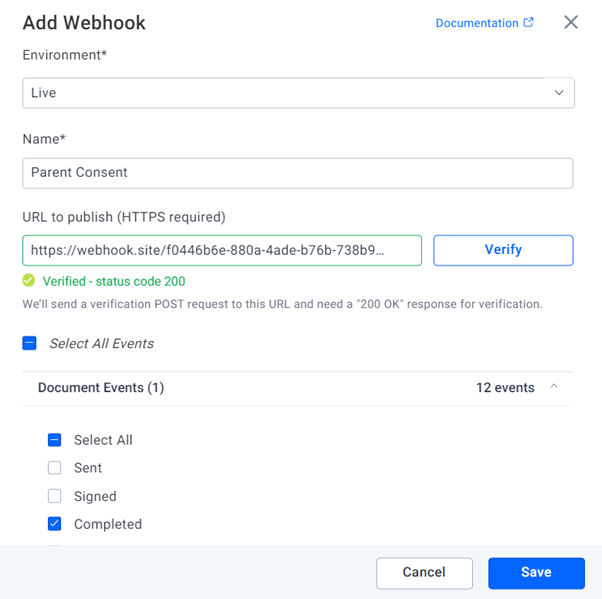
Our webhooks introduction explains each webhook type. You can add your own on the BoldSign API webhooks page.
Which plan do you need for a custom signing link?
Embedded signing, webhooks and live API access come with the Enterprise API plan. It starts at $30 a month with 40 envelopes, and extra envelopes cost $0.75 each.
Prices are in USD, as listed on the BoldSign API pricing page in November 2026. You can build and test the whole flow in a free sandbox first. Sandbox documents carry a test watermark, and we delete them after 14 days.
How do you start sending from your own domain?
Build the flow in the sandbox, then move to live access when your signing page is ready.
- Create a free API sandbox account and test the custom link end to end.
- Book a demo to talk through your signing flow with our team.
- Contact our support team with a question about your integration.
Frequently asked questions
What is a custom signing link?
A custom signing link is a signing address on your own domain instead of app.boldsign.com. Your page opens our signing page inside an iframe, so signers stay on your site.
How do I stop BoldSign from emailing my signers?
Set DisableEmails to true when you call the send document API. We then send no document emails to the recipients, and you notify them yourself.
How do I get the signing link for one signer?
Call the getEmbeddedSignLink endpoint with the document ID and the signer's email address. Use the same email address you gave when you created the document.
Can I set when an embedded signing link expires?
Yes. Pass signLinkValidTill in date-time format to set how long the signer can use the link.
Can I send signers to my own page after they sign?
Yes. Pass a redirectUrl when you request the embedded signing link. We send the signer to that address once signing is done.
What is a custom signing handler?
It is the page on your site that receives the custom link, turns it back into our signing address and loads it in an iframe. You build and host it yourself.
How does my page know the signer has finished?
The iframe posts an onDocumentSigned message to your page when signing succeeds. For the final PDF, wait for the Completed webhook event on your server.
Can I test a custom signing link for free?
Yes. A free API sandbox account gives full API access with no credit card. Sandbox documents carry a test watermark and are deleted after 14 days.

Karthick Ramasamy
I am an experienced full-stack developer with 7 years of hands-on expertise in .NET Core and JavaScript. My passion lies in crafting top-notch and highly efficient programs. I derive great satisfaction from solving technical challenges and continuously seek to expand my knowledge in software development. Outside of work, I find joy in embarking on journeys that take me over mountains. Connect with him on LinkedIn.
More posts by Karthick Ramasamy