How to Sign a Document Online with a Legally Valid Electronic Signature
 Preethi Loganathan
TL;DR: US law says a signature cannot be rejected only because it is electronic, so a typed, drawn, or uploaded signature can all count. The signer must mean to sign, agree to sign electronically, and the record must be tied to the document and kept. Proof matters most, and our eSignature audit trail records who signed, when, and how.
A contract is due today. Printing and scanning it feels like a waste of an afternoon. Yet a typed name on a screen does not quite feel like a real signature.
The law treats it as one. The harder part is proof. This guide shows how to sign online in a few minutes, and when you need a tracked record behind it.
Is it legal to sign documents online?
Yes, when the document is not on the short list of exceptions and the signer means to sign. The Electronic Signatures in Global and National Commerce (ESIGN) Act sets the federal rule.
A signature or contract “may not be denied legal effect, validity, or enforceability solely because it is in electronic form.”
Congress passed the ESIGN Act in 2000. The Uniform Electronic Transactions Act (UETA) does similar work at state level. Our ESIGN Act and UETA guide notes that 49 states have adopted it.
The law also defines an electronic signature broadly. It is “an electronic sound, symbol, or process” tied to a record and adopted “with the intent to sign the record.”
So a typed name counts, and so does a signature drawn with a mouse or fingertip.
An uploaded image of your handwriting counts too.
What makes an electronic signature legally valid?
Four conditions do the work. The style of the mark matters far less than these:
- You meant to sign, and knowingly applied the signature to this document.
- Each party agreed to sign electronically, since the law forces nobody to accept electronic records.
- The signature is tied to that exact document.
- Everyone entitled to the record can keep it and reproduce it accurately later.
The first three happen in the moment you sign. The fourth plays out over the years that follow, and self-signers often fall short there.
Consumer deals add one more step. A consumer owed written notice by law must first agree to get it electronically. They also need a clear notice of their rights, as section 7001(c) sets out.
Which documents still need a handwritten signature?
A short list of documents falls outside the ESIGN Act. The exceptions in section 7003 include:
- Wills, codicils, and testamentary trusts
- Adoption, divorce, and other family law matters
- Court orders, notices, and official court documents
- Most Uniform Commercial Code matters, apart from Articles 2 and 2A
- Some consumer notices, such as utility shutoffs, eviction, or insurance cancellation
States can add rules of their own. Everyday business papers, such as sales agreements and offer letters, sit outside that list. Check with a lawyer before you sign anything close to one of these groups.
Which way should you sign a document online?
There are three common ways. Each gives you a valid signature, but each leaves you with different proof:
- A PDF tool on your computer, where you place a signature on the page and save the file.
- A free one-off signing website, often with no lasting record.
- An eSignature platform, which gives you the signed file plus a timed log of who did what.
Some people call any of these a digital signature. Our guide to electronic and digital signatures explains the difference.
When is signing it yourself enough?
Signing in a desktop PDF tool leaves you with a signed file and nothing else. That works when you sign alone, the stakes are low, and nobody is likely to dispute it.
| PDF tool, self-signed | BoldSign, self-signed | BoldSign signature request | |
|---|---|---|---|
| Who signs | You alone | You alone | You, other people, or both |
| What you keep | The signed file | The file and a timed signing record | The file and a full audit trail |
| Identity check | Your own device | Your signed-in account | A code, security questions, or a photo ID check per signer |
| Good fit | Forms nobody will question | Records you may need to find later | Anything with money, renewals, or liability |
When do you need a tracked signature request?
Switch to a tracked request when any of these is true:
- Someone other than you has to sign.
- The agreement carries payment terms, a renewal clause, or liability.
- You may need to show the other party saw the final version.
- You may need the record years from now, after the signer has left.
A self-signed document is still valid in these cases. A tracked request makes it easier to defend.
How to legally sign a document online with BoldSign
You can sign alone in a few minutes. Use these steps for a vendor form, a policy acknowledgment, or a contract the other side has already signed.
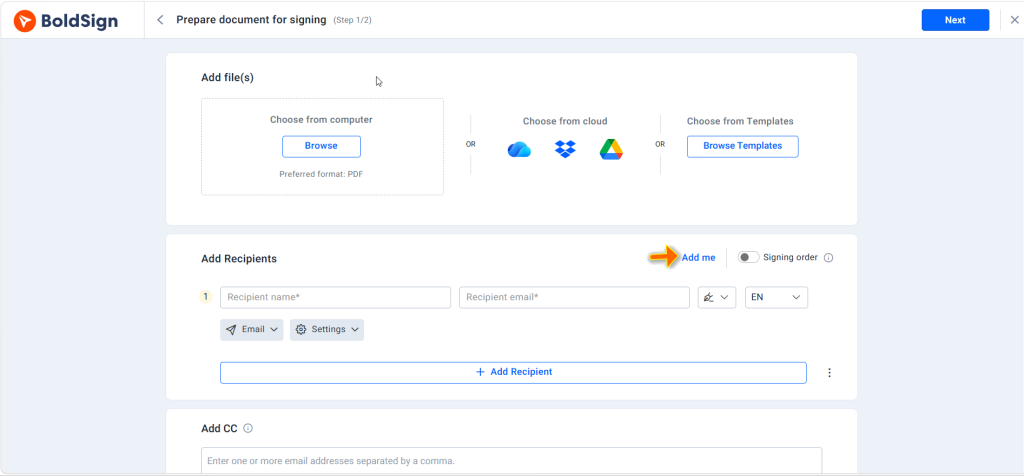
- Select Create New, then Create New Document, and add your file.
- In Add recipients, select Add me to add yourself as the signer.
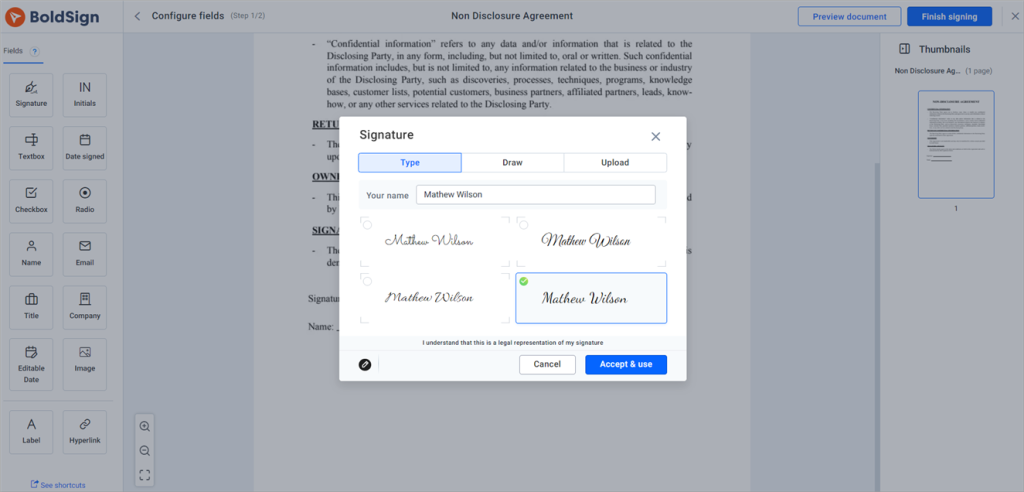
- Place a signature field, plus any date, initials, or checkbox fields.
- Type, draw, or upload your signature, then finish the document.
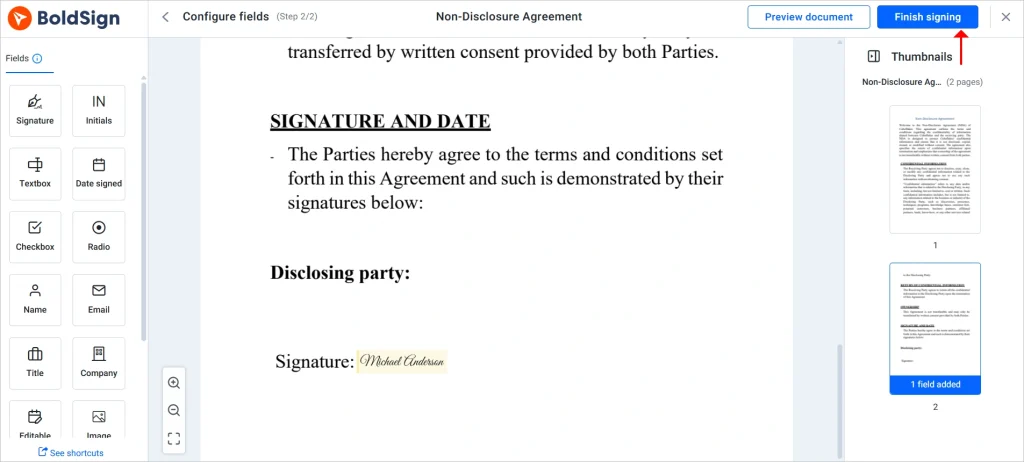
You can upload a PDF, an Office file such as Word, or an image. Our help article on supported file formats and sizes lists the limits. The signed copy stays in your account, ready to download or share.
How do you send an eSignature online request to other people?
Send a signature request when a client, employee, or vendor has to sign. Signers open a secure link and sign in their browser, with no BoldSign account needed.
- Select Create New, then Create New Document, and upload the agreement.
- Under Add recipients, add each signer’s name and email, and select Add me if you sign too.
- Turn on the Signing order toggle when people must sign in turn.
- Place a signature field for each signer, then select Next.
- Assign every field to the right signer, review the details, and select Send.
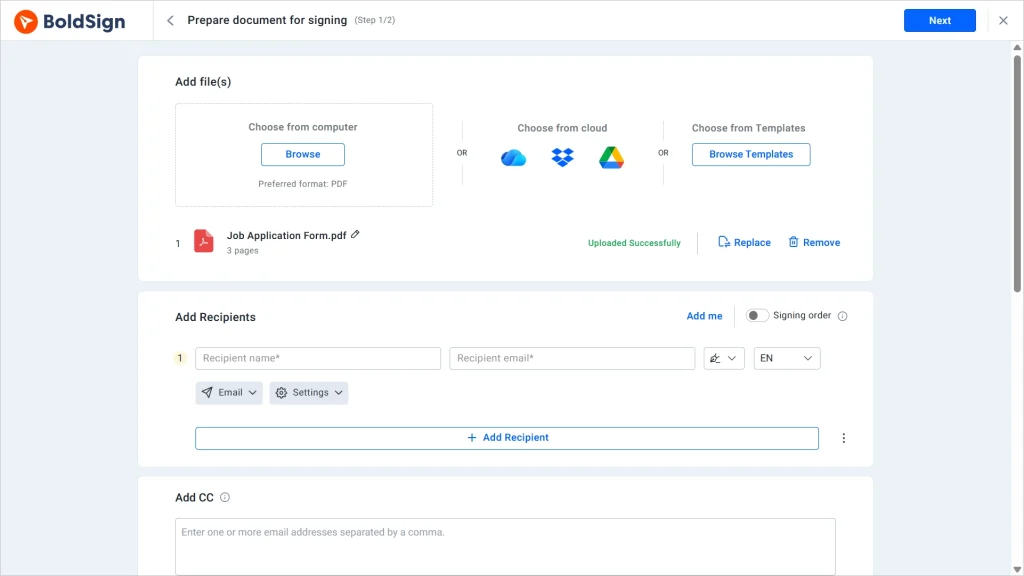
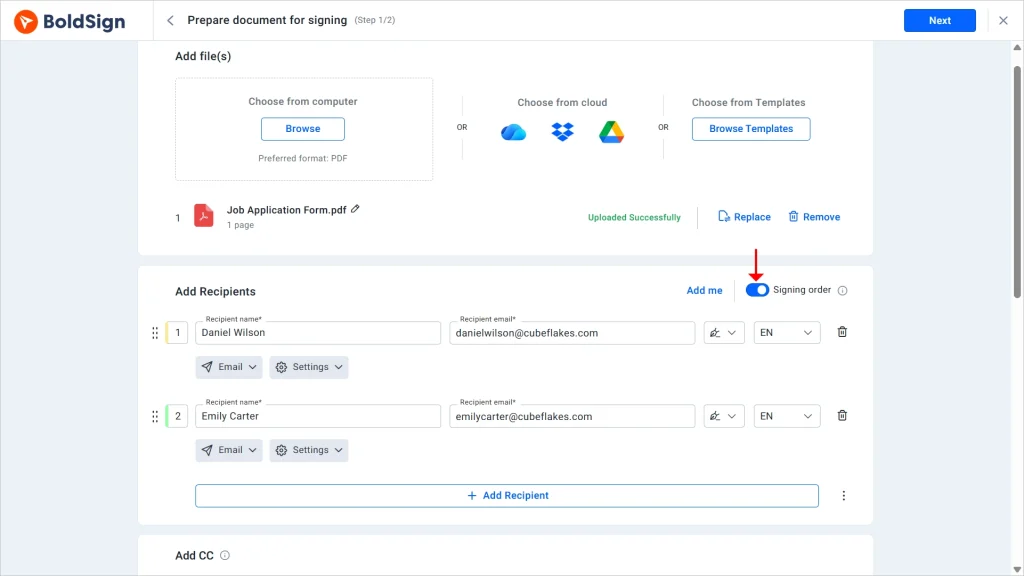
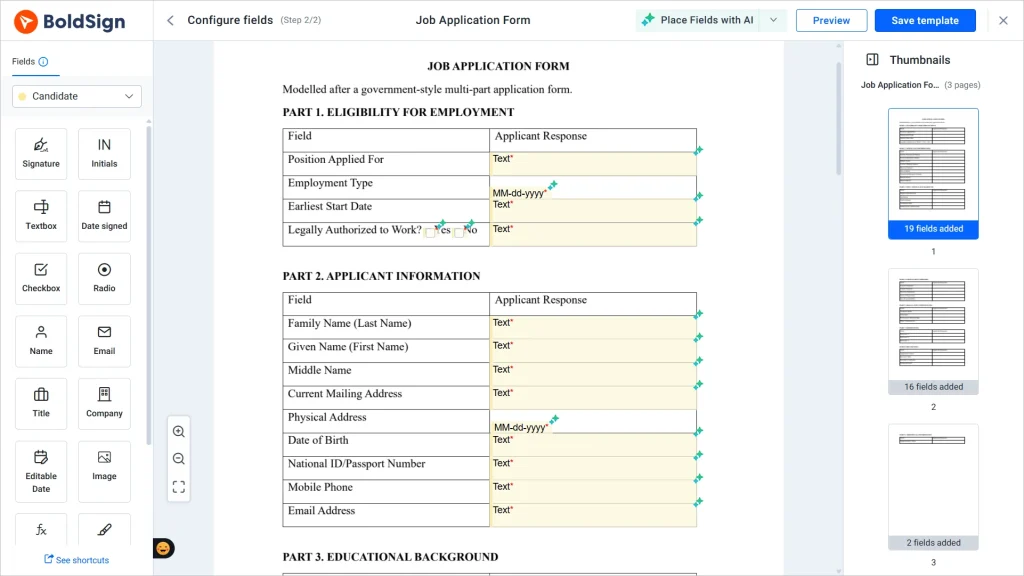
With signing order on, each person gets the request only after the one before them finishes. Our guide to setting the signing order shows each step.
Which fields can you add?
Beyond the signature, you can add fields such as initials, dates, and checkboxes. Our help article lists every form field and its properties.
What happens after everyone signs?
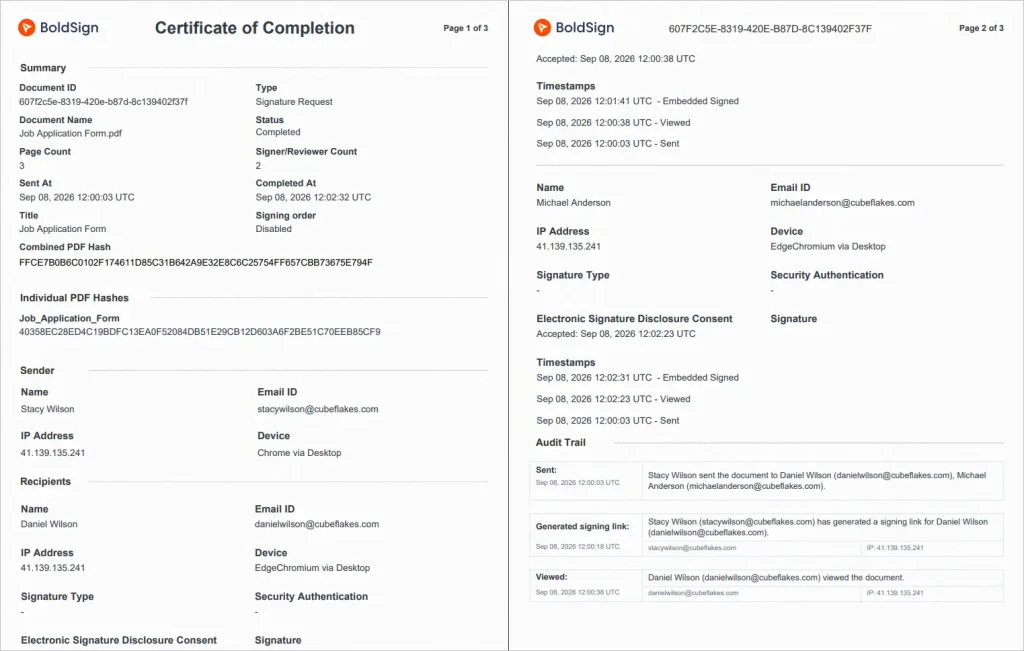
You can see whether the document was viewed, signed, declined, or completed. The finished file and its audit trail stay in your account for later.
How do you prove who signed?
Match the identity check to what the agreement is worth. An email reaching an inbox proves only that someone could open that inbox.
Our signer authentication offers five checks per signer:
- An email one-time passcode (OTP) for everyday agreements
- An SMS OTP that ties the check to a phone
- An access code you share through a separate channel
- Knowledge-based authentication (KBA), which asks US signers security questions
- ID verification, which matches a government ID to a live selfie
Each extra check adds a step for the signer. A small renewal rarely needs a photo ID check, while a commercial lease may well need one.
What does the audit trail record?
Our audit trail logs every view, signature, and completion with a time. It also notes each signer’s email, internet protocol (IP) address, device, and the check they passed.
How do we keep repeat agreements and records safe?
Save documents you send often, such as non-disclosure agreements (NDAs) and offer letters, as reusable templates. The fields and wording then stay the same each time.
We meet the ESIGN Act and UETA requirements. We have also completed a System and Organization Controls 2 (SOC 2) Type 2 audit, as our SOC 2 Type 2 overview explains. Our parent company follows General Data Protection Regulation (GDPR) principles.
Teams that handle health data can turn on support for the Health Insurance Portability and Accountability Act (HIPAA). Ask what you would need to show if the deal were challenged in two years, then pick the signing method that keeps that proof.
Which BoldSign plan do you need, and what does it cost?
Signature requests, email checks, and the audit trail are on every plan, including the free Essential plan. Prices are in USD and billed yearly, as listed on the BoldSign pricing page in November 2026.
The Growth plan costs $5 per user a month. The Business plan costs $15 per user a month, and the Premium plan costs $99 a month for unlimited users.
SMS OTP ($0.20 per SMS), KBA ($1.50 per attempt), and ID verification ($2 per verification) are add-ons from the Business plan. HIPAA support comes with yearly Business and Premium plans. Templates are capped at 2 on Essential and 10 on Growth, with no cap on Business or Premium.
Ready to sign your next document online?
Try a self-signed form first, then send a tracked request to a colleague.
- Start a 30-day free trial and send your first tracked signature request.
- Book a demo to see signer checks and the audit trail on your own documents.
- Read our electronic signature legality guide for the rules in other countries.
Frequently asked questions
Is signing a document online legally valid?
Yes, when the signer means to sign, both sides agree to deal electronically, and the record is kept. US federal law says a signature cannot lose legal effect only because it is electronic.
What's the proper way to sign a contract online so it holds up legally?
Sign it through a tool that ties your signature to the document and logs each step with a time. Make sure every party has agreed to sign electronically, and keep a copy that all of you can open later.
Is a typed name a legal electronic signature?
Yes, when you type it with the intent to sign and it is attached to the document you mean to sign. US law covers any sound, symbol, or process used that way.
What electronic signature wording does a contract need?
Usually just the signature itself, though a law for your document type can set its own. US federal law defines an electronic signature by intent and its link to the record. Many contracts add a short clause in which the parties agree to sign electronically.
Can I sign a Word document online, or does it have to be a PDF?
Yes, you can sign a Word file. We also take Excel and PowerPoint files, PDFs, and common image files.
Do the people I send a document to need an account to sign it?
No. Signers open a secure link from their email and sign in their browser. Only the sender needs a BoldSign account.
Do I need witnesses or a notary to sign online?
Most everyday contracts need neither. Some documents need a witness or a notary under state law, so check the rules for your document type first.
How do I prove who signed an online document?
Keep the audit trail from your eSignature tool. Ours records each view and signature with a time, the signer's email and IP address, and the check each signer passed.

Preethi Loganathan
Preethi is a Digital Marketing Executive at BoldSign who develops precise, research-driven content on eSignatures, compliance, and digital signing workflows. She works closely with product and engineering teams to ensure every article is accurate, validated, and aligned with industry best practices. Connect with her on LinkedIn.
More posts by Preethi Loganathan