How to Speed Up Nonprofit Grant Agreement Signatures with BoldSign
 Yvone Atieno Odhiambo
TL;DR: You can cut the wait on a grant agreement by sending it from a template, in a set signing order, with automatic reminders. Board members and funders sign in a browser with no account, and the audit trail records each step. Our eSignature for nonprofits page shows how verified nonprofits use BoldSign free.
The grant is approved and the program is ready to start. Before any money moves, the agreement still needs your finance lead, your executive director and the funder to sign.
On email, that path can take a week or more. A signer is traveling, a board member misses the message, or the wrong version goes out. This guide shows where the time goes and how to get the agreement back to the funder faster.
Why do grant agreements take so long to sign?
Most delays come from handoffs, not from the terms. Each person waits for the one before them, and nobody can see where the document is.
On paper the path looks simple. The funder sends the award letter and agreement, and your team reviews the terms. An authorized signer signs, and the funder often countersigns last.
In practice, small gaps add days:
- Files sit in different inboxes and shared folders.
- People are unsure who reviews and who signs.
- A board chair or executive joins the list late.
- The signed copy is hard to find when the auditor asks.
Where does a nonprofit lose the most time?
The longest waits happen at signature collection. The steps before and after it add smaller delays of their own.
Preparing the agreement
Grant files often arrive in pieces. Your team has to gather them before review can start:
- the award letter and the agreement
- the budget and its attachments
- the follow-up emails with changes
Collecting signatures
Signature collection is where agreements stall. The wrong version goes out, or signers get it out of order. An executive on the road may not open the email for days.
Keeping the signed copy
The work does not end at the last signature. Your team needs the signed copy and proof of completion for reports, invoices and audits.
How does BoldSign speed up grant agreement signatures?
We help at each point where the wait builds up. You prepare once, route in order and let reminders do the chasing.
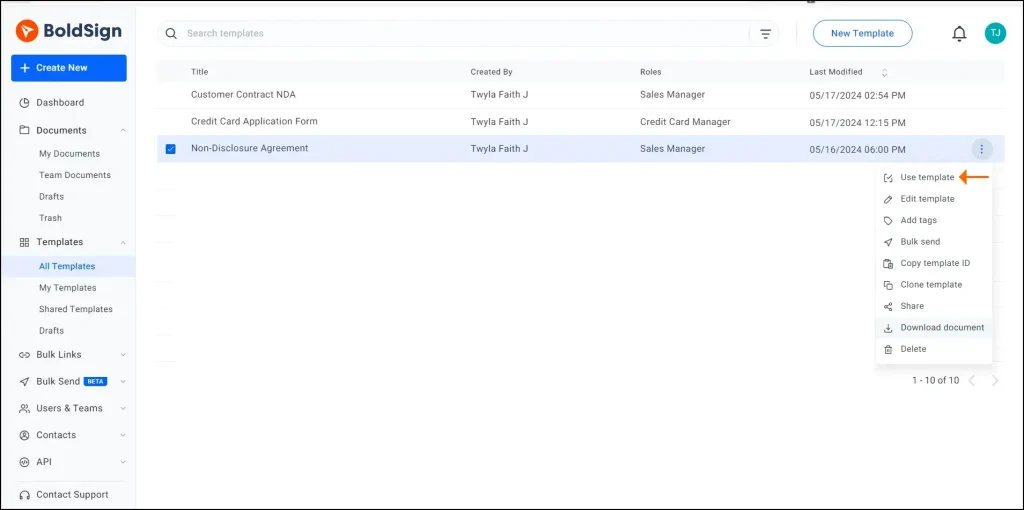
Start from a template
Save your standard grant agreement as a template with its fields already placed. Our help article on creating templates walks through the steps.
Send everyone the same document
Every signer works on the one document you sent, so no edited copies travel by email. Two people can even share one email address, as our guide on sending to signers who share an email address explains.
Set the signing order
Turn on Signing order and drag each signer into place. Our article on setting the signing order shows each step.
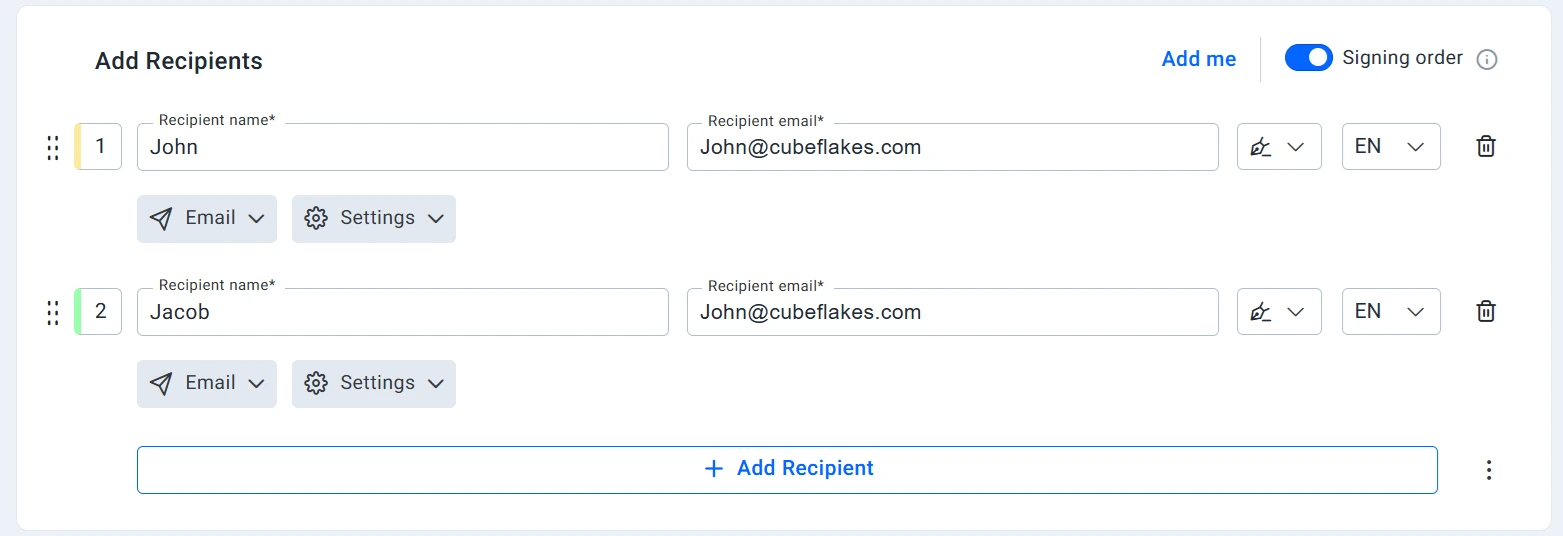
We email only the first signer at the start. Each later signer gets the email once the one before them has signed.
Let reminders do the chasing
Turn on Auto reminder and set Remind every to the number of days you want. Automatic reminders go out up to 5 times.
Board members and funders sign from a phone or computer. They need no BoldSign account.
How do you keep a record of a signed grant agreement?
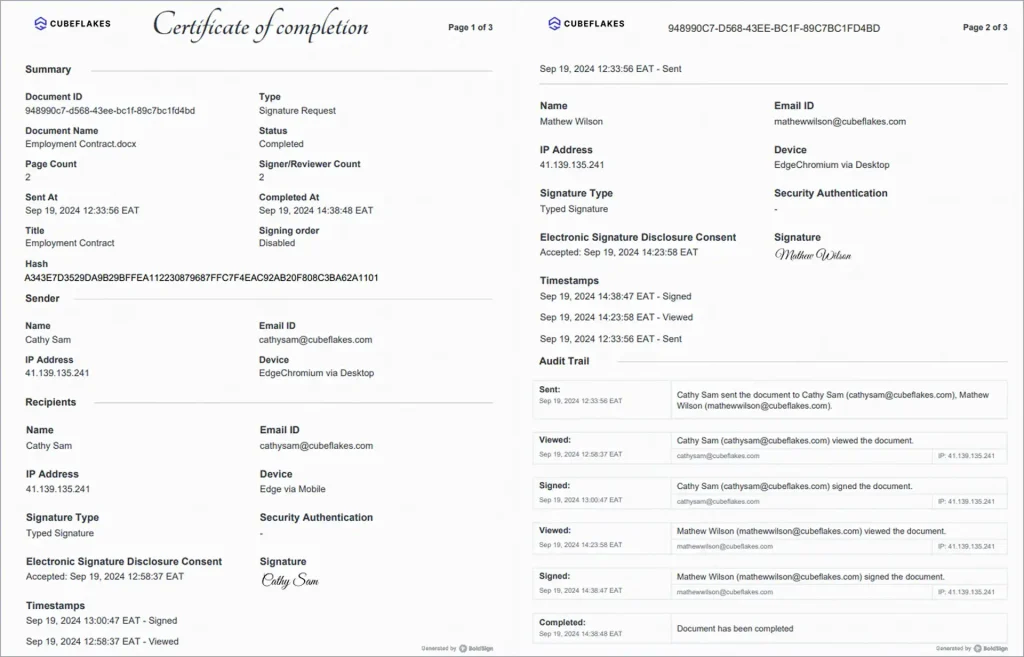
Every completed document comes with an audit trail. It shows who signed, from where and at what time.
Our audit trail records each signer’s name, email address, internet protocol (IP) address and device. It also logs the signature method and every view and action.
What does a faster grant agreement look like in practice?
A faster agreement moves through every signer without anyone chasing it. Picture a grant that needs three people inside your nonprofit before it goes back to the funder.
- Your grants manager starts the agreement from the saved template.
- She adds the program lead, finance manager and executive director in that order.
- She adds the funder last, then turns on reminders and sends.
- Each signer gets the email when it is their turn.
- Everyone receives the signed copy, and the audit trail stays with it.
Nobody forwards attachments or asks who has signed. Your team sees the status of the agreement from the dashboard.
What should you look for in an eSignature tool for grant agreements?
Pick the features that fix your own delays. For most grant teams, routing and outside signers matter most.
Routing and outside signers
- Signer order that crosses organizations, with the funder last
- Signing in a browser with no account for outside partners
- Automatic reminders you set once
Records and control
- Reusable templates for your standard agreements
- Audit trails that show who signed and when
- Secure storage for signed copies
Board approvals follow the same pattern. Our guide to nonprofit board governance approvals covers resolutions and minutes. For the earlier step, see how to sign nonprofit grant applications.
Which BoldSign plan does a nonprofit need, and what does it cost?
Verified nonprofits get the Growth plan free for one user. Each extra user costs the standard $5 a month, and the plan includes 10 templates.
Larger teams can move to the Business plan, with unlimited templates. A nonprofit pays $8 per user a month for it, against the standard $15.
The Premium plan costs a nonprofit $50 a month for unlimited users, against the standard $99. All prices are in USD and billed yearly, as listed on our nonprofit page in November 2026.
How do you get your next grant agreement signed faster?
Send one live agreement with a signing order and reminders. Then compare the wait with your last grant.
- Start a 30-day free trial and send your next grant agreement.
- Book a demo to see a grant agreement routed from staff to funder.
- Compare every plan to see which features each one includes.
Frequently asked questions
What electronic signature tools help nonprofits finalize grant agreements with remote partners across multiple organizations?
Look for a tool that lets outside signers sign in a browser without an account, sets a signing order across organizations and sends reminders. BoldSign does all three and keeps an audit trail of each step.
How can nonprofits speed up grant agreement approvals?
Prepare the agreement from a reusable template, set the signing order once, and turn on automatic reminders. Each signer then gets the document at the right moment, and nobody has to chase them by email.
Do funders and board members need a BoldSign account to sign?
No. Signers open the agreement from an email link and sign in a browser on a phone or computer. Only the people who send documents need a seat.
Can the funder sign last on a grant agreement?
Yes. Turn on Signing order and drag the funder to the bottom of the list. We email each signer only after the one before them has finished.
Why do nonprofits need an audit trail for grant agreements?
Funders and auditors may ask who signed, and on what date. The audit trail records each signer's name, email address, internet protocol (IP) address and the time of every action.
Are electronic signatures on grant agreements legally binding?
Yes, when the signers agree to sign electronically and the signed record is kept. Check the funder's own terms, since a few funders still ask for a wet signature.
How many reminders can BoldSign send to a signer?
Up to 5. You choose how many days pass between reminders in the document settings when you send.
Does BoldSign offer nonprofit pricing?
Yes. Verified nonprofits get the Growth plan free for one user. The Business plan costs a nonprofit $8 per user a month, billed yearly, against the standard $15.

Yvone Atieno Odhiambo
Yvone is a Technical Assistant at BoldSign who specializes in creating clear documentation and engaging videos. She combines her technical skills and creativity to deliver user-focused solutions. Connect with her on LinkedIn.
More posts by Yvone Atieno Odhiambo