Why eSignatures Are Essential for Small Businesses, and What to Look For
 Lakshmi Priya Soundar Rajan
TL;DR: eSignatures let a small business send, sign and track contracts online, so deals stop waiting on printers and post. Look for reminders, a status dashboard, an audit trail and a price your team can afford. Our eSignature software for small business page shows how we cover each one.
A customer is ready to buy, but the contract sits in a printer tray. Someone has to scan it, email it and chase the signature by phone. A week later, the deal is still open.
That delay is common for small teams that still run on paper. This guide explains what eSignature solutions for small business do, which features matter, and how to set one up.
Why are eSignatures essential for small businesses?
eSignatures remove the print, sign, scan and send loop from every contract. Your team spends less time chasing paper and more time on customers.
Paper causes the same problems again and again:
- Signed copies get lost, and nobody can prove who signed or when.
- Contracts wait while a signer is away from the office.
- Nobody knows which documents are still unsigned.
- Filing cabinets fill up, and finding an old contract takes time.
What are eSignature solutions for small business?
An eSignature solution is an online app where you upload a document, mark where people sign, and send it by email. Each signer opens a link, signs on any device, and everyone gets the finished copy.
Think of it like a parcel with tracking. You still send the same document, but you can see where it is at every step. You also get a record of who touched it.
What features should I look for in an eSignature solution?
Start with the features you will use every week, then check the price. The list below covers what most small teams need.
- Reminders that go out on their own until signers finish.
- A dashboard that groups documents by status.
- An audit trail with each action, its timestamp and internet protocol (IP) address.
- Templates for documents you send often.
- Your own logo and colors on signing emails and pages.
Signers should also be able to sign without creating an account. That keeps the request simple for customers.
What questions should companies ask before choosing an eSignature solution?
A short list of questions keeps a trial focused. Ask each vendor the same ones.
- Can we test the tool with our own documents for free?
- Which laws and security standards does the tool meet?
- Which features are in the plan we can afford?
- How do we reach support when something goes wrong?
How do companies evaluate eSignature tools?
Most teams pick two or three tools and send the same real document through each. Compare how long setup took and what your signers said about it.
Read each plan’s limits as well as its price when you compare leading digital signature providers for small business. Envelope counts, template counts and extra user costs change the real monthly bill.
What are eSignature use cases for small businesses?
Any document that needs a signature from a customer, staff member or supplier can move online. Our guide to the top use cases of eSignatures covers more examples.
- Client contracts, sales proposals and service agreements.
- Vendor and supplier agreements.
- Employee onboarding forms, offer letters and non-disclosure agreements (NDAs).
- Internal approvals for budgets and policies.
- Customer consent forms.
How can small businesses implement eSignature solutions effectively?
Begin with one document that causes the longest wait today. Get it working well, then move the next one online.
- Pick the contract that waits longest, such as a sales agreement.
- Upload it, add signer fields, and save it as a template.
- Set the signing order when more than one person signs.
- Turn on automatic reminders before you send.
- Watch its status on the dashboard and download the signed copy when it is done.
Our guide on how to save time with templates walks through step 2.
How do you track documents in real time?
The BoldSign dashboard groups every document by status, so you can see what is waiting and what is done. You can filter by status and send a manual reminder to one signer at any time.
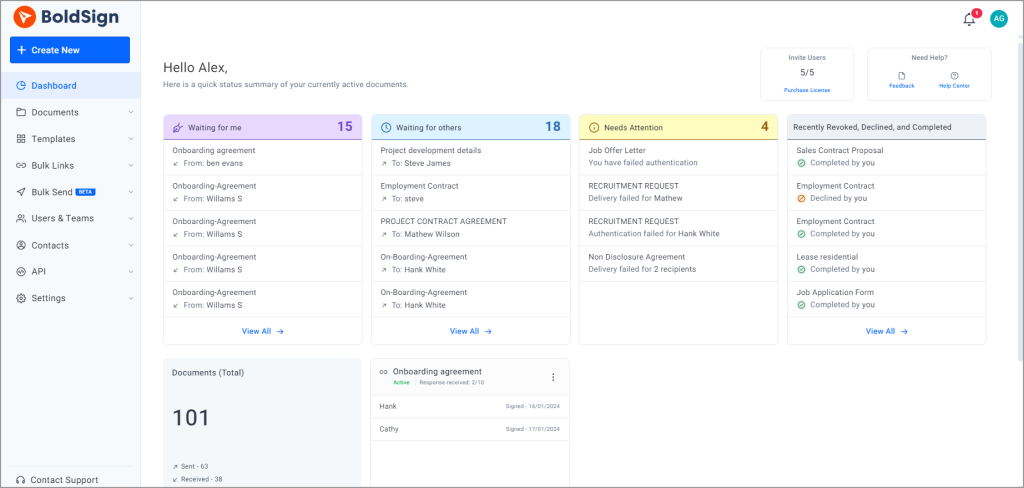
Each document also keeps a full history. Our eSignature audit trail page shows what it records, and our help article explains how to download the audit trail.
How do enterprises scale eSignature usage?
Larger teams scale by sharing templates and organizing people into teams with set roles. That way, each new person sends the same approved documents.
We support the same steps for a growing small business:
- Shared templates, with the option to stop others from changing them.
- Teams and user roles, with a view of each team’s documents.
- Bulk send, which sends one document to many signers at once.
You can start with one user and add more people as the business grows. You keep the same account, templates and history.
How does BoldSign keep documents secure and compliant?
We store documents with Advanced Encryption Standard (AES) 256-bit encryption and encrypt data twice, once in the service and once in the infrastructure. Signed documents and audit trails carry a digital certificate, so later changes can be detected.
We have completed a System and Organization Controls 2 (SOC 2) Type 2 audit. We meet the General Data Protection Regulation (GDPR) and support the Health Insurance Portability and Accountability Act (HIPAA).
Card payments go through Stripe, a payment processor that meets the Payment Card Industry (PCI) standards. Our legal center holds the full policies.
Where can you get help when you need it?
Our knowledge base and video tutorials cover setup, templates and team settings. You can also raise a ticket through our support portal.
How much does eSignature for small business cost?
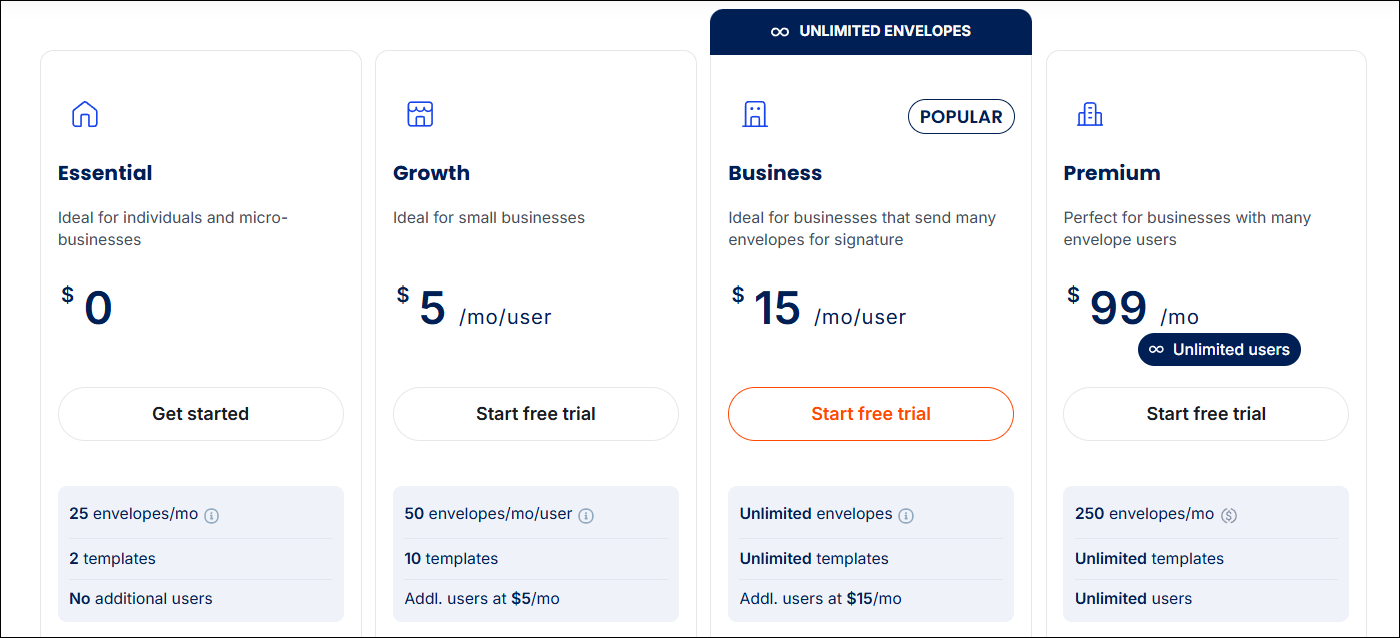
BoldSign starts free, and paid plans start at $5 per user a month, billed yearly. All prices are in USD, as listed on the BoldSign pricing page in November 2026.
- The Essential plan is free for one user, with 25 envelopes a month and 2 templates.
- The Growth plan costs $5 per user a month, with 50 envelopes a month and 10 templates.
- The Business plan costs $15 per user a month, with unlimited envelopes and templates.
- The Premium plan costs $99 a month for unlimited users, with 250 envelopes a month.
Bulk send and HIPAA support need the Business or Premium plan. Each paid plan comes with a 30-day free trial.
Verified nonprofits get the Growth plan free for one user and 50% off the Business and Premium plans. See our nonprofit offer to apply.
How do you get started with eSignatures for your small business?
Move one contract online this week and see how long it takes to come back signed.
- Start a 30-day free trial and send your first contract.
- Book a demo to see how a small team sets up templates and reminders.
- Read 6 questions to evaluate before investing in an eSignature platform before you choose.
Frequently asked questions
What features should small businesses look for in e-signature software?
Look for simple sending, reminders, a status dashboard and an audit trail on every document. Check that signers can sign without an account and that the free plan or trial lets you test real documents.
Do my customers need an account to sign?
No. Your customers open the link in the email and sign in their browser, on a phone or a computer. Signing is free for them, and they do not need a BoldSign account.
What are the top e-signature platforms for small businesses sending customer contracts?
The right platform is the one your customers find easy and your budget can carry. Shortlist two or three tools, then send the same customer contract through each during a free trial.
What types of digital signature tools help small businesses replace paper-based contract approvals?
Web-based eSignature apps with a mobile app do most of the work. You upload the contract, place the fields, and each approver signs from a link on a phone or computer.
How can companies implement eSignature solutions for faster deal cycles?
Start with the contract that waits longest today, such as a sales agreement. Save it as a template, turn on automatic reminders, and send it to the next customer from the template.
How can I use eSignature solutions to build trust with my customers?
Send documents with your own logo and colors so customers know who the request is from. Give them a copy of the signed document and its audit trail when signing ends.
Are electronic signatures legally binding for small businesses?
Yes, when the signer agrees to sign electronically and the signed record is kept. In the US, the Electronic Signatures in Global and National Commerce (ESIGN) Act says a signature cannot be denied legal effect only because it is electronic.
Does BoldSign have a free plan for small businesses?
Yes. Our Essential plan is free for one user, with 25 envelopes a month and 2 templates. Paid plans also come with a 30-day free trial.

Lakshmi Priya Soundar Rajan
Lakshmi Priya Soundar Rajan is a Technical Writer at BoldSign. With expertise in simplifying complex concepts, she contributes to the comprehensive documentation and user-friendly content at BoldSign. Lakshmi’s commitment to quality ensures users have access to clear and helpful information. Connect with her on LinkedIn.
More posts by Lakshmi Priya Soundar Rajan