ASP.NET Core JWT Authentication: Setup, Validation, and Security
 Priya Vinayagam
TL;DR: A JWT (pronounced “jot”) is a signed token that proves who sent each API call. ASP.NET Core, the .NET (pronounced dot net) framework named after Active Server Pages (ASP), checks its signature, issuer, audience and expiry on each call. Keep tokens short-lived and claims small; our eSignature API uses the same bearer-token pattern.
You have an API that a web app, a mobile app and two internal services all call. Each call has to prove who sent it. Keeping a login session on the server for every caller gets harder with each new client and server you add.
A JSON Web Token (JWT) solves that by carrying the proof inside the request, written in JavaScript Object Notation (JSON). This guide shows how JWT authentication works in ASP.NET Core, with setup code you can copy.
What is JWT authentication in .NET Core?
JWT authentication in .NET Core is a token check that runs on every request. The client sends a signed token, and your API checks it before running any code.
Think of a wristband at a music festival. The gate checks your ticket once and gives you a wristband. Staff inside only glance at the wristband, without calling the ticket office each time.
The token is the wristband. Your API checks it with a signing key, without loading a session from a shared store. That makes the API easier to scale, as the JWT standard (RFC 7519) describes.
JWT vs .NET: what does each one do?
A JWT is a token format, and .NET is the platform your API runs on. You use them together: .NET reads and checks each JWT.
ASP.NET Core does the checking through the JWT bearer handler. A bearer token is a token that works for whoever holds it, much like cash.
What does a JWT not do on its own?
A JWT only carries the proof. You still need other parts around it.
- A login screen and a way to check passwords.
- A flow that issues tokens, such as OAuth 2.0 or OpenID Connect (OIDC).
- A plan for refreshing and revoking tokens.
- A safe place on the client to keep the token.
What’s inside a JWT?
A JWT has three parts, encoded in Base64URL and joined by dots: header.payload.signature. Each part has its own job.
What is in the header?
The header names the signing algorithm in alg, such as HS256 or RS256. It often carries kid, a key ID that helps when keys rotate.
Example (decoded JSON):
{
"alg": "HS256",
"typ": "JWT"
}
What is in the payload?
The payload holds claims, which are statements about the caller. Some claim names are registered in the standard.
issis the issuer, andaudis the audience.expis the expiry time, andnbfmeans “not before”.iatis the time the token was issued.subis the subject, usually a user ID.
Example:
{
  "iss": "https://issuer.example",

  "aud": "api://orders",

  "sub": "user-123",

  "exp": 1736352000,

  "role": "Admin"
}
What is the signature?
The signature proves that someone holding the signing key issued the token. It also shows the token has not changed since then.
Are JWTs encrypted?
Most JWTs are encoded, not encrypted. Anyone holding the token can decode the header and payload and read every claim. Keep secrets and sensitive personal data out of the payload.
How does JWT authentication work in ASP.NET Core?
The client signs in, gets a token and sends it with each call. ASP.NET Core checks the token, builds the user from its claims and then runs your authorization rules.
- The client signs in with a password, client credentials or a federated sign-in.
- The token issuer adds claims, sets an expiry time and signs the token.
- The client calls your API with the header
Authorization: Bearer <token>. - Your API checks the signature, issuer, audience and lifetime.
- ASP.NET Core builds
HttpContext.Userfrom the claims, then runs your policies.
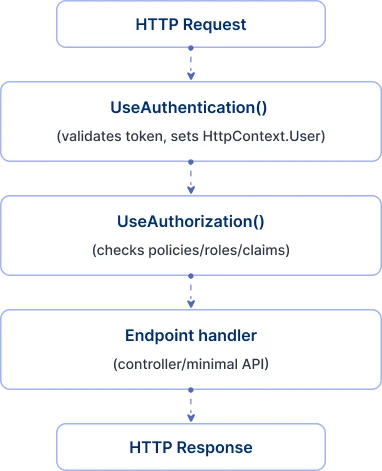
Authentication decides who the caller is, and authorization decides what they can reach. When the JWT bearer handler succeeds, HttpContext.User holds a ClaimsPrincipal with the token’s claims, as Microsoft’s ASP.NET Core authentication overview explains.
How do you configure JWT authentication in ASP.NET Core?
Add the JWT bearer handler in Program.cs, set the validation rules and call UseAuthentication before UseAuthorization. The sample below checks the issuer, audience, signature and lifetime.
The handler lives in the Microsoft.AspNetCore.Authentication.JwtBearer NuGet package. The sample uses a symmetric key to keep it short. In production, you usually point the handler at an identity provider instead.
using System.Text;
using Microsoft.AspNetCore.Authentication.JwtBearer;
using Microsoft.IdentityModel.Tokens;

var builder = WebApplication.CreateBuilder(args);
builder.Services.AddControllers();

builder.Services
    .AddAuthentication(JwtBearerDefaults.AuthenticationScheme)
    .AddJwtBearer(options =>
    {
        // If validating tokens from an OIDC authority, you’d often set:
        // options.Authority = "https://issuer.example";
        // options.Audience  = "api://orders";
        var signingKey = builder.Configuration["Jwt:SigningKey"];
        options.TokenValidationParameters = new TokenValidationParameters
        {
            ValidateIssuer = true,
            ValidIssuer = builder.Configuration["Jwt:Issuer"],
            ValidateAudience = true,
            ValidAudience = builder.Configuration["Jwt:Audience"],
            ValidateIssuerSigningKey = true,
            IssuerSigningKey = new SymmetricSecurityKey(Encoding.UTF8.GetBytes(signingKey!)),
            RequireExpirationTime = true,
            ValidateLifetime = true,
            // Keep this small; clock skew is a real-world reality, not a license for long tokens.
            ClockSkew = TimeSpan.FromMinutes(1),
        };
    });

builder.Services.AddAuthorization();

var app = builder.Build();
app.UseHttpsRedirection();

// Order matters:
app.UseAuthentication();
app.UseAuthorization();

app.MapControllers();
app.Run();
Leave the four main checks switched on. Turning off issuer, audience, expiry or lifetime checks triggers the .NET code analysis rule CA5404, because untrusted tokens could then get through.
What should appsettings.json look like?
{
  "Jwt": {

    "Issuer": "https://issuer.example",

    "Audience": "api://orders",

    "SigningKey": "REPLACE_WITH_A_LONG_RANDOM_SECRET"
  }
}
Keep real signing keys out of appsettings.json. Store them in a secrets manager or managed key store, and rotate them on a schedule.
What replaced UseJwtBearerAuthentication?
AddJwtBearer replaced it in ASP.NET Core 2.0. You register the handler with AddJwtBearer and call UseAuthentication in the pipeline.
The ASP.NET Core 2.0 migration guide shows the change line by line. Older samples that still call UseJwtBearerAuthentication will not build on current versions.
How do you create and sign a .NET JWT?
Create a token only after you have checked who the caller is. Give it few claims and a short expiry, and sign it with a key your API trusts.
Microsoft’s guide to JWT bearer authentication advises using OpenID Connect or OAuth to issue tokens in production. Keep self-made tokens like the one below for tests and closed systems.
using System.IdentityModel.Tokens.Jwt;
using System.Security.Claims;
using System.Text;
using Microsoft.IdentityModel.Tokens;
public sealed class JwtTokenService
{
    private readonly string _issuer;
    private readonly string _audience;
    private readonly SymmetricSecurityKey _key;
    public JwtTokenService(IConfiguration config)
    {
        _issuer = config["Jwt:Issuer"]!;
        _audience = config["Jwt:Audience"]!;
        _key = new SymmetricSecurityKey(Encoding.UTF8.GetBytes(config["Jwt:SigningKey"]!));
    }
    public string CreateAccessToken(string userId, string role)
    {
        var claims = new List<Claim>
        {
            new(JwtRegisteredClaimNames.Sub, userId),
            new(ClaimTypes.Role, role),
        };
        var creds = new SigningCredentials(_key, SecurityAlgorithms.HmacSha256);
        var token = new JwtSecurityToken(
            issuer: _issuer,
            audience: _audience,
            claims: claims,
            notBefore: DateTime.UtcNow,
            expires: DateTime.UtcNow.AddMinutes(10),
            signingCredentials: creds);
        return new JwtSecurityTokenHandler().WriteToken(token);
    }
}
Since ASP.NET Core 8, the bearer handler checks tokens with JsonWebTokenHandler by default. The older JwtSecurityTokenHandler still works, as the JwtBearerOptions source shows. Check the library notes when you upgrade.
When should you pick a shared secret or a key pair?
Pick a shared secret when one service both issues and checks tokens. Pick a key pair when many services check tokens.
- HMAC (hash-based message authentication code), such as HS256, uses one secret to sign and check.
- RSA (named after Rivest, Shamir and Adleman), such as RS256, signs with a private key.
- ECDSA (elliptic curve digital signature algorithm), such as ES256, also signs with a private key.
- With RSA or ECDSA, other services check the signature with the public key.
Microsoft’s guide says to use asymmetric key pairs when you create access tokens. With an outside identity provider, point the handler at the provider’s metadata. It then fetches the rotating public keys for you.
How does ASP.NET Core validate JWTs at runtime?
TokenValidationParameters decides which checks run on each request. These checks separate real authentication from simply reading a signed token.
What checks run during validation?
ValidateIssuerSigningKeychecks the signature.ValidateIssuerandValidateAudiencecheck who issued the token and who it is for.ValidateLifetimeandRequireExpirationTimecheck the expiry time.ClockSkewallows a small gap between server clocks.
What happens when validation fails?
The handler fails authentication, and the API usually answers 401 Unauthorized. A valid token that lacks the right permission gets 403 Forbidden instead.
How do you hook into validation events?
Attach handlers such as OnAuthenticationFailed or OnTokenValidated through JwtBearerOptions.Events. They let you log failures and add your own checks.
    .AddJwtBearer(options =>

    {

        // ...TokenValidationParameters...

        options.Events = new Microsoft.AspNetCore.Authentication.JwtBearer.JwtBearerEvents
        {
            OnAuthenticationFailed = context =>
            {
                // Log context.Exception (avoid leaking details to clients)

                return Task.CompletedTask;

            },

            OnTokenValidated = context =>
            {
                // Optional: additional checks (e.g., user is disabled, token jti revoked)
                return Task.CompletedTask;
            }
        };
    });
How do roles and policies work with an ASP.NET Core JWT?
The bearer handler gives you a ClaimsPrincipal, and authorization policies decide what it can reach. Define each rule once as a named policy, then apply it to endpoints.
Protect endpoints with policies rather than checks scattered through your code:
builder.Services.AddAuthorization(options =>
{
    options.AddPolicy("AdminOnly", policy =>
        policy.RequireRole("Admin"));
    options.AddPolicy("CanReadOrders", policy =>
        policy.RequireClaim("scope", "orders.read"));
});
// Controller example (OrdersController.cs):
using Microsoft.AspNetCore.Authorization;
using Microsoft.AspNetCore.Mvc;
[ApiController]
[Route("api/orders")]
public class OrdersController : ControllerBase
{
    [HttpGet]
    [Authorize(Policy = "CanReadOrders")]
    public IActionResult GetOrders() => Ok(new { message = "orders" });

    [HttpPost]
    [Authorize(Policy = "AdminOnly")]
    public IActionResult CreateOrder() => Ok();
}
The same policy works in a minimal API:
var orders = app.MapGroup("/api/orders").RequireAuthorization("CanReadOrders");
orders.MapGet("/", () => Results.Ok(new { message = "orders" }));
Keep tokens small and policies clear. Adding claims to skip a database call leads to large tokens and fragile access rules.
How should you handle token expiry, refresh and logout?
Use short-lived access tokens and longer-lived refresh tokens that you store and can revoke. A JWT cannot be called back once issued, so a short expiry limits the damage.
What strategy do most teams use?
- Access tokens that last minutes.
- Refresh tokens stored on the server, which you can revoke.
- A new refresh token on each use, with the old one revoked.
Refresh tokens are your own feature to build, with storage, hashing and replay detection. A full identity solution can supply them instead.
Why is revocation hard with stateless tokens?
An access token stays valid until it expires. Stopping it sooner means checking a deny list of token IDs (jti) in OnTokenValidated, which adds a lookup to each request.
Short-lived access tokens keep that window small. For that reason, they are the default advice for high-security systems.
How do you secure .NET JWT authentication in production?
Protect the signing keys, send tokens only over Hypertext Transfer Protocol Secure (HTTPS) and store them safely on the client. Then design against the attacks that target tokens.
How do you protect signing keys?
- Keep signing keys out of source control.
- Rotate keys on a plan, using
kidso old and new keys can overlap. - Limit who and what can create tokens.
Why does every call need HTTPS?
A bearer token works like a password for as long as it lasts. Anyone who intercepts one can replay it until it expires.
RequireHttpsMetadata defaults to true when you validate through an authority or metadata endpoint. Turn it off only in development, as the JwtBearerOptions source notes.
Where should clients store tokens?
- Browser apps: keep long-lived tokens out of local storage, and guard against cross-site scripting (XSS).
- Mobile and desktop apps: use the secure key store of the operating system.
- Server-rendered web apps: keep tokens on the server and give the browser a secure HttpOnly cookie.
The OWASP JSON Web Token Cheat Sheet from the Open Worldwide Application Security Project (OWASP) lists the common token-handling mistakes.
Which JWT attacks should you design against?
- Stolen tokens being replayed, which short expiry, HTTPS and safe storage reduce.
- Weak validation, where the issuer, audience, lifetime or signature check is off.
- Trusting claims from an issuer you have not verified.
- Secrets placed in the payload, which anyone can read.
How do you keep JWT validation fast?
Validation runs on every call to a protected endpoint, so keep each check light. Small tokens and cached keys do most of the work.
- Keep tokens small, with few and light claims.
- Avoid custom checks that hit a database on every request.
- Let the platform cache issuer metadata and keys.
Validation can slow down with very large tokens, heavy claim transforms or a central revocation lookup per call. Apply server-side checks to high-risk actions only, such as admin changes, payments and data exports.
How do you troubleshoot JWT authentication failures?
Log failures in OnAuthenticationFailed and compare the token’s claims with your settings. Most 401 errors come from a handful of mismatches.
Which causes come up most often?
UseAuthenticationmissing, or placed afterUseAuthorization.- An issuer or audience that differs between the token and your settings.
- A wrong signing key, a rotated key without
kidsupport, or a different algorithm. - An expired token, or server clocks that have drifted apart.
How do you log failures safely?
- Log each failure from
OnAuthenticationFailed. - Add correlation IDs and trace IDs so you can follow one request.
- Keep exception details out of the responses that clients see.
Which JWT mistakes cause security bugs?
Most JWT security bugs come from switched-off checks and tokens that live too long. Each mistake below has a simple fix.
- Turning off issuer, audience or lifetime checks to get a test passing, then shipping it.
- Long-lived access tokens, which turn one stolen token into weeks of access.
- Sensitive data in the payload, where anyone can read it.
- Treating a valid login as permission to reach everything.
- Writing your own cryptography instead of using tested libraries.
What do JWT authentication ASP.NET Core apps need before going live?
Run through this list before you ship. Each line maps to a section above.
Settings and keys
- HTTPS everywhere, including metadata endpoints.
- Strong signing keys with a rotation plan.
ValidateIssuer,ValidateAudience,ValidateLifetimeandRequireExpirationTimeall switched on.- Short-lived access tokens, with the refresh flow written down.
Claims, rules and tests
- Small claims, with no secrets or extra data.
- Authorization policies for roles and claims.
- Logging for failed authentication.
- Tests for expired tokens, wrong audience, wrong issuer and wrong signature.
How does the BoldSign API use bearer tokens?
Our eSignature API uses OAuth 2.0, built on OpenID Connect. Your app gets an access token and sends it in the Authorization: Bearer header, the same pattern this guide sets up.
You can get a token with the authorization code flow or the client credentials flow. Each refresh token works once, as our OAuth 2.0 guide for developers explains. Our post on API keys vs OAuth authentication compares both ways of signing in to the API.
For a full project, see how to integrate our eSignature API in an ASP.NET Core app.
Which BoldSign plan do you need for live API calls, and what does it cost?
Live calls to the BoldSign API need the Enterprise API plan, which starts at $30 a month with 40 envelopes. Prices are in USD, as listed on the BoldSign pricing page in November 2026.
The sandbox is free on every plan. You can build and test your token handling against it before you go live.
Where do you go next with JWT authentication in ASP.NET Core?
Start with strict validation and short-lived tokens, then add refresh and logging as your API grows. A sandbox lets you try a real bearer-token API with no risk.
- Create a free API sandbox account and call our API with a bearer token.
- Request a demo to talk through your integration with our team.
- Visit our support portal with a question about your setup.
Frequently asked questions
Is JWT authentication the same as OAuth 2.0 or OpenID Connect?
No. A JWT is a token format, and OAuth 2.0 and OpenID Connect are flows that issue tokens. ASP.NET Core validates a bearer JWT the same way whichever flow issued it.
Why do I get 401 even though my token looks valid?
Check four things first: the issuer and audience values, the signing key, the expiry time and the middleware order. UseAuthentication must run before UseAuthorization.
Should I store user permissions inside the JWT?
Store them only when they rarely change. A claim stays frozen until the token expires, so look up permissions that change often on the server.
Can I revoke a JWT immediately on logout?
Only with an extra server check, such as a deny list of token IDs. Without one, the token works until it expires, so short lifetimes matter.
What's a safe access token lifetime for APIs?
Minutes rather than hours or days. Our sample uses 10 minutes. Pick the shortest lifetime your refresh flow can support.
Do I need to validate issuer and audience for internal microservices?
Yes. Without those checks, a token issued for one service can be replayed against another. The checks cost almost nothing per request.
Where are the ASP.NET Core JWT bearer authentication official docs?
Microsoft Learn has the official guide, titled Configure JWT bearer authentication in ASP.NET Core. Its source is public in the dotnet/AspNetCore.Docs repository on GitHub.
Is it .NET vs JWT, or do you use both?
You use both. .NET is the platform your API runs on, and a JWT is the token your API receives and checks on each call.

Priya Vinayagam
Priya Vinayagam is a Product Manager at BoldSign and an active full-stack developer at Syncfusion, with four years of hands-on experience across .NET and JavaScript. She writes practical, performance-focused technical articles that help developers tackle real-world challenges. Known for looking beyond the obvious, Priya brings a builder’s mindset to every post—breaking down complex problems into clear, actionable solutions. Connect with her on LinkedIn.
More posts by Priya Vinayagam