How to Manage BoldSign API Rate Limits: Practical Tips for Developers
 Gopinath Kannusamy
TL;DR: BoldSign allows 2,000 API requests an hour on a live account and 50 an hour in the sandbox, counted per account. Go over and the API returns a 429 error. Watch the response headers, use webhooks instead of polling, and retry with growing pauses to stay within the limit of our eSignature API.
Your app sends contracts through our API, and it works well in testing. Then a busy Monday arrives. A sync job checks every open document, a sales team sends a batch of offers, and calls start to fail with a 429 error.
This guide shows how our rate limits work and how to design your integration so a busy hour does not stop your signing flow. For the general idea of rate limiting, see our guide to API rate limiting.
What are the BoldSign API rate limits?
A live account can make up to 2,000 requests an hour, and a sandbox account up to 50. The limit counts calls per account, as our rate limit documentation explains.
- Live: up to 2,000 requests an hour per account.
- Sandbox: up to 50 requests an hour per account, for building and testing.
- Scope: the whole account, not each OAuth app or each user.
API key calls and OAuth calls share the same limit. Two apps on one account draw from one hourly quota.
What happens when you hit the limit?
The API stops your extra calls and answers each one with status code 429, Too Many Requests. Each 429 response carries a message that explains the error.
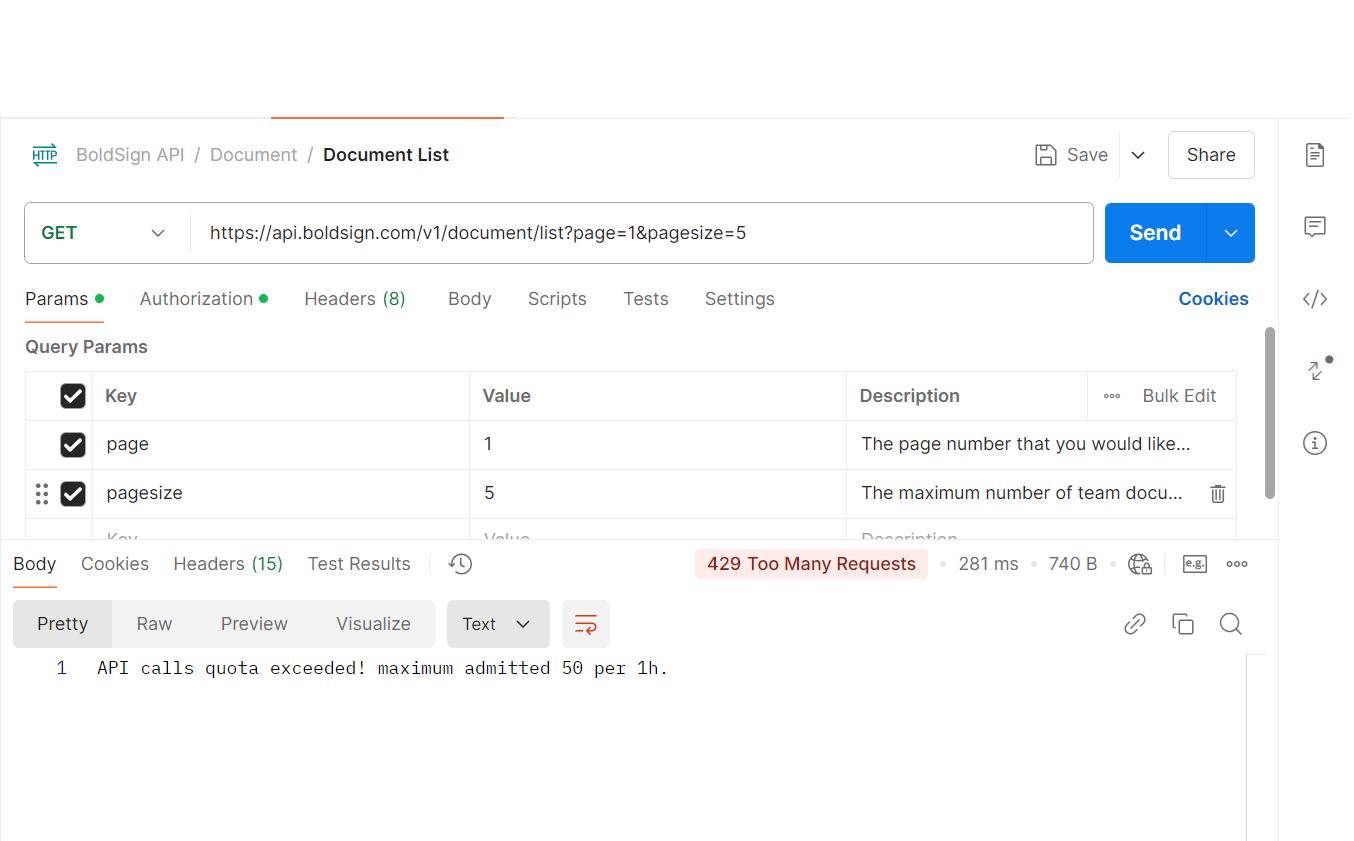
A 429 is not a fault in your request. Your app should wait, then try again.
How do you track your remaining requests?
Read the response headers that come back with every call. Our documentation says they show your current rate limit usage.
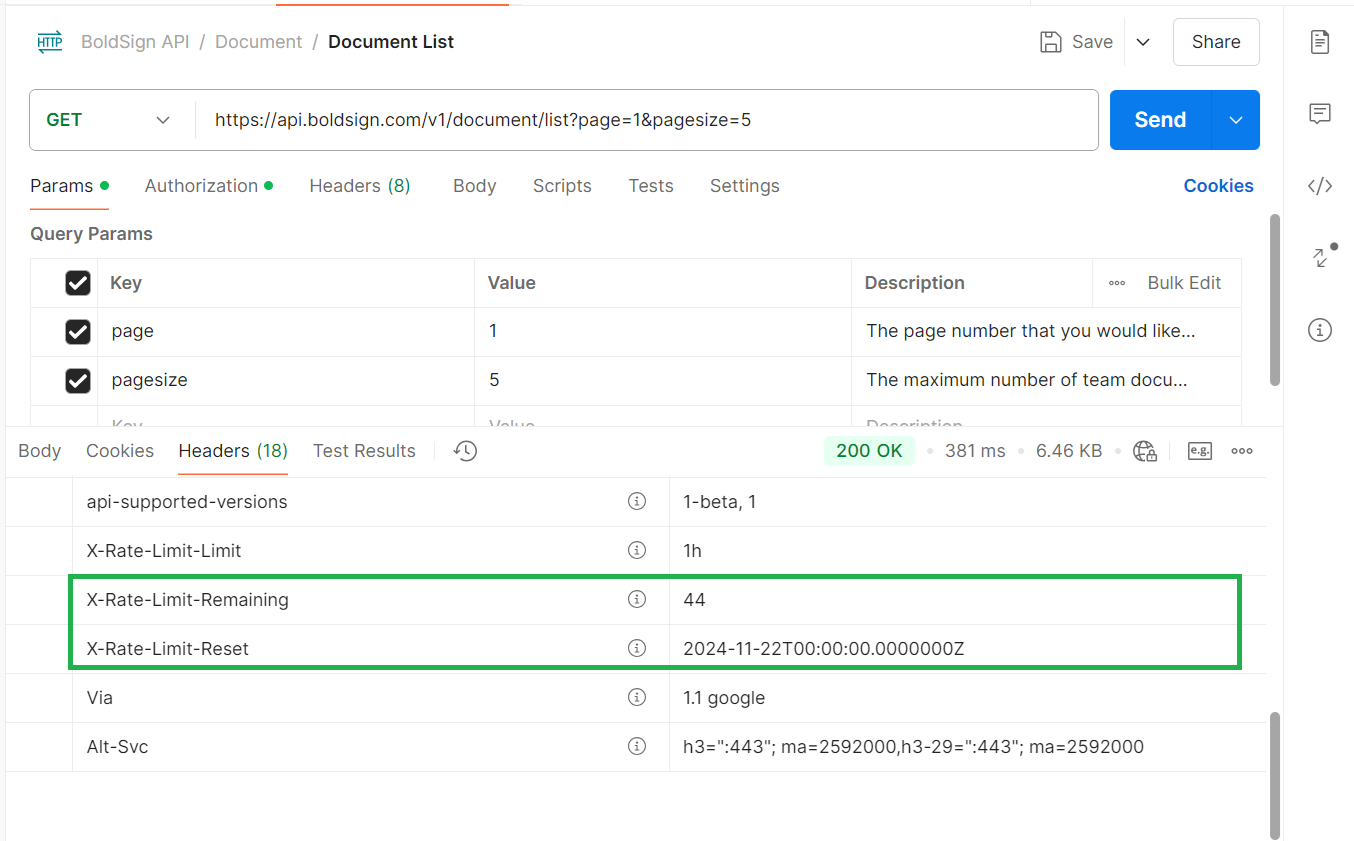
Log these values in your app. Then add an alert when the count drops low, so your team sees a busy hour coming.
How do you keep your app within the limit?
Most 429 errors come from calls your app does not need. Cut those first, then control the pace of the rest.
Use webhooks instead of polling
A loop that asks for each document’s status every few minutes uses up your quota fast. Set up webhooks instead, and we send your server a message when an event happens.
Follow our guide to verify webhook events to check that each event really came from us. Our post on webhook retries and idempotency covers how to handle each event once.
Put important calls first
Some calls matter more than others. Sending a contract to a new hire should win over a nightly report.
- List the calls your app makes and mark which ones users wait for.
- Send those calls straight away.
- Move reports, syncs and clean-up tasks to a queue that runs at quiet times.
Set your own limit below ours
Give your app a request budget that sits below 2,000 an hour. A shared counter or queue spreads calls across the hour, so one burst cannot use the whole quota.
Leave some headroom for retries and for other apps on the same account.
How should your app retry after a 429 error?
Wait, then retry with a pause that grows after each failure. Sending the same call again straight away only adds to the load.
- Catch the 429 status in your API client.
- Wait a short time, then retry the call.
- Double the wait after each further 429, and add a small random delay.
- Stop after a set number of tries and log the failure for a person to check.
Our guide to the API retry mechanism explains this pattern in more detail.
How do you test rate limits in the sandbox?
Test with small batches, since the sandbox allows 50 requests an hour. That low ceiling makes it easy to see how your code reacts to a 429.
Run a short test that sends more than 50 calls on purpose. Check that your app waits, retries and logs the error as planned. Then keep the rest of the hour for normal work.
Which plan do you need for live API access?
Live API calls come with the Enterprise API plan, from $30 a month billed yearly with 40 envelopes, and $0.75 per extra envelope. The Enterprise API plan also includes webhooks and embedded signing, as listed on our pricing page.
Building and testing is free. A free API sandbox account gives you the 50-request hourly limit to try every call. Prices are in USD.
Expect steady traffic above 2,000 requests an hour? Contact our support team with your expected volume before you go live.
Where do you go from here?
Pick the next step that fits where your integration is today.
- Start a 30-day free trial and try the BoldSign web app alongside the API.
- Book a demo to talk through your request volume with our team.
- Read why webhooks matter in an API integration before you replace your polling jobs.
Frequently asked questions
What is the BoldSign API rate limit?
A live account can make up to 2,000 requests an hour. A sandbox account can make up to 50 requests an hour. Both limits count every call the account makes.
Do API keys and OAuth apps have separate rate limits?
No, they share one. API key calls and OAuth calls follow the same rate limit system, and the limit applies to the whole account.
What happens when I go over the BoldSign rate limit?
The API answers with status code 429, Too Many Requests, and a message. Your app should pause and retry later instead of sending the same call again at once.
How can I see how many requests I have left?
Read the response headers on each API call. Our developer documentation says they carry your rate limit usage, so your code can slow down in time.
Why is the sandbox limit so much lower?
The sandbox is for building and testing, not for real traffic. Fifty requests an hour is enough to try each call, so test bulk jobs with small batches.
How do webhooks help with rate limits?
Webhooks tell your server when a document changes, so your app can stop asking for its status on a timer. That leaves more of your hourly quota for real work.
Can I get a higher API rate limit?
Contact our support team with your expected volume before you go live. We can talk through your use case and suggest how to fit your workload.
Should I retry a request that failed with a 429 error?
Yes, after a pause. Wait a little longer after each failed attempt, add a small random delay, and stop after a set number of tries.

Gopinath Kannusamy
Gopinath is a passionate software developer with 2 years of experience at BoldSign. He is an avid writer and enjoys sharing his insights on technology and development. In his free time, he enjoys exploring new technologies and learning new things. Connect with him on LinkedIn.
More posts by Gopinath Kannusamy