How to Build a Better Client Intake Form With eSignature Form Fields
 Preethi Loganathan
TL;DR: A good client intake form asks only what you will use and gives each question the right kind of answer box. It hides questions that do not apply. It also collects the client’s signature in the same document as their details. Our artificial intelligence (AI) form field detection page shows how BoldSign can place those fields on your existing form for you.
You send a new client an intake form as a PDF. Two days later, it comes back with the phone number in the address line and the referral question left blank. The start date reads 03/04, which could mean March or April.
So you email the client again, and then once more about the consent form they never signed. Filling in the form took ten minutes, but the cleanup takes three days. People fill out forms the way the form lets them, so a better design stops most of this chasing.
What makes a client intake form work?
A client intake form works when clients can fill it in correctly on the first try. Four design choices decide that, and they apply on paper, in a form builder or in an eSignature document.
- Ask only for answers you will use.
- Give each question an answer box that fits it.
- Show each client only the questions that apply to them.
- Collect the signature in the same document as the details.
The rest of this guide takes each choice in turn, then shows how to build the form in BoldSign.
How do you decide which questions to ask?
Keep a question only when you can name where its answer goes. A field in your customer relationship management (CRM) system counts, and so does a scheduling decision or a compliance file.
Cut the question when you cannot name a use for its answer. Every extra question is one more place a client can stall, skip ahead or answer badly.
How do you match each question to the right kind of answer?
Give each question the answer box that only accepts a good answer. A blank line accepts anything, including the wrong thing.
- Offer a list to choose from for a fixed set of options, such as a state or a service type.
- Show a calendar with set earliest and latest dates for any date question.
- Allow only digits in boxes for phone numbers, amounts and other numbers.
- Add an upload box for documents, photos or ID copies, listing the file types you accept.
- Keep open text boxes for answers that need words, such as project details.
A typed date line invites “03/04” or “as soon as possible”, and neither tells you a real date. The right answer box gives you data you can use at once, instead of data you must interpret or chase.
How do you keep a long intake form short for each client?
Show each client only the questions that apply to them. Long forms lose people partway through, and questions that do not fit that client cause most of the drop-off.
Group your questions by situation before you build anything. A returning client needs fewer questions than a first-time client. A question that matters only after a “yes” should appear only after the client answers yes.
Why should the signature sit in the same document as the details?
One document means the client has one task to finish instead of two. Splitting details and signature into two requests doubles the follow-up.
Many teams collect details first and send the consent or engagement letter days later. Each gap between those steps is a chance for the client to lose the email or put it off.
A better reminder will not close that gap. Put the signature and any consent statements in the same document as the questions, so the client finishes everything in one visit.
How do you use electronic signatures in an online intake form?
Build the form inside an eSignature document, where form fields and the signature field live together. The client fills in their details and signs in one session, and you receive one signed file.
Each design choice above has a name in an eSignature builder:
- A list of options is a dropdown field.
- A calendar with a set range is an editable date field.
- An upload box is an attachment field.
- Showing a follow-up question after a certain answer is conditional logic.
A web form builder can collect the same answers. Linking a signature to those answers, though, usually means exporting them into a separate agreement.
What does an eSignature document add that a web form does not?
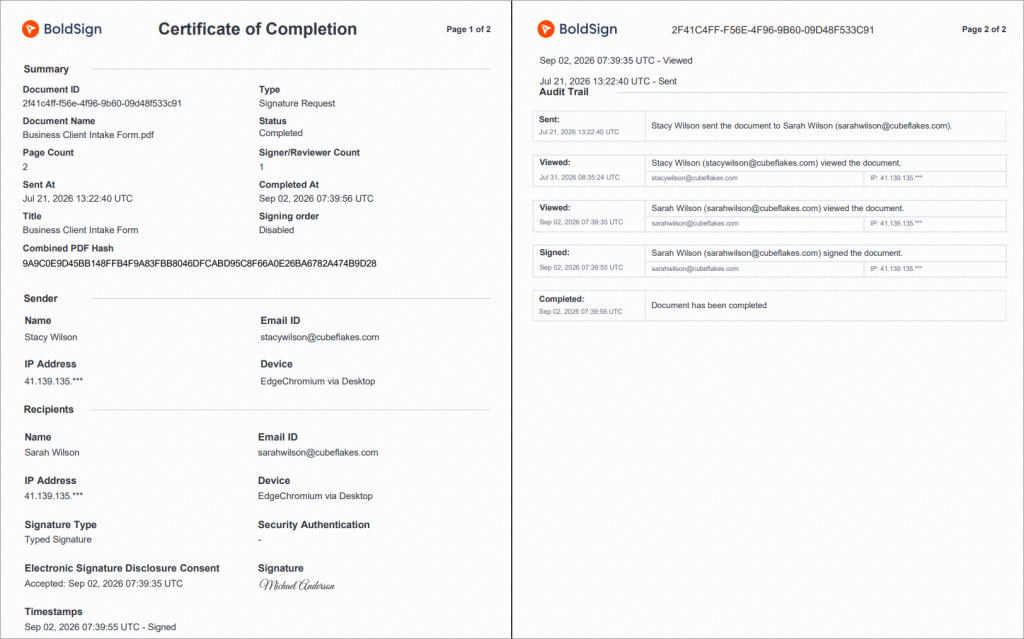
An eSignature document adds a signed record of who agreed to what, and when. We call that record the audit trail.
Our audit trail records each participant’s name, email address, internet protocol (IP) address and device. It also logs every view and signature with a timestamp, the method used to verify each signer, and when each signer accepted electronic consent.
The audit trail can matter as much as the signature itself in an intake packet with consent or an authorization.
How does BoldSign handle each part of an intake form?
BoldSign gives you a field type, a setting or a rule for each of the four design choices. The sections below show where each one lives.
Which form fields can you add?
Our available form fields cover every kind of answer an intake form needs.
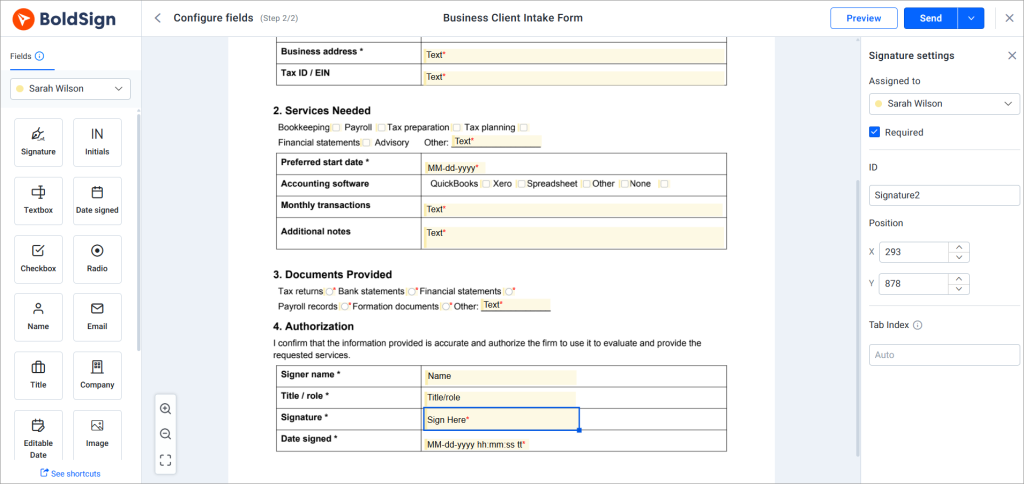
- Answer fields: textbox, dropdown, radio, checkbox and editable date.
- Upload fields: attachment and image.
- Signer fields: signature, initials, name, email, title and company.
How do you stop wrong answers in text boxes?
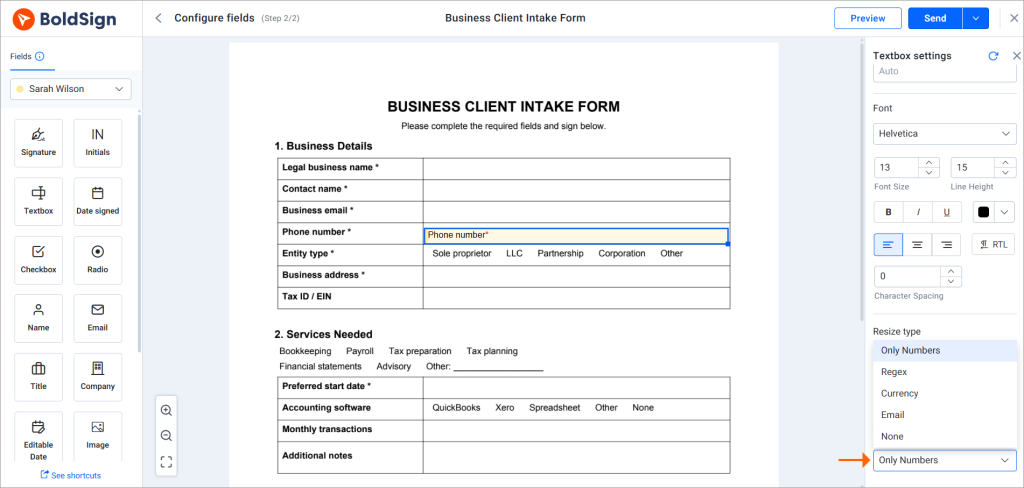
Pick a rule from the Validation list in the textbox settings. Choose Only Numbers, Currency or Email, or pick Regex to set your own pattern. None turns the check off.
With Only Numbers set, a phone number box accepts digits and nothing else. Our help article on how to add validation to a textbox walks through each option.
How do you limit the dates a client can pick?
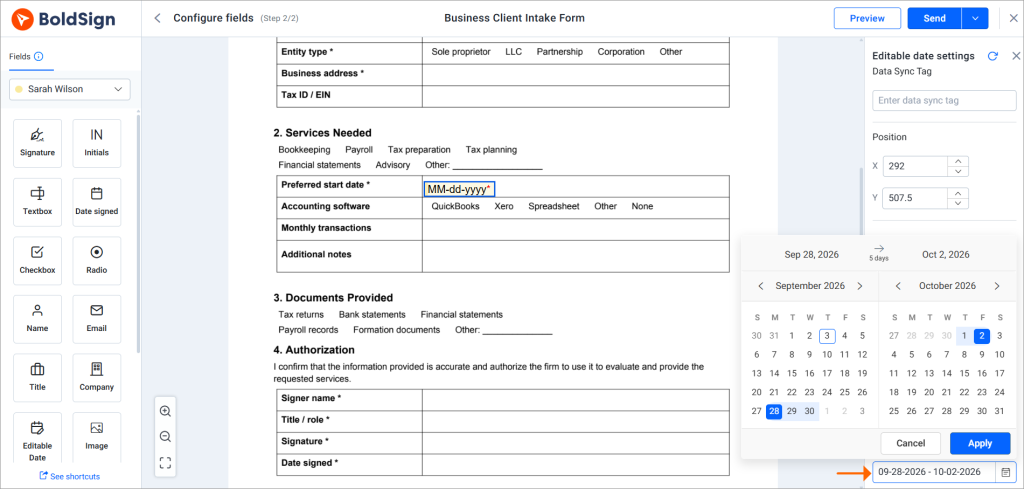
Set a date range on an editable date field, so the client can pick only dates inside it. You can also set a Default Date that appears filled in for the client.
Clients then pick only start dates your team can meet.
How do you show follow-up questions only when they apply?
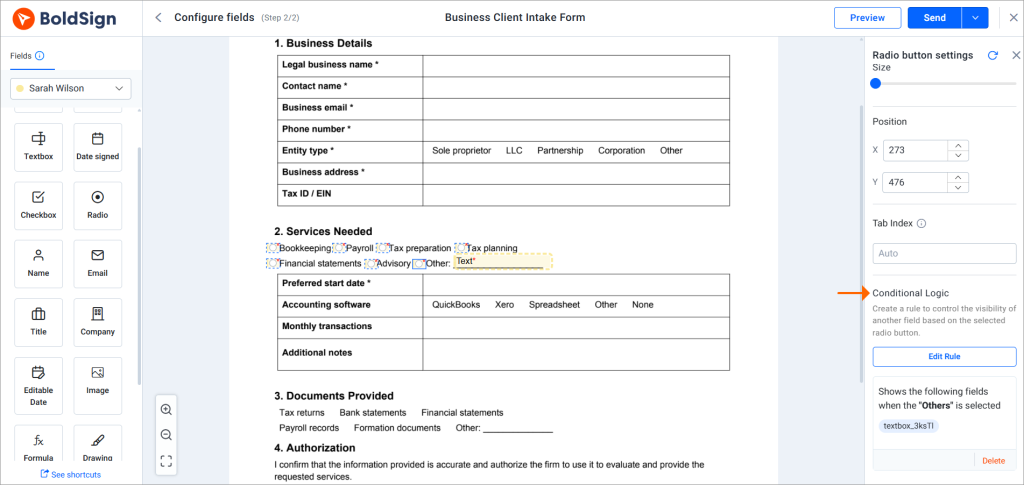
Add a conditional logic rule to a checkbox, radio button or dropdown field. Select Create Logic under Conditional Logic, choose an answer, then click the field that should appear for it.
Any question you want to branch on must be one of those three field types. A free-text answer cannot trigger a rule.
How do you collect files from clients?
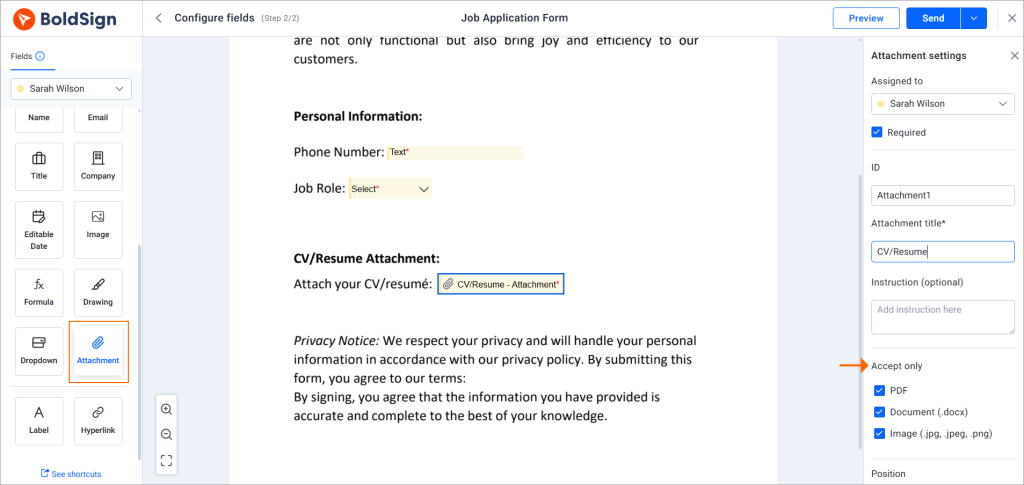
Add an attachment field for supporting documents. It accepts PDF files, Word documents and common photo formats.
Add an image field when you need a photo, such as an ID copy. Image fields take the usual photo formats as well as vector graphics.
Who fills in each field?
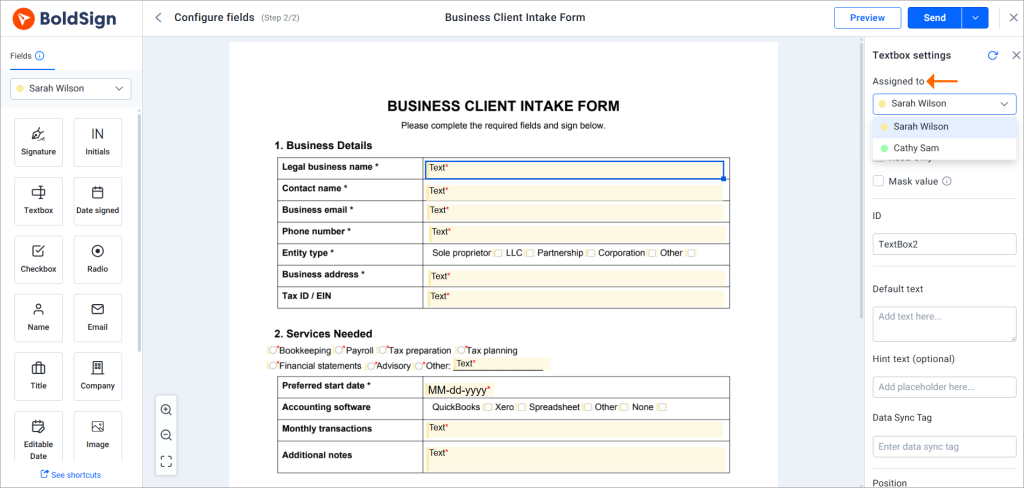
Each field belongs to one recipient, and that person completes only the fields assigned to them. Give internal fields, such as a case number or an agreed fee, to someone on your team as a separate recipient.
The client then sees only their own questions, and your team adds its details in the same document.
Can you fill in answers you already have?
Yes, your developers can prefill form fields through the API on a document that is in progress. Textbox, checkbox, radio, editable date, dropdown and image fields can be prefilled.
Signature, initials and attachment fields stay with the signer, so the client always supplies those.
How do you keep the form the same for every client?
Save the form as a template. A template assigns fields to roles, such as Client, instead of to named people.
You build the form once, and each send keeps the same fields, validation and conditional rules. Only the names change.
Can BoldSign place fields on a form you already have?
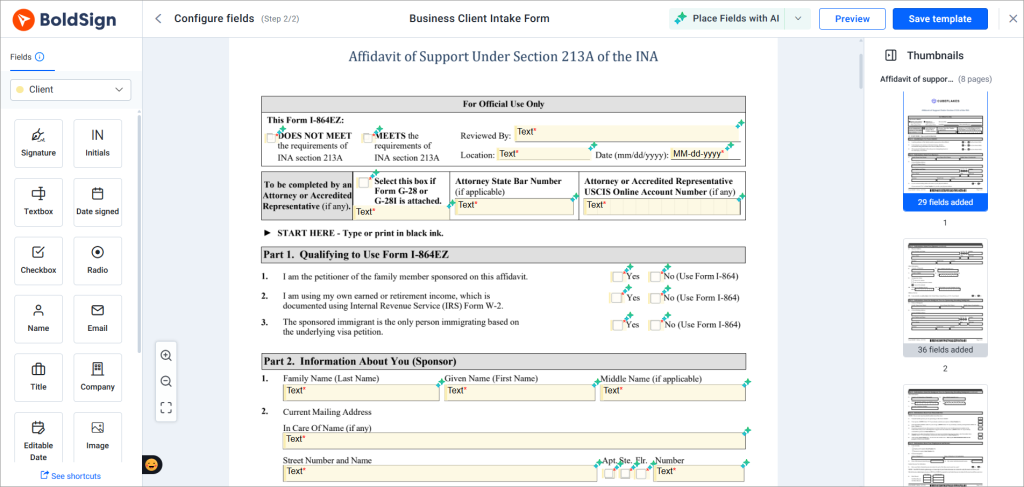
Yes, AI field detection can place a first set of fields when you create a template from a PDF or Word file. It reads layout clues such as underlines and boxes. It adds signature and date signed fields, plus textbox, checkbox and radio fields.
Detection needs a file with real text, so a scanned page may fail. Check the placed fields before you save the template.
How do you build and send an intake form in BoldSign?
Build the form once as a template, then send it to each new client. The steps below take a few minutes for a typical form.
- Start a new template and upload your intake form as a PDF or Word file.
- Let AI field detection place the first fields, or place them yourself.
- Add dropdowns, dates, attachments and a signature field where each answer needs one.
- Set validation on text boxes and add conditional rules for follow-up questions.
- Send the form by email, SMS or WhatsApp, and track its progress.
Once the client signs, download the completed document with its audit trail for your records.
Which BoldSign plan do you need for client intake forms?
Form fields, validation, conditional fields and the audit trail come with every plan, including the free Essential plan. Template limits differ by plan.
Essential includes 2 templates, and Growth includes 10 at $5 per user a month. Business costs $15 per user a month and Premium costs $99 a month for unlimited users. Both include unlimited templates.
AI field detection and sending by SMS or WhatsApp start on the Business plan. Each SMS costs $0.20, and each WhatsApp notification costs $0.10.
Prefilling fields through the API on live documents needs the Enterprise API plan, from $30 a month with 40 envelopes. You can test it first in a free sandbox.
Prices are in USD and billed yearly. You can try it all with a 30-day free trial.
Where do you start with your own intake form?
Pick the intake form your team chases clients about most, and rebuild it around the four design choices. Then save it as a template so every new client gets the same tested version.
- Start a 30-day free trial and build your first intake template.
- Book a demo to see an intake form set up for your team.
- Visit the BoldSign Help Center for step-by-step guides on building and sending forms.
Frequently asked questions
What should a client intake form include?
Start with contact details and the scope of the work. Add the dates you need, any files the client must upload, and their consent or engagement signature. Leave out any question whose answer has no use.
What is the difference between a client intake form and a client onboarding form?
An intake form gathers what you need for one engagement. Onboarding is the wider process around it, which can also cover account set-up, scheduling and handing the client to your team.
Is an electronically signed client intake form legally binding?
Yes, when the document is a type that US law allows to be signed electronically. The Electronic Signatures in Global and National Commerce (ESIGN) Act covers most business records, but it excludes some, such as wills and family law papers.
How to use electronic signatures in an online intake form and which platforms support that?
Use an eSignature platform that puts form fields and a signature field in one document, as BoldSign does. You build the form once as a template, send it, and the client fills it in and signs in one sitting.
What's a good way to send intake forms and contracts to clients and get them signed?
Put the intake questions and the contract in one document and send it for eSignature. The client answers and signs in one visit, and you get a signed copy with an audit trail.
Can I use the same intake form for every client?
Often you can. Conditional logic shows each client only the questions that fit their service type. Keep a separate template when two services need very different information.
How long should a client intake form be?
Make it as short as the work allows. Cut every question you cannot tie to a use, and hide follow-up questions until an earlier answer calls for them.
Do clients need a BoldSign account to complete an intake form?
Clients sign without a BoldSign account. They open the request from an email or a text message, fill in their fields and sign in the browser.

Preethi Loganathan
Preethi is a Digital Marketing Executive at BoldSign who develops precise, research-driven content on eSignatures, compliance, and digital signing workflows. She works closely with product and engineering teams to ensure every article is accurate, validated, and aligned with industry best practices. Connect with her on LinkedIn.
More posts by Preethi Loganathan