How to Mark Car Dents Clearly in a Vehicle Inspection Form
 Preethi Loganathan
TL;DR: To mark a car dent clearly, circle it on a vehicle diagram in the inspection form. Give it a number, a short note and a photo. Then have the inspector and the driver sign the same document. Our Drawing form field lets signers draw those marks right on the diagram before they sign.
A car comes back from a rental, and the check-out form says “dent on the door.” Now someone asks which door. Was it the front left or the rear right?
Nobody can tell from the note. The dent may be old, or it may be new, and the form cannot settle it. This guide shows how to record each dent so the answer is on the page.
What is a vehicle inspection form?
A vehicle inspection form records the state of a car at one moment, such as a hand-over or a return. It lists dents, scratches, tires and lights, and both sides sign it.
Think of it as a photo of the car on paper. Later, you compare the car against it to see what changed.
Many groups use these forms:
- Rental firms at check-out and return
- Fleet and delivery teams when drivers swap cars
- Repair shops and dealers when a car comes in
- Insurers when a driver makes a claim
Why is a text note like “dent on the door” not enough?
A text note cannot point. It names a part of the car but not the exact spot, side or size.
A note like that leaves these questions open:
- Which side of the car, and which panel?
- Where on the panel is the dent?
- How big and how deep is it?
- Is the paint cracked?
Each question can turn into a dispute weeks later. A mark on a diagram answers most of them at a glance.
What should you record for each dent?
Record enough that a stranger could walk to the car and find the dent. A good entry joins a mark, a note and a photo.
What goes in the dent note?
Keep the note to one line with the facts that matter:
- Panel and side, such as “left rear door”
- Rough size: small, medium or large
- Depth: shallow or deep
- Paint: broken or intact
A weak note says “dent on left side.” A clear note says “small shallow dent, left rear door, paint intact.”
What vehicle details go at the top of the form?
Put the car’s details in fields at the top, so each form matches one car:
- Make, model and license plate
- Vehicle identification number (VIN)
- Mileage at the time of the check
- Date, time and inspector’s name
How do you mark car dents on a vehicle inspection form?
Work around the car in the same order each time, so you do not miss a panel. These steps suit a paper or a digital form.
- Use a diagram that shows the front, back and both sides of the car.
- Walk around the car and place a mark on the diagram for each dent.
- Number the marks so each one links to a note and a photo.
- Take a close photo of the dent and a wider photo that shows where it sits.
- Check that the marks, notes and photos agree, then have both sides sign.
The wide photo matters as much as the close one. The close photo shows the damage, and the wide one shows its place on the car.
How do you mark dents with the BoldSign Drawing form field?
Our Drawing form field turns any area of a PDF into a space the signer can draw on. You place it over the vehicle diagram, and the signer marks the dents there before signing.
The sender sets it up while preparing the document:
- Select Create New Document, fill in the details and select Next.
- In the Fields panel, find Drawing Field and drag it onto the vehicle diagram.
- Resize the field to cover the whole diagram, then select Send.
The signer then opens the document and selects the Drawing field. A dialog shows that part of the page, ready for marks. After drawing, the signer selects Save and finishes signing.
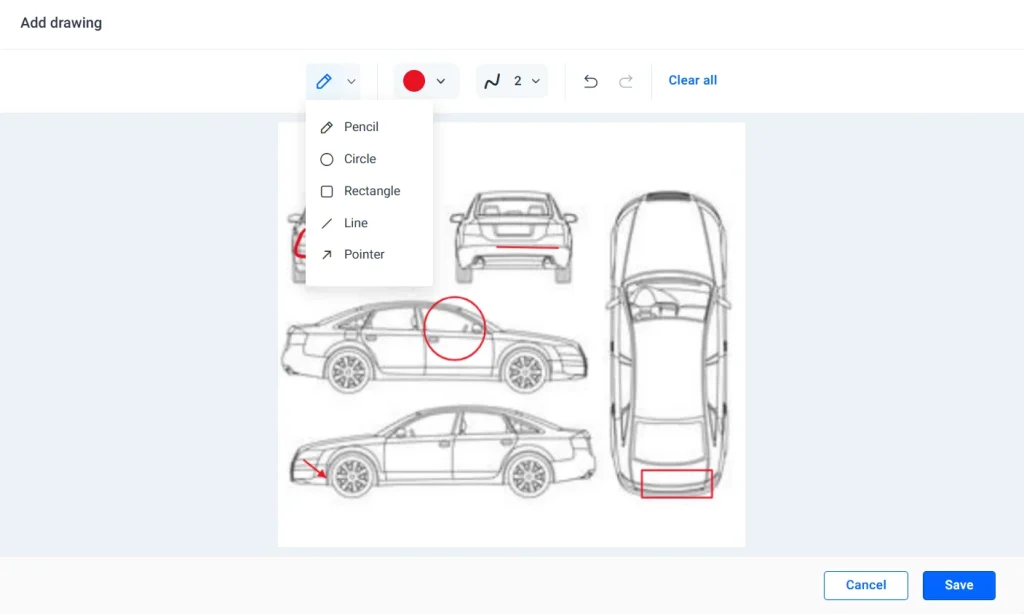
The marks become part of the signed document. Our help article on the Drawing form field covers each setting.
Which drawing tools can signers use?
Signers can draw with a mouse or a finger on a touch screen. The shape tools suit dents well:
- Pencil for freehand marks and short handwritten notes
- Circle or Rectangle to ring or box a dent
- Line to trace a long scratch
- Pointer arrow to point at one spot on the car
Signers can also pick a pen color and set the stroke width from 1 to 20. Undo and Redo fix single marks, while Clear All removes every mark and cannot be undone.
Which other form fields help record a dent?
The diagram shows where the dent is, and other fields hold the details. A multi-line text field takes the dent note. Checkboxes, radio buttons and dropdowns keep damage types and sizes the same on every form.
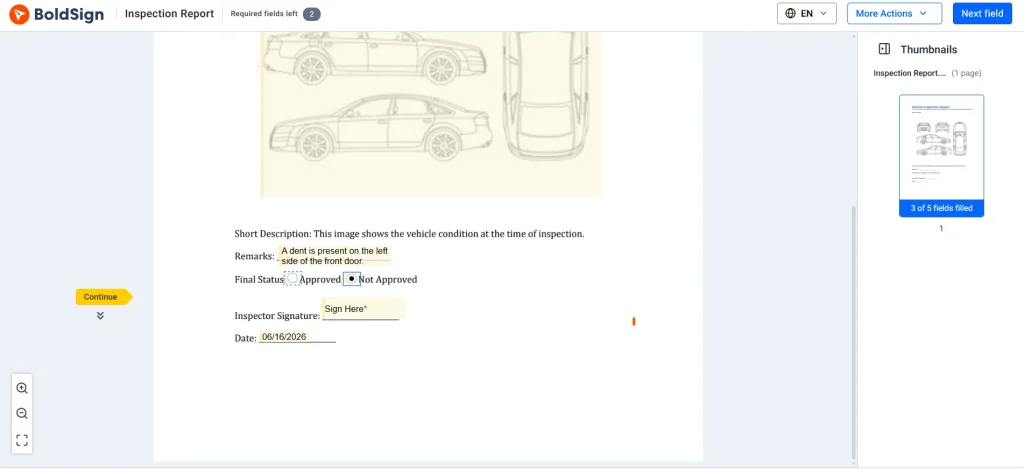
Save the finished form as a template, so each car gets the same fields. Our guide on how to save time with templates walks through it.
What should you watch out for when marking dents?
Most problems come from a field that is too small or a form that skips a step. A few habits prevent them.
- Make the Drawing field cover the whole diagram, so every panel can be marked.
- Use the Drawing field only where a mark adds something, and keep text fields for words.
- Agree on one pen color for new damage across your team.
- Check the marks before signing, since Clear All cannot be reversed.
Which BoldSign plan do you need, and what does it cost?
Every BoldSign plan includes basic and advanced form fields, mobile signing and an audit trail. Prices are in USD, billed yearly.
The Essential plan is free, with 25 envelopes a month and 2 templates. The Growth plan costs $5 per user a month and holds 10 templates. The Business plan costs $15 per user a month, with unlimited templates and envelopes.
The Premium plan costs $99 a month for unlimited users.
A 30-day free trial lets you test the Drawing form field on your own inspection form before you choose. The pricing page lists every feature by plan.
How do you start marking dents on your own forms?
Pick one inspection form your team uses today, add a Drawing field over its diagram and send it to yourself. You will see how the marks look in the signed copy.
- Start your 30-day free trial and build your first inspection form.
- Request a demo to see the Drawing field on a vehicle form.
- Read how to show accident damage in insurance claim forms for claims after a crash.
Frequently asked questions
What is dent marking in a vehicle inspection form?
Dent marking means showing each dent on a drawing of the car, not only in words. A mark on the diagram, a short note and a photo together show where the dent is and how bad it looks.
What is the clearest way to mark car dents in a vehicle inspection form?
Circle or point to each dent on a vehicle diagram inside the form. Then give it a number, a one-line note and a photo, so anyone can match the mark to the real panel.
What details should be included for each dent?
Write the panel and side, a rough size and whether the paint is broken. Add a photo number that matches the mark on the diagram, plus the date and the inspector's name.
Can BoldSign be used to visually mark vehicle damage?
Yes. Our Drawing form field lets a signer circle, box or point to dents, scratches and cracks on a vehicle diagram in a PDF. The marks are saved as part of the signed document.
Can a customer mark dents on a phone or tablet?
Yes. The Drawing form field works with a finger on a touch screen as well as with a mouse. A customer can mark the diagram at the rental counter on a tablet.
Who should sign a vehicle inspection form?
The inspector signs, and so does the person taking or returning the car, such as a driver or renter. Two signatures show that both sides saw the same marks.
Can I undo a mark on the vehicle diagram?
Yes. The drawing tools include Undo and Redo for single marks. Clear All removes every mark at once, and you cannot undo that step.
Should I use one inspection form for every vehicle?
Yes, a single standard form keeps every check the same, so reports are easy to compare. Save it as a template and send a fresh copy for each car.

Preethi Loganathan
Preethi is a Digital Marketing Executive at BoldSign who develops precise, research-driven content on eSignatures, compliance, and digital signing workflows. She works closely with product and engineering teams to ensure every article is accurate, validated, and aligned with industry best practices. Connect with her on LinkedIn.
More posts by Preethi Loganathan