How Electronic Signatures in Healthcare Work, From Intake Form to Patient Record
 BoldSign Team
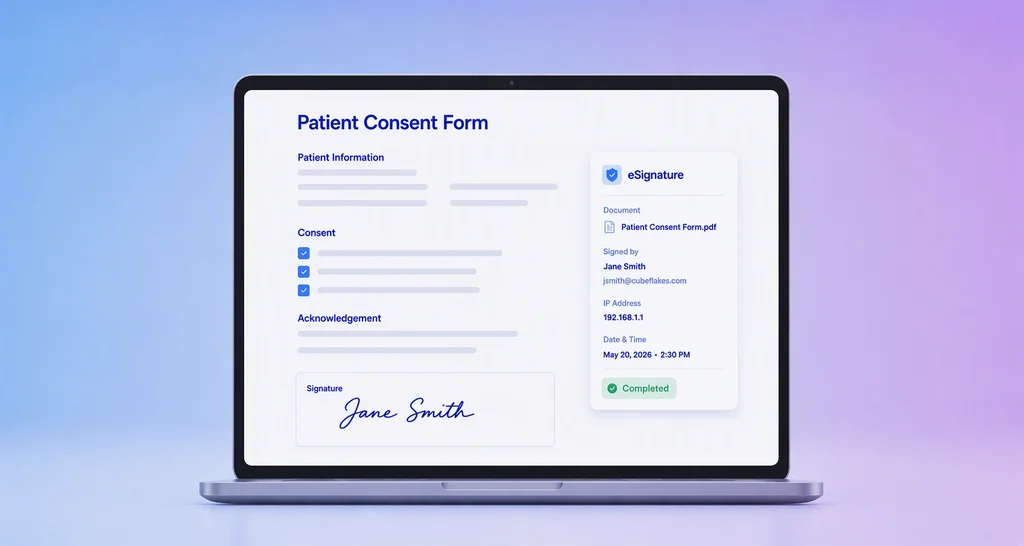
TL;DR: Electronic signatures in healthcare replace the clipboard. Patients sign on a phone or clinic tablet, and each signed copy files itself with an audit trail. The platform must also protect patient data under the Health Insurance Portability and Accountability Act (HIPAA). See our electronic signatures for healthcare page.
A patient arrives for a short procedure, and the consent form is not in the file. Someone prints a new one, finds a pen and waits. Later, a staff member scans the page and names it by hand.
Each step is small, but a busy clinic repeats them all day. This guide shows how electronic signatures change that flow, from the first form to the stored record.
What are electronic signatures in healthcare?
An electronic signature is a person’s agreement to a form, given on a screen instead of paper. In healthcare, the signer is usually a patient, a parent or a staff member.
Think of a sign-in sheet at the front desk. A good one shows who signed and when. An e-signature does the same for every form, and it also records how the signer proved who they were.
Which healthcare documents can you sign electronically?
Most forms a patient or staff member signs can move online. Your legal team confirms which ones your state accepts.
- Patient intake and registration forms
- Consent to treatment and procedure consent
- Notice of privacy practices acknowledgments
- Authorizations to release medical records
- Staff onboarding forms and vendor contracts
Consent has its own rules. Our guide on collecting patient consent online covers care and research consent in detail.
What are the benefits of electronic signatures in healthcare?
Staff stop printing, scanning and chasing forms, and patients can sign before they arrive. Each signed form keeps its own record of who signed and when.
- The front desk skips reprints, scanning and missing initials.
- Patients get a shorter check-in and can read forms at home.
- Compliance staff get one audit trail per form, ready for a review.
Remote signing also suits virtual visits. Our post on digital patient consent covers pre-visit, check-in and telehealth flows.
How does an electronic signature work in a clinic?
The flow has four steps, and the first one happens only once per form. After that, staff fill in a name and send.
- Build the form once as a template, with fields for each signer.
- Send a signing link by email or text, or open the form on a clinic tablet.
- The patient checks a code, reads the form and signs.
- The signed copy is sealed and stored with its audit trail.
What does this look like at a small dental practice?
Picture a dental practice that sees six patients an hour. Each patient signs an intake form, a treatment consent and a privacy notice.
Staff send all three as links the day before. Patients who miss the link sign on a tablet in the waiting room. Nobody rekeys data or files paper.
Are electronic signatures legal and HIPAA compliant?
Yes, when the signer agrees to sign electronically and the record is kept. The federal e-signature law keeps a signature’s legal effect when it is electronic.
HIPAA adds rules about the data, not the signature. A vendor that handles protected health information (PHI) signs a business associate agreement (BAA) with you. The Code of Federal Regulations (CFR) sets the contract terms at 45 CFR 164.504(e).
Our HIPAA overview lists what the signing process needs: signer checks, tamper-evident documents, limited access and audit controls. State law still applies too. Our page on federal and state e-signature laws explains both.
How do you collect electronic signatures in healthcare with BoldSign?
Turn on HIPAA mode, build your forms as templates, then send them. Patients sign in a browser, with no app or account.
An Account Admin accepts our BAA under Settings, then Compliance. That turns on HIPAA mode for your whole organization. Then staff save each form as one of our templates and send it from there.
For patients at the desk, use in-person signing on a clinic device. Our step-by-step guide on setting up patient consent in BoldSign shows every screen.
How do you check who is signing?
Add a code check in the signer’s settings, as our article on how to add authentication to a signer shows. You can pick one of three methods:
- Email OTP: we email a one-time passcode (OTP) to the patient.
- SMS OTP: we text the code to the patient’s phone.
- Access code: your staff share a code ahead of time.
What does the audit trail record?
Each audit trail lists who opened and signed the form, with timestamps, network addresses and devices. It also shows how each signer’s identity was checked.
We encrypt data at rest and in transit. Our guide to digitizing medical records explains how signed forms fit into your records.
What should you watch out for with healthcare e-signatures?
The platform protects the data it holds, but your staff decide what goes into each request. A few habits keep patient data where it belongs.
- Keep patient details out of document titles and email messages.
- Accept the BAA before any form holds PHI.
- Match the code check to the risk of each form.
- Give each staff member a role that limits what they see.
- Test the flow on a phone and a tablet before launch.
Your team still owns training, policies and internal reviews. The signing platform is one part of your HIPAA program.
Which BoldSign plan do you need, and what does it cost?
HIPAA support comes with our Business and Premium plans when billed yearly. The Business plan costs $15 per user a month, and the Premium plan costs $99 a month for unlimited users.
Both plans include unlimited templates and SMS OTP. The Growth plan, at $5 per user a month, includes in-person signing and 10 templates but no HIPAA support. Prices are in USD, as listed on the BoldSign pricing page in November 2026.
Monthly plans, trials and the free Essential plan do not include HIPAA support.
How do you start using electronic signatures in your practice?
Pick one form your front desk handles every day, and move that one online first. Then add the rest.
- Start a 30-day free trial and send a sample intake form to yourself.
- Book a demo to plan a patient signing flow with our team.
- Have a question first? Open a ticket on our support portal.
Frequently asked questions
What is an electronic signature in healthcare?
It is a patient's or staff member's agreement to a form, given on a screen instead of paper. The platform records each signer, the time and the identity check they passed.
Are electronic signatures legal in healthcare?
Yes, when the signer agrees to sign electronically and the signed record is kept. The federal Electronic Signatures in Global and National Commerce (ESIGN) Act gives e-signatures the same effect as ink, and state laws may add rules for some forms.
Does HIPAA allow electronic signatures?
Yes, when the platform protects patient data. HIPAA asks for a business associate agreement (BAA) with any vendor that handles protected health information (PHI), plus access controls and audit records.
Can patients sign forms on their phone before a visit?
Yes. The patient opens a link in any browser and signs there. No app or account is needed, so most patients finish in a few minutes.
What if a patient does not have an email address?
Hand them a clinic tablet instead. With in-person signing, a staff member starts the session and the patient signs on that device.
How do I know the right patient signed the form?
Add a code check before the form opens. The patient enters a one-time passcode sent by email or text, or a code your staff shared ahead of time.
Is BoldSign HIPAA compliant?
Yes, when an Account Admin accepts our BAA. HIPAA support comes with our yearly Business and Premium plans, and it then applies to every user in your organization.
How much does a HIPAA eSignature plan cost with BoldSign?
Our Business plan costs $15 per user a month and our Premium plan costs $99 a month for unlimited users. Both are billed yearly in USD and include HIPAA support.

BoldSign Team
The official team behind BoldSign—the simple, secure eSignature solution trusted by businesses worldwide. Our platform helps individuals and teams create, sign, and manage documents effortlessly while maintaining full compliance. Experience BoldSign yourself with a free trial or request a personalized demo to see it in action.
More posts by BoldSign Team