How to Schedule Contract Delivery with the BoldSign API, with Code Samples
 Evans Omondi Otieno
TL;DR: Add
scheduledSendTimeto your send request as a Unix timestamp to schedule contract delivery with the BoldSign API. The time must be at least 30 minutes away and before the document’s expiry date. We send the contract at that moment, and our eSignature API page shows what else you can automate.
A sales team closes a deal at 6 p.m. on a Friday. The client works in another time zone, and the contract should reach them at 9 a.m. on Monday, their time. Someone could set a reminder and send it by hand, or your app could book the send now.
Scheduled send does the booking for you. This guide shows how to set the send time, with code in six languages and tips for getting the timestamp right.
What is scheduled contract delivery?
Scheduled delivery means you create the signing request now and pick the moment it goes out. We hold the document and email it to the signers at that time.
Think of scheduling an email in your inbox. You write the message today, choose Monday at 9 a.m., and the mail leaves then. Scheduled send does the same for a contract.
When does it help to schedule a contract?
Scheduling helps whenever the right moment to send differs from the moment the contract is ready. Common cases:
- Signers work in another time zone, and the email should arrive in their working hours.
- A contract has to go out on a set date, such as the first day of a new term.
- Your app prepares documents overnight and releases them in the morning.
How do you schedule a contract with the BoldSign API?
Add the scheduledSendTime property to your send document request. The value has to meet three rules:
- It is a Unix timestamp, such as 1744279200.
- It is at least 30 minutes after the current time.
- It is earlier than the document’s expiry date.
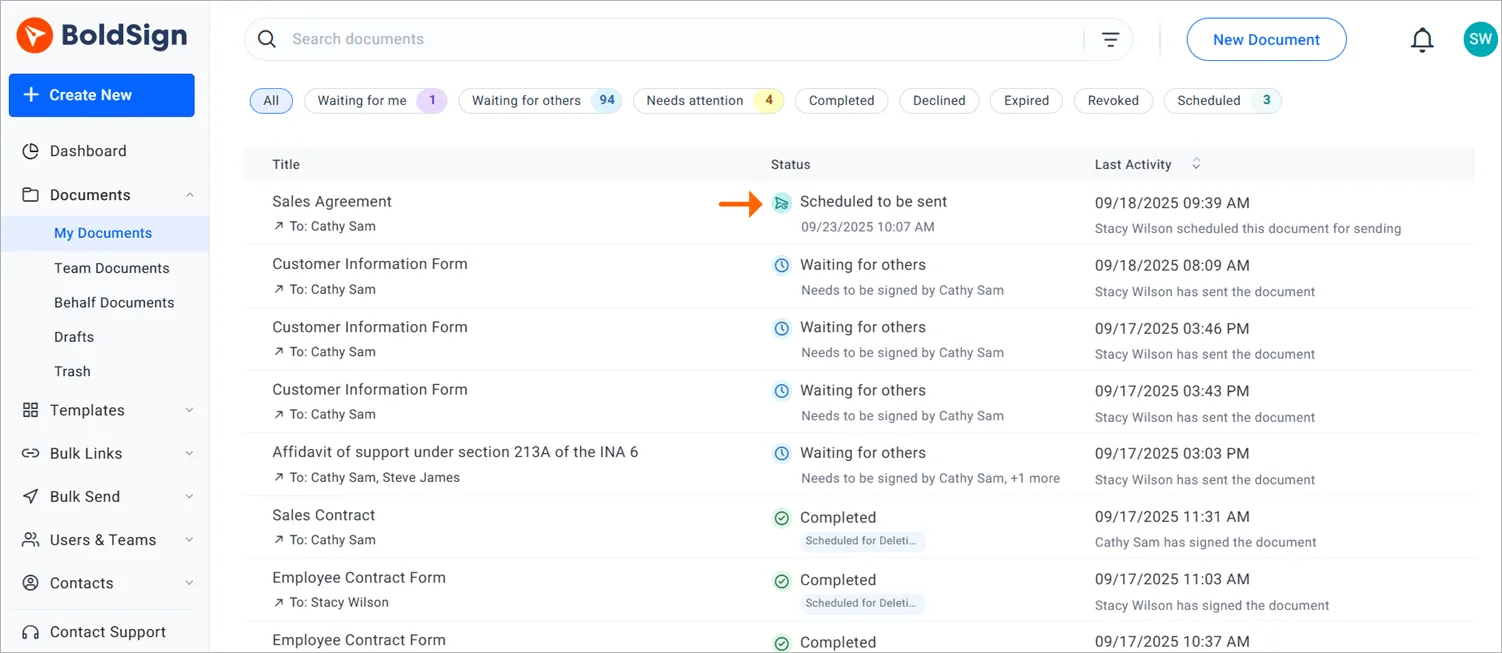
Our help article on how to schedule and send documents via API lists the same rules. After you schedule a document, the My Documents page shows it with the status Scheduled to be sent, plus the date and time you chose.
What does the code look like in each language?
Each sample sends one PDF to one signer with a signature field. The value 1745107200 sets the send time, so replace it with a future timestamp before you run the code.
curl -X POST \
  'https://api.boldsign.com/v1/document/send' \
  -H 'accept: application/json' \
  -H 'X-API-KEY: YOUR_API_KEY' \
  -H 'Content-Type: multipart/form-data' \
  -F 'Message=Please sign this document' \
  -F 'Title=Agreement' \
  -F 'scheduledSendTime=1745107200' \
  -F 'Signers={
  "name": "Alex",
  "emailAddress": "alex@example.com",
  "signerType": "Signer",
  "deliveryMode": "Email",
  "formFields": [
    {
      "id": "sign1",
      "name": "Signature",
      "fieldType": "Signature",
      "pageNumber": 1,
      "bounds": {
        "x": 100,
        "y": 100,
        "width": 100,
        "height": 50
      },
      "isRequired": true
    }
  ],
  "locale": "EN"
}' \
  -F 'Files=@/path/to/your/document.pdf'
// Initialize API client with your BoldSign API key
var apiClient = new ApiClient("https://api.boldsign.com", "YOUR_API_KEY");
var documentClient = new DocumentClient(apiClient);
// Prepare the document file
var documentFile = new DocumentFilePath
{
ContentType = "application/pdf",
FilePath = "path/to/your/document.pdf"
};
var filesToUpload = new List<DocumentFilePath> { documentFile };
// Define the signature field
var signatureField = new FormField(
id: "sign1",
isRequired: true,
type: FieldType.Signature,
pageNumber: 1,
bounds: new Rectangle(x: 100, y: 100, width: 100, height: 50)
);
var formFields = new List<FormField> { signatureField };
// Create signer details
var signer = new DocumentSigner(
signerName: "Alex",
signerType: SignerType.Signer,
signerEmail: "alex@example.com",
formFields: formFields,
locale: Locales.EN
);
var signers = new List<DocumentSigner> { signer };
// Create the send request with scheduled time
var sendForSign = new SendForSign
{
Message = "Please sign this document.",
Title = "Agreement",
Signers = signers,
Files = filesToUpload,
ScheduledSendTime = 1745107200 // Unix timestamp for scheduled delivery
};
// Send the document
var documentCreated = documentClient.SendDocument(sendForSign);import boldsign
# Configure the API client with your API key
configuration = boldsign.Configuration(api_key="YOUR_API_KEY")
with boldsign.ApiClient(configuration) as api_client:
document_api = boldsign.DocumentApi(api_client)
# Define the signature field
signature_field = boldsign.FormField(
fieldType="Signature",
pageNumber=1,
bounds=boldsign.Rectangle(x=100, y=100, width=100, height=50),
)
# Create signer details
signer = boldsign.DocumentSigner(
name="Alex",
emailAddress="alex@example.com",
signerType="Signer",
formFields=[signature_field],
)
# Prepare the document for sending
send_for_sign = boldsign.SendForSign(
title="Agreement",
signers=[signer],
files=["path/to/your/document.pdf"],
scheduledSendTime=1745107200, # Unix timestamp for scheduled delivery
)
# Send the document
response = document_api.send_document(send_for_sign=send_for_sign)<?php
require_once "vendor/autoload.php";
use BoldSign\Configuration;
use BoldSign\Api\DocumentApi;
use BoldSign\Model\FormField;
use BoldSign\Model\Rectangle;
use BoldSign\Model\DocumentSigner;
use BoldSign\Model\SendForSign;
use BoldSign\Model\FileInfo;
// Initialize configuration with your API key
$config = new Configuration();
$config->setApiKey('YOUR_API_KEY');
// Create the Document API client
$documentApi = new DocumentApi($config);
// Define the signature field
$formField = new FormField();
$formField->setFieldType('Signature');
$formField->setPageNumber(1);
$formField->setBounds(new Rectangle([100, 100, 100, 50]));
// Create the signer
$documentSigner = new DocumentSigner();
$documentSigner->setName("Alex");
$documentSigner->setEmailAddress("alex@example.com");
$documentSigner->setSignerType("Signer");
$documentSigner->setFormFields([$formField]);
// Prepare the file
$file = new FileInfo();
$file->setFilePath('YOUR_FILE_PATH'); // e.g., '/path/to/document.pdf'
$file->setContentType('application/pdf');
// Create the SendForSign request
$sendForSign = new SendForSign();
$sendForSign->setTitle('Agreement');
$sendForSign->setMessage('Please sign this document.');
$sendForSign->setSigners([$documentSigner]);
$sendForSign->setFiles([$file]);
$sendForSign->setScheduledSendTime(1745107200); // Unix timestamp
// Send the document
$documentCreated = $documentApi->sendDocument($sendForSign);
?>import com.boldsign.ApiClient;
import com.boldsign.Configuration;
import com.boldsign.api.DocumentApi;
import com.boldsign.model.*;
import java.io.File;
import java.util.Arrays;
public class BoldSignScheduler {
public static void main(String[] args) {
// Initialize API client
ApiClient client = Configuration.getDefaultApiClient();
client.setApiKey("YOUR_API_KEY");
DocumentApi documentApi = new DocumentApi(client);
// Define signature field
FormField signatureField = new FormField();
signatureField.setFieldType(FormField.FieldTypeEnum.SIGNATURE);
signatureField.setPageNumber(1);
signatureField.setBounds(new Rectangle().x(100f).y(100f).width(100f).height(50f));
// Create signer
DocumentSigner signer = new DocumentSigner();
signer.setName("Alex");
signer.setEmailAddress("alex@example.com");
signer.setSignerType(DocumentSigner.SignerTypeEnum.SIGNER);
signer.setFormFields(Arrays.asList(signatureField));
// Prepare document
FileInfo fileInfo = new FileInfo();
fileInfo.setFilePath("YOUR_FILE_PATH"); // e.g., "/path/to/document.pdf"
fileInfo.setContentType("application/pdf");
// Create SendForSign request
SendForSign sendForSign = new SendForSign();
sendForSign.setTitle("Document SDK API");
sendForSign.setMessage("Please sign this document.");
sendForSign.setSigners(Arrays.asList(signer));
sendForSign.setFiles(Arrays.asList(fileInfo));
sendForSign.setScheduledSendTime(1745107200); // Unix timestamp
// Send the document
DocumentCreated documentCreated = documentApi.sendDocument(sendForSign);
// Output document ID or status
System.out.println(
"Document scheduled successfully. ID: " + documentCreated.getDocumentId());
}
}import { DocumentApi, DocumentSigner, FormField, Rectangle, SendForSign, FileInfo } from "boldsign";
import * as fs from "fs";
// Initialize the Document API and set your API key
const documentApi = new DocumentApi();
documentApi.setApiKey("YOUR_API_KEY");
// Define the signature field
const bounds = new Rectangle();
bounds.x = 100;
bounds.y = 100;
bounds.width = 100;
bounds.height = 50;
const formField = new FormField();
formField.fieldType = FormField.FieldTypeEnum.Signature;
formField.pageNumber = 1;
formField.bounds = bounds;
// Create signer details
const documentSigner = new DocumentSigner();
documentSigner.name = "Alex";
documentSigner.emailAddress = "alex@example.com";
documentSigner.signerType = DocumentSigner.SignerTypeEnum.Signer;
documentSigner.formFields = [formField];
// Prepare the file
const fileStream = fs.createReadStream("path/to/your/document.pdf");
const fileInfo = new FileInfo();
fileInfo.fileName = "document.pdf";
fileInfo.fileData = fileStream;
fileInfo.contentType = "application/pdf";
// Create the SendForSign request
const sendForSign = new SendForSign();
sendForSign.title = "Agreement";
sendForSign.message = "Please sign this document.";
sendForSign.signers = [documentSigner];
sendForSign.files = [fileInfo];
sendForSign.scheduledSendTime = 1745107200; // Unix timestamp
// Send the document
documentApi
.sendDocument(sendForSign)
.then((response) => {
console.log("Document scheduled successfully:", response.documentId);
})
.catch((error) => {
console.error("Error scheduling document:", error);
});Two values need your own details: the API key and the send time. The next three parts cover both.
Where do you find your API key?
Every call carries your API key in the X-API-KEY header. Put your own key where each sample shows the key placeholder.
To make a key, open API in the left menu of the web app and select API Key. Select Generate API Key, then Generate Token, and copy the key. Our guide to API key vs OAuth explains when each sign-in method fits.
How do you pick a valid send time?
A Unix timestamp counts the seconds since midnight on January 1, 1970, in Coordinated Universal Time (UTC). One number means the same moment everywhere, so time zones cause no mix-ups.
Keep the expiry date in mind when you schedule far ahead. Our guide on how to apply an expiration date through the API shows how to set it. You can also turn a calendar date into a timestamp with Epoch Converter.
How do you generate a timestamp in code?
Each line below gives a timestamp one hour from now, which is 3,600 seconds. The Python line needs import time at the top of the file.
| Language | Code |
|---|---|
| Python | future_time = int(time.time()) + 3600 |
| JavaScript | const futureTime = Math.floor(Date.now() / 1000) + 3600; |
| .NET | var futureTime = DateTimeOffset.UtcNow.ToUnixTimeSeconds() + 3600; |
Run the code, and we hold the document until the time you set.
What should you watch out for when you schedule a send?
Most failed schedules come from a timestamp that is too close, in the wrong unit, or past the expiry date. A few habits prevent them:
- Generate the timestamp right before the request, so it stays more than 30 minutes ahead.
- Send seconds. JavaScript’s
Date.now()returns milliseconds, so divide by 1,000 first. - Change a draft’s send time with the Edit Document endpoint; a null value sends it right away.
- Test in the sandbox first. Its documents carry a test watermark, and we delete them after 14 days.
Which BoldSign plan do you need for scheduled send, and what does it cost?
Scheduled send is on the Business, Premium and Enterprise API plans, and Essential and Growth leave it out. Sending through the BoldSign API on a live account needs the Enterprise API plan.
The Enterprise API plan starts at $30 a month with 40 envelopes, and each extra envelope costs $0.75. You can build first in a free sandbox with full API access and no credit card.
For the web app, Business costs $15 per user a month and Premium $99 a month for unlimited users, billed yearly. Prices are in USD.
How do you start scheduling contracts with BoldSign?
Start in the sandbox, then switch to a live key once your flow works.
- Create a free API sandbox account and send your first scheduled document.
- Read the BoldSign API documentation for every send option.
- Book a demo with our team, or open a ticket on the support portal.
Frequently asked questions
What is a Unix timestamp?
A Unix timestamp counts the seconds since midnight on January 1, 1970, in Coordinated Universal Time (UTC). The API reads the send time in this form, so one number means the same moment in every time zone.
How far in advance can I schedule a document with the BoldSign API?
You can pick any time at least 30 minutes from now. The send time must also fall before the document's expiry date, so set a later expiry for sends far ahead.
Can I change the send time of a scheduled document?
Yes, for a draft document. The Edit Document endpoint accepts a new scheduledSendTime value, and a null value sends the document right away.
What status does a scheduled document show?
It shows Scheduled to be sent on the My Documents page, next to the date and time you chose. At that time we email the document to each signer.
Can I schedule documents sent from a template?
Yes. The send-from-template endpoint takes the same scheduledSendTime property, with the same 30-minute and expiry date rules.
Can I test scheduled sending before going live?
Yes. Create a free sandbox account and send scheduled documents to email addresses you own. Sandbox documents carry a test watermark, and we delete them after 14 days.
What happens if the send time is less than 30 minutes away?
The API returns an error and schedules nothing. Generate the timestamp just before you send the request, and leave a margin above the 30 minutes.
Which BoldSign plan includes scheduled send?
Scheduled send is on the Business, Premium and Enterprise API plans. Sending through the API on a live account needs the Enterprise API plan, from $30 a month with 40 envelopes.

Evans Omondi Otieno
Evans Omondi Otieno is a customer support representative and writer at BoldSign, specializing in creating clear, insightful content to help users navigate eSignature solutions. As a blog author, Evans writes well-researched articles that simplify technical concepts, helping businesses and professionals understand how to use BoldSign effectively. With expertise in technical support and content creation, he ensures users have a seamless experience and gain valuable knowledge from his articles.
More posts by Evans Omondi Otieno