How Do Companies Evaluate Electronic Signature Software? The Five Checks Enterprise Reviewers Run
 Meikanda Nayanar
TL;DR: Companies evaluate electronic signature software with five checks: audits, data location, signer identity, document proof and admin controls. A reviewer can confirm each one from outside, without the vendor’s word. See how we cover all five on our enterprise electronic signature software page.
You found a signing tool your team likes. Then the purchase stops at security review, and a reviewer sends you a long questionnaire.
This guide walks through what that reviewer checks, in the order they usually check it. For each step, you will see what to ask and how we answer it.
How do companies evaluate electronic signature software?
They look for proof a stranger can check. A product page describes the controls, but a reviewer wants records that exist outside the vendor’s own words.
Think of hiring a builder. The builder can say they hold a license. A license number you can type into the state board’s website settles the matter in a minute.
Enterprise reviews work the same way. Audit reports, public registers and published standards carry weight because a reviewer can check them alone. Product claims count for less, even when they are true.
What features should an enterprise electronic signature platform have?
An enterprise electronic signature platform needs five things a reviewer can test. Each one can stop a purchase before the next one matters.
- An independent audit of its security controls.
- A data region that you choose.
- Signer checks you can set for each signer.
- A signed file that anyone can verify.
- Admin controls and a public uptime record.
Three of these you can confirm with nothing asked of the vendor. For the other two, how quickly the vendor answers tells you something too.
How should enterprises assess an electronic signature provider’s security controls?
Ask for an independent audit, not a policy. A policy says what a vendor plans to do; an audit tests whether the controls worked.
What does an independent audit show?
A System and Organization Controls (SOC) 2 report comes from an independent auditor. Type 1 looks at controls on one day. Type 2 tests that they kept working over a period of months.
We have completed a SOC 2 Type 2 audit, as our security policy states. Admins on paid plans find the report in the Compliance section of account settings.
Prospects ask for it through the security and compliance request form. Our legal team reviews each request.
Can you check a certification on a public register?
Yes, for some. We hold Level 2 certification under the Texas Risk and Authorization Management Program, which covers cloud services for Texas state agencies.
Texas lists certified products on the Department of Information Resources (DIR) public register. A reviewer can look up our entry there without contacting us.
How does the Health Insurance Portability and Accountability Act (HIPAA) apply?
HIPAA has no certificate to look up. You check two things: support for HIPAA workflows, and a business associate agreement (BAA).
With us, an Account Admin accepts the BAA in Settings, under Compliance. HIPAA mode then applies to the whole organization. See the HIPAA overview.
Where is the data stored, and who decides?
You decide, when you set up the account. For many enterprises, data location is the first hard stop, and it gets settled before anyone looks at features.
Ask who chooses the region, you or the vendor. Then ask which regions exist, and whether a region costs extra or needs a higher plan.
We offer four regions on every plan: the US, the EU, Canada and Australia. The US region runs in US East, the EU region in the Netherlands, Canada in Toronto and Australia in Sydney.
We host on Google Cloud Platform and Microsoft Azure. Our support article on data storage states that your data is stored and processed within your region.
Pick with care. Once you select a region, it stays fixed, and a move means a new account. See data residency compliance.
How was the signer identified?
Signer checks decide how strong a signature is in a dispute. A signature backed by inbox access proves one thing: somebody reached that inbox.
Ask for the full list of methods, and whether you can set them for each signer. We offer these checks:
- An access code you share with the signer
- A one-time passcode by email or SMS
- Knowledge-based authentication (KBA) with public-record questions
- ID verification that matches a government ID to a live selfie
We set the check per signer. One document can ask a client for an email code and a guarantor for KBA. See signer authentication, knowledge-based authentication and identity verification.
What does the completed document prove?
A signature image pasted onto a PDF and a sealed file look the same on screen. They behave differently when someone disputes the document.
Ask two things. Does the file carry a signature built to a published standard? Can a third party check it without the vendor?
We seal each completed document and its audit trail with a certificate. Our security policy names PDF Advanced Electronic Signatures (PAdES) as the standard we follow.
Anyone with the file can open it in Adobe Reader and see the signature details at the top. If someone edits the file after signing, Adobe Reader shows a warning there instead.
The audit trail adds a record of each step: who acted, from where and when. Read more in why e-signature audit trails matter for compliance.
Which legal tier does the signature meet?
The seal and the legal tier are separate questions. The EU electronic identification, authentication and trust services (eIDAS) rules define simple, advanced and qualified tiers.
The tier depends on how firmly the signer was identified. Some EU teams need a set tier for certain documents, so ask before you sign.
We offer simple electronic signatures as standard. We also support qualified electronic signatures (QES) through qualified trust service providers. See our pages on US electronic signature law and eIDAS compliance.
Who can run the account, and is uptime published?
The last two checks cover control and availability. With one team on a platform, they barely matter; with four teams, they decide whether the rollout passes an audit.
What admin controls should you ask about?
Ask whether admin controls come built in, and whether retention runs on a schedule. Our admin controls include:
- Single sign-on (SSO) through your own identity provider
- Custom roles and permissions, with team management
- Internet protocol (IP) restrictions to approved network ranges
- Automatic deletion on your retention schedule, plus automatic cloud backup
Is there a published uptime record?
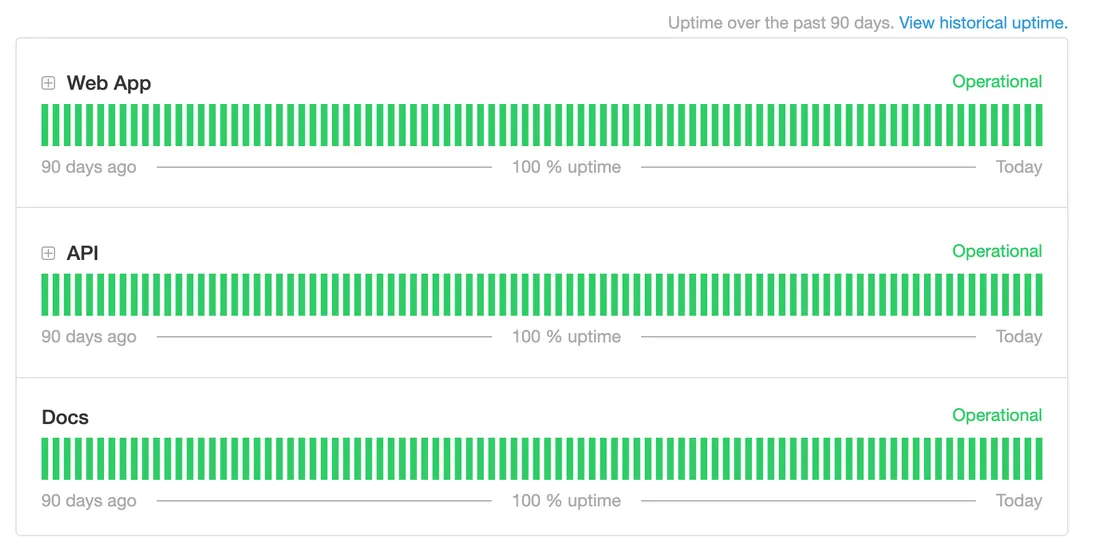
Ask whether the uptime figure sits in the contract, and over what window. A monthly window is stricter than a yearly one, since one bad day cannot hide across twelve months.
Our service level agreement (SLA) commits to 99.99% uptime in any calendar month, with exclusions. The SLA points to status.boldsign.com, which shows the past 90 days and past incidents.
Why do enterprises outgrow basic electronic signature software?
Volume grows past the plan the tool was bought on. Then cost and governance problems arrive at the same time.
A team buys a tool for one workflow. Then HR, finance and legal start using it too. Each department opens its own account, with its own templates and its own retention rule.
Payroc, a US payment processing company, reached that point. Our Payroc customer story lists an organization size of 1,000+ and over 12,000 documents a year.
Before switching, Payroc paid almost three times as much per transaction. Their plans had limited monthly allowances, and the true cost was hard to predict.
“There’s nothing hidden with BoldSign, and I think that’s one of the most refreshing things. Everything you’re paying for is right out in the open and clearly defined.”
Jason Meuter, developer at Payroc
Payroc now pays a flat rate per document. Testing workflows costs them nothing, and they download audit trails to store internally.
What actually slows enterprise signing down?
The coordination around the signature slows it down. A supplier form takes two minutes to sign, but sending it to 400 suppliers and proving who signed takes much longer.
Most teams face two poor choices. Sending one at a time stops working past a few dozen people. A bulk tool with one shared file leaves you without a record per person.
We close that gap with three tools:
- Bulk send turns each row of a CSV file into its own request, with its own audit trail.
- Bulk links let anyone with one link sign their own copy.
- Locked templates keep approved wording the same across teams.
Finding a document later gets easier too. AI Search uses artificial intelligence (AI) to find documents from a plain sentence.
What questions should companies ask before choosing an esignature solution?
Ask the questions a reviewer will ask, before the review starts. The five below come from the checks in this guide.
- Can we read the audit report, and is any certificate on a public register?
- Can we choose the data region, and does it cost extra?
- Can we set signer checks for each signer?
- Can a third party verify a signed file without the vendor?
- Is uptime in the contract, with a public status history?
Other teams own other questions. Developers test the eSignature API and the integration list. Our Legal Center holds the legal documents a reviewer may want to read in full.
Which BoldSign plan covers enterprise controls, and what does it cost?
Most enterprise controls start on the Business plan. As of November 2026, the BoldSign pricing page lists these prices in USD, billed yearly.
The Business plan costs $15 per user a month. It adds bulk send, bulk links, SMS passcodes, KBA, ID verification, SSO, custom roles, IP restrictions, AI Search, automatic deletion, cloud backup and HIPAA support.
The Premium plan costs $99 a month for unlimited users, with the same controls. The free Essential plan and the Growth plan, at $5 per user a month, include data residency and the SOC 2 Type 2 audit. Developers who need live access use the Enterprise API plan, from $30 a month with 40 envelopes.
Where should you start your enterprise evaluation?
Start with the check your reviewer will ask about first. Then pick the next step that fits your team.
- Start a 30-day free trial and test the admin controls with your own documents.
- Book an enterprise demo to walk through controls and audit reports with our team.
- Read 6 questions to evaluate before investing in an eSignature platform for the buying side.
Frequently asked questions
How do companies evaluate esignature tools?
They run a short list of checks in order: independent audits, data location, signer identity, document integrity and admin controls. A tool that fails an early check rarely reaches the later ones.
How do I verify a software vendor's enterprise experience before signing a contract?
Ask for customer stories from companies your size, then check public records you can read yourself. Look for audit reports, entries on public registers and a public uptime history.
What certifications and audits does BoldSign hold?
We have completed a System and Organization Controls (SOC) 2 Type 2 audit. We also hold Level 2 certification under the Texas Risk and Authorization Management Program. Our security policy lists our General Data Protection Regulation (GDPR) and eIDAS commitments.
Where is enterprise data stored, and who chooses the region?
You choose the region for your account: the US, the EU, Canada or Australia. Every plan includes this. Once you select a region, it stays fixed, so a move means a new account.
Can a third party check that a signed document is unchanged without asking BoldSign?
Yes. Anyone with the file can open it in Adobe Reader and read the signature details at the top. A document changed after signing shows a warning there.
Do signers need a BoldSign account or a paid license?
No. We license senders. Signers open the request, sign and finish, and a send to 200 people adds no users to your account.
Is a BoldSign signature legally enforceable in the US and EU?
Yes, when the signer means to sign and all parties agree to sign electronically. The record must also be kept. We comply with the US Electronic Signatures in Global and National Commerce (ESIGN) Act, the Uniform Electronic Transactions Act (UETA) and eIDAS.
Will BoldSign sign a HIPAA business associate agreement (BAA)?
Yes, on yearly Business and Premium plans. An Account Admin accepts the BAA in Settings, under Compliance, and HIPAA mode then applies to the whole organization.

Meikanda Nayanar
A veteran product manager at BoldSign, boasting a decade-long journey as a .NET developer. With a rich history of leading product development across diverse technologies like Windows Forms, WPF, UWP, Xamarin.Forms, Flutter, and MAUI, Meikandan brings a unique blend of technical expertise and strategic insight to the table. Connect with him on LinkedIn.
More posts by Meikanda Nayanar