Evans Omondi Otieno
TL;DR: An artificial intelligence (AI) agent uses the Model Context Protocol (MCP) to call eSignature actions as tools. Through our MCP server, it can send a document, check its status, send a reminder or revoke the request from inside a chat. Our BoldSign MCP page shows what the server does.
An AI agent can collect a customer’s details in a few messages. Then the document needs a signature, and the work goes back to a person. Someone opens the eSignature app, picks the form, sends it and checks on it later.
The agent understood the task. It just had no way to act in the signing system. This guide explains how MCP gives it that way, step by step, from the first request to the signed copy.
What is eSignature MCP?
MCP is an open standard that lets AI agents call tools in outside systems. In eSignature MCP, signing actions such as send and remind become tools the agent can call.
Think of a hotel concierge with a phone list. The concierge cannot cook, but knows which number books a table. MCP is that phone list, and the eSignature service does the cooking.
MCP does not replace the eSignature API. The API still runs each action, and MCP gives agents a standard way to reach it.
How does an MCP electronic signature request work?
An MCP electronic signature request moves through four parts: the person, the agent, the MCP server and the eSignature API. Each part has one job.
- You ask in plain words, such as “Send the non-disclosure agreement (NDA) to Alex.”
- The agent reads the list of tools the server offers and picks one.
- The MCP server turns that tool call into a request to the API.
- The result comes back, and the agent tells you what happened.
Our overview of the BoldSign MCP server covers setup for each AI client.
Which eSignature tools can an AI agent call?
Our hosted server gives an agent tools for documents, templates, contacts, users and teams. The BoldSign MCP Server documentation lists each one.
Tools that act on documents
- Send a document from a template you already built.
- Start a new send through a guided, step-by-step flow.
- Send a reminder to signers who still need to sign.
- Revoke a document that is in progress, so no one can sign it.
Tools that read information
- List your documents, your team’s documents, and those sent on behalf of others.
- Get one document’s details and status.
- List templates and read one template’s details.
- List and read contacts, users and teams.
How does an agent move a document from request to signature?
An agent follows the same arc a person does, but each step is a tool call. Reading comes first, acting comes second.
- The agent lists templates and contacts to find the right form and signer.
- The agent shows you what it plans to send and waits for a yes.
- The agent sends from the template, or starts a new send when no template fits.
- Later, it reads the status: waiting for others, completed, declined, revoked or expired.
- The agent sends a reminder, or revokes the request when it was sent in error.
Each signer still opens their own copy and signs it. The agent never signs for anyone.
What does this look like in a real conversation?
Our AI warranty claim agent is a working example. A customer reports a faulty laptop in a chat, and the agent sends the warranty claim agreement for signature.
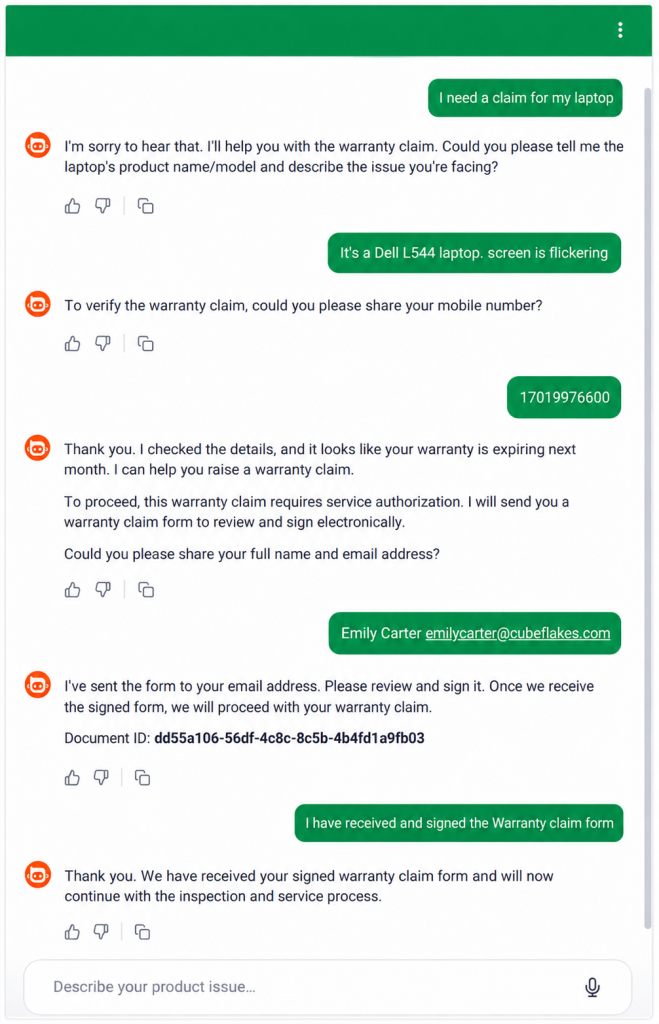
The agent collects the product and customer details, fills the claim template, and asks before it sends. Then it checks the status and can remind the customer. Once the form is signed, the retailer moves on to inspection or repair.
You can try it with seven other agents on our MCP agent demos page. Our post on the warranty claim agent demo walks through it in more detail.
Which processes suit an MCP agent?
Any process that sends the same kind of form many times suits an agent. The form changes, but the tool calls stay the same.
- HR sending new hire paperwork from an approved template.
- Legal teams sending NDAs and asking where each one stands.
- Insurers sending a claim form after a customer describes the incident.
- Property managers sending a lease once the move-in date is set.
Our guide on what an AI eSignature agent is explains how to write the instructions that map chat answers to form fields.
Why do developers use MCP instead of custom code?
Without MCP, each AI app needs its own code for every signing action. With MCP, any compatible client can call the same tools on one server.
Our hosted server works with Claude, ChatGPT, coding editors and agent pipelines. Teams spend less time on glue code and reuse the templates they already have. The BoldSign eSignature API stays the base for every action.
Our server is hosted, so there is nothing to install. An earlier local version is on GitHub and as an npm package. That repository is now deprecated, and it points new users to the hosted server.
What should you watch out for?
Treat an MCP connection as a high-trust link to your eSignature account. A few habits keep the agent safe.
- Start with read-only requests, such as listing templates, before you let the agent send.
- Ask for a human yes before the agent sends, revokes or reminds.
- Give each agent its own API key with only the access it needs.
- Use the endpoint for your account’s region, or sign-in and tool calls can fail.
Our MCP authentication guide covers API keys and OAuth sign-in. Every send still goes into the document’s audit trail.
Which plan do you need, and what does it cost?
You can test every MCP tool free in the API sandbox. Sending live documents needs the Enterprise API plan.
The Enterprise API plan starts at $30 a month and includes 40 envelopes. Each extra envelope costs $0.75. Prices are in USD, as listed on our API pricing page in November 2026.
How do you get your own agent sending documents?
Start in the sandbox with one client and one template. Move to live sending once the agent does what you expect.
- Create a free API sandbox account and connect your AI client.
- Book a demo to see an agent send from your own templates.
- Read the BoldSign MCP Server documentation to pick your region and sign-in method.
Frequently asked questions
What is eSignature MCP?
It is the Model Context Protocol (MCP) applied to electronic signatures. An eSignature service publishes its actions as tools, and an AI agent calls those tools to send, track and manage signing requests.
Can AI agents send documents for signature?
Yes. With our MCP server, an agent can send a document from one of your templates or start a new send through a guided, step-by-step flow.
Can an AI agent check whether a document has been signed?
Yes. The agent reads the document's details and status, such as completed or expired, and tells you in the chat.
Does MCP replace the eSignature API?
No. The API still does the work behind each action. MCP gives AI agents one standard way to find and call those actions.
Can an AI agent sign a document for someone?
No. The agent can send, track, remind and revoke, but each signer opens and signs their own copy.
Should a person approve what the agent sends?
Yes, for actions that change something. Our documentation suggests a human confirmation step before the agent sends, revokes or reminds, most of all when it also uses other tools.
Can an AI agent run eSignature tasks without a person in the chat?
Yes. Server-to-server agents pass an API key in each request, and our hosted MCP server treats them the same as interactive clients.
Are documents sent by an AI agent legally binding?
Yes, when they meet the same rules as any electronic signature, such as the signer agreeing to sign electronically. The agent only sends the request; the signer still signs.

Evans Omondi Otieno
Evans Omondi Otieno is a customer support representative and writer at BoldSign, specializing in creating clear, insightful content to help users navigate eSignature solutions. As a blog author, Evans writes well-researched articles that simplify technical concepts, helping businesses and professionals understand how to use BoldSign effectively. With expertise in technical support and content creation, he ensures users have a seamless experience and gain valuable knowledge from his articles.
More posts by Evans Omondi Otieno