Ship eSignatures Faster with the BoldSign Skill in GitHub Copilot Using Claude
 Gayathri Annamalai
TL;DR: The BoldSign eSignature skill is a folder of guidance that artificial intelligence (AI) coding agents such as GitHub Copilot read before they write code. It helps a Claude model write working code for Node.js, Python, .NET (Microsoft’s app framework) and PHP (a web scripting language). That code covers sending, webhooks and embedded signing with the BoldSign eSignature API.
You ask an AI assistant to add contract signing to your app, and it writes code in seconds. Then the code calls an endpoint that does not exist, or treats a slow step as instant. You spend the afternoon fixing it.
This guide shows how to add the BoldSign skill to Visual Studio Code and prompt GitHub Copilot with a Claude model. You will also see how to check the code it gives you. The examples use .NET and C#.
What is an AI skill, and why does eSignature code need one?
A skill is a folder of instructions and reference files that an AI coding agent reads before it writes code. It teaches the agent your API patterns, naming conventions and known mistakes, so it stops guessing.
Think of the onboarding notes a senior developer hands a new hire. The new hire can code already. The notes tell them how this team’s systems actually behave.
eSignature code needs those notes. The details that break in production are easy for a model to miss:
- Sending a document finishes in the background, after the API call returns.
- Webhooks report each status change, and your server must check that each one is real.
- Form fields sit at exact positions on each page.
- Several signers can sign in a set order.
The BoldSign eSignature skill packs this knowledge into one folder that the agent reads each time you ask for help.
What is inside the BoldSign skill?
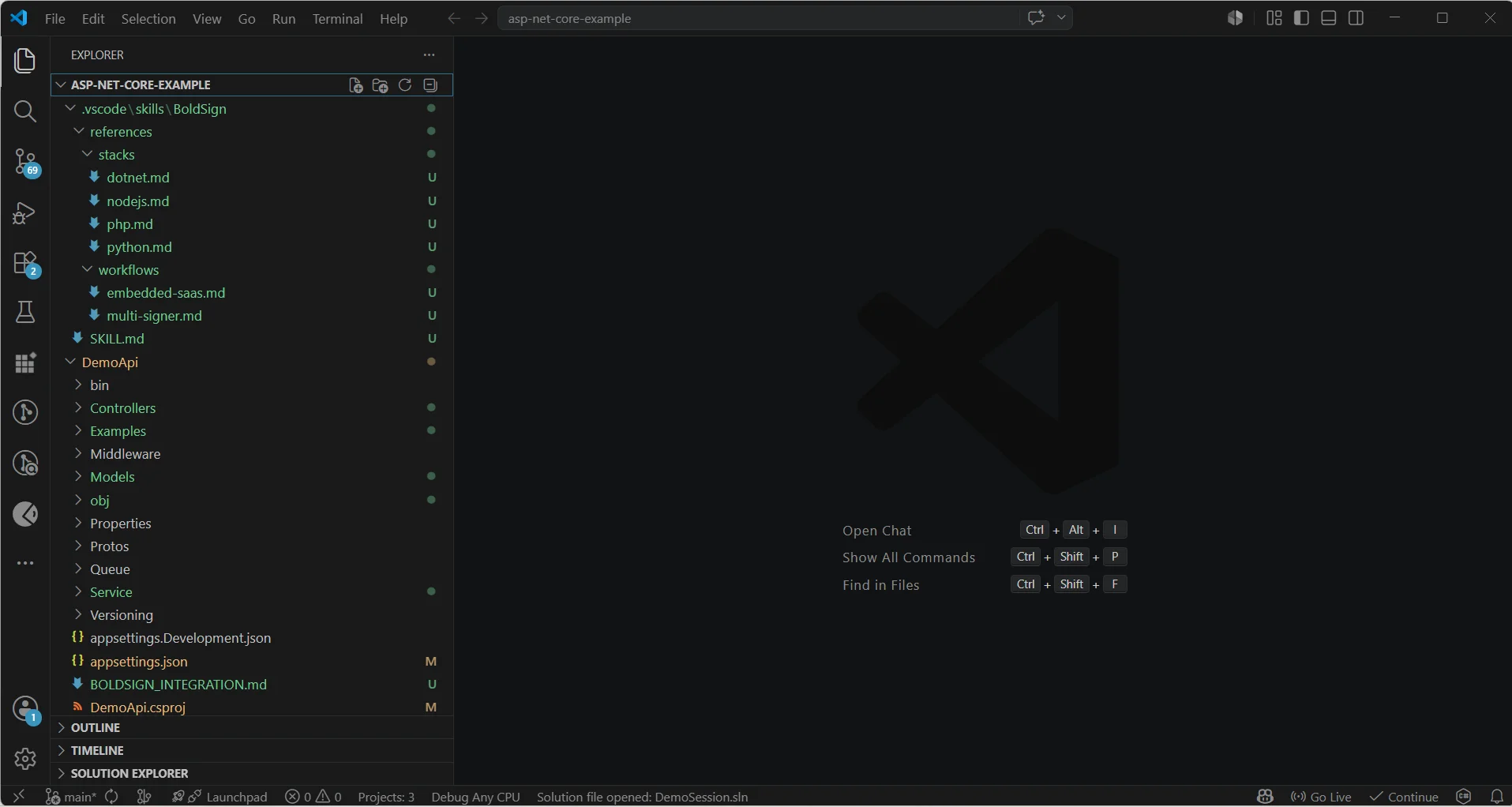
The skill is a BoldSign/ folder with a root SKILL.md file and reference files grouped by stack and workflow.
BoldSign/
├── SKILL.md                          ← Main entry point Claude reads first
├── references/
│   ├── stacks/
│   │   ├── nodejs.md                   ← Node.js / TypeScript SDK
│   │   ├── python.md                   ← Python SDK
│   │   ├── dotnet.md                   ← .NET / C# SDK, our focus today
│   │   └── php.md                      ← PHP SDK
│   └── workflows/
│       ├── embedded-saas.md            ← Embedded send + sign in iframes
│       └── multi-signer.md             ← Sequential, parallel, bulk signing
The root SKILL.md covers the ideas every stack shares. These include sign-in methods, rate limits, sandbox and live accounts, and webhook events. It also covers form field types, text tags and the warning that sending is asynchronous.
The agent then loads the right stack file, such as references/stacks/dotnet.md. A request for a C# webhook handler leaves the Node.js and Python files out, which keeps the agent’s working memory small.
How do you install the BoldSign skill in Visual Studio Code?
You download the skill, place the folder where your agent looks for skills, pick a model and start prompting. Each step takes a minute or two.
Step 1: Get the skill folder
Install the skill with this command, either for your whole machine or for the current project.
npx skills add boldsign/boldsign-esignature-skillsYou can also download or clone the GitHub repository and copy the BoldSign/ folder yourself.
Step 2: Place the folder in your skills folder
Copy the BoldSign/ folder into the skills folder of your workspace. The original setup for this guide used /.vscode/skills/; check your agent’s documentation for the folder it reads.
Step 3: Select your AI model
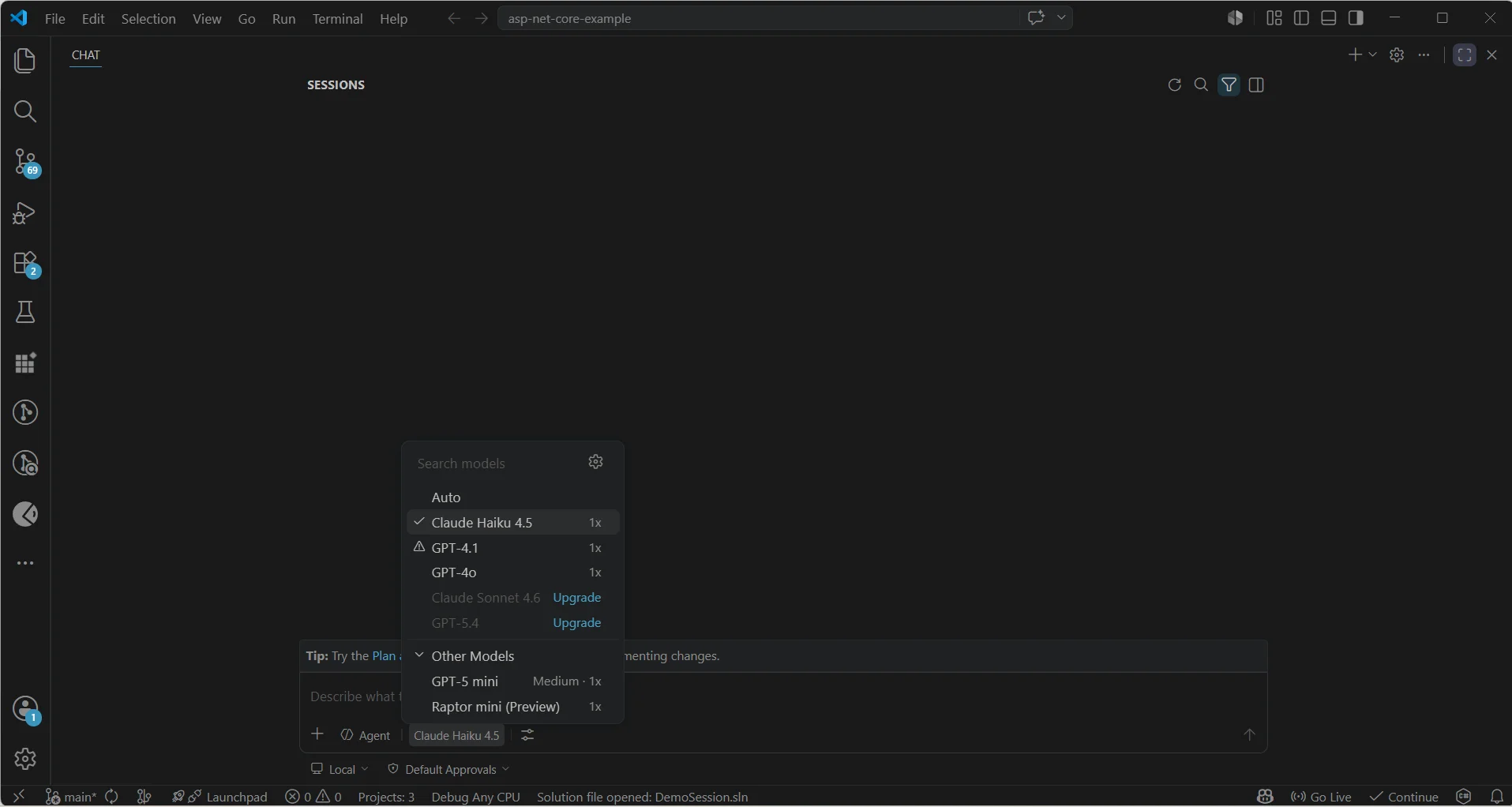
Open the model selector at the bottom of Copilot Chat and choose a Claude model.
Step 4: Start prompting
Ask the agent to add eSignature to your app in plain words. You need no special command once the folder is in place.
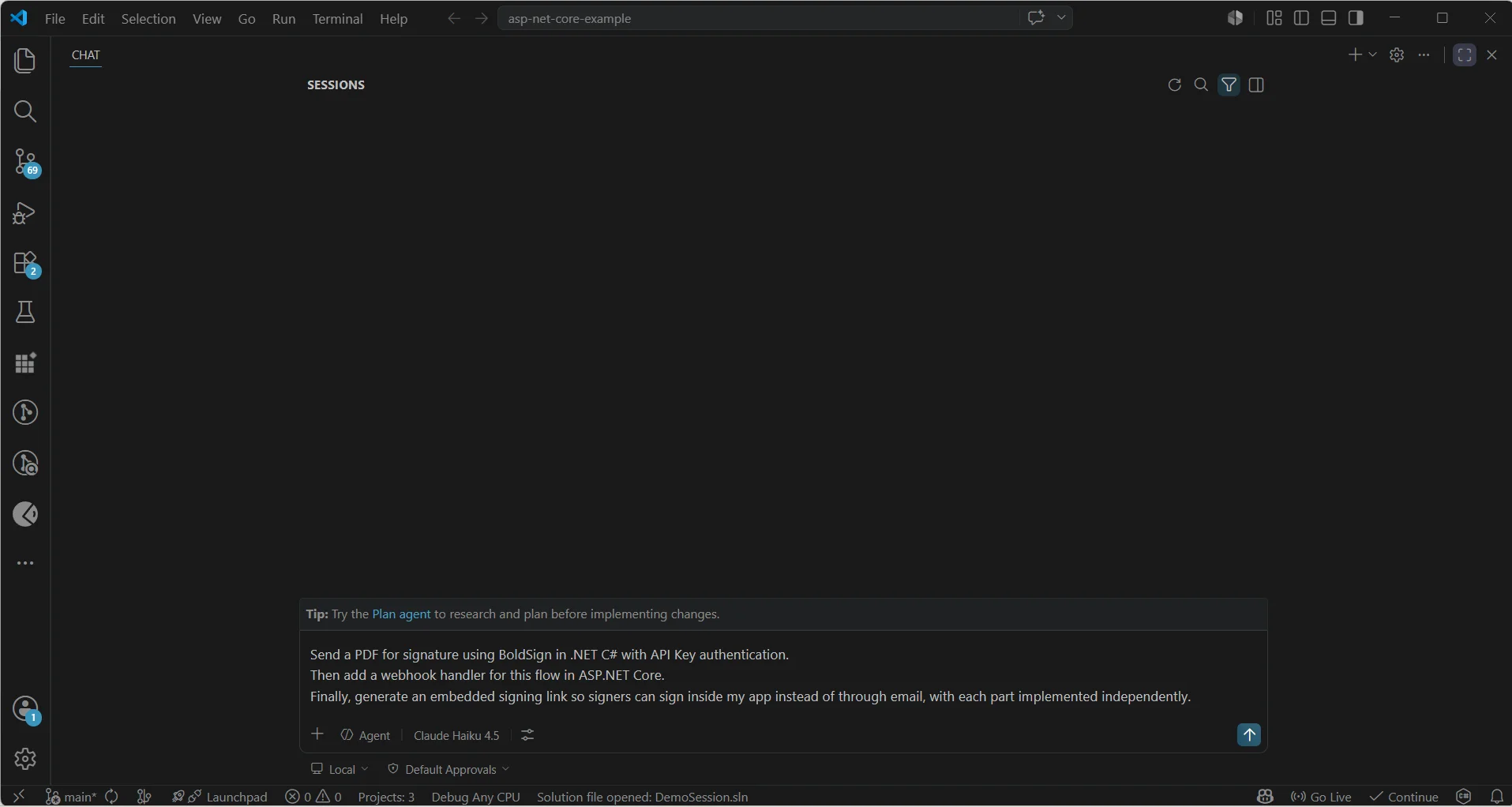
Tip: The skill switches on by itself when your request mentions BoldSign, eSignature, document signing or automating a signing workflow.
Which AI coding agents can use the skill?
Any coding agent that reads skill folders can load the BoldSign skill and write code that matches our software development kits (SDKs). These are some popular ones:
- Syncfusion Code Studio: an AI code editor for building business apps.
- Claude Code: Anthropic’s coding agent for the terminal, editors, desktop and browser.
- Cursor: an AI-first code editor.
- GitHub Copilot coding agent: GitHub’s agent for project tasks and fixes.
- OpenAI Codex: OpenAI’s coding agent.
How do you generate your first eSignature flow with the skill?
Write one prompt that names the stack, the sign-in method and the parts you want. Here is a real prompt for .NET and C#.
"Send a PDF for signature using BoldSign in .NET C# with API Key authentication.
Then add a webhook handler for this flow in ASP.NET Core.
Finally, generate an embedded signing link so signers can sign inside my app instead of through email, with each part implemented independently."
Send a document
The agent pulls in references/stacks/dotnet.md and writes a send method with our NuGet SDK. The code places a signature field, adds the signer and notes that sending finishes in the background.
using BoldSign.Api;
using BoldSign.Model;

public async Task<string> SendDocumentAsync()
{
    var apiClient = new ApiClient(
        "https://api.boldsign.com",
        Environment.GetEnvironmentVariable("BOLDSIGN_API_KEY")
    );
    var documentClient = new DocumentClient(apiClient);

    using var fileStream = File.OpenRead("contract.pdf");
    var documentFile = new DocumentFileStream
    {
        ContentType = "application/pdf",
        FileData    = fileStream,
        FileName    = "contract.pdf"
    };

    // Define where the signature field appears on the PDF
    var bounds = new Rectangle
    { X = 100, Y = 200, Width = 200, Height = 50 };

    var signatureField = new FormField
    {
        FieldType  = FieldType.Signature,
        PageNumber = 1,
        Bounds     = bounds,
        IsRequired = true
    };

    var signer = new DocumentSigner(
        name:         "Alex",
        emailAddress: "alex@example.com",
        signerType:   SignerType.Signer,
        formFields:   new List<FormField> { signatureField }
    );

    var sendRequest = new SendForSign
    {
        Title   = "Service Agreement",
        Message = "Please sign this agreement.",
        Signers = new List<DocumentSigner> { signer },
        Files   = new List<IDocumentFile> { documentFile }
    };

    var result = documentClient.SendDocument(sendRequest);
    Console.WriteLine($"Document ID: {result.DocumentId}");
    // Async: use webhooks to confirm Sent status
    return result.DocumentId;
}
Add a webhook handler
Next comes a controller for ASP.NET Core, Microsoft’s web framework built on Active Server Pages (ASP). It reads the raw request body and checks the X-BoldSign-Signature header before it trusts the event.
The handler then reacts to Completed, Declined and SendFailed events. On Completed, it downloads the signed PDF and audit trail, a step many developers forget.
[ApiController]
[Route("webhooks")]
public class BoldSignWebhookController : ControllerBase
{
    [HttpPost("boldsign")]
    public async Task<IActionResult> HandleWebhook()
    {
        // 1. Read raw body for HMAC verification
        using var reader = new StreamReader(Request.Body);
        var body = await reader.ReadToEndAsync();

        // 2. Verify HMAC SHA-256 signature
        var signature = Request.Headers["X-BoldSign-Signature"].ToString();
        var secret = Environment.GetEnvironmentVariable("BOLDSIGN_WEBHOOK_SECRET");
        try
        {
            WebhookUtility.ValidateSignature(body, signature, secret);
        }
        catch (BoldSignSignatureException)
        {
            return Unauthorized();
        }

        // 3. Parse and route event
        var payload = JsonSerializer.Deserialize<JsonElement>(body);
        var eventType = payload
            .GetProperty("event")
            .GetProperty("eventType").GetString();
        var documentId = payload
            .GetProperty("document")
            .GetProperty("documentId").GetString();

        switch (eventType)
        {
            case "Completed":
                await HandleCompleted(documentId);
                break;
            case "SendFailed":
            // Alert ops: don't silently swallow failures
                break;
            case "Declined":
            // Notify relevant parties
                break;
        }

        return Ok();
    }

    private async Task HandleCompleted(string documentId)
    {
        // Download signed PDF + audit trail
        var pdf = documentClient.DownloadDocument(documentId);
        await File.WriteAllBytesAsync(
            $"signed/{documentId}.pdf", pdf);

        var audit = documentClient.DownloadAuditLog(documentId);
        await File.WriteAllBytesAsync(
            $"signed/{documentId}-audit.pdf", audit);
    }
}
We corrected the signature check in this sample on November 18, 2026. It now uses the SDK’s WebhookUtility.ValidateSignature method. That method reads the timestamp and signature from the header, as our guide to verify webhook events describes.
Embed signing in your app
The last part is a backend method that creates a short-lived signing link. Your frontend loads that link in an <iframe>, so the signer stays in your app.
public string GetEmbeddedSignLink(
    string documentId,
    string signerEmail)
{
    var signLinkExpiry = DateTime.UtcNow.AddHours(24);

    var result = documentClient.GetEmbeddedSignLink(
        documentId:        documentId,
        signerEmail:       signerEmail,
        signLinkValidTill: signLinkExpiry,
        redirectUrl:       "https://yourapp.com/signing-complete"
    );

    return result.SignLink; // load in <iframe>
}
Important: The skill starts every project in the sandbox, our free test account. Sandbox documents carry a watermark and are deleted after 14 days. The skill adds the steps for live use only when you ask for production setup.
What can you ask the skill to build?
Most common signing tasks have a matching prompt. The table shows sample prompts and the skill files the agent reads for each.
| What you want | Example prompt | Skill files used |
|---|---|---|
| Basic document send | “Send a PDF for signature using .NET C#” | SKILL.md and dotnet.md |
| Send from a template | “Send from a BoldSign template in C#” | SKILL.md and dotnet.md |
| Embedded signing | “Embed signing in my ASP.NET app via iframe” | SKILL.md and dotnet.md |
| Embedded sending | “Let users prepare and send docs without leaving my app” | SKILL.md and embedded-saas.md |
| Several signers in order | “Set up a 3-party NDA with sequential signing in C#” | SKILL.md and multi-signer.md |
| Webhook setup | “Add BoldSign webhooks to my ASP.NET Core API” | SKILL.md and dotnet.md |
| Download the signed PDF | “Download the completed document and audit trail in C#” | SKILL.md and dotnet.md |
How do BoldSign webhooks work with the skill?
Our API returns a DocumentId straight away, but the document is not sent yet. The skill pairs every send with a webhook handler, so your app learns the real status.
You will handle these document events most often:
| Event | When it fires | What to do |
|---|---|---|
Sent |
The signature request has gone out | Mark it as sent in your database |
SendFailed |
The request could not be sent | Alert your team and fix the cause |
Signed |
One signer has signed | Track progress; in a set order, we notify the next signer |
Completed |
Every signer has finished | Download the signed PDF and audit trail, then store them |
Declined |
A signer refused to sign | Tell the people involved |
Expired |
The request ran out of time | Clean up and send again if needed |
Your endpoint must answer with 200 OK within 10 seconds. After a failure, we retry the delivery at 1 minute, 15 minutes, 45 minutes, 1 hour, 8 hours and 24 hours. Answer fast and do slow work, such as PDF downloads, in a background task.
Check every event: Verify the
X-BoldSign-Signatureheader before you process a webhook. Our signature uses a hash-based message authentication code (HMAC) with the Secure Hash Algorithm (SHA), SHA-256.
Which mistakes does the skill help you avoid?
A skill carries lessons that a general model has to guess at. These are the mistakes the BoldSign skill steers the agent away from.
Checking status on a timer instead of using webhooks
Repeated status checks use up your rate limit: 50 requests an hour in the sandbox and 2,000 an hour in a live account. The skill tracks status with webhooks instead.
Sending files in the wrong format
File uploads must use multipart/form-data, not JavaScript Object Notation (JSON). The .NET SDK handles this through DocumentFileStream, and the skill makes sure the agent uses it.
Treating a send as finished
The API returns a DocumentId while the document is still processing. The skill adds a warning comment and a webhook handler every time.
Skipping the signature check
An unchecked endpoint accepts fake events from anyone. The skill tells the agent to verify the X-BoldSign-Signature header in every webhook handler.
Writing API keys into the code
Each sample reads secrets from Environment.GetEnvironmentVariable or appsettings.json. Keys stay out of your source files.
Using the wrong regional address
Accounts in the EU, Canada and Australia use their own API address. The skill reminds the agent to set api-eu.boldsign.com, or the right address for your region.
How do embedded sending and signing fit together?
Embedded sending and signing keep both the sender and the signer inside your app. The skill can write the whole flow in three steps.
- The sender prepares the document:
POST /v1/document/createEmbeddedRequestUrlreturns a sendUrl to load in an iframe. - The signer signs in your app:
GET /v1/document/getEmbeddedSignLinkreturns a signLink to load in an iframe. - Webhooks report
Sent,Signedand thenCompleted, when your app downloads the PDF and audit log.
The skill’s embedded-saas.md and dotnet.md files guide the agent through three pieces. These are the embedded request with toolbar and button settings, the signing link with expiry and redirect, and the webhook controller.
Tip: Repeat documents such as contracts, offer letters and non-disclosure agreements (NDAs) suit BoldSign templates. Create the template once with its fields in place, then send it with
TemplateClient.SendUsingTemplate. The skill writes theSendForSignFromTemplatecode with role mapping for you.
Which BoldSign plan do you need for API access?
Every BoldSign plan, including the free one, includes sandbox API access for testing with the skill. Live API calls need the Enterprise API plan, from $30 a month with 40 envelopes, billed yearly.
The Enterprise API plan also includes webhooks and embedded signing. Prices are in USD, as of November 2026, and the pricing page lists every plan.
How do you start building with the BoldSign skill?
Start with a basic send in the sandbox, then add webhooks, embedded signing or templates as your app grows. These links help you take the next step.
- Create a free API sandbox account and generate a sandbox API key.
- Read the BoldSign developer documentation for every endpoint and SDK.
- Ask the BoldSign support portal for help during setup or testing.
Frequently asked questions
What is the BoldSign eSignature skill?
It is a free folder of instructions and reference files for AI coding agents. Your agent reads it before writing BoldSign code, so the code matches our API and SDKs.
Which programming languages does the BoldSign skill cover?
The skill has reference files for Node.js and TypeScript, Python, .NET with C#, and PHP. Your agent loads only the file for the stack you ask about.
Do I need to type a special command to use the skill in Visual Studio Code?
No. Once the folder is in place, you prompt Copilot Chat as usual. The skill switches on when your request mentions BoldSign, eSignature, document signing or a signing workflow.
Can I use the BoldSign skill with Claude Code or Cursor?
Yes. Any agent that reads skill folders can use it. Copy the BoldSign folder into the skills folder that your agent reads.
Are documents signed in the BoldSign sandbox kept?
No. Signed sandbox documents carry a watermark and are deleted 14 days after they are created. Use a live account for real agreements.
How many API calls can I make in the BoldSign sandbox?
The sandbox allows 50 requests an hour per account. A live account allows 2,000 requests an hour, so use webhooks rather than polling for status.
How often does BoldSign retry a failed webhook?
We retry up to six times, from 1 minute to 24 hours after the first failure. Your endpoint must answer with a 200 status code within 10 seconds to count as a success.
Is the BoldSign skill free to use?
Yes. The skill sits in a public GitHub repository that you can download at no cost, and the sandbox it targets is free. Live API calls need a paid API plan.

Gayathri Annamalai
Gayathri Annamalai is a software developer with 1 year of experience at BoldSign. She enjoys continuous learning, strengthening her technical skills, and exploring new tools and technologies. She also has an interest in writing clear and helpful content for developers. Connect with her on LinkedIn.
More posts by Gayathri Annamalai