What Is an AI eSignature Agent and How Do You Build One?
 Meikanda Nayanar
TL;DR: An artificial intelligence (AI) eSignature agent is a chat assistant that sends documents for signature. It asks your client for the details a template needs, fills it in and sends it to sign in the same chat. Your client still signs it, and our AI eSignature agents page has live demos.
A customer gets in touch because their car was damaged in a car park. Your team needs a signed claim form before it can start work on the claim.
Normally, a claims handler notes the details and finds the right form. Then they fill it in and email it out for signature. An agent does that paperwork in the chat, while the customer is still there.
What is an AI eSignature agent?
An AI eSignature agent is a chat assistant that prepares a document and sends it for signature. It never signs; the person it sends to does that.
Think of the front desk at a doctor’s office. The clerk asks your name and date of birth, writes them on the intake form and hands it to you. You sign it, not the clerk.
An agent does the same job in a chat. It uses the Model Context Protocol (MCP), an open standard that lets AI assistants call outside tools. Our BoldSign MCP server gives it tools to read templates and to send and track documents.
What does an AI eSignature agent need to work?
A claims agent needs four tools and one set of written instructions. Each one answers a question the agent has at some step.
| The question | Tool | What it returns |
|---|---|---|
| Which template fits? | list_templates |
The templates in your account, such as “Auto Claim” or “Home Claim” |
| What does the template need? | get_template_properties |
The template’s signer roles and form fields |
| How do I send it? | send_document_from_template |
A document made from the template, filled in and sent to sign |
| Where is it now? | get_document_properties |
The document’s details and status, such as in progress or completed |
| Which answer fills which field? | None: your instructions | Nothing; you write this mapping yourself |
Check the last row first when an agent acts oddly. A missing mapping lets the agent keep running, but it can put answers in the wrong fields.
Why does one client signature take a week?
The form is rarely the slow part; the handoffs around it are. Filling in a claim form takes minutes, but each step waits on a person.
- Monday: the customer explains the problem, and support passes it on.
- Tuesday: the form owner opens the template and retypes the details.
- Wednesday: the form goes out by email.
- Thursday: the customer cannot find the reference number and replies with a question.
- Friday: someone answers, and the form is signed the next Monday.
Nothing in that week was hard. You can hire more staff to shorten each wait, which costs more and keeps every handoff. Or you can build a self-service portal and ask clients to fill in forms on their own.
An agent removes the handoffs instead. It collects the details and sends the form in the same chat.
How to build an AI eSignature agent in three steps
Connect the server, turn on only the tools you need and write the mapping. The third step decides whether the agent works well.
Step 1: Connect the BoldSign MCP server
Our MCP server documentation has setup steps for Claude, ChatGPT and GitHub Copilot. Other MCP clients connect with your region’s endpoint and an API key.
Step 2: Turn on only four tools
Turn on list_templates, get_template_properties, send_document_from_template and get_document_properties. With those four, the agent can pick a template, read its fields, send it and track it. Fewer tools make the agent easier to check and to trust.
Step 3: Write the mapping instructions
The tools hand the agent data, but they do not plan the chat. Your instructions say what to ask and which field each answer fills.
State each mapping in plain words:
“Ask for the client’s full name and map it to claimant_name. Ask for the policy number and map it to policy_number. Only ask for fields marked as required.”
The pattern “ask for X and map it to field Y” turns a field list into a working chat. Without it, the agent may skip a required field or put an answer in the wrong place. Our guide to build an AI agent that sends contracts with BoldSign MCP and the Claude API has the full code.
What does your client see in the chat?
Your client answers a few questions and gets the document to sign in the same conversation. Nobody retypes their answers into a form.
Our AI Warranty Claim Agent demo shows the whole flow. It collects claim details in a chat and sends a warranty claim agreement to sign. No real claim is processed, and the agreement is for demonstration only.
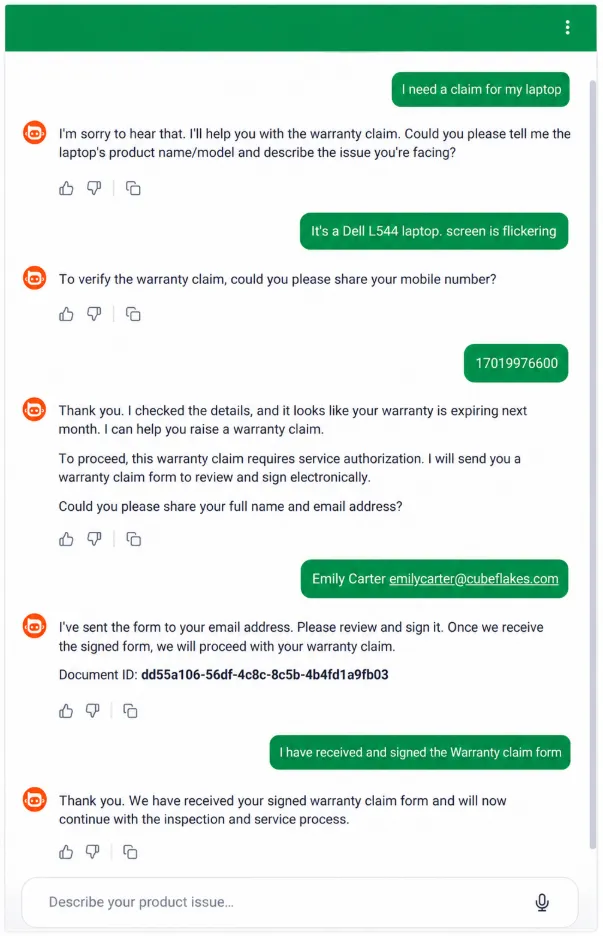
The same tools can serve many workflows. A claims agent and a contract agent differ only in their template and their instructions. MCP sits on top of the BoldSign API and gives agents a standard way to call it.
How to sign with an AI agent: does the agent ever sign?
No. The agent sends the request, and the signer opens it and signs it themselves.
The tools have no signing action. A full set of answers changes nothing about who may sign. Your client reviews the document and adds their own signature, just as with a document a colleague sent.
What will the agent never do?
Two limits keep the agent on task: its tool list and your instructions. The tools set what it can do, and your instructions set what it should do.
In this setup, the agent sends only from templates you have approved. Any action outside its four tools is out of reach.
- It sends documents, but it cannot sign them.
- It reads your templates, but it cannot change them.
- It asks only the questions your instructions approve.
- It can be told to refuse details such as bank account numbers.
Our MCP documentation also advises a human check before an agent sends, cancels or reminds.
Are agent-sent documents legally valid?
Yes, when the signer agrees to sign electronically and signs the document themselves. The agent only prepares and sends it, so the signature is the signer’s own.
In the US, the Electronic Signatures in Global and National Commerce (ESIGN) Act and the Uniform Electronic Transactions Act (UETA) recognize electronic signatures. In the EU, the electronic identification, authentication and trust services (eIDAS) regulation does the same.
The audit trail records the send, each view and the signature, whatever started the request. A cryptographic hash and a tamper-evident seal show any change made after signing. Read more on why eSignature audit trails matter.
Which BoldSign plan do you need, and what does it cost?
You can build and test the whole agent free in the API sandbox. Sending live documents through the MCP server needs the Enterprise API plan.
The Enterprise API plan starts at $30 a month and includes 40 envelopes. Each extra envelope costs $0.75. Prices are in USD, as listed on the API pricing page in November 2026.
How do you start building your own agent?
Start with one template and one test address you control. An agent is one more way to start a signing request, next to our web app and the API.
- Create a free API sandbox account and connect your first template.
- Book a demo to see an agent send from your own templates.
- Read the BoldSign MCP Server documentation for each tool and region endpoint.
Frequently asked questions
What is an AI eSignature agent?
It is a chat assistant that prepares a document and sends it for signature during a conversation. It picks a template, asks for the details that template needs and sends it to the signer.
Can an AI agent sign a document for me?
No. The agent has no tool that signs. It sends the request, and you open the link and add your own signature.
Is an AI eSignature agent the same as an eSignature API?
No. The API is the interface your code calls. The agent is a chat layer on top of it that chooses which call to make and what to ask first.
Does the agent know what questions to ask?
Only when you tell it. The template tool returns a list of fields. Your written instructions say which question fills each field.
How long does it take to build an AI eSignature agent?
Connecting the server takes minutes. Writing and testing the instructions takes longer, and that time grows with the number of fields in your template.
Are documents sent by an AI agent legally binding?
Yes, when the signer agrees to sign electronically and signs the document themselves, as with any electronic signature. The agent only prepares and sends it.
Does an AI agent weaken the audit trail?
No. The audit trail records the send, each view and the signature in the same way, whatever started the request.
What stops the agent from asking for sensitive data?
Your instructions do. The tools set what the agent can do, and your instructions set what it asks for. You can tell it to collect a policy number but refuse bank account numbers.

Meikanda Nayanar
A veteran product manager at BoldSign, boasting a decade-long journey as a .NET developer. With a rich history of leading product development across diverse technologies like Windows Forms, WPF, UWP, Xamarin.Forms, Flutter, and MAUI, Meikandan brings a unique blend of technical expertise and strategic insight to the table. Connect with him on LinkedIn.
More posts by Meikanda Nayanar