Explore BoldSign eSignature APIs in Postman: A Step-by-Step Guide
 Jayavigneshwaran
TL;DR: You can try BoldSign eSignature APIs in Postman by forking our public collection, adding your API key and sending a request. This guide sends a document for signature, checks its status and downloads the signed copy. Our eSignature API page covers what else the API does.
You want to see how an eSignature API behaves before you write any code. Postman lets you send real requests and read the responses in one window.
We keep a ready-made BoldSign collection there. Postman is an app for building and testing APIs, and our collection holds every request already set up for you.
What is the BoldSign Postman collection?
The BoldSign Postman collection is a set of saved API requests, grouped by area such as Documents. You fill in a few values and press Send.
Think of it as a recipe book with the ingredients already measured. You pick a recipe, swap in your own details and cook. You can view the BoldSign page in Postman or open the BoldSign API collection to look around first.
How do you fork the BoldSign API collection?
Select the Run in Postman link below and fork the collection into your workspace. Forking makes your own copy, so you can change it without touching ours.
Start with a free API sandbox account to send test requests. Sandbox documents carry a test watermark and are deleted after 14 days.
How do you get a BoldSign API key?
Generate a key on the API Keys page in the BoldSign web app. Every request uses that key to show who you are.
- Open the API menu in the left pane and select API Key.
- Select Generate API Key, then select Generate Token in the dialog.
- Copy the key and keep it somewhere safe.
You can hold up to four keys, with no more than two in the live or sandbox environment. Our docs explain how to create an API key in more detail.
How do you add your API key to the collection?
Add the key once on the collection, and every request inherits it. Our API in Postman docs page shows the same setup.
- Open the three-dot menu next to the collection name and choose Edit.
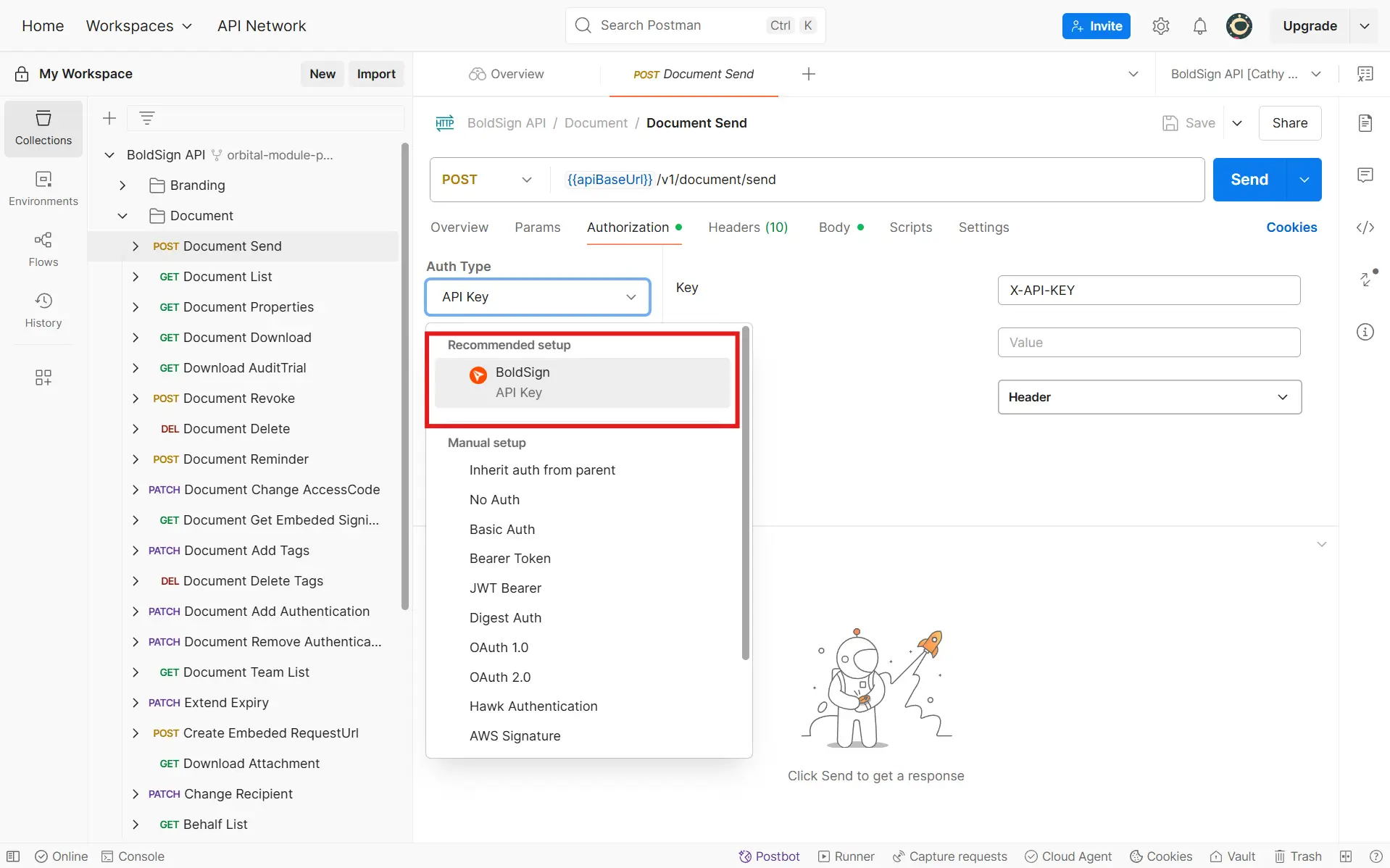
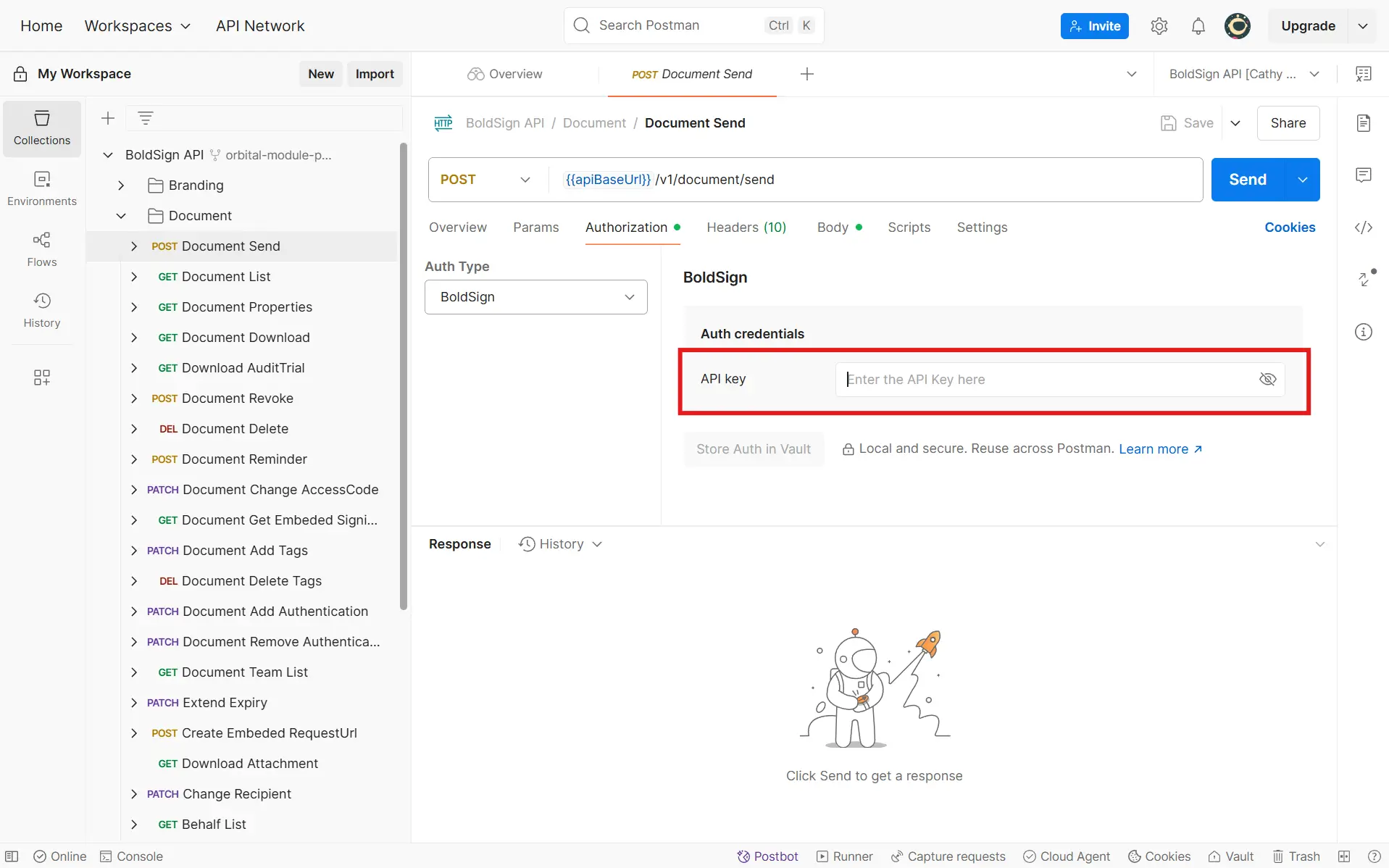
- On the Authorization tab, choose the key type and enter
X-API-KEYas the key. - Paste your token as the value, set Add to as Header, then select Update.
Each request’s Authorization tab should show Inherit auth from parent.
How do you send a document for signature from Postman?
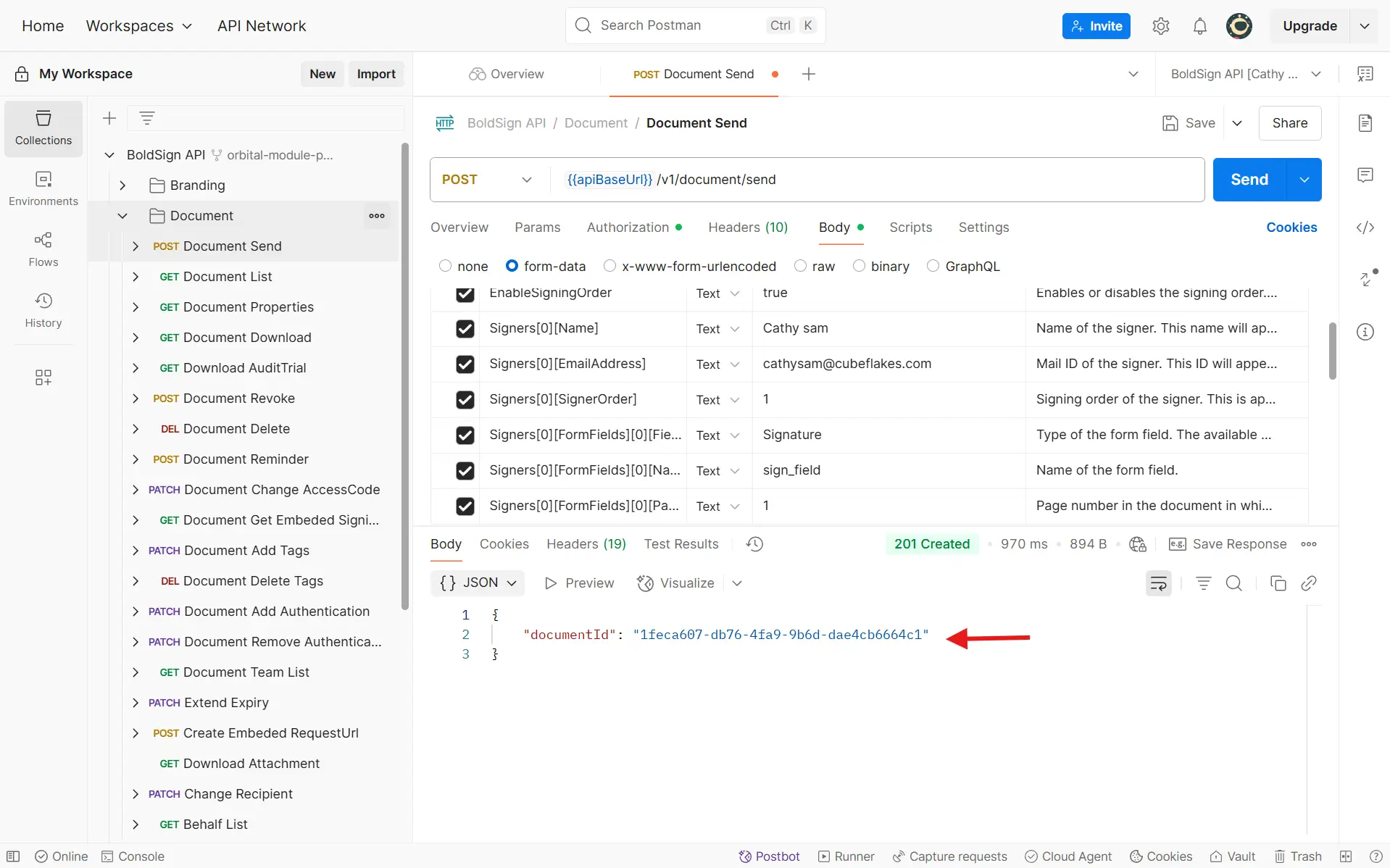
Open the Document Send request in the Documents folder, fill in the body and select Send. The response holds the new document’s ID.
The send document reference lists every field. The required ones are already selected, so you only replace these values:
- Title: the name of the signature request
- Signers[0][Name]: the signer’s name
- Signers[0][EmailAddress]: the signer’s email address
- Files: the file you want signed
A request takes up to 25 files of up to 25 megabytes each. Copy the document ID from the response, since the next requests need it.
Prefer JavaScript Object Notation (JSON) over form data? Our post on JSON support for BoldSign APIs shows how to send the same request as JSON.
How does the signer sign the document?
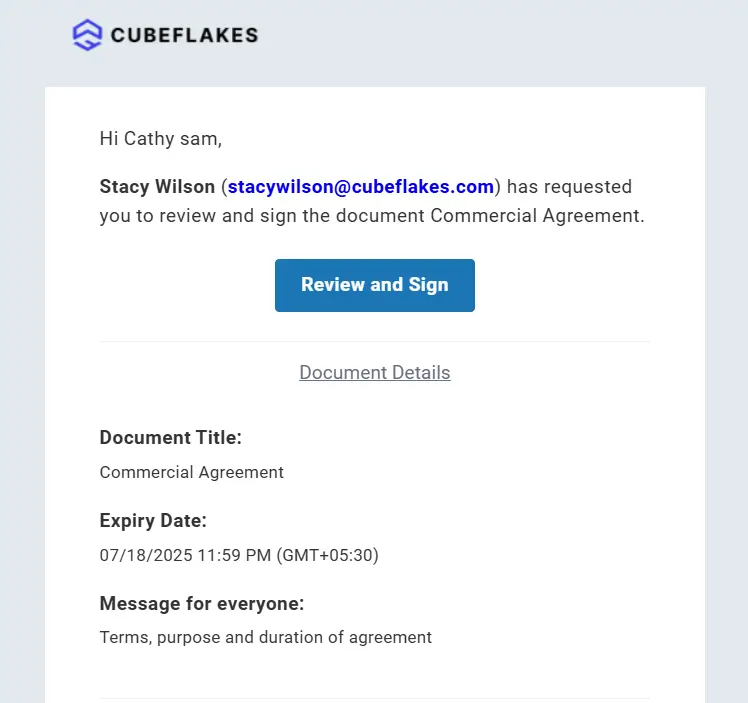
The signer gets an email and selects Review and Sign to open the document. They sign without a BoldSign account.
How do you check the document status?
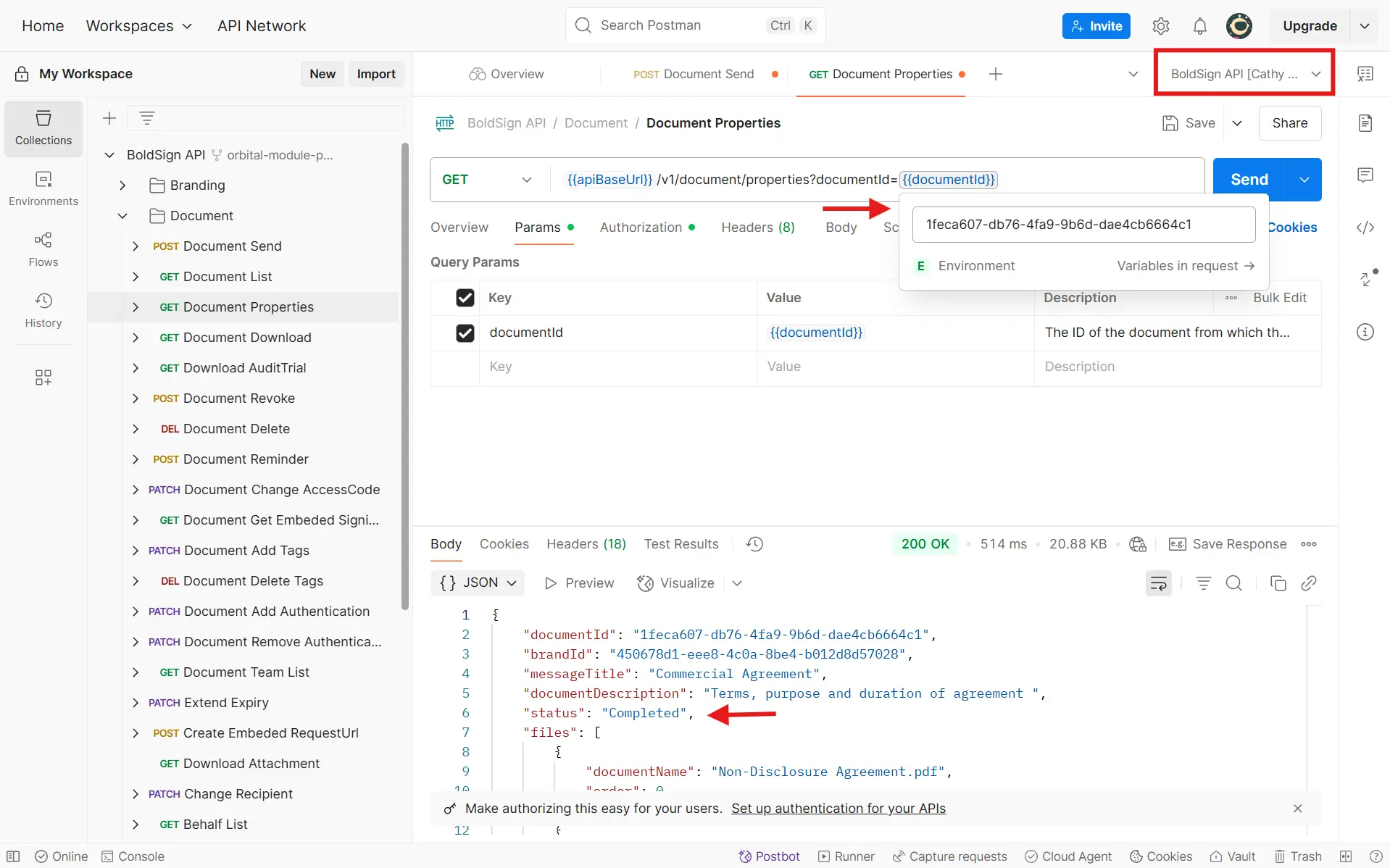
We email you once the signer has signed. You can also check the document status with the Document Properties request in the Documents folder.
Choose the BoldSign API environment, put the copied ID in the documentId variable and select Send. The response shows the full details, and the status Completed means every signer has signed.
How do you download the signed document and audit trail?
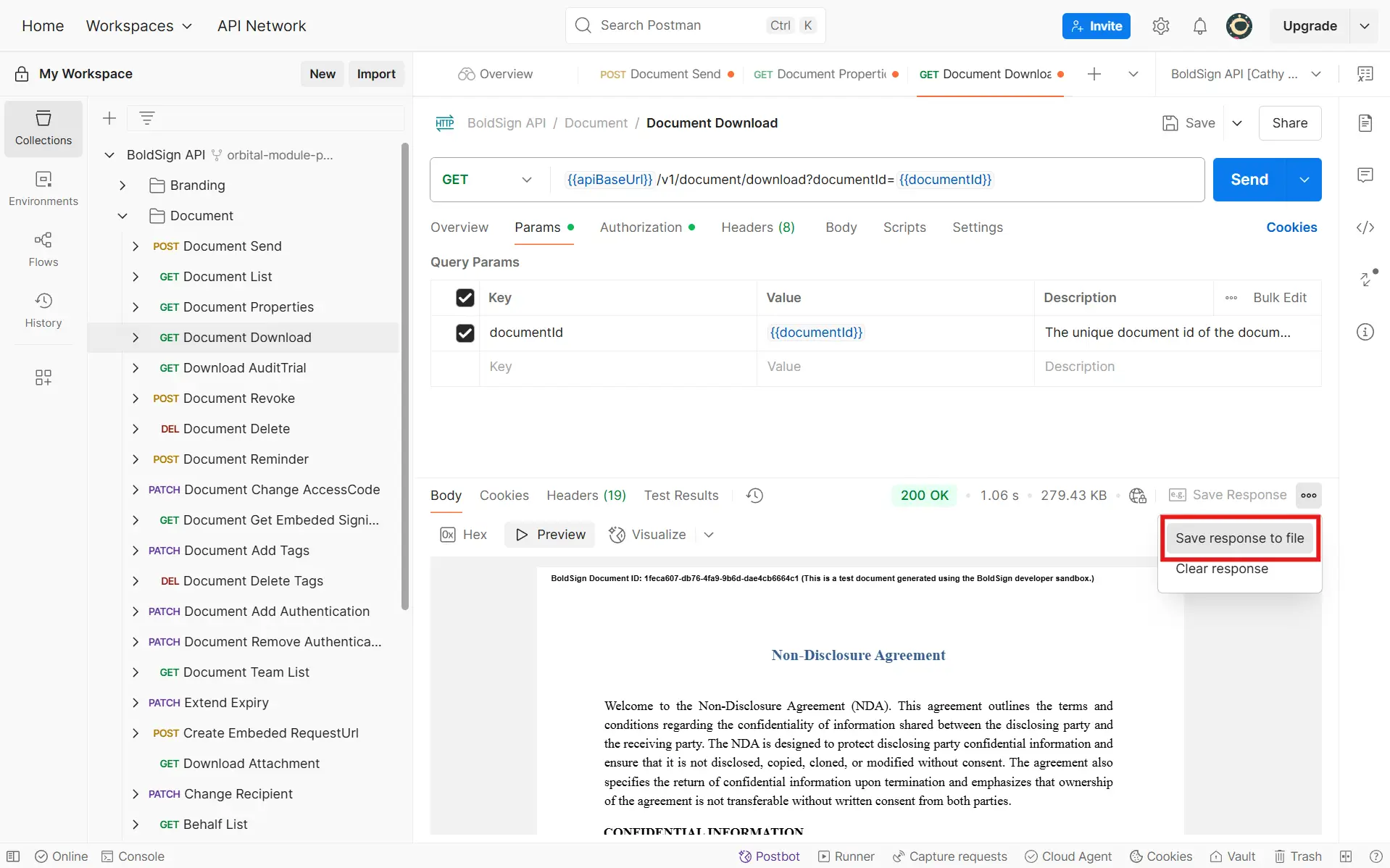
Send the Document Download request for the signed PDF and the Document AuditTrail request for the audit trail. We also email you both files once everyone signs.
The documentId variable is already set, so you only select Send. Select Save response to file in the response menu to keep the file on your computer.
Our guides on downloading a signed document via API and downloading audit trails go further.
Which BoldSign API plan do you need, and what does it cost?
Testing in Postman costs nothing with the free API sandbox. Live requests need the Enterprise API plan, from $30 a month with 40 envelopes, as listed on the BoldSign pricing page in November 2026.
Each extra envelope costs $0.75, and prices are in USD. Your plan must include API access before you can generate a live key.
Where do you go next with the BoldSign API?
Send a few test requests in the sandbox, then read the developer documentation for the rest of the API.
- Create a free API sandbox account and send your first request.
- Book a demo to talk through your integration with our team.
- Ask on our support portal or suggest a feature on our feedback portal.
Frequently asked questions
Is there a BoldSign Postman collection?
Yes. We publish the BoldSign API collection in our public Postman workspace. You fork it into your own workspace and send requests from there.
How do I add my BoldSign API key in Postman?
Edit the collection and open its Authorization tab. Choose the key type, enter the header name from our docs as the key and your token as the value, and add it to the header.
Can I test the BoldSign API in Postman for free?
Yes. A free API sandbox account lets you send test requests. Sandbox documents carry a test watermark and are deleted after 14 days.
How many API keys can I create in BoldSign?
You can hold up to four API keys at once. No more than two of them can be in the same environment, live or sandbox.
Does the signer need a BoldSign account?
No. The signer gets an email with a link and signs from there, without creating an account.
How do I know when a document sent from Postman is signed?
We email you when the signer finishes. You can also call the document properties endpoint with the document ID and look for the status Completed.
Can I save a signed PDF from a Postman response?
Yes. Send the download request, then pick Save response to file in Postman's response menu to keep the PDF on your computer.
Can I send JSON requests to the BoldSign API from Postman?
Yes. The send document endpoint accepts application/json as well as multipart/form-data. Put each file in the Files array as a base64 string.

Jayavigneshwaran
Product Manager at BoldSign with a strong foundation in web and mobile development. Started as a web developer working with React, Angular, TypeScript, and Blazor, then moved into mobile development with Flutter and Dart. Now leading the BoldSign mobile app and support experience, combining technical depth with product strategy to deliver reliable releases and great customer outcomes. Connect with him on LinkedIn.
More posts by Jayavigneshwaran