Gopinath Kannusamy
TL;DR: Since July 2024, the BoldSign API accepts JavaScript Object Notation (JSON) for sending documents, creating templates and building embedded links. You put base64-encoded files and signer details in one JSON body. Our eSignature API page covers what else the API does.
Most web apps already speak JSON. Before this update, four of our endpoints took only multipart/form-data, since each request carries files.
We announced JSON support for those endpoints on July 9, 2024. This post shows a sample request for each one and how to try them in Postman.
What changed with JSON support in the BoldSign API?
Four endpoints now accept application/json as well as multipart/form-data. Both content types still work, so existing code keeps running.
The four endpoints are:
- Send a document for signature
- Create a template
- Create an embedded request URL
- Create an embedded template URL
A JSON body suits apps that build requests from objects in code. You send one structured payload, with no form parts to assemble.
How do you send a document with a JSON request?
Build a JSON body with the document details and post it to /v1/document/send. Files go in the Files array as base64 data uniform resource identifier (URI) strings.
The send document reference lists every field. A basic request holds these parts:
TitleandMessage, which the signer seesFiles, each one a base64 data URI stringSigners, with a name, email address and signer typeFormFieldsfor each signer, such as a signature box
Each file starts with a prefix such as data:application/pdf;base64,. You can pass public links in FileUrls instead, but not both in one request. This sample uses client URL (cURL):
curl -X 'POST' \
  'https://api.boldsign.com/v1/document/send' \
  -H 'accept: application/json' \
  -H 'X-API-KEY: {your API key}' \
  -H 'Content-Type: application/json' \
  -d '{
  "Title": "Sample document",
  "Message": "Please sign this",
  "Files": [
    "data:application/pdf;base64,JVBERi0xLjcKJcfs...",
    "data:application/msword;base64,JVBERi0xLjUNCiW..."
  ],
  "Signers": [
    {
      "name": "Alex",
      "emailAddress": "alex@example.com",
      "signerType": "Signer",
      "formFields": [
        {
          "id": "string",
          "name": "string",
          "fieldType": "Signature",
          "pageNumber": 1,
          "bounds": {
            "x": 50,
            "y": 50,
            "width": 200,
            "height": 30
          },
          "isRequired": true
        }
      ],
      "locale": "EN"
    }
  ]
}'
How do you create an embedded request URL with JSON?
An embedded request URL opens our sending screen inside your app. Your users review the document, change it and send it for signature without leaving your site.
The document stays a draft until the user sends it. You can set the link’s expiry with SendLinkValidTill, up to 180 days. Here is how to create an embedded request URL with JSON:
curl -X POST \
  'https://api.boldsign.com/v1/document/createEmbeddedRequestUrl' \
  -H 'X-API-KEY: {your API key}' \
  -H 'Content-Type: application/json' \
  -d '{
  "Title": "Sent from API Curl",
  "Locale": "EN",
  "Message": "This is document message sent from API Curl",
  "Files": [
    "data:application/pdf;base64,JVBERi0xLjcKJcfs...",
    "data:application/msword;base64,JVBERi0xLjUNCiW..."
  ],
  "Signers": [
    {
      "Name": "Alex",
      "EmailAddress": "alex@example.com",
      "FormFields": [
        {
          "FieldType": "Signature",
          "Id": "Sign",
          "PageNumber": 1,
          "IsRequired": true,
          "Bounds": {
            "X": 50,
            "Y": 50,
            "Width": 200,
            "Height": 30
          }
        }
      ]
    }
  ],
  "ShowToolbar": true,
  "ShowNavigationButtons": true,
  "ShowPreviewButton": true,
  "ShowSendButton": true,
  "ShowSaveButton": true,
  "SendViewOption": "PreparePage",
  "ShowTooltip": false
}'
How do you create a template with JSON?
Post the template details to /v1/template/create with roles in place of named signers. A template is a reusable document with fields already placed.
Templates help when you send the same document again and again, such as an offer letter. Each role gets a default signer and its own form fields:
curl -X 'POST' \
  'https://api.boldsign.com/v1/template/create' \
  -H 'accept: application/json' \
  -H 'X-API-KEY: {your API key}' \
  -H 'Content-Type: application/json' \
  -d '{
  "Title": "Sample template",
  "DocumentTitle": "Sample document",
  "DocumentMessage": "Please sign this",
  "Files": [
    "data:application/pdf;base64,JVBERi0xLjcKJcfs...",
    "data:application/msword;base64,JVBERi0xLjUNCiW..."
  ],
  "Roles": [
    {
      "name": "Hr",
      "index": 1,
      "defaultSignerName": "Alex",
      "defaultSignerEmail": "alex@example.com",
      "signerType": "Signer",
      "formFields": [
        {
          "id": "sign_id",
          "fieldType": "Signature",
          "pageNumber": 1,
          "bounds": {
            "x": 50,
            "y": 100,
            "width": 200,
            "height": 30
          },
          "isRequired": true
        }
      ]
    }
  ]
}'
How do you create an embedded template URL with JSON?
An embedded template URL lets your users build their own templates inside your app. You post the details to /v1/template/createEmbeddedTemplateUrl and get a link back.
The template stays a draft until the user finishes it from that link. Here is how to create an embedded template with JSON:
curl --location --request POST \
  'https://api.boldsign.com/v1/template/createEmbeddedTemplateUrl' \
  --header 'X-API-KEY: {your API key}' \
  --header 'Content-Type: application/json' \
  --data-raw '{
  "Title": "Sample template",
  "DocumentTitle": "Sample document",
  "DocumentMessage": "Please sign this",
  "Files": [
    "data:application/pdf;base64,JVBERi0xLjcKJcfs...",
    "data:application/msword;base64,JVBERi0xLjUNCiW..."
  ],
  "Roles": [
    {
      "name": "Manager",
      "index": 1,
      "defaultSignerName": "Alex",
      "defaultSignerEmail": "alex@example.com",
      "signerType": "Signer",
      "formFields": [
        {
          "id": "sign_id",
          "fieldType": "Signature",
          "pageNumber": 1,
          "bounds": {
            "x": 50,
            "y": 100,
            "width": 200,
            "height": 30
          },
          "isRequired": true
        }
      ]
    }
  ],
  "ShowToolbar": true,
  "ShowSaveButton": true,
  "ShowSendButton": true,
  "ShowPreviewButton": true,
  "ShowNavigationButtons": true,
  "ShowTooltip": false,
  "ViewOption": "PreparePage"
}'
How do you test BoldSign JSON requests in Postman?
Fork our public Postman collection, add your API key and send a request. Our guide to BoldSign APIs in Postman goes into more depth.
Add the collection
- Download Postman and install it.
- Open the BoldSign Postman collection and choose to fork it.
- Give the fork a label, pick your workspace and confirm.
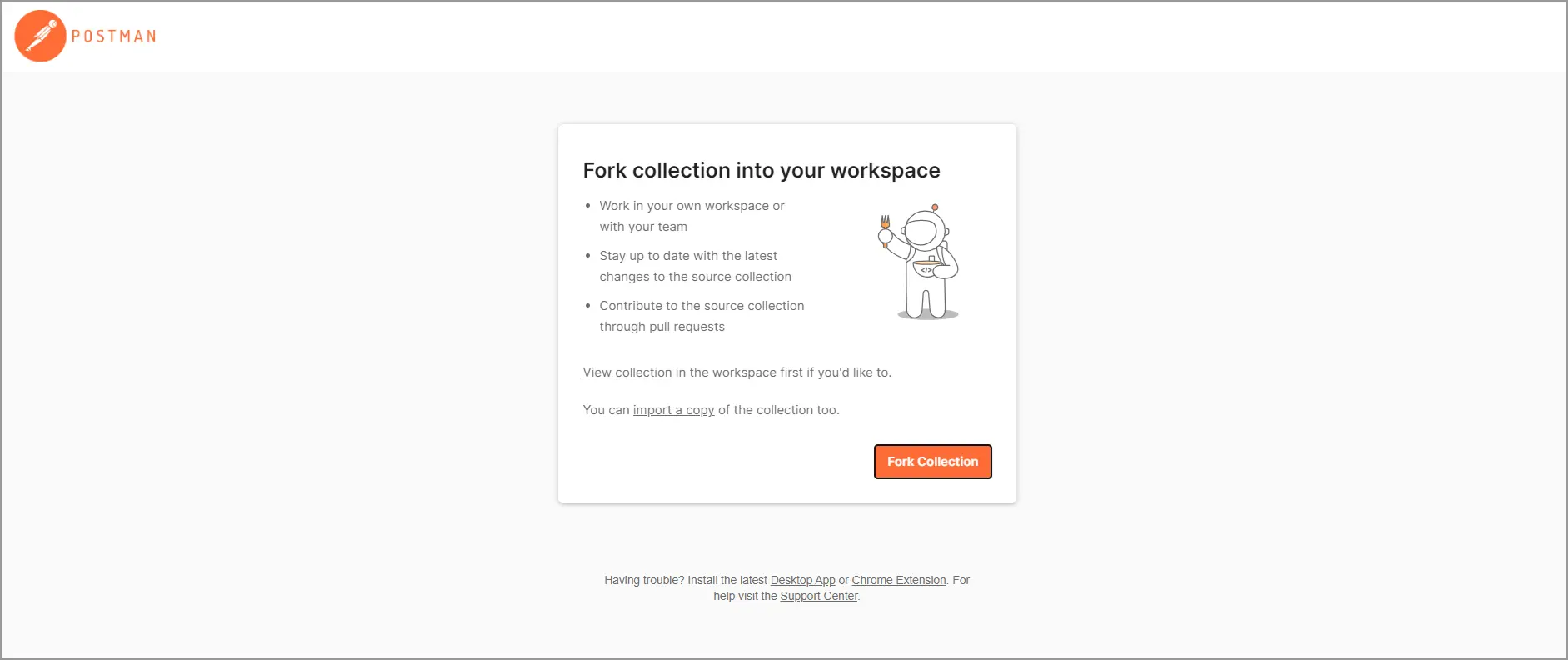
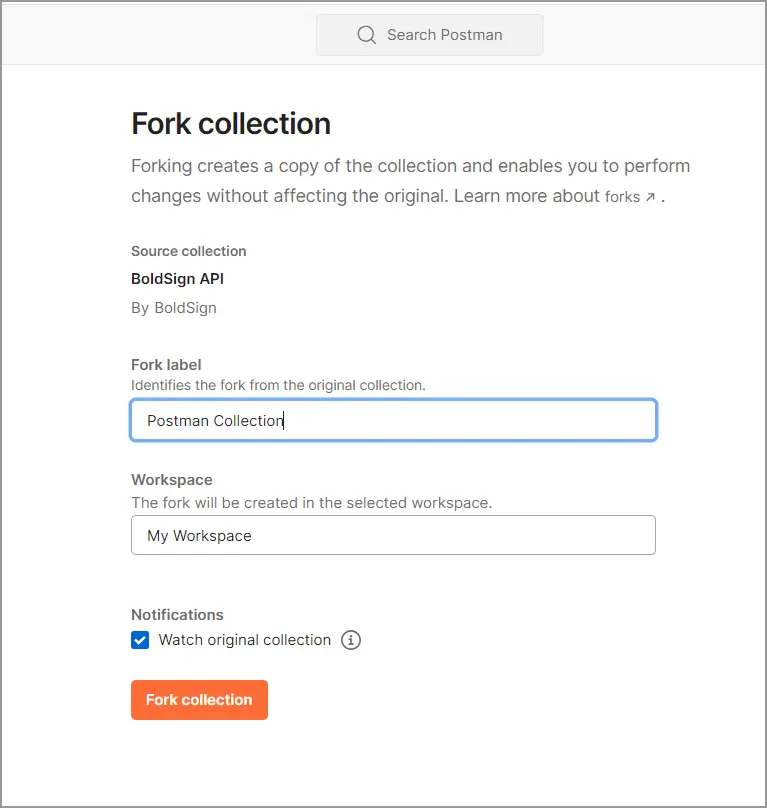
The API in Postman page in our docs shows the same setup.
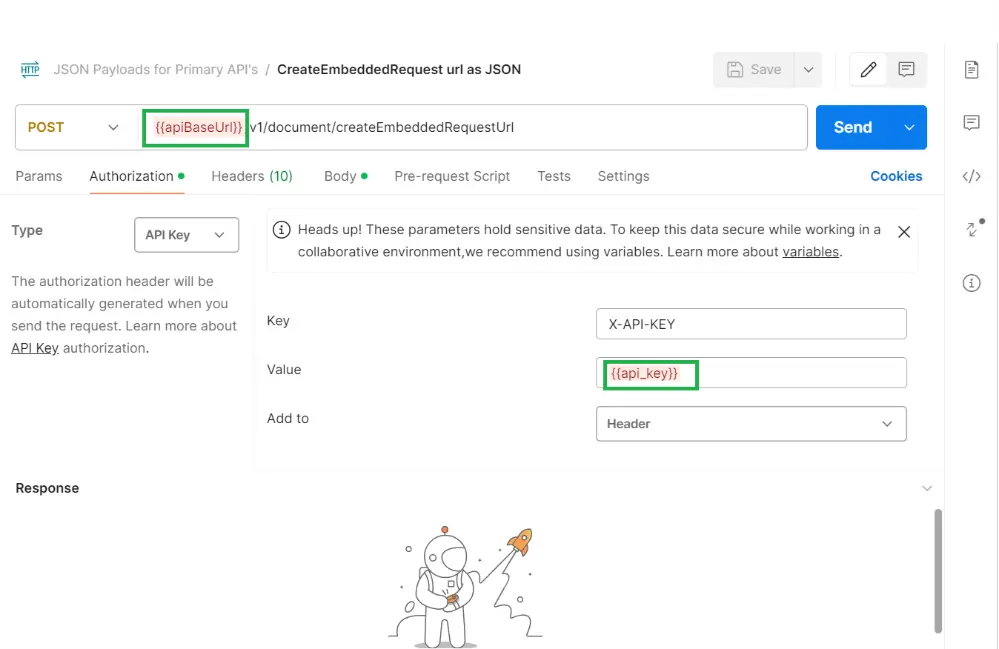
Set the base URL and API key
Replace {{apiBaseUrl}} with the base URL for your account’s region:
- US:
https://api.boldsign.com - Europe:
https://api-eu.boldsign.com - Canada:
https://api-ca.boldsign.com - Australia:
https://api-au.boldsign.com
Then open the collection’s Authorization tab and add your key as X-API-KEY in the header. Our docs explain how to generate an API key.
Send a JSON request
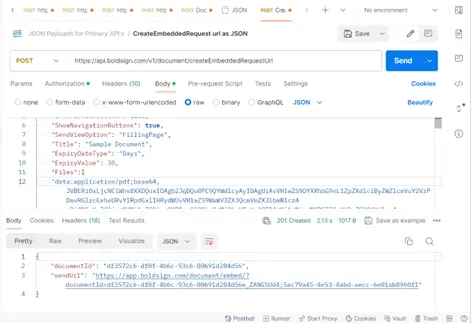
- Open a request, such as the embedded request URL, and go to the Body tab.
- Add each file to
Filesasdata:application/{{fileType}};base64,{{base64-encoded-file-content}}. - Add your signers with their names, email addresses and form fields.
- Select Send and check the response for the document ID or link.
Which BoldSign API plan do you need, and what does it cost?
Live API requests need the Enterprise API plan, from $30 a month with 40 envelopes, as listed on the BoldSign pricing page in November 2026. Each extra envelope costs $0.75, and prices are in USD.
The plan includes embedded requesting and embedded signing. To build and test first, use the free sandbox. It needs no credit card, and its documents carry a test watermark and are deleted after 14 days.
Where do you go next with JSON requests in the BoldSign API?
Try a JSON request against your own documents in the sandbox, then move to live keys when you are ready.
- Create a free API sandbox account and send your first JSON request.
- Book a demo to talk through your integration with our team.
- Ask a question on our support portal when a request does not behave as you expect.
Frequently asked questions
Does the BoldSign API accept JSON requests?
Yes. The send document, create template, embedded request and embedded template endpoints accept application/json as well as multipart/form-data.
How do I attach a file in a JSON request?
Encode the file in base64 and add it to the Files array as a string such as data:application/pdf;base64, followed by the content. You can pass public links in FileUrls instead.
Can I use Files and FileUrls in the same request?
No. Each request takes one or the other. Pick FileUrls when your files already sit at a public address.
Which file types can I send through the API?
Our docs list PDF, image and Office files, with PDF preferred. A request takes up to 25 files, and each document can be up to 25 megabytes.
When did BoldSign add JSON support to its API?
We announced JSON support for these endpoints in July 2024. Before that, they took multipart/form-data only, because the requests carry files.
Is multipart/form-data still supported?
Yes. Both content types work on these endpoints, so code you wrote for multipart/form-data keeps running.
How long does an embedded request link stay valid?
You set the expiry with SendLinkValidTill. The longest you can set is 180 days.
Can I test the BoldSign API for free?
Yes. The free sandbox needs no credit card. Its documents carry a test watermark and are deleted after 14 days.

Gopinath Kannusamy
Gopinath is a passionate software developer with 2 years of experience at BoldSign. He is an avid writer and enjoys sharing his insights on technology and development. In his free time, he enjoys exploring new technologies and learning new things. Connect with him on LinkedIn.
More posts by Gopinath Kannusamy