Construction Contract Basics: What to Include and How to Get It Approved
 Stephen Otieno Okoth
TL;DR: A construction contract should set out the parties, scope, schedule, payment terms and change rules, so everyone knows what to do when plans shift. A short approval workflow then takes it from draft to signed copy. Our eSignature templates let you reuse the same contract on every job.
A general contractor wins a kitchen remodel. The owner wants work to start Monday, the electrician needs a subcontract, and the architect still has notes on the drawings.
The contract sets out each party’s work, the payment dates, and the steps to follow when the job changes. This guide covers what to put in it, where agreements break down, and how to get one approved without chasing signatures.
Why does a solid construction contract matter?
A construction contract sets the rules before work starts, so disagreements have an answer on paper. Without one, each party relies on their own memory of the deal.
A good contract gives every party something they can point to:
- Owners know what they are paying for and when.
- Contractors know the scope they priced and how they get paid for extra work.
- Subcontractors and suppliers know their tasks, dates and payment terms.
- Everyone knows the steps for changes, delays and disputes.
Think of it as the rulebook for a pickup game agreed before the first throw. Nobody argues about the score later, because everyone agreed the rules while they were calm.
What are the most common problems in construction agreements?
Most problems come from vague terms, unsigned changes and approvals nobody can prove. The table shows the common ones and the contract term that prevents each.
| Problem | What goes wrong | What the contract should say |
|---|---|---|
| Delays | Weather, labor or supply gaps push dates back | Delay allowances and notice deadlines |
| Payment disputes | Parties disagree on amounts or timing | Milestones, retainage and approval conditions |
| Unclear wording | Scope or duties read two ways | Standard language and clear drawing references |
| Scope creep | Extra work starts without a price | A formal change order process |
| Quality disputes | Nobody owns a workmanship issue | Named duties and traceable sign-offs |
Our guide to construction project delays looks at how slow paperwork adds to late schedules.
What should every construction contract include?
Every construction contract needs the same core sections, whatever the job size. Each one answers a question someone will ask halfway through the project.
Who are the parties?
List the full legal name, address and role of each party. That usually means the owner, the general contractor, and any subcontractors, architects or engineers who sign.
What is the scope of work?
The scope says what you will build and to what standard. Include these points:
- The tasks and deliverables for each stage
- The materials and workmanship standards
- References to drawings, specifications and addenda
- Exclusions and assumptions, so extra work is easy to spot
What is the schedule?
State the start date and the substantial completion date. Add milestone dates, the notice a party must give for a delay, and what happens when dates slip.
How and when is payment made?
Payment terms keep cash moving and stop arguments about amounts. Spell out these items:
- The total contract value or pricing method
- The progress payment schedule and invoicing rules
- The retainage percentage and when the owner releases it
- Late payment terms
How are changes approved?
Define what counts as a change, what paperwork it needs, and who signs it. State how cost and schedule changes are worked out.
Our post on why unsigned change orders are unpaid work shows what a missing signature costs. For changes to the main agreement itself, see our guide to contract amendment vs addendum.
Who is responsible, and what is covered?
Assign duties to the owner, the contractor and each subcontractor. Add the workmanship and materials warranties, and the insurance each party must carry.
How are disputes settled?
Set the path for a disagreement before one starts. Name the method, such as mediation, arbitration or court, plus the governing law and the notice steps.
How can the contract end early?
Say when a party can end the contract, for cause or for convenience. Include notice periods, time to fix a problem, and how final payment and materials are handled.
What about events nobody controls?
A force majeure clause covers events such as storms or floods that no party can control. State how such events affect the schedule, and what safety reporting each party owes.
Which documents form the contract?
List every document that is part of the agreement. That includes general and special conditions, drawings, specifications, schedules and signed change orders.
What are the steps in a construction contract approval workflow?
A typical approval workflow has five steps, from first draft to stored copy. Give each step an owner, so the contract keeps moving from one inbox to the next.
- Draft: start from your standard contract, then add the project’s scope, schedule and payment terms.
- Review: share the draft with legal, the project manager and anyone who must approve it.
- Negotiate: settle the feedback, then confirm pricing, milestones, retainage and change rules.
- Sign: send the final version to each signer in the agreed order.
- Store: send everyone the signed copy and keep it with its signing record.
Approvals break down most often when two versions circulate at once. Send a single final version for signature, and keep the drafts out of the signing step.
How do you run the approval workflow with BoldSign?
We cover the last three steps of the workflow: the final version, the signatures and the record. Here is how each part works.
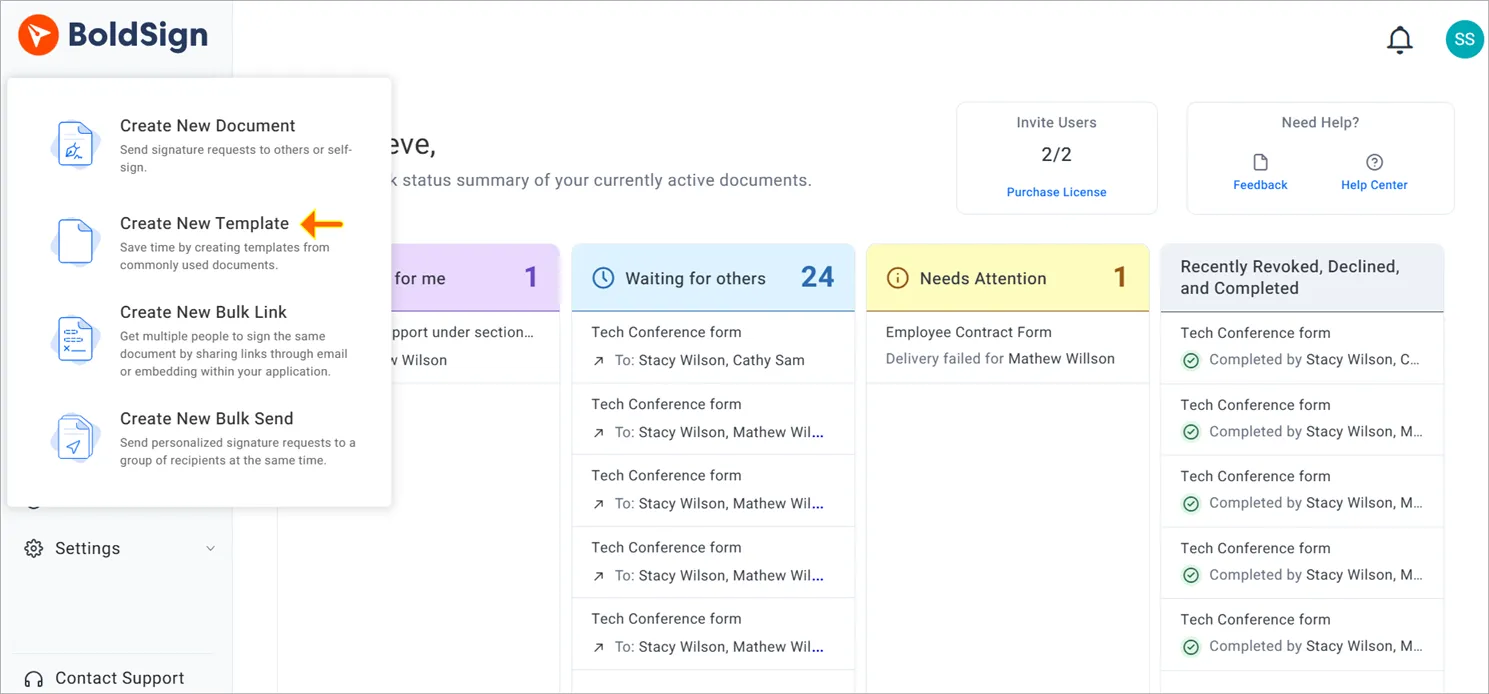
Start from a template
Save your standard construction contract as a template, with a role for each party. Each new project then starts with the same fields and wording. Our guide on how to save time with templates walks through creating one.
Set the signing order
Turn on Signing order and drag the recipients into the order you agreed. We send the contract to the first signer only, and the next signer gets it after them.
Our help article on how to allow signers to sign in a particular order shows each step. For contracts with many parties, read our guide to multi-party approvals in construction contracts.
Keep the contract moving
Turn on automatic reminders when you create the document. We then remind signers at the interval you choose until they sign. You can also select Remind now on the document’s overview page, once a day.
The dashboard shows each document under a status, such as Waiting for others or Completed. Our help articles on how to manage auto reminders and how to track a document’s status cover both.
Keep the signed record
Once every signer has signed, you can download the audit trail. It records each signer’s name, email address, IP (internet protocol) address and device, plus the time of every action.
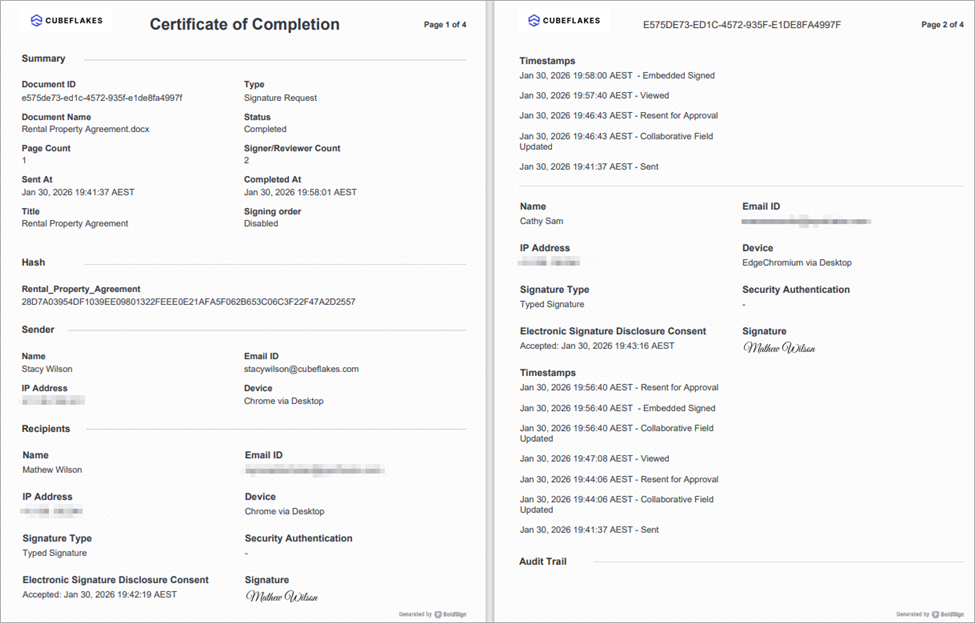
Our help article on what the audit trail contains lists every field. To use it as proof of approvals, see our guide to a construction audit trail.
Are electronic signatures valid on construction contracts?
In the US, electronic signatures are valid on most construction contracts. The federal Electronic Signatures in Global and National Commerce (ESIGN) Act says a contract cannot be denied legal effect only because it was signed electronically.
Some documents carry extra rules, such as lien notices or filings with a county office. Check the local rules for those, or ask a construction lawyer.
Which BoldSign plan do you need, and what does it cost?
Every plan lets you send contracts for signature, with signing order, reminders and an audit trail. The plans differ mostly in how many templates and envelopes you get.
The free Essential plan includes 2 templates and 25 envelopes a month. The Growth plan costs $5 per user a month, with 10 templates and 50 envelopes a month. The Business plan costs $15 per user a month, with unlimited templates and envelopes.
The Premium plan costs $99 a month for unlimited users, with unlimited templates and 250 envelopes a month. All prices are in USD and billed yearly, as listed on our pricing page in November 2026.
How do you get your next construction contract signed?
Pick the contract you send most often and run it through the five steps once. These links help you start:
- Start a 30-day free trial and send a test contract with signing order on.
- Request a demo to see a construction approval workflow set up for your team.
- Read how eSignatures speed up construction approvals across a whole project.
Frequently asked questions
What should a construction contract include?
A construction contract names the parties, the scope of work, the schedule and the payment terms. It also sets out how changes are approved, how disputes are settled and how the contract can end.
Why do construction projects end up in disputes?
Most disputes start with vague scope, changes that nobody signed, or late payments. Clear contract terms and a signed record of each approval leave less room to argue.
What are the steps in a construction contract approval workflow?
A typical workflow has five steps: draft the contract, review it, negotiate changes, collect signatures in order, then send and store the signed copy.
Who should sign a construction contract first?
Follow the chain of approval your parties agree on, so each person signs after the people they depend on. Set it as the signing order before you send, so nobody signs out of turn.
Are electronic signatures legal on construction contracts?
Yes, when the signers agree to sign electronically and the record is kept. In the US, the federal Electronic Signatures in Global and National Commerce (ESIGN) Act gives these contracts the same legal effect as paper. Check local rules for notices such as lien filings.
What is retainage in a construction contract?
Retainage is a share of each payment that the owner holds back until the work is finished. The contract should state the percentage and the conditions for releasing it.
What do I do when the project scope changes after signing?
Use the change order process in your contract. Write down the change, its cost and its effect on the schedule, and get it signed before the work starts.
Can I reuse the same construction contract on every project?
Yes. Save your standard contract as a template with a role for each party, then fill in the project details each time. The scope and price still need checking on every job.

Stephen Otieno Okoth
Stephen is a Technical Assistant at BoldSign who specializes in creating clear documentation and engaging videos. He combines his technical skills and creativity to deliver user-focused solutions. Connect with him on LinkedIn.
More posts by Stephen Otieno Okoth