Embedded Signing API for In-App Contract Signing: What to Look For
 Evans Omondi Otieno
TL;DR: An embedded signing API lets your users sign a contract inside your own app, with no trip to a separate signing site. Your server creates the document, asks for a signing link and loads it in your app. Our embedded signing page shows how it fits into a product.
You want users to sign a contract without leaving your product. It sounds like a sprint of work: create a document, add a signer and show a signing page.
Then the details arrive. Multiple signers, signing order, mobile screens, audit trails and legal questions all need answers. This guide explains how in-app contract signing works and what to look for in an API before you build.
What is embedded signing?
Embedded signing places the signature step inside your own app or website. The signer reads and signs the contract on a page that sits within your product.
Think of paying at your table instead of walking to the till. The waiter brings the card reader to you. Embedded signing brings the contract to the signer in the same way.
The opposite is redirect signing, where the signer leaves your app for an email link. Our guide to embedded signing vs redirect signing compares the two.
Why does in-app contract signing get complicated so quickly?
The steps look short, but each one hides work. Teams often plan two weeks and find that edge cases stretch the project much longer.
The build takes longer than planned
Sample code runs well in a sandbox. The work starts when you connect it to your real product.
- Webhook setup and retries need testing against your own servers.
- Signer checks must fit your existing user accounts.
- Error handling needs custom logic for expired links and abandoned sessions.
- The signing page must work on small mobile screens.
The signing page feels like a different product
Your app looks consistent until the user selects a signing button. A page with other colors and another flow makes people hesitate, and hesitation slows deals.
Legal and record questions appear
Contracts raise questions that a normal feature never does. Can you prove who signed?
Is there a record of every step? Does the signature hold up under the law where your users live?
Simple use cases grow
Version one is one signer and one document. Then customers ask for a vendor and a legal team to both sign, in a set order.
Others want to reuse the same nondisclosure agreement (NDA) from a template. Each request means more workflow code to write and maintain.
How does an embedded signing API work?
Your server talks to the API, and your front end shows the signing page. The signer does not need an account with us.
- Your server creates a document, or sends one from a template, with each signer’s name and email.
- Your app confirms the signer’s identity in its own login or check.
- Your server asks for an embedded signing link for that signer.
- Your app loads the link in a frame, a popup window or a new tab.
- A webhook tells your server when the document is signed, and your app saves the signed copy.
You can turn off our signing request emails when signers only sign in your app.
How do you get an embedded signing link with BoldSign?
One call to the BoldSign API returns an embedded signing link for a signer. The email must match a signer on the document you created.
var apiClient = new ApiClient("https://api.boldsign.com", "Your_API_Key");

var documentClient = new DocumentClient(apiClient);

var embeddedSigningLink = documentClient.GetEmbeddedSignLink("YOUR_DOCUMENT_ID", "alex@example.com");
var signLink = embeddedSigningLink.SignLink;
Load the link inside your app, often in an iframe. You can also set how long the link stays valid and a page to send the signer to afterwards.
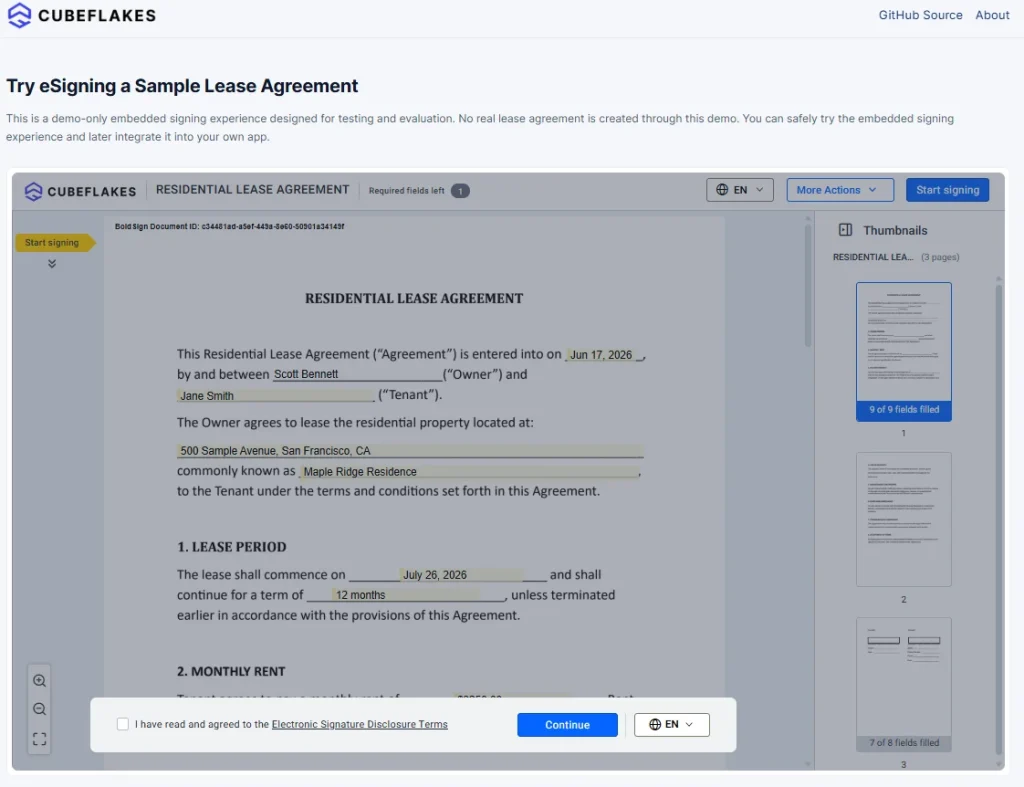
Try embedded signing in a complete lease signing flow, a sample rental app we built.
What should you look for in an embedded signing API?
Look for an API that covers the whole contract, from first draft to signed copy, without custom workflow code. Then check the records, the brand options and the developer tools.
Signing and workflow features
- An embedded signing link that works in a website and a mobile app
- Multiple signers and a signing order set in the request
- Templates you can fill from your own data
- Webhooks for each signing event, with retries
Our webhook endpoint rules ask your server to reply within 10 seconds. Failed deliveries are retried for about a day, as our webhook guide explains.
Records and security
Every document gets an audit log of each action, with user details, IP (internet protocol) address and timestamp. We completed a System and Organization Controls (SOC) SOC 2 Type 2 audit, and our security page lists these standards:
- General Data Protection Regulation (GDPR)
- Electronic Signatures in Global and National Commerce (ESIGN) Act in the US
- Electronic identification and trust services (eIDAS) rules in the EU
Brand and developer tools
A brand puts your logo and colors on our emails and your logo on the signing page. Official software development kits (SDKs) save you from writing raw web requests:
Our post on a representational state transfer (REST) API vs an SDK helps you pick one.
Are contracts signed in your app legally binding?
Yes, when the signer agrees to sign electronically, you confirm who they are, and the record is kept. In the US, the ESIGN Act backs this for most contracts.
Section 7001 of the US Code says a contract cannot be denied legal effect only because an electronic signature was used.
Our developer guide asks your app to verify each signer before it shows the link. Keep your own record of that check, since our audit trail notes the embedded link. Our electronic signature legality page lists the rules by country.
What should you test in a sandbox before going live?
Test every path a real signer can take, including the ones that fail. A short checklist keeps the launch calm.
- Signer login and access to the right document
- Link expiry, and what happens when an old link is reused
- Multi-signer routing and signing order
- Webhook delivery, retries and duplicate events
- Download of the signed PDF and the audit trail
Also check how your app handles a signer who closes the page halfway through.
Which plan do you need, and what does it cost?
Live embedded signing, webhooks, custom branding and production API access come with the Enterprise API plan. It starts at $30 a month with 40 envelopes, and each extra envelope costs $0.75.
Prices are in USD. You can build and test first with a free API sandbox account, with no credit card. Sandbox documents carry a “This is a test document” watermark and are deleted after 14 days.
Our pricing page lists every plan.
How do you start adding embedded signing to your app?
Start in the sandbox with one signer and one document, then add signers, templates and webhooks. Our enhanced embedded signing guide shows the settings you can change on the signing page.
- Create a free API sandbox account and request your first signing link.
- Book a demo to talk through your app’s signing flow.
- Read why webhooks matter in an API integration before you go live.
Frequently asked questions
What is embedded eSignature, and how is it different from email-based signing?
Embedded eSignature lets users review and sign inside your app or website, in a frame, popup window or new tab. Email-based signing sends the signer out of your product to an email invitation and link.
Who is responsible for signer authentication in embedded signing?
Your app is. You confirm who the signer is before you show the signing link, and you keep your own record of that check. Our audit trail notes that the document was signed through an embedded link.
What should an audit trail include for embedded signing?
It should list each action by each recipient with a timestamp. Our audit trail PDF also holds a hash of the signed document, so you can tell whether the file changed later.
How do embedded signing links work?
Your server asks our API for a signing link for one signer on a sent document. You load the link in your app, and you can set how long it stays valid and where the signer lands afterwards.
Do I need webhooks, or can I just poll the API?
Webhooks are usually the better choice, because we tell your server the moment something changes. Polling can work at low volume, but it adds load and delay as your app grows.
Can embedded signing carry my own brand inside my product?
Yes. A brand sets your logo and colors on our emails and your logo on the signing page, through our branding options. Your app picks the brand when it sends each document.
Are contracts signed through embedded signing legally binding?
Yes, when the signer agrees to sign electronically, your app confirms who they are, and the signed record is kept. Rules differ by country and document type, so check the ones that apply to you.
Can I test embedded signing for free?
Yes. A free API sandbox account gives you full API access with no credit card. Sandbox documents carry a test watermark and are deleted after 14 days.

Evans Omondi Otieno
Evans Omondi Otieno is a customer support representative and writer at BoldSign, specializing in creating clear, insightful content to help users navigate eSignature solutions. As a blog author, Evans writes well-researched articles that simplify technical concepts, helping businesses and professionals understand how to use BoldSign effectively. With expertise in technical support and content creation, he ensures users have a seamless experience and gain valuable knowledge from his articles.
More posts by Evans Omondi Otieno