How Embedded Lease Signing Speeds Up Leases in Real Estate Apps
 Evans Omondi Otieno
TL;DR: Embedded lease signing lets a tenant sign a lease inside your rental app, with no trip to a separate signing site. Your app builds the lease from a template, fills in the tenant and property details, and opens the signing page in place. Our embedded signing page shows how it fits into your product.
A tenant finds a home in your app, fills in their details and is ready to commit. Then the app emails them a PDF, and someone on your team retypes the same details into a lease. The tenant waits, and you chase the signature.
This guide shows how to keep that whole step inside your app. We walk through the Cubeflakes Realtor Lease Demo, a sample rental app built on the BoldSign API.
What is embedded lease signing?
Embedded lease signing places the signature step inside your own app. The tenant reads, fills and signs the lease on a page that looks like the rest of your product.
Think of paying for dinner at your table instead of walking to the till. The waiter brings the card reader to you. Embedded signing brings the lease to the tenant in the same way.
The opposite is redirect signing, where the tenant leaves your app for an email link. Our guide to embedded signing vs redirect signing compares the two.
How can real estate teams manage lease agreements with electronic signatures?
Real estate teams can send every lease from one approved template and let the app fill in the details. The tenant signs in the app, and the app files the signed copy on its own.
That workflow rests on five pieces:
- A lease template with the approved wording and the fields to fill
- Prefilled fields for tenant, landlord, property, rent and dates
- A signing page that opens inside your app
- Status updates sent to your server as people sign
- A download of the signed lease for your records
The result is one record from start to finish, with no retyping. Our page on electronic signatures for real estate covers the wider use.
How do I screen a tenant and route the lease for e-signature in one workflow?
Run your screening step first, then send the lease from a template the moment the tenant passes. The tenant signs on the next screen, with no email in between.
- The tenant picks a property and fills in the rental form in your app.
- Your app runs its own tenant screening and records the result.
- Once the tenant passes, your app sends the lease from a template with the fields filled in.
- Your app requests an embedded signing link and opens it for the tenant.
- A webhook tells your app when the lease is complete, and the app saves the signed copy.
Your app must confirm who the signer is before it shows the signing link. Our developer guide says you keep your own record of that check. Our post on tenant identity verification for lease signing covers the options.
How does the Cubeflakes Realtor Lease Demo work?
The Cubeflakes Realtor Lease Demo is a sample rental app that runs the full lease flow. You can click through it from property search to a signed lease.
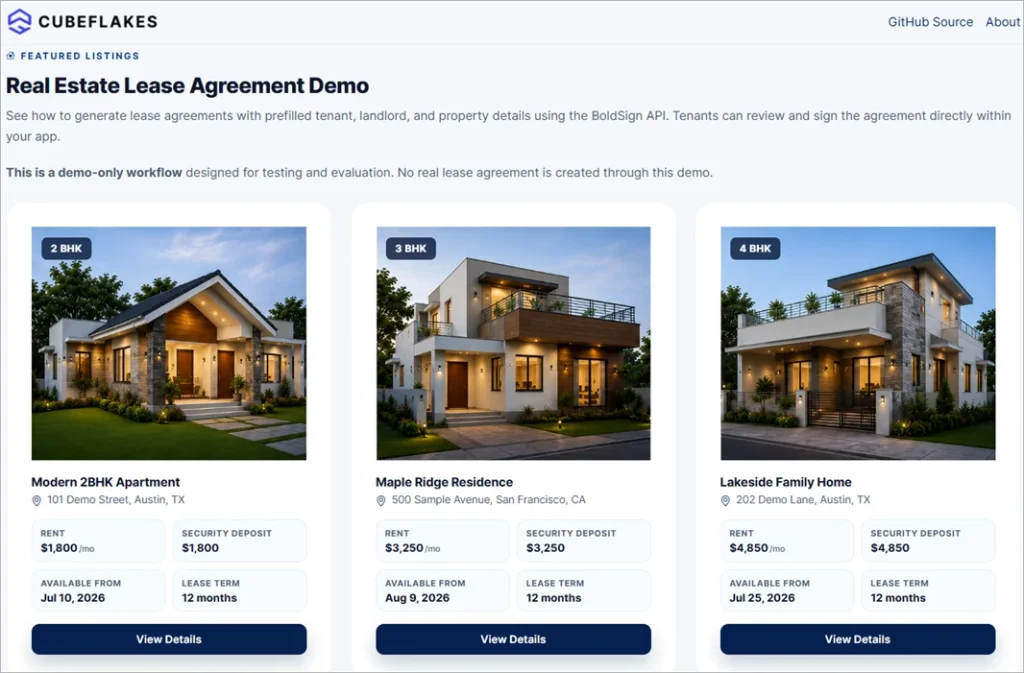
Property listings
The tenant browses rental homes and compares the rent, security deposit, lease term and move-in date.
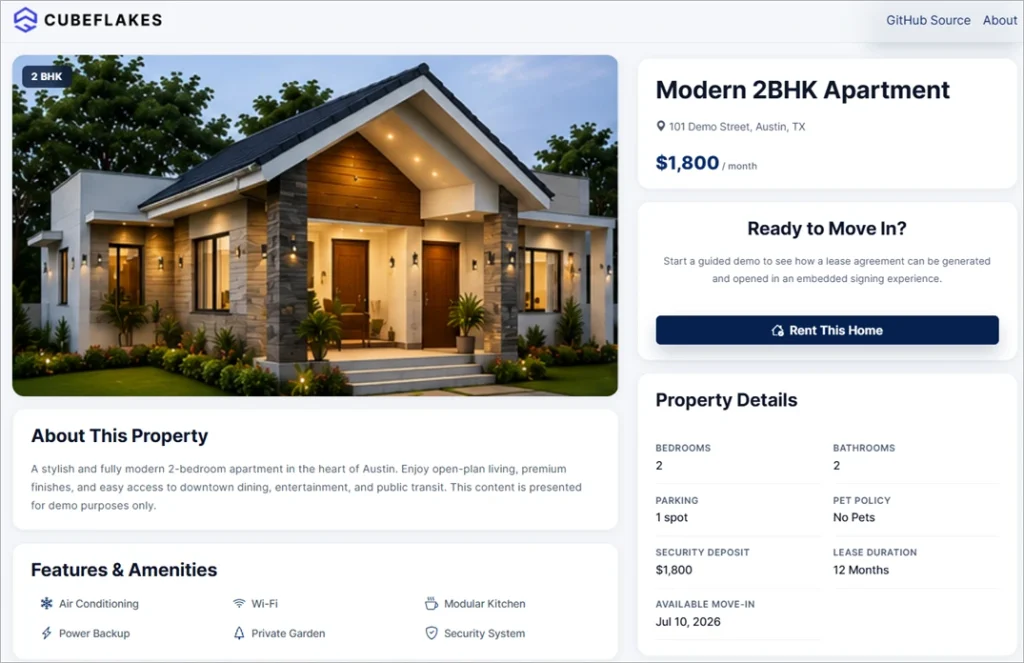
Property details
Picking a home opens a details page with more facts and a button to start renting.
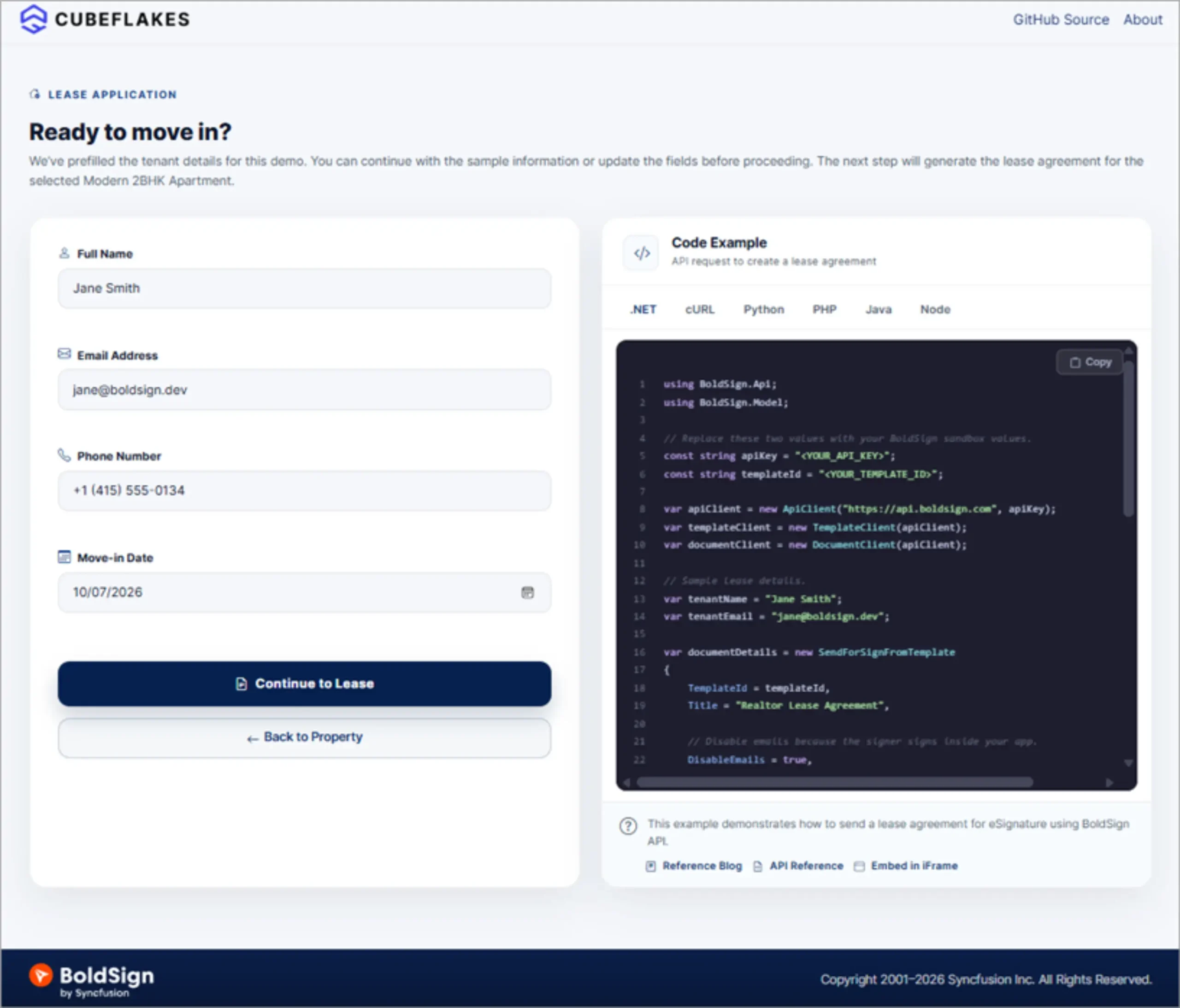
Tenant details and lease creation
The tenant fills in the details the lease needs. The app then sends the lease from a template with the tenant, landlord and property fields filled in.
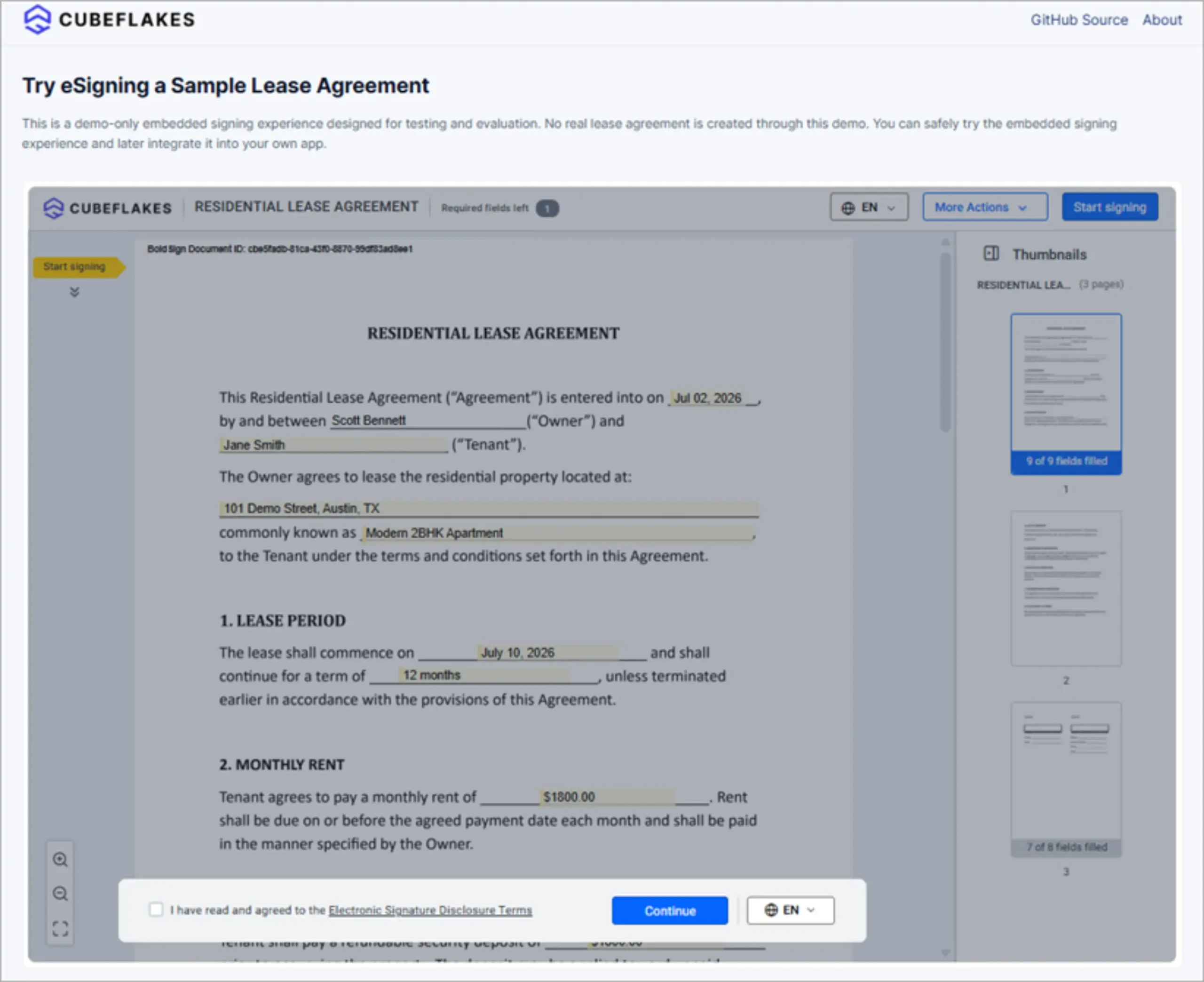
Signing inside the app
The lease opens inside the demo app, and the tenant signs it there.
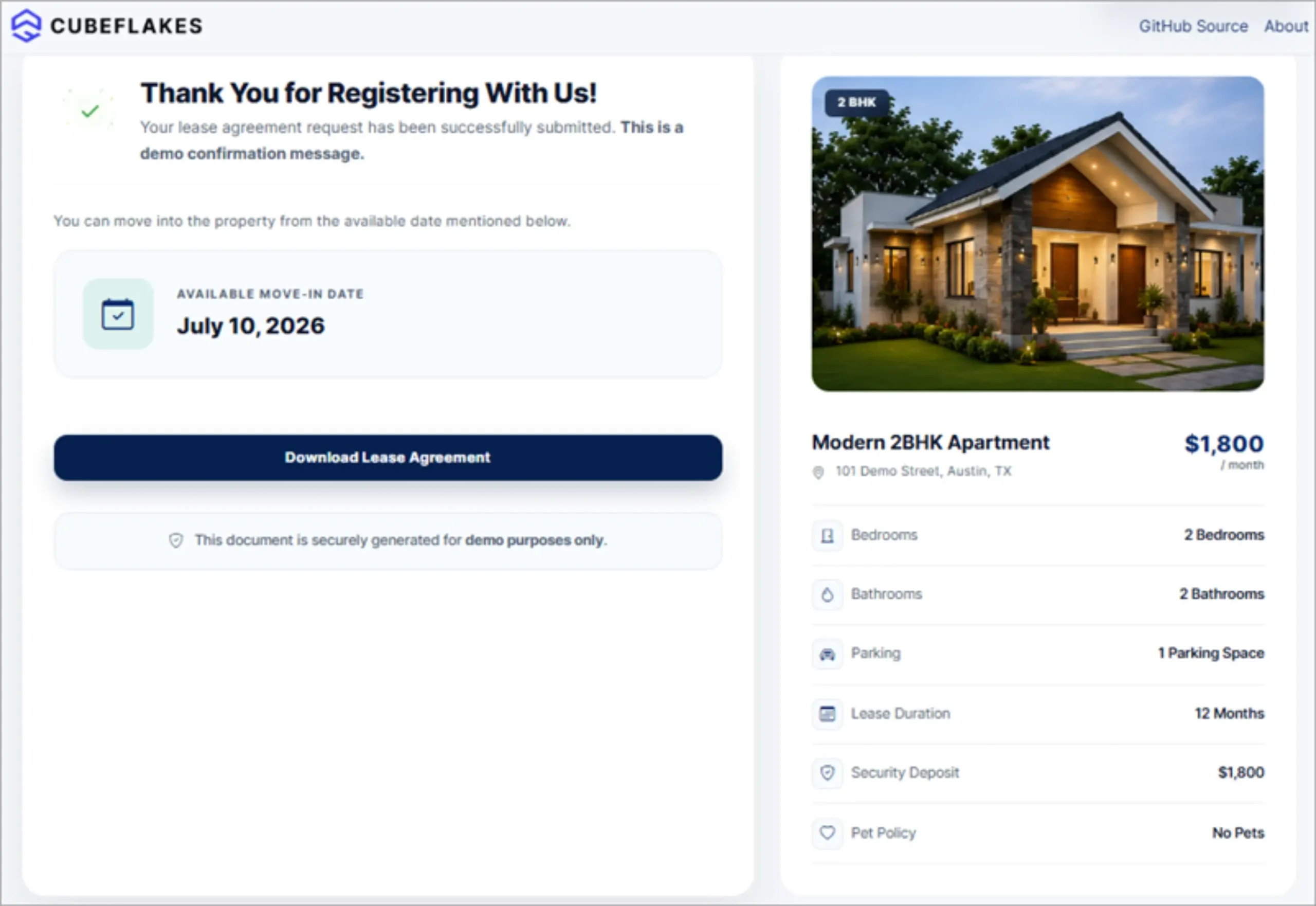
Signed lease download
After signing, the tenant can download the completed lease from the app.
You can watch the demo walkthrough on Vimeo or read the demo source code on GitHub.
Which BoldSign API features does the demo use?
The demo uses six features of the BoldSign API, each with its own developer guide. Our getting started guide explains how to get an API key.
Templates
A template holds the lease wording and its fields, so every lease starts from the same approved copy.
Send documents from templates with prefilled form fields
Your app calls the template send endpoint with a value for each field. Each field is matched by the ID you gave it in the template.
Embedded signing
Your app asks for a signing link for one signer on a sent document. The link opens in a frame, a popup window or a new tab, and can send the signer to a page you choose afterwards.
You can set how long the link stays valid. You can also turn off our signing emails, so the tenant signs only in your app.
Custom branding
A brand sets the logo, background color and button colors on our emails and the signing page. Your app picks the brand when it sends each lease.
Webhooks
We post an event to your server when a lease is sent, viewed, signed, completed, declined or expired. Your app can update its records without checking by hand.
The Completed event is the natural trigger for resident onboarding automation after lease signing software marks the lease done. Your app might then send a welcome email or set up the rent account.
Signed document download
Your app downloads the signed PDF and stores it with the tenant record.
What else can you sign with the same workflow?
The same template, embed and webhook pattern works for other property documents. Only the template changes.
- Rental applications and move-in checklists
- Lease renewals and addendums
- Pet and parking agreements
- Property disclosure forms
- Vendor and maintenance contracts
Our guide to lease renewals and amendments shows one of these in more detail.
What should you look for in digital workflow platforms offering embedded signing experiences?
Look for an API that covers each step of the lease, from template to signed copy. Then check the developer tools and the test account.
- Embedded signing that works in a website and a mobile app
- Templates with fields you can fill from your own data
- Webhooks for each signing event
- An audit trail for every signed document
- A free sandbox and clear documentation
Our post on how to enhance the embedded document signing experience with BoldSign shows the settings you can change on the signing page.
Are electronic signatures valid for lease agreements?
Yes, when the tenant agrees to sign electronically and the signed record is kept. In the US, the Electronic Signatures in Global and National Commerce (ESIGN) Act backs this for most leases.
Section 7001 of the US Code says a contract cannot be denied legal effect only because an electronic signature was used.
Most states add their own version of the Uniform Electronic Transactions Act (UETA). Rules differ by country, state and document type, so check them with a lawyer for your market. Our electronic signature legality page lists the rules by country.
Which plan do you need, and what does it cost?
Live embedded signing, webhooks and production API access come with the Enterprise API plan. It starts at $30 a month with 40 envelopes, and each extra envelope costs $0.75.
Prices are in USD. You can build and test first with a free API sandbox account. Sandbox documents carry a “This is a test document” watermark and are deleted after 14 days.
Our pricing page lists every plan.
How do you start building your own lease signing workflow?
Start in the sandbox, follow the demo code, and ask us when you get stuck. You can also contact our support team at any point.
- Create a free API sandbox account and send your first test lease.
- Book a personalized demo to talk through your rental app.
- Try the Cubeflakes Realtor Lease Demo to see the full flow.
Frequently asked questions
What is embedded lease signing?
Embedded lease signing puts the lease signing step inside your own rental app or website. The tenant reads and signs the lease on your page and never opens a separate signing site.
Can I sign leases using a property management mobile app?
Yes, when the app supports embedded signing. Our embedded signing link opens inside a website or mobile app, in a frame, a popup window or a new tab.
Which platform allows electronic signatures on leases?
Any eSignature platform that meets the Electronic Signatures in Global and National Commerce (ESIGN) Act and state electronic signature rules can handle most leases. BoldSign lets you send leases from the web app or build signing into your own app with our API.
Can lease details be filled in before the tenant signs?
Yes. Your app sends the lease from a template and passes a value for each field, such as the tenant name, rent and move-in date.
How does my app know when a lease is fully signed?
A webhook tells it. We post a Completed event to your server when every signer has finished, so your app can move the tenant to the next step.
Can the signing page carry my company's logo and colors?
Yes. A brand sets the logo, background color and button colors on emails and on the signing page. Your app picks the brand when it sends the lease.
Are electronic signatures legal on a residential lease?
Yes, when the signer agrees to sign electronically and the signed record is kept. The ESIGN Act says a contract cannot be refused legal effect only because it was signed electronically. Check local rules for your property type.
Can I test embedded lease signing for free?
Yes. A free API sandbox account lets you send test documents and try embedded signing. Sandbox documents carry a test watermark and are deleted after 14 days.

Evans Omondi Otieno
Evans Omondi Otieno is a customer support representative and writer at BoldSign, specializing in creating clear, insightful content to help users navigate eSignature solutions. As a blog author, Evans writes well-researched articles that simplify technical concepts, helping businesses and professionals understand how to use BoldSign effectively. With expertise in technical support and content creation, he ensures users have a seamless experience and gain valuable knowledge from his articles.
More posts by Evans Omondi Otieno