Embedded Signing: How to Let Users Sign Documents Inside Your App with BoldSign
 Gopinath Kannusamy
TL;DR: Embedded signing lets your users sign a document inside your own app instead of a separate signing site. You send the document through the BoldSign API, ask for a signing link, and show that link in an iframe or redirect to it. Our embedded signing page shows how it looks to signers.
Your users already work inside your app. Then a contract arrives, and they get an email that takes them to someone else’s website to sign it. Some get lost on the way, and some never come back.
Embedded signing keeps that step in your product. This guide covers what it is, how to set it up in three API calls, and what you need for a legal signing flow.
What is embedded signing?
Embedded signing loads a document inside your application so your users can sign it there. The whole signing step happens on your page, with no trip to another site.
Think of a shop that takes card payments at its own counter. Customers pay where they already stand, instead of walking to a bank down the road. Embedded signing puts the signing counter inside your app in the same way.
Why embed signing in your app?
Signing in the app they already use saves your users a step. They skip the switch to a separate eSignature site and the hunt for an email.
You also keep control of the experience. Your app decides when the signer sees the document, and where they land once they finish.
How do I embed the signing form into my application?
Embedding the signing form takes three steps with the BoldSign API. You send the document, ask for a signing link, then show that link in your app.
1. Send the document for signing
Start by sending the document to the signer with the send document endpoint. The response gives you a document ID, which you need in the next step.
Note: Set DisableEmails to true when signers will sign only inside your app. We then send no invitation email, so every signer finishes the whole process on your page.
curl -X 'POST' \
  'https://api.boldsign.com/v1/document/send' \
  -H 'accept: application/json' \
  -H 'X-API-KEY: {your API key}' \
  -H 'Content-Type: multipart/form-data' \
  -F 'DisableEmails=true' \
  -F 'Message=' \
  -F 'Signers={
  "name": "Alex",
  "emailAddress": "alex@example.com",
  "signerType": "Signer",
  "formFields": [
    {
      "id": "string",
      "name": "string",
      "fieldType": "Signature",
      "pageNumber": 1,
      "bounds": {
        "x": 50,
        "y": 50,
        "width": 125,
        "height": 30
      },
      "isRequired": true
    }
  ],
  "locale": "EN"
}' \
  -F 'Files=@{your file}' \
  -F 'Title=Contract Form'
2. Generate the embedded signing link
Pass the document ID and the signer’s email address to the Get Embedded Signing Link endpoint. The response holds the signing link you place in your app.
curl -X GET \
  'https://api.boldsign.com/v1/document/getEmbeddedSignLink?documentId=17882g56-xxxx-xxxx-xxxx-ce5737751234&signerEmail=alex@example.com' \
  -H 'X-API-KEY: {use your API-KEY here}'
The same request accepts a few more options:
- signerEmail, or phoneNumber with countryCode, picks the signer, matching how you sent the document.
- signLinkValidTill sets the date and time when the link stops working.
- redirectUrl sends the signer to a page of your choice after signing.
3. Show the link in your application
Place the signing link in your page with an inline frame (iframe) element. Users then read and sign the document without leaving your app.
<iframe src="https://app.boldsign.com/document/sign/?documentId=17882f5a-xxxx-xxxx-xxxx-ce5737756339s_dyU07s_hkU07;dfeab145-xxxx-xxxx-xxxx-d705b85823c8" width="100%" height="100%"></iframe>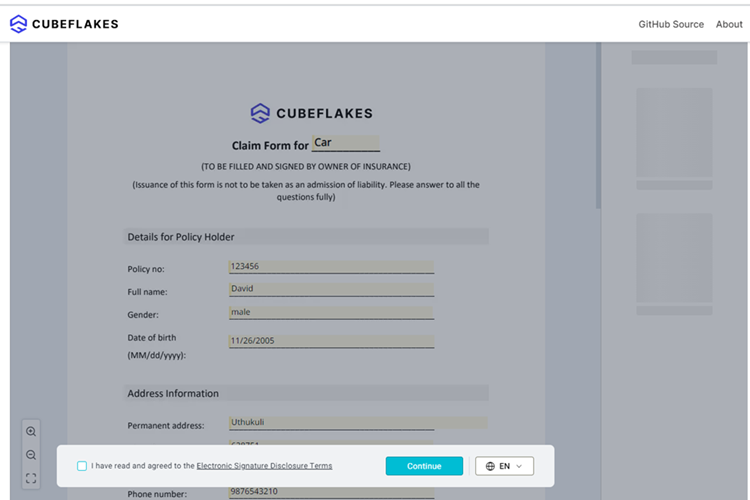
Redirect to the signing page instead
You can also send users to the signing link in a full page. Add a redirect URL, and we bring them back to your app once they finish.
curl -X GET \
  'https://api.boldsign.com/v1/document/getEmbeddedSignLink?documentId=17882g56-xxxx-xxxx-xxxx-ce5737751234&signerEmail=alex@example.com&redirectUrl=https://example.com/' \
  -H 'X-API-KEY: {use your API-KEY here}'
Our guide to embedded signing vs redirect signing helps you choose between the two.
What does a legal embedded API signing flow need?
You must confirm who the signer is before your app shows them the signing link. Our developer documentation says this check is needed for the signature to be legally binding.
Our audit trail records that the document was signed through an embedded link. Keep your own record that your system checked the signer’s identity first, such as a login or a one-time code.
Each country sets its own rules for electronic signatures. Check the rules for your document type with your legal team.
Which BoldSign plan do you need for embedded signing, and what does it cost?
Embedded signing and live API access come with the Enterprise API plan. It starts at $30 a month with 40 envelopes, and each extra envelope costs $0.75.
You can build and test first in our free sandbox, with no credit card. Sandbox documents carry a test watermark and are deleted after 14 days. Prices are in USD, as listed on the BoldSign pricing page in November 2026.
Where do you go next with embedded signing?
Pick the step that fits where you are:
- Create a free API sandbox account and try the three calls above.
- Book a demo to see embedded signing with our team.
- Ask our support team about your setup.
Frequently asked questions
What is embedded signing?
Embedded signing shows a document inside your own website or app so users can sign it there. They never leave your product to open a separate signing site.
How do I get an embedded signing link from BoldSign?
Send the document first and keep the document ID it returns. Then call the get embedded signing link endpoint with that ID and the signer's email address or phone number.
Can I stop BoldSign from emailing the signer?
Yes. Set DisableEmails to true when you send the document. Signers then get no invitation email and sign only inside your app.
Can the signing link expire?
Yes. The signLinkValidTill option sets a date and time after which the link stops working. Generate a new link for signers who come back later.
Can I send signers back to my app after they sign?
Yes. Add a redirectUrl to the request for the signing link. We send the signer to that address once they finish signing.
Is embedded signing legally binding?
Yes, when you confirm who the signer is before you show them the link and keep a record of that check. Our audit trail notes that the signer used an embedded link.
Do signers need a BoldSign account?
No. Signers use the link your app shows them. They sign in the page without creating an account or paying for a seat.
Can I test embedded signing for free?
Yes. Our free API sandbox lets you build and test the full flow with no credit card. Sandbox documents carry a test watermark and are deleted after 14 days.

Gopinath Kannusamy
Gopinath is a passionate software developer with 2 years of experience at BoldSign. He is an avid writer and enjoys sharing his insights on technology and development. In his free time, he enjoys exploring new technologies and learning new things. Connect with him on LinkedIn.
More posts by Gopinath Kannusamy