Preethi Loganathan
TL;DR: To sign an NDA online, upload the non-disclosure agreement (NDA) to an eSignature tool, place a signature field for each party, and send it. In the US, an electronic NDA has the same legal effect as a paper one when both sides agree to sign that way. Our eSignature templates let you set up the NDA once and send it again in a minute.
You’re about to share something private with someone new: a product plan, a client list or source code. Before you do, you want their signature on an NDA. Printing, signing, scanning and emailing it back can take days.
An easy eSign NDA process takes minutes instead. Signing a non-disclosure agreement online also works for a virtual NDA with someone you have only met on a call. This guide covers what NDA signing means, what to check in the document, whether an e-signature holds up, and how to sign an NDA online.
What is NDA signature, and what does NDA sign mean?
An NDA signature is a person’s mark showing they accept the terms of a non-disclosure agreement. The phrase “NDA sign” means the moment each party agrees to keep the shared information private.
Think of a guest book at a private event. You write your name, and the host knows you agreed to the house rules. An NDA signature works the same way, but the rules are written down and both sides keep a copy.
A digital NDA agreement follows the same idea on screen. You open the online NDA, sign it, and the NDA signing process is done.
An electronic NDA, or e-NDA, has the same parts as a paper one. Only the way people sign it changes.
What should an NDA include before you sign the NDA?
Read the full document before anyone signs, because the signature agrees to every line. Most NDAs share these common parts:
- The legal names of the people or companies signing.
- A plain description of what counts as confidential information.
- Exclusions, such as information that was already public.
- What the other side may do with the information.
- How long the duty to keep it private lasts.
Ask a lawyer when the NDA covers employment terms, regulated data or a deal with another country. This guide explains the signing steps, and it is not legal advice.
Mutual or one-way: which NDA do you need?
Pick the type by asking who shares information. A one-way NDA fits when only you share. A mutual NDA fits when both sides share.
| One-way NDA | Mutual NDA | |
|---|---|---|
| Who shares | One party | Both parties |
| Who must keep it private | The receiving party | Both parties |
| Common use | New hires, contractors, vendors | Partnerships, joint projects |
Free templates help here. Start from a disclosing party confidentiality agreement or a receiving party confidentiality agreement, then check that it fits the deal.
Is a digital signature valid for a nondisclosure agreement?
Yes, when both parties agree to sign electronically. In the US, federal law says a contract can’t be denied legal effect just because it was signed electronically.
That law is the Electronic Signatures in Global and National Commerce Act (ESIGN), which you can also read on Congress.gov. It also says no one has to accept electronic signatures. So the other party must agree to sign this way.
An NDA online contract is still covered by state law too. Most states have adopted the Uniform Electronic Transactions Act (UETA). It gives electronic records and signatures the same effect as paper when the parties agreed to deal electronically.
Can I sign an NDA electronically with someone outside the US?
Often you can, but other countries have their own e-signature laws. Check the rules where the other party lives before you rely on the same steps.
How to sign non-disclosure agreements online with BoldSign
Upload your NDA, add the signers, place the fields and send it. These steps show how to sign NDA agreement files you already have, using our web app.
- Select Create New, then Create New Template, and upload the NDA agreement signing document.
- Add a role for each signer, such as Company and Contractor.
- Place the signature, name, title and date fields on the NDA signature page.
- Assign each field to a role, then save the template.
- Select Use template, enter each signer’s name and email, and send.
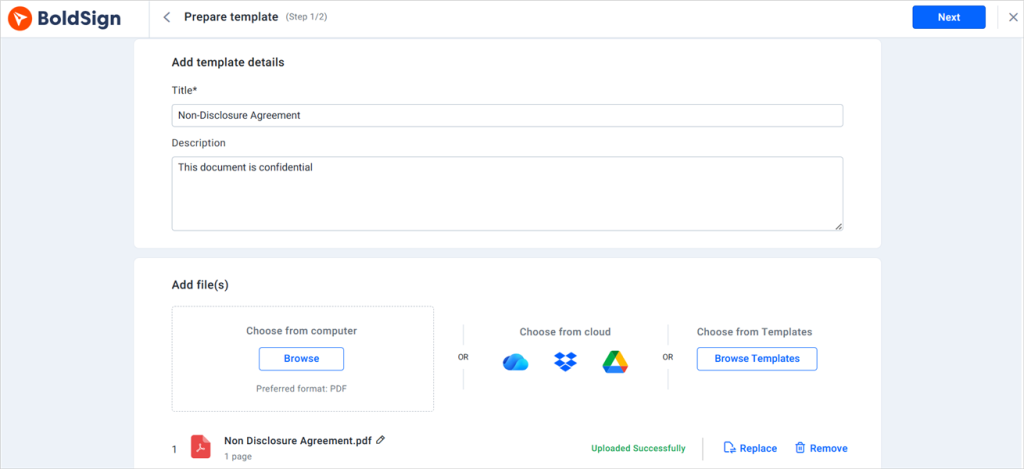
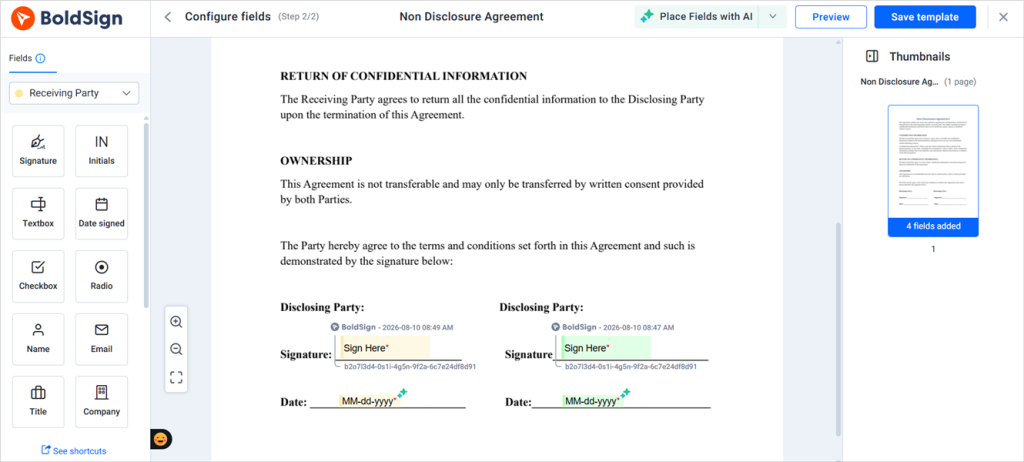
The file can be a PDF, a Word document or an image. Our guide to saving time with templates covers roles in more detail.
How do I send a mutual NDA for signature?
Add both parties as signers on one document. Leave signing order off, so both get the link at once. Each side signs on their own device, and the NDA completes when the last person signs.
How do you sign a customer’s NDA without printing it?
Upload the customer’s file and add yourself as the signer with the Add me option. You sign it on screen, and the signed copy comes back to you as a PDF to send on.
How to sign NDA by name, title and company
For a business NDA, sign in company capacity: add your name, your job title and the company name. Only a person allowed to bind the company should sign for it.
What should a sample email request to sign NDA say?
Keep it short and say why you need the signature. The email that comes with the request is the first thing your signer reads.
Hi [Name], before our call on [date], please review and sign the attached NDA. It covers the product plans we’ll share. Signing takes about two minutes, and you don’t need an account. Thanks, [Your name]
Most of how to make someone sign an NDA quickly is a clear request. Write the purpose and the deadline in the request’s message box. Then the signer knows what they’re agreeing to before they open the file.
How to create a secure NDA online?
Add a check on who opens the NDA, sized to how private the information is. Each signer on one document can get a different check.
- An email one-time password (OTP): a code sent to the signer’s inbox.
- An SMS OTP: a code sent to the signer’s phone.
- An access code: a code you set and share in another way.
- ID verification, with a government ID and a live selfie.
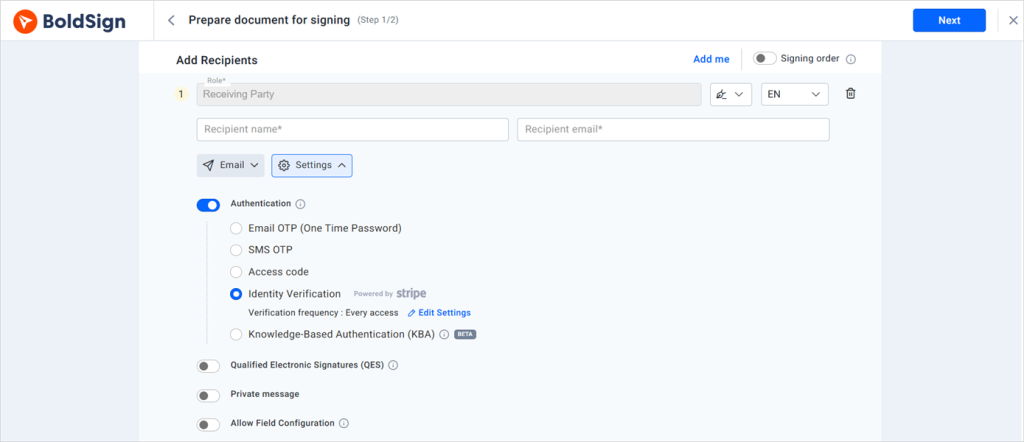
Every extra check adds a step for the signer. Use a light check for routine NDAs and a stronger one for financial data or trade secrets. Our signer authentication page explains each method.
What’s a quick way to create and send an NDA for someone to sign online?
Save the NDA as a template once, then send it from that template each time. Only the signer’s name and email change between sends.
NDA templates with online signing remove the setup work for teams that sign NDAs every week. Nobody hunts for the latest file or drags the fields back into place. Keep one template for each relationship, such as employees, contractors and vendors.
What’s a quick way to send a one-page NDA for signature to a freelancer?
Open your contractor template, enter the freelancer’s name and email, and send. The freelancer can open the NDA, sign online from a phone and fill in the online NDA form in a few minutes.
How do I get an NDA signed quickly by a remote contractor?
Send it the day you agree to work together, and add a deadline in the message. Turn on automated reminders, which email the signer every few days until they sign.
What software reminds customers to sign an NDA?
Most eSignature tools send reminders. Ours sends up to five automatic email reminders per document, and you can send a manual one at any time. Reminders stop once everyone has signed.
How do I automate sending NDAs and collecting signatures during employee onboarding process?
Use bulk send for a group of new hires. You upload a CSV file with one row per person, and each hire gets their own copy.
Developers can also send NDAs from the BoldSign API. Your HR system sends the signer’s details, and webhooks report each signature back.
How does a sign request work for executing NDAs or contracts while maintaining formatting and an audit trail?
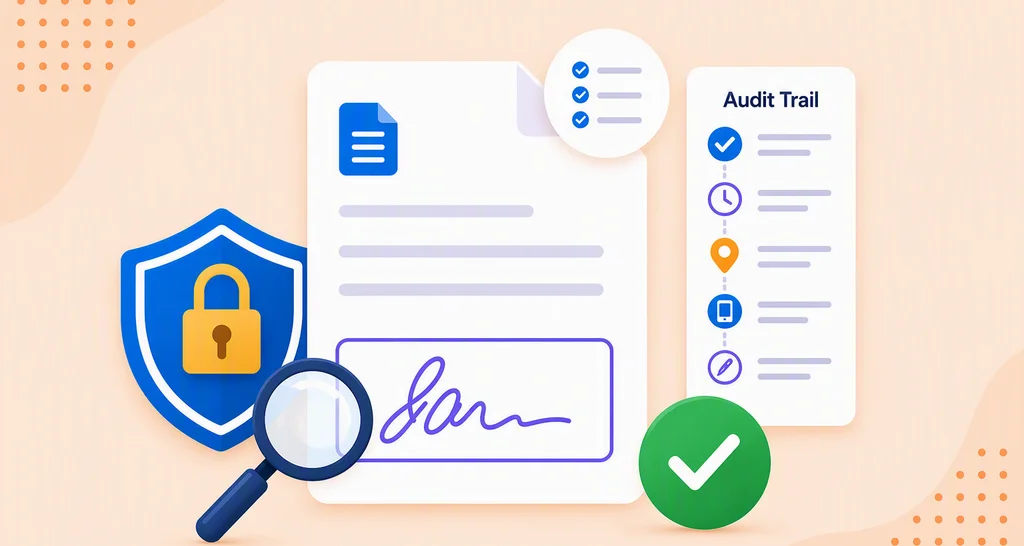
A sign request places fields on top of your file, so the text and layout stay as you wrote them. Each step of the signing is recorded in an audit trail.
Upload a PDF when you want the layout locked exactly. The signer fills in the fields, and the electronic NDA submission is sealed when the last person signs. A tamper-evident seal shows any change made after signing.
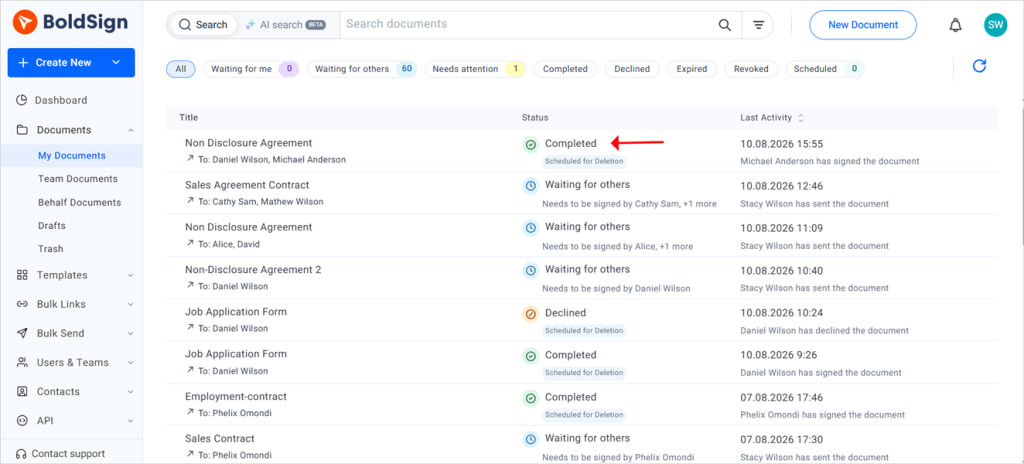
The same steps work when you eSign documents: non-disclosure agreement, offer letter or vendor contract.
How do I store signed NDAs so I can audit them later?
Keep each signed NDA with its audit trail. The audit trail records names, email addresses, internet protocol (IP) addresses, timestamps and the check each signer passed.
Once every signer has finished, download the signed NDA and its audit trail as one PDF. Each signer also receives the signed copy by email. Signed documents stay in your account, so you can search them later.
Every electronic signature NDA you send gets this record, so you can see when each NDA electronic signature was added. Our post on why e-signature audit trails matter explains how to read one.
What types of electronic signature software help companies get NDAs signed before sharing confidential information with external partners?
Electronic signature software does this job. Look for a tool that sends the NDA, tracks it and keeps a record of each signature.
When you compare tools, check these points:
- Signers can sign without an account or an app.
- You can save the NDA as a template.
- Every signed copy carries an audit trail.
- You can choose a signer check that fits the risk.
Reviews in the e-signature software category on G2 help you compare options. Using eSignature for NDA work also means each partner gets the same approved version.
What does it cost to sign NDA online free or on a paid plan?
You can sign NDA free on our Essential plan, which includes 25 envelopes a month. Paid plans add more templates and more ways to check signers.
All prices are in USD, billed yearly, from our pricing page in November 2026:
- Essential is free, with 2 templates.
- Growth costs $5 per user a month, with 10 templates.
- Business costs $15 per user a month and adds bulk send, SMS OTP and ID verification.
- Premium costs $99 a month for unlimited users and also includes bulk send and ID verification.
Sending from the BoldSign API in production, with webhooks, needs the Enterprise API plan. It starts at $30 a month with 40 envelopes. You can try BoldSign first with a 30-day free trial.
Where do you start with your first NDA?
Pick one NDA your team sends often and set it up as a template. Then send NDA requests from it whenever someone new joins a project.
- Start a 30-day free trial and send your first NDA today.
- Book a demo to see an NDA template set up for your team.
- Browse our free templates for a starting NDA you can upload.
Frequently asked questions
What is NDA sign-in, and does the signer need an account?
The signer skips any account or sign-in. We email each signer a link, and they open the NDA and sign without an app or a payment.
Can an NDA be signed electronically?
Yes, when both parties agree to sign that way and each signer means to sign. US federal law says a contract can't lose its legal effect just because it was signed electronically.
Is an online NDA legally binding?
Yes, when the NDA is a valid contract in the first place. Signing online changes how you prove who signed and when. It leaves the terms of the contract as they are.
I have an NDA in Word. How do I get it signed?
Upload the Word file to BoldSign, add each signer's name and email, and place a signature field for each person. We send the signing link, and you get the signed copy back by email.
Can I e-sign an NDA on my phone before a coffee meeting?
Yes. The signing page works on a phone, so you can open the email link, read the NDA and sign it in a few minutes.
Can two parties e-sign a mutual NDA at the same time on different devices?
Yes. Signing order is off by default, so both signers get the link at once and sign on their own devices. Turn it on when one side has to sign first.
How do I send an NDA for signature without exposing the recipient's email to other signers?
Send each person a separate copy of the NDA from a template. Each copy has one signer, so the other people you send to stay off it.
What kinds of platforms help organizations collect and manage signed nondisclosure agreement forms?
Electronic signature platforms do this job. They send the NDA, remind people who haven't signed, and store each signed copy with a record of the signing.

Preethi Loganathan
Preethi is a Digital Marketing Executive at BoldSign who develops precise, research-driven content on eSignatures, compliance, and digital signing workflows. She works closely with product and engineering teams to ensure every article is accurate, validated, and aligned with industry best practices. Connect with her on LinkedIn.
More posts by Preethi Loganathan