How to Create and Use a Lease Renewal Template Online
 Preethi Loganathan
TL;DR: A lease renewal agreement lets a tenant stay past the original end date and records what changes, usually the term and the rent. A reusable lease renewal template holds the signer roles and fields, so each renewal becomes a short fill-in-and-send task.
Lease renewals rarely go wrong because the document is hard. They go wrong because they start late. The end date sits in a spreadsheet, someone spots it six weeks out, and the tenant is already viewing other places.
How do I renew or extend a lease digitally? You decide what changes, build a template once, and send each renewal for signature with reminders running.
What is the process for renewing or extending a lease digitally?
You confirm what changes, fill in a lease renewal template, and send it for electronic signature. Both parties sign online, and you keep the signed file with its audit trail.
Think of it like a printed form at a clinic desk. The boxes stay in the same place, and only the answers change for each patient.
- Send the tenant a renewal letter that asks whether they want to stay.
- Decide the new term, the rent and any other changes.
- Fill in your lease renewal template with those details.
- Send it for signature with reminders turned on.
- Store the signed agreement with its audit trail.
None of this is legal advice. Rent and notice rules vary by state and city, so confirm them before you set any numbers.
Do you need a renewal, an extension or a new lease?
A renewal works as a new agreement, while an extension only moves the end date of the current lease. A rent increase or new terms usually call for a renewal.
| What you’re doing | What you probably need |
|---|---|
| Moving the end date only | Lease extension |
| Continuing the lease with a rent increase or a few updated terms | Lease renewal agreement |
| Changing most of the terms, or adding or removing tenants | A new lease |
| Changing one thing mid-lease, with the same end date | A lease amendment |
A new pet, an extra parking spot or a new payment method needs an amendment, not a renewal. You can sign an amendment at any time during the lease. Our guide to lease renewals and amendments explains how eSignature handles each one.
Keep the renewal letter and the renewal agreement apart, too. The letter asks the tenant whether they want to stay. The agreement is what you both sign.
What should a lease renewal agreement include?
A lease renewal agreement names both parties and the property, then points back to the original lease. It lists the new term, the new rent and anything else that changes.
- Names and contact details for the landlord and every adult tenant.
- The property address and the date of the original lease.
- The new start date, end date and rent.
- A line saying every other term of the original lease still applies.
- A signature and date line for each person on the lease.
Read your original lease for a renewal clause first. Follow any notice period or rent limit it sets, so the renewal matches the lease it extends.
What should you decide before you fill in the template?
Decide what changes before you open the file. Most renewals touch only a few items.
- The term: new start and end dates, or a move to month-to-month.
- The rent: the new amount and the date it starts.
- The people: remove anyone who moved out and add any new adult.
- The deposit: keep it, top it up or leave it as it is.
- The policies: pets, parking, insurance and how rent gets paid.
Write a new lease when more than a couple of these change. A new lease is often quicker than a renewal full of exceptions.
When should you send a lease renewal?
Your real deadline is the notice date, which comes well before the lease end date. Check the notice period in your lease and in your state and city rules.
Set your own reminder two weeks before that notice date. You then have the document ready before you need it.
Missing the window has real effects. Under some local rules, a landlord who keeps accepting rent after the lease ends may be treated as renewing the lease. The Legal Information Institute’s note on the holdover tenant explains how this varies by place.
Why use an eSignature template instead of a saved file?
A saved Word file or PDF holds the text, but you still place every signature and date field by hand each time. An eSignature template stores the document and its fields together.
Placing fields by hand is how mistakes start. A field lands on the wrong page, or a renewal comes back with the tenant’s signature and an empty landlord line.
In a template, you add signer roles and place the fields once. Each field belongs to a role, such as Tenant, instead of a named person. That is why one lease renewal template works for every tenant you send it to.
Can lease templates be reused for multiple tenants?
Yes. You send the same template to each tenant and type in a new name and email address each time.
Artificial intelligence (AI) field detection can place most fields for you on the first upload. The same set-up works for other documents real estate teams send often, such as amendments and move-out forms. Our page on eSignature for real estate shows more of these.
How do you create a lease renewal template in BoldSign?
You upload your renewal document, add a role for each signer, place the fields and save. Our help article on how to create a template covers every option.
You need your renewal document as a PDF or Word file. Our free contract templates include a residential lease and a commercial lease to start from.
Have any renewal wording checked against your local rules before a real tenant signs it.
Step 1: Start the template and add roles
- Select Create New, then Create New Template.
- Enter a Title you will recognize, such as “Residential lease renewal, 12 month”, and a Description.
- Upload your file in the Add files section.
- Under Add role, add a Landlord role and a Tenant role, plus a second Tenant role for a co-tenant.
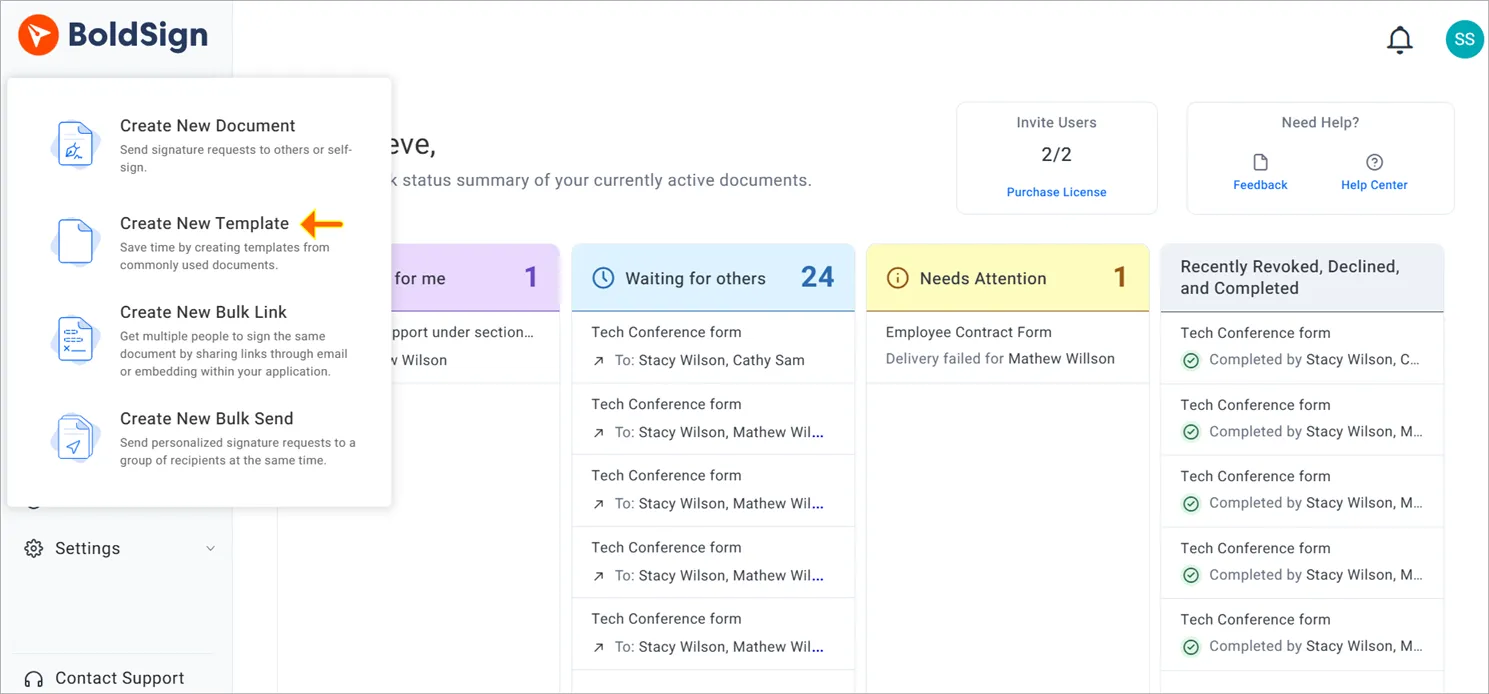
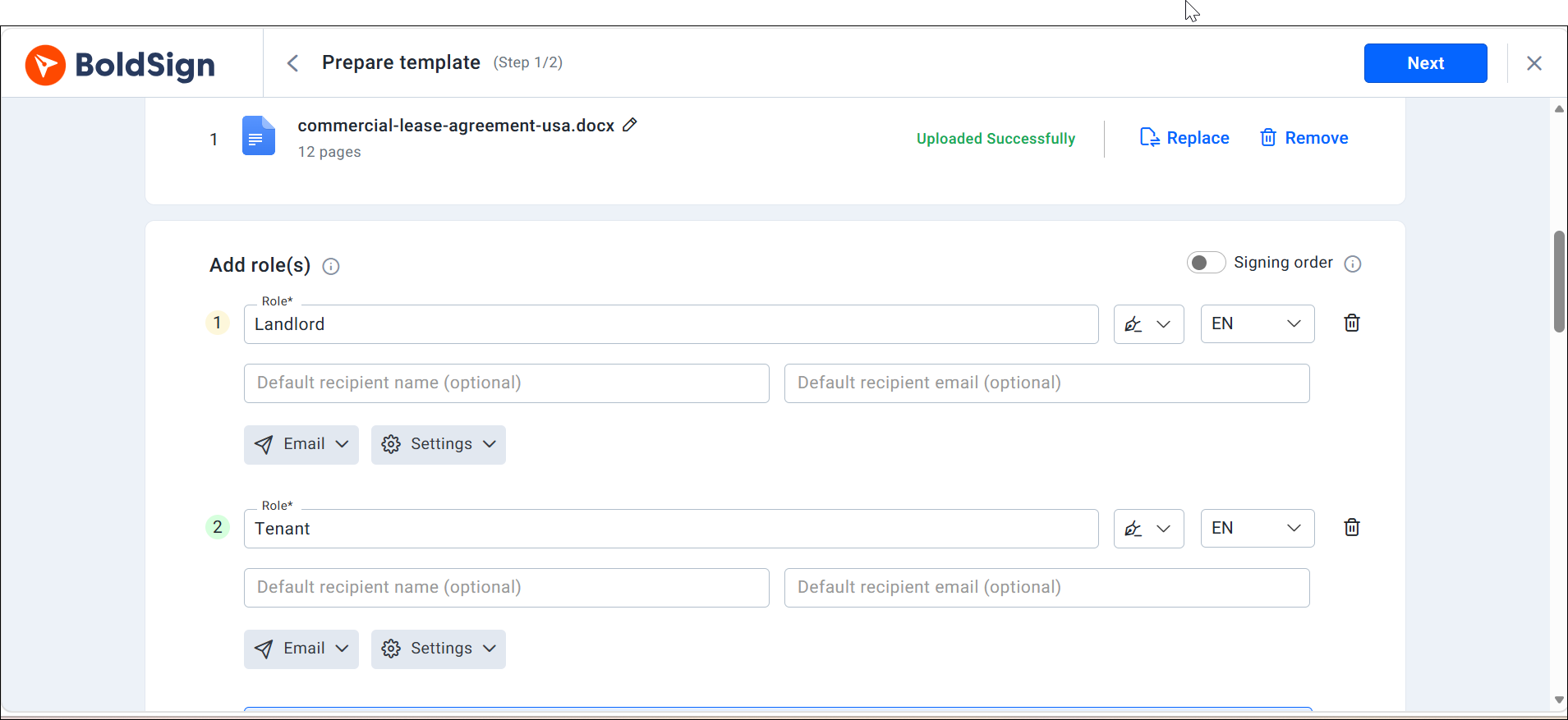
A role is a placeholder, so you do not type anyone’s real name yet.
Step 2: Lock settings and add copies
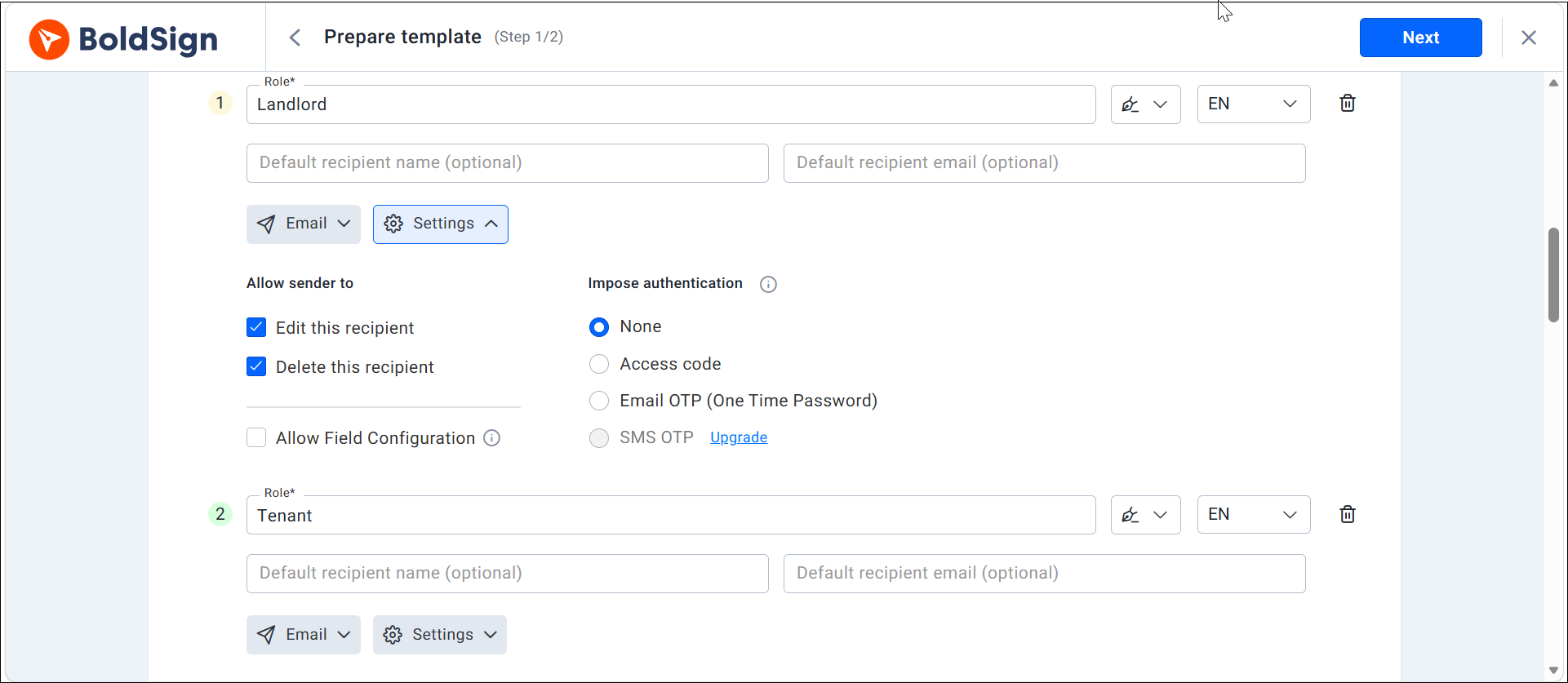
- Select Show settings and turn off Edit this recipient to keep a role’s details fixed.
- Add your property owner or accounts team as a CC (carbon copy) recipient to send them a copy.
- Set the Template Usage Settings to stop senders changing files or fields.
Step 3: Place the fields and save
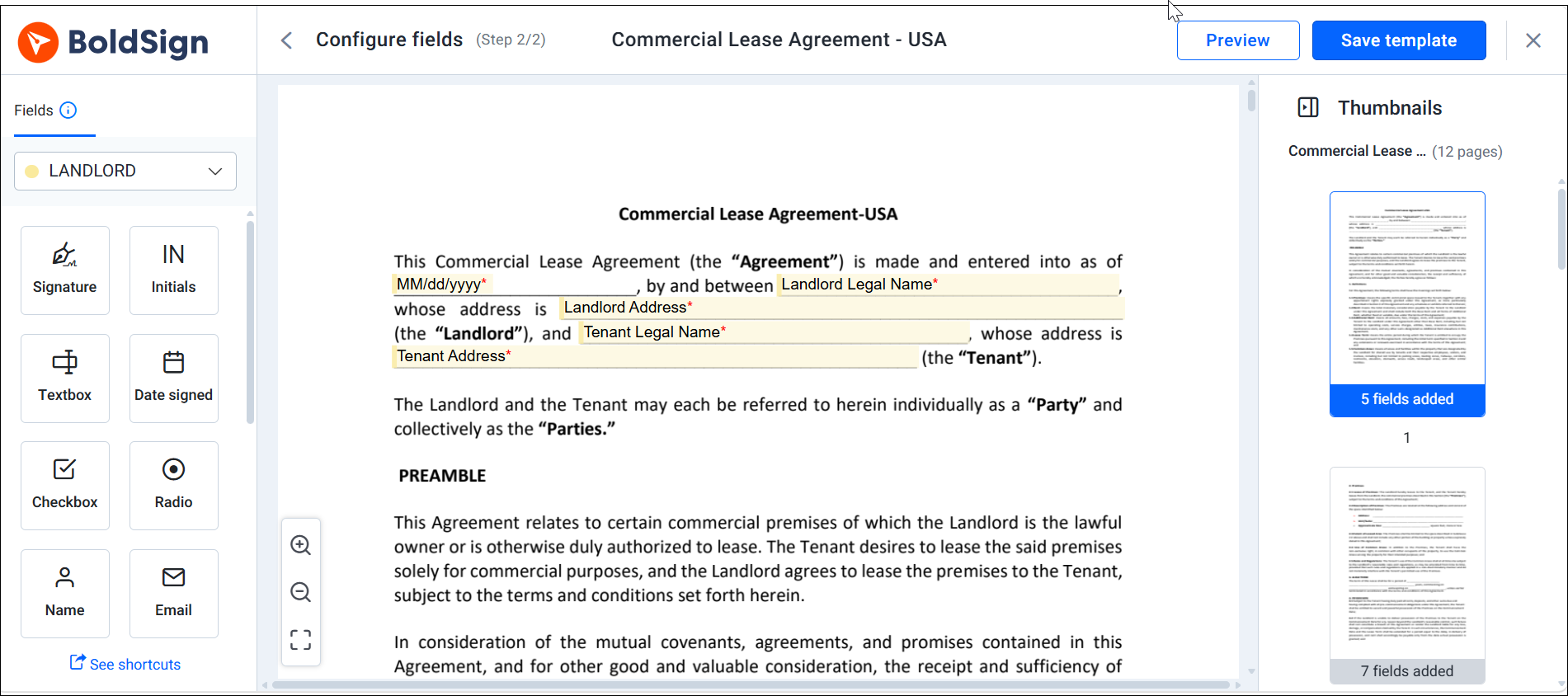
- Select Next to open the prepare page.
- Add fields for the new rent, the start date and the end date.
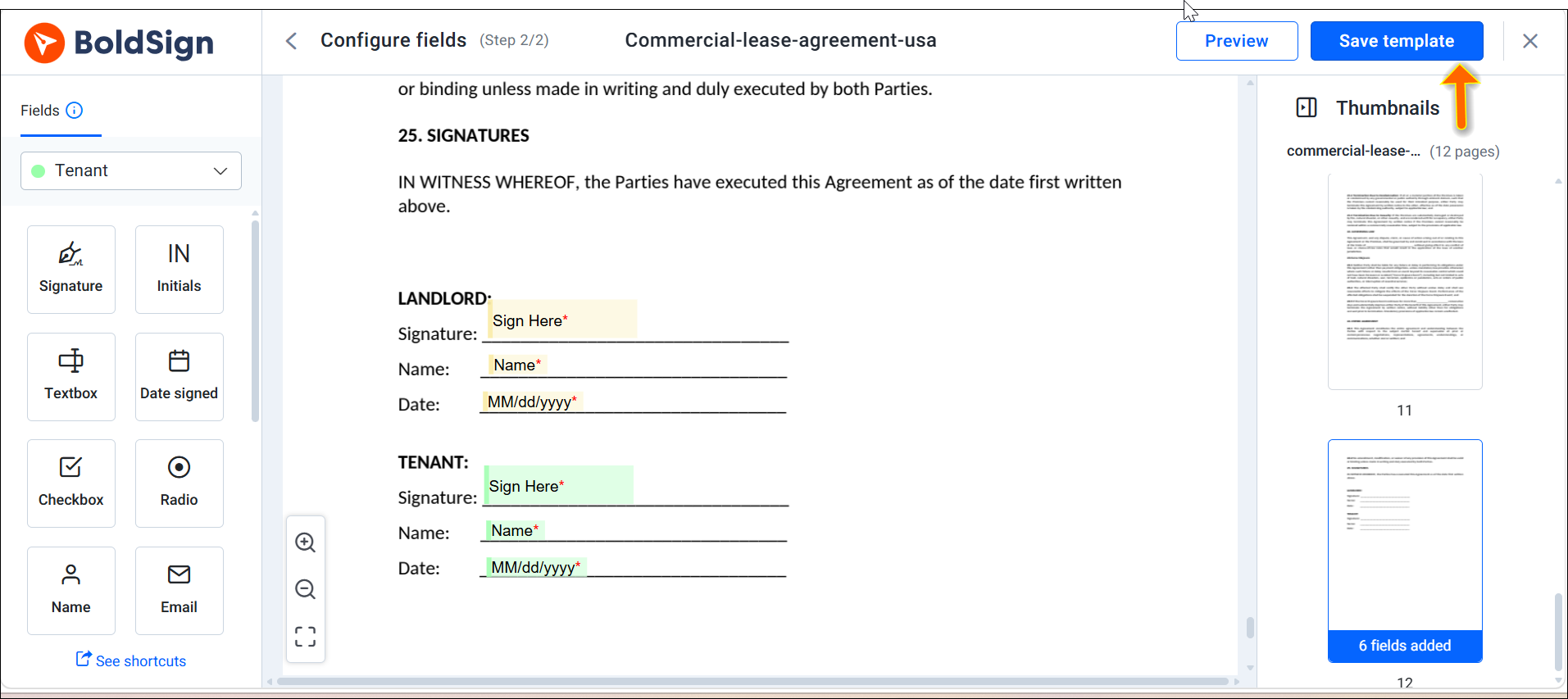
- Add initials beside the rent change, plus a signature and date for each party.
- Assign each field to the right role from the dropdown.
- Select Save template. It now appears under My Templates.
Step 4: Use the template for each renewal
- Hover over the template under My Templates and select Use.
- Enter the tenant’s name and email address.
- Update the rent and dates, then send.
The layout stays exactly as you set it up. Your next renewal becomes a five-minute update instead of a new document.
How do reminders keep a renewal moving?
Turn on reminders when you send the renewal. They stop on their own once the tenant signs, so nobody gets chased after signing.
Our automated reminders go out every 3 days, up to 3 times, by default. You can set up to 5 automatic reminders per document. You can also send a manual reminder at any time, once a day per document.
Turn on expiration alerts as well. Signers get an alert 1 day before the document expires, or 2 hours before when less time remains.
Watch the document status, too. A tenant who opened the renewal four days ago needs a different call from one who never opened the email.
What proof do you keep after the tenant signs?
The audit trail is your proof of what was agreed and how. Tracking shows where a document is now, and the audit trail records the full signing history.
Our audit trail, called the Certificate of Completion, records these details:
- The document ID, title, status, and sent and completed times.
- Each person’s name, email address, internet protocol (IP) address and device.
- Every view, signature and completion, each with a timestamp.
- How each signer was verified and when they accepted electronic consent.
You can download the audit trail once every signer has finished. A signed PDF in a shared folder shows a signature. The audit trail shows which version was signed and whether the tenant agreed to sign electronically.
Can tenants sign a renewal inside your own app?
Yes, with embedded signing through the BoldSign API. The tenant reviews and signs without leaving the portal they already use.
Your app pulls the document from a stored template and fills in the tenant, property and rent details. It then shows the signing screen inside your portal. Our walkthrough on embedded lease signing for real estate apps covers the details.
Your developers will find the template and signing link set-up on our eSignature API page.
Which BoldSign plan do you need, and what does it cost?
Templates, reminders and the audit trail come with every plan. Live access to the BoldSign API, including embedded signing, needs the Enterprise API plan, from $30 a month with 40 envelopes.
Prices below come from our pricing page in November 2026, in USD and billed yearly. The Essential plan is free and includes 2 templates.
The Growth plan costs $5 per user a month and includes 10 templates, plus locked templates. The Business plan costs $15 per user a month, with unlimited templates and AI field detection. The Premium plan costs $99 a month for unlimited users and unlimited templates.
How do you start your first lease renewal template?
Pick one renewal that is coming up soon and build the template around it. Then choose your next step.
- Start a 30-day free trial and turn your renewal document into a template.
- Book a demo to see a renewal template set up for your properties.
- Read how we handle lease renewals and amendments together.
Frequently asked questions
What is a lease renewal agreement?
A lease renewal agreement is a short document that keeps a tenancy going past the original end date. It points back to the original lease and lists only what changes, such as the rent and the new term.
Is a lease renewal the same as a lease extension?
They differ. An extension moves the end date of the current lease, while a renewal works as a new agreement, so it suits a rent increase or other new terms.
Can a landlord raise the rent as part of a lease renewal?
Often yes, but the amount and the notice you must give depend on local law. Some cities limit increases, so check your state and city rules before you set the new rent.
Is an online lease renewal agreement legally binding?
Yes, when both parties agree to sign electronically and the record shows each signature. The federal Electronic Signatures in Global and National Commerce (ESIGN) Act says a contract may not be denied legal effect only for being electronic.
How do I e-sign a lease renewal addendum without redoing the whole lease?
Upload only the addendum, add a role for each signer and place their fields. The addendum refers back to the original lease, and the lease itself stays as it is.
Can lease templates be reused for multiple tenants?
Yes. A template ties each field to a role such as Tenant, not to a person. You type each tenant's name and email when you send, and the layout stays the same.
What's a smart way to sign a lease renewal PDF on my Android phone and email it to my property manager?
Ask your property manager to send the renewal through an eSignature tool. You open the link on your Android phone, sign in the browser, and the signed copy goes back to them automatically.
What happens if a tenant stays after the lease ends without signing a renewal?
The answer depends on where the property is. In some places, a landlord who keeps accepting rent may be treated as renewing the lease, so check your local rules.

Preethi Loganathan
Preethi is a Digital Marketing Executive at BoldSign who develops precise, research-driven content on eSignatures, compliance, and digital signing workflows. She works closely with product and engineering teams to ensure every article is accurate, validated, and aligned with industry best practices. Connect with her on LinkedIn.
More posts by Preethi Loganathan