Mohan Ravi
TL;DR: Create a sender identity for the person, and you can send eSignature documents on behalf of others with the BoldSign API. They approve it by email, and you add their email to the onBehalfOf field when you send. Our sender identity page shows how the whole process fits together.
An assistant prepares contracts every week for a director who rarely has time to send them. Signers expect the request to come from the director, not from the assistant. Logging in as the director would mean sharing a password.
A sender identity solves that. This guide shows each API call, from creating the identity to tracking and revoking the documents you send with it.
What is a sender identity?
A sender identity is a person who has approved you to send signature requests in their name. Signers see that person as the sender, while you run the process.
A sender identity works like a signed letter of authority. A manager writes one note saying you may post letters for them, and they can tear it up whenever they like.
Our post on OAuth vs sender identities explains when to choose a sender identity and when to connect an app with OAuth instead.
How do you create a sender identity with the API?
Send a request to /v1/senderIdentities/create with the person’s name and email. You can also create identities in the web app, but this guide sticks to the API.
curl -X 'POST' \
  'https://api.boldsign.com/v1/senderIdentities/create' \
  -H 'accept: */*' \
  -H 'X-API-KEY: {your API key}' \
  -H 'Content-Type: application/json' \
  -d '{
  "name": "John Cooper",
  "email": "john@boldsign.dev"
}'
A successful call returns a 201 status code and the new sender identity ID. Store the ID in your database for later calls about this identity.
{
  "senderIdentityId": "a0f845a4-6272-4050-a4e8-6779a9b7886b"
}
You can now send for John Cooper once he approves. Our developer guide on how to create a sender identity lists every optional field.
How do you choose which notifications the sender gets?
Add a notificationSettings object to the create request. Each setting turns one email alert on or off for documents sent in that person’s name.
Leave the object out, and the sender gets no updates about these documents. The example below emails John when a document is sent or completed, but not when a signer fails authentication.
curl -X 'POST' \
  'https://api.boldsign.com/v1/senderIdentities/create' \
  -H 'accept: */*' \
  -H 'X-API-KEY: {your API key}' \
  -H 'Content-Type: application/json' \
  -d '{
  "name": "John Cooper",
  "email": "john@boldsign.dev",
  "notificationSettings": {
    "sent": true,
    "completed": true,
    "authenticationFailed": false
  }
}'
Other settings cover events such as viewed, declined, expired and reminders. The request body reference lists them all. You can change them later with the update endpoint, shown further down.
How does the person approve a sender identity?
We email the person a link to approve your request. The email names who is asking and what they want to do.
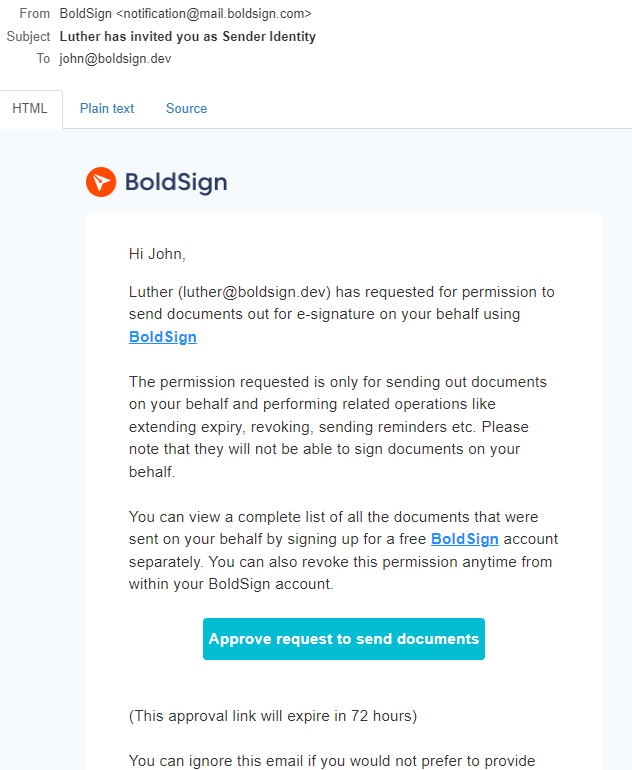
The link opens an approval page. There, the person reviews the permissions you asked for and gives consent.
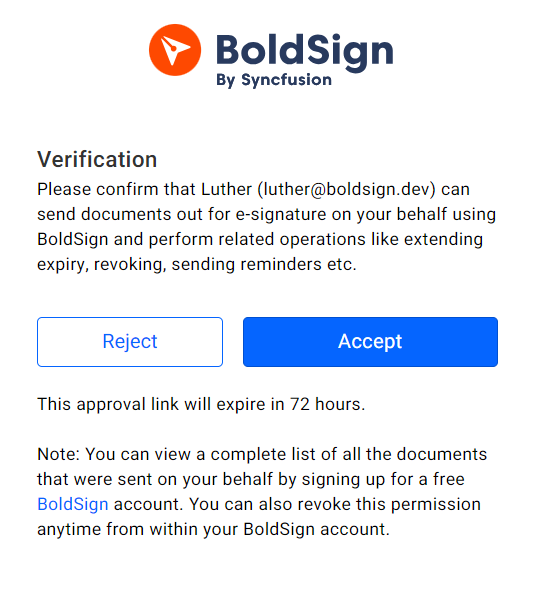
Nothing goes out in their name until they approve. That keeps the person in charge of what is sent for them.
How do you resend an approval request?
Call /v1/senderIdentities/resendInvitation with the person’s email address. Use it when the first email was deleted or missed.
curl -X 'POST' \
  'https://api.boldsign.com/v1/senderIdentities/resendInvitation?email=john@boldsign.dev' \
  -H 'accept: */*' \
  -H 'X-API-KEY: {your API key}' \
  -d ''
There is a cap on how many times you can resend for one identity. Past the cap, the API returns a 400 status code with this error.
{
  "error": "Exceeded the maximum resend verification limit"
}
Our guide to resend a sender identity invitation has examples in other languages.
What do you do when someone declines the request?
Call /v1/senderIdentities/rerequest to send the person a fresh approval request. They get another chance to review it and approve.
curl -X 'POST' \
  'https://api.boldsign.com/v1/senderIdentities/rerequest?email=john@boldsign.dev' \
  -H 'accept: */*' \
  -H 'X-API-KEY: {your API key}' \
  -d ''
A second request helps when the first refusal was a mistake or the person needed more time. See our guide to re-request sender identity approval.
How do you send eSignature documents on behalf of others?
Put the approved person’s email address in the onBehalfOf field of your send request. The document then goes out in their name.
Say John has approved Luther to send for him. Luther sends a saved template with John’s email in onBehalfOf, so signers see John as the sender.
curl --location --request POST \
  'https://api.boldsign.com/v1/template/send?templateId=80e68eed-38d2-48f8-83b2-8e887e4cd32d' \
  --header 'X-API-KEY: {your API key}' \
  --header 'Content-Type: application/json' \
  --data-raw '{
  "onBehalfOf": "john@boldsign.dev"
}'
A successful call returns the document ID. Use it to track the document’s status.
{
  "documentId": "de6350c1-cc8c-4120-a8ed-29e10b7249f4"
}
The same field works on the regular send endpoint. Our guide to send a document on someone’s behalf shows both.
What does the signer see?
The signer gets an email with a link to sign. It shows John’s name and email as the sender, not Luther’s.
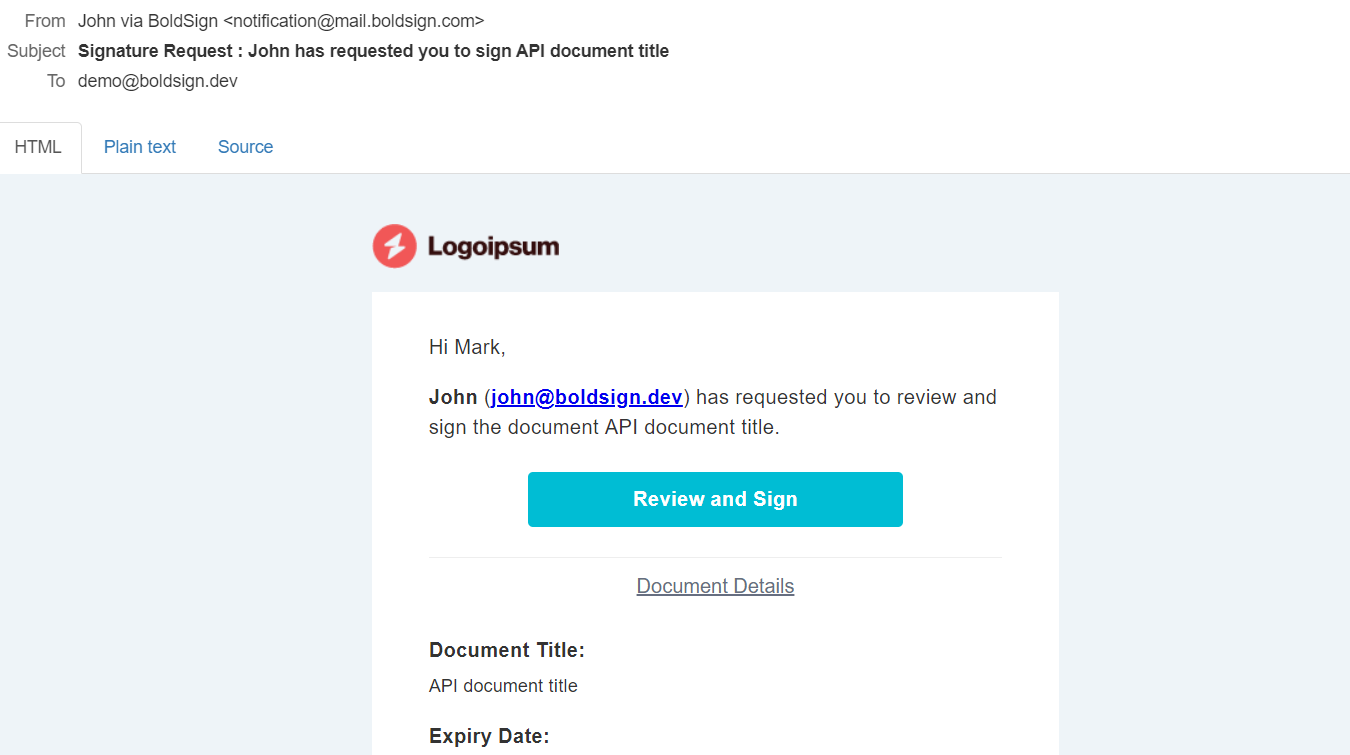
The request reads as if John sent it himself. Luther still does all the work.
How do you track documents sent on behalf of others?
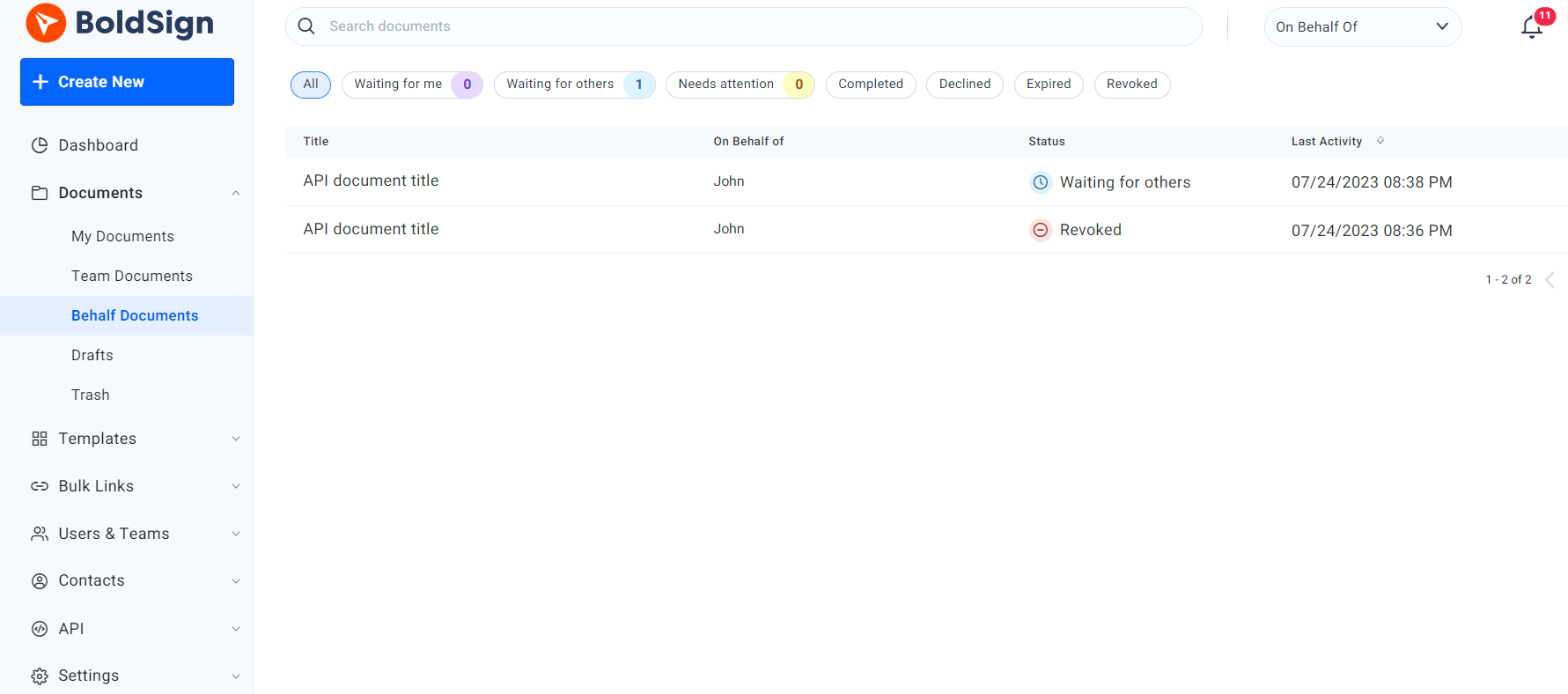
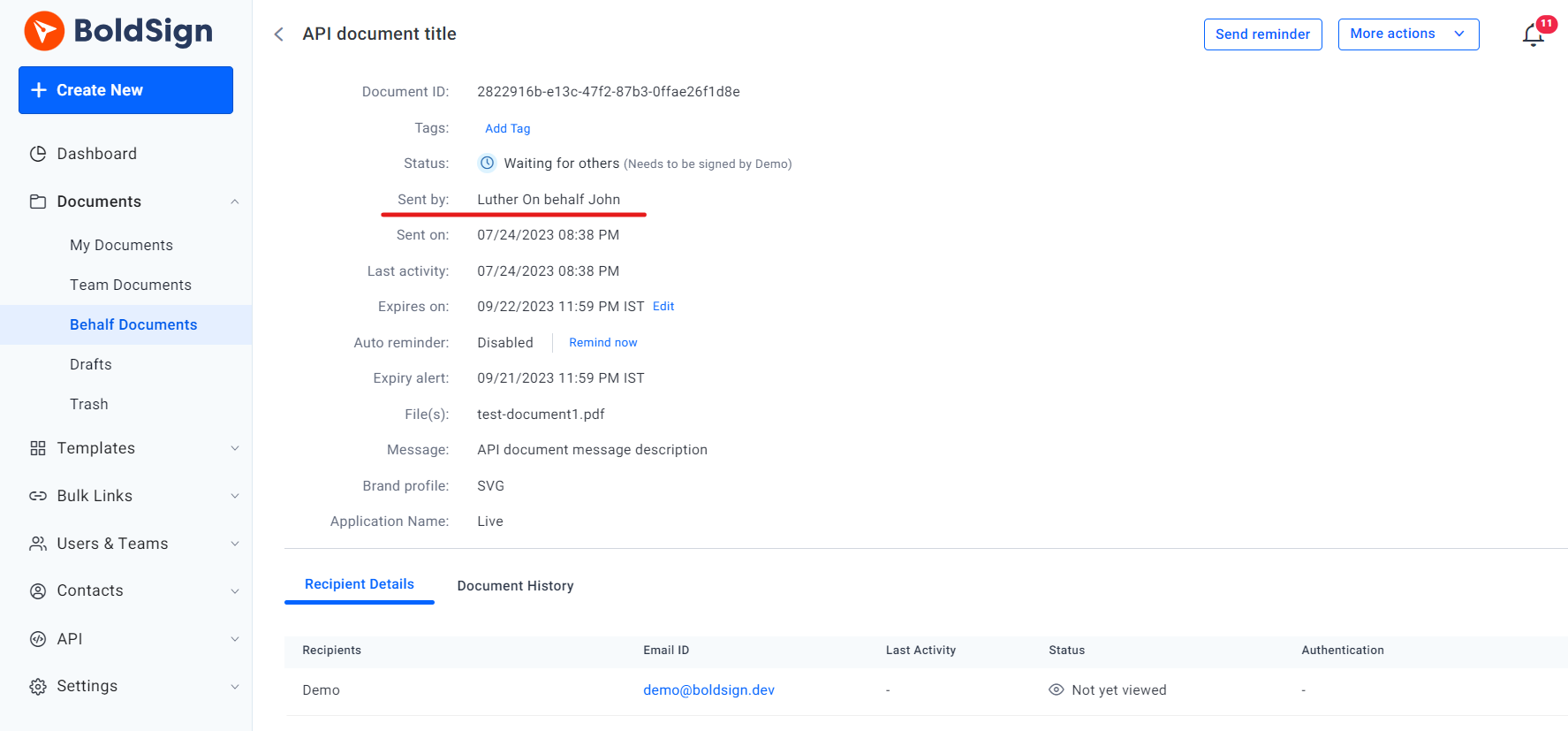
In the web app, open Documents, then Behalf Documents. Through the API, call the /v1/document/behalfList endpoint.
Once someone approves you, you can also revoke these documents, change a signer’s access code, read document properties and download the files and audit trail.
How do you filter the behalf list?
By default, the list returns documents sent with every approved sender identity. You can filter by email address, document status, signer email and date range.
This request lists documents sent for John that are still WaitingForOthers.
curl --location \
  'https://api.boldsign.com/v1/document/behalfList?Status=WaitingForOthers&EmailAddress=john@boldsign.dev' \
  --header 'accept: application/json' \
  --header 'X-API-KEY: {your API key}'
How do you revoke a document sent on someone’s behalf?
Call /v1/document/revoke and include the onBehalfOf field in the request body. The same field works on other document actions, such as reminders and access code changes.
curl --location \
  'https://api.boldsign.com/v1/document/revoke?documentId=de6350c1-cc8c-4120-a8ed-29e10b7249f4' \
  --header 'Content-Type: application/json' \
  --header 'X-API-KEY: {your API key}' \
  --data-raw '{
  "message": "Sample revoke message",
  "onBehalfOf": "john@boldsign.dev"
}'
Leave out onBehalfOf on a document you sent for someone else, and the API returns this error. Documents you send in your own name need no such field.
{
  "error": "The email provided is not a valid sender identity."
}
Our guide to revoke a document lists the other fields.
How do you manage sender identities over time?
You can update an identity’s notification settings, delete identities you no longer need, and react when the owner withdraws access. Each step works through the API.
How do you update notification settings?
Call /v1/senderIdentities/update with the identity’s email address. Send the new settings in the request body.
curl -X 'POST' \
  'https://api.boldsign.com/v1/senderIdentities/update?email=john@boldsign.dev' \
  -H 'accept: */*' \
  -H 'X-API-KEY: {your API key}' \
  -H 'Content-Type: application/json' \
  -d '{
  "notificationSettings": {
    "viewed": true,
    "sent": false,
    "deliveryFailed": true,
    "declined": true,
    "revoked": true,
    "reassigned": true,
    "completed": true,
    "signed": true,
    "expired": true,
    "authenticationFailed": true,
    "reminders": true
  }
}'
The same endpoint can change the name, redirect URL and language. See our guide to update a sender identity.
How do you delete a sender identity?
Send a delete request to /v1/senderIdentities/delete with the identity’s email address. Deletion is permanent, so sending for that person again means a new identity and a new approval.
curl -X 'DELETE' \
  'https://api.boldsign.com/v1/senderIdentities/delete?email=john@boldsign.dev' \
  -H 'accept: */*' \
  -H 'X-API-KEY: {your API key}'
Our guide to delete a sender identity has the full reference.
How does the owner withdraw access?
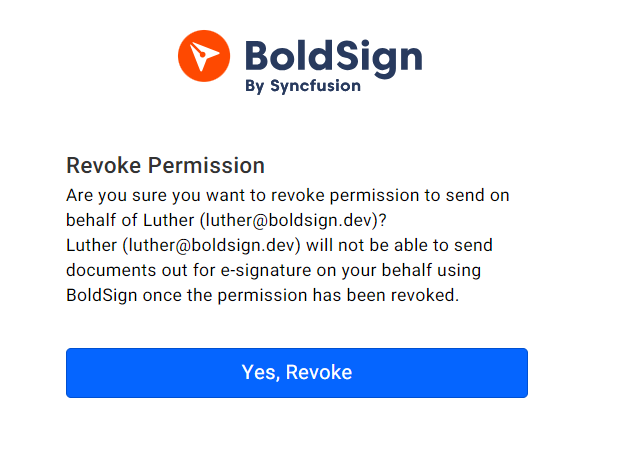
The identity owner can withdraw your access at any time. They can open the link in their approval email, or go to API, then Sender Identities, in their BoldSign account and select Revoke.
Webhooks can tell your app when an identity is approved, denied or revoked. For example, your app could email the requester right away. Our webhooks documentation covers the set-up.
Which plan do you need, and what does it cost?
You can build and test sender identities free in the sandbox. Sending live documents through the API needs the Enterprise API plan, from $30 a month with 40 envelopes.
Extra API envelopes cost $0.75 each, and webhooks are part of the Enterprise API plan too. Sandbox documents carry a watermark and are deleted after 14 days. Our pricing page has the current figures, in USD.
Where do you go from here?
BoldSign gives you everything above in one API. Pick the next step that fits.
- Create a free API sandbox account and try the calls in this guide.
- Schedule a demo to see sender identities with our team.
- Ask a question through our support portal.
Frequently asked questions
How do I send a document on behalf of someone else with the BoldSign API?
Create a sender identity for that person and wait for them to approve it. Then put their email address in the onBehalfOf field of your send request.
What does the signer see when I send on someone's behalf?
The signer sees the name and email of the person who approved the sender identity. Your own name stays out of the signing request email.
What happens if the person never sees the approval email?
You can resend the invitation with the resendInvitation endpoint and the person's email address. A successful call returns a 204 status code.
Can I ask again after someone declines my sender identity request?
Yes. The rerequest endpoint sends a fresh approval request to the person who declined. They can then review it and approve.
Can I revoke or remind on a document I sent for someone else?
Yes. Add the onBehalfOf field to the request, and you can revoke, send reminders, change access codes and download the audit trail for that document.
How do I list the documents I sent on behalf of others?
Call the behalfList endpoint. You can filter it by the identity's email address, document status, signer and date range.
Can the person behind a sender identity take back my access?
Yes. The identity owner can withdraw your access at any time. Documents already sent keep their original sender details.
Is a document sent on someone's behalf legally binding?
Yes, when the signer agrees to sign electronically and the record is kept, as with any electronic signature. The person you send for must approve your sender identity first.

Mohan Ravi
A seasoned tech enthusiast with over 5 years of hands-on experience in the ever-evolving world of software development. From mastering the intricacies of .NET to harnessing the power of JavaScript, Mohan’s expertise extends across the realms of full-stack development. A true problem-solver and a passionate coder at heart, he is always eager to explore new technologies and bring innovative ideas to life.
More posts by Mohan Ravi