How to Track Contract Status in Salesforce Without Switching Dashboards
 Stephen Otieno Okoth
TL;DR: You can track contract status in Salesforce by sending contracts from the record itself. Our Salesforce eSignature integration shows whether each contract is sent, opened, signed, declined or expired on that record. The signed copy saves back to the same record.
A rep sends a renewal contract on Monday. By Wednesday the manager wants an update. Finance asks for the signed copy.
The answer sits in a separate eSignature dashboard, so someone has to go and look. Each check pulls people away from the deal.
This guide shows what Salesforce contract status should show, how to keep it in sync, and how we track it for you.
Why does contract tracking get messy in Salesforce?
Contracts leave Salesforce once they go out for signature, so the record stops telling the full story. Teams then fill the gap by hand.
A typical workflow without an integration runs like this:
- The rep prepares the contract and sends it from an eSignature tool.
- The rep checks that tool’s dashboard for signing updates.
- Someone updates the Salesforce record by hand.
- Someone downloads the signed copy and uploads it to the record later.
Each manual step is a chance to miss something. A signer may open the contract without the rep noticing. A request may expire while the deal still looks active.
Can sales see contract status inside Salesforce without pinging legal?
Yes, when contracts go out from the Salesforce record through an eSignature integration. The status then shows on the record, and anyone with access to it can check progress.
Think of it like parcel tracking. You don’t phone the courier to ask where a parcel is, because the tracking page tells you. Contract status on the record works the same way for sales, finance and legal.
What should Salesforce contract status show?
Each contract should show which stage it has reached and what should happen next. Five stages cover most contracts:
- Sent: the contract is waiting for the signer.
- Opened: the signer has viewed it, so a follow-up is timely.
- Signed: the contract is complete, and onboarding can start.
- Declined: the signer refused it, so review the reason and revise.
- Expired: the request has lapsed and needs a fresh send if the deal is still live.
How to track when a contract is signed in Salesforce
Open the record the contract went out from and look at its document status. A signed contract shows as signed, and the completed PDF appears on the record.
Look for these three things when you choose a setup:
- Contracts go out from records such as opportunities, accounts, contacts and leads.
- Status shows on the record itself, not in a separate dashboard.
- The signed copy saves to the same record without a manual upload.
Templates help here too. A template is a reusable document with fixed fields, such as an NDA (non-disclosure agreement) or an order form. Field mapping fills in names, amounts and dates from the record, so you type less and make fewer mistakes.
How to sync contract status automatically with Salesforce
Connect your eSignature tool to Salesforce so each status change writes to the record as it happens. You then never copy updates across by hand.
With our integration, status updates sync in real time. Admins can also build Salesforce reports on document status. They can use Flow to update a record when a status changes, such as moving a deal stage after signing.
Our guide to eSignature for Salesforce covers how sending, tracking and saving fit together.
How does BoldSign track contract status in Salesforce?
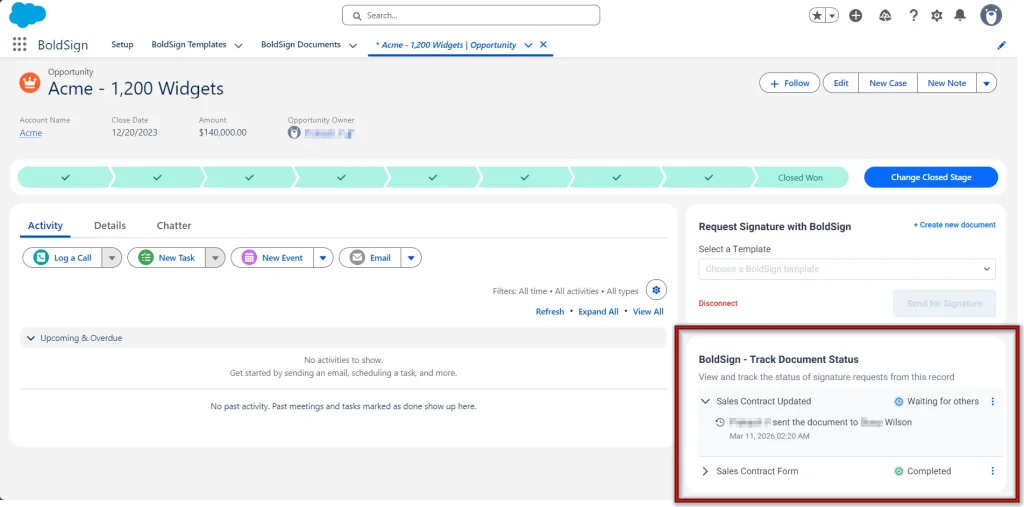
We add a BoldSign Document Status component to the Salesforce record. Each record shows only the documents sent from it, so contracts stay with the right deal and duplicate requests are easier to avoid.
What can the document owner do from the record?
The person who sent the contract can act on it without leaving Salesforce:
- Open the Document Overview page or the View Document page in BoldSign.
- Send a reminder email to a signer who has not signed yet.
- Revoke a signature request that should no longer go ahead.
Other users can view the status only. They cannot open document details, send reminders or revoke requests, so each contract stays under its owner’s control. Our help article on how to track BoldSign document status from Salesforce lists each action.
What happens after the contract is signed?
We save the completed document to the Notes and Attachments section of the related record. Your Salesforce admin sets up a custom permission for this, as our BoldSign and Salesforce integration article explains.
Signed values can also write back to record fields. Our post on how a Salesforce eSignature workflow helps close deals faster shows the full journey from send to close.
Which plan do you need, and what does it cost?
The Salesforce integration is a paid add-on on the Business and Premium plans, as listed on our Salesforce integration page in November 2026. Prices are in USD.
The Business plan costs $15 per user a month, billed yearly, plus $10 per user a month for the Salesforce add-on. The Premium plan costs $99 a month for unlimited users, billed yearly, plus $21 a month per organization for the add-on.
You can try the integration during a 30-day free trial of either plan. The BoldSign pricing page lists everything else each plan includes.
How do you start tracking contracts in Salesforce?
Start with one contract type your team sends often, such as renewals. Track it on the record for a few weeks before you add more.
- Start a 30-day free trial and send a test contract from a Salesforce record.
- Book a demo to see contract tracking set up for your Salesforce objects.
- Watch the Salesforce contract workflows webinar, or read the webinar recap and our Salesforce help center.
Frequently asked questions
Why track contracts inside Salesforce?
Contract status then sits next to the deal it belongs to. Reps follow up sooner, managers stop asking for updates, and the signed copy is on the record when finance needs it.
Can you send a reminder to a signer from Salesforce?
Yes. The document owner can send a reminder email from the BoldSign Document Status component on the record. Other users can see the status but cannot send reminders.
Can you cancel a signature request from Salesforce?
Yes. The document owner can revoke a pending request from the same component. Revoke a request when the terms change, then send a corrected version.
Where does the signed contract go in Salesforce?
We save the completed document to the Notes and Attachments section of the related record. Saving needs a custom permission that your Salesforce admin sets up.
Which Salesforce objects can show contract status?
Leads, contacts, accounts and opportunities can all show it, and so can custom objects. Each record shows only the documents sent from that record.
Do signers need a Salesforce account to sign?
No. The signer opens the request from an email and signs in the browser. Only the people who send contracts from Salesforce need the integration.
Is a contract signed through Salesforce legally binding?
Yes, when it meets the usual rules for electronic signatures, such as each party agreeing to sign electronically. Check the rules for your contract type and country.
Can Salesforce update a deal when a contract is signed?
Yes. Admins can build Salesforce reports on document status and use Flow to update records when the status changes, such as moving a deal forward after signing.

Stephen Otieno Okoth
Stephen is a Technical Assistant at BoldSign who specializes in creating clear documentation and engaging videos. He combines his technical skills and creativity to deliver user-focused solutions. Connect with him on LinkedIn.
More posts by Stephen Otieno Okoth