Common Security Flaws Every Developer Needs to Know and How to Fix Them
 Jackson Paul Thiraviaraj
TL;DR: Most security flaws come from trusting data you do not control: user input, values the browser reports, cookies and URLs. Encode output, keep every security decision on the server, use random session IDs, and keep secrets out of URLs and comments. Our security policy shows how we apply the same ideas to BoldSign.
You test a feature, it passes, and it goes live. A week later someone finds that a search box runs their script, or that a changed response skips your login check. Each began with one assumption that turned out wrong.
This guide walks through five flaws we see often in real code. Each one comes with the attack, the root cause and the fix.
Why do security flaws matter for developers?
One flaw can undo every good feature you ship. A breach can expose user data, damage trust in your product and bring legal trouble.
Think of a house with strong locks and one window left open. Nobody tries the locks when the window works. Testing and scans help, but the cheaper fix is to avoid writing the open window in the first place.
How does unsanitized input lead to cross-site scripting (XSS)?
Cross-site scripting happens when your app shows user input on a page without encoding it. The browser then runs any script hidden in that input.
Apps take input from many places, and an attacker can control all of them:
- URL parameters
- Form fields in the request body
- Hypertext Transfer Protocol (HTTP) headers
- Cookies
What does an XSS attack look like?
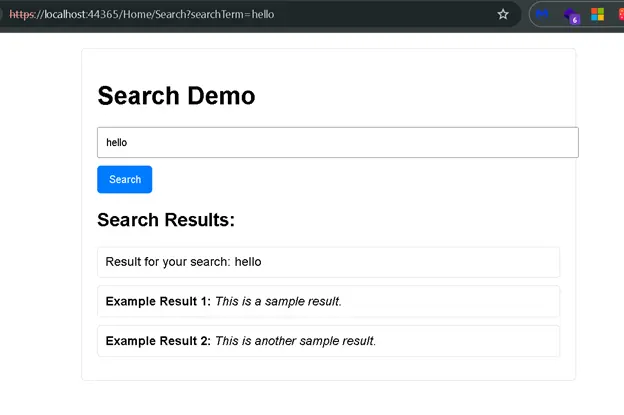
Picture a site that goes live after careful testing. Then an attacker types this payload into the search bar: <img src onerror="alert(document.cookie)">. The page runs the script and shows the user’s cookies.
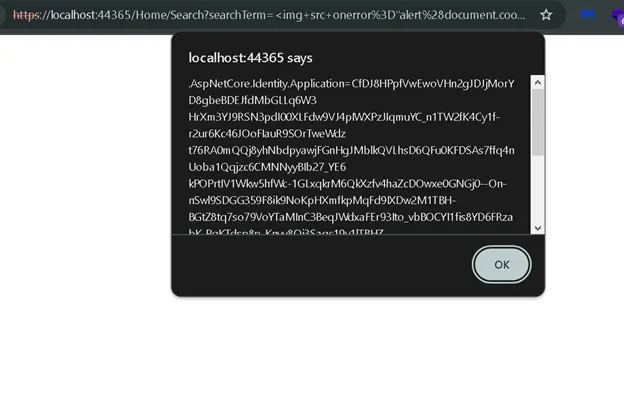
Next, the attacker changes the script to send cookies to their own server. They share the link with signed-in users. Anyone who opens it hands over their session, which can lead to account takeover.
What is the root cause of the XSS flaw?
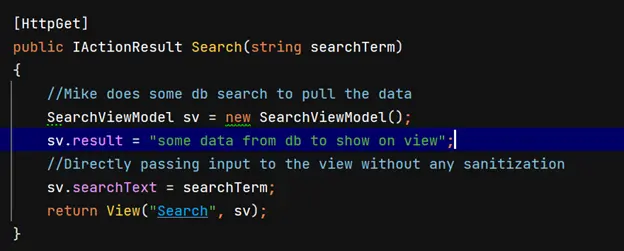
The search action passes the user’s text straight to the view. Nothing checks or cleans it on the way.
The view then prints the text with @Html.Raw, which shows it as is, with no encoding.
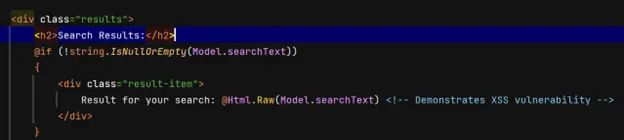
The developer made two mistakes here:
- Trusting the input without checking it.
- Printing it without encoding it for the page.
How do you prevent XSS?
Treat every value from the client as untrusted until you have checked it. Then encode it at the moment you show it.
- Validate input against what you expect, such as length and allowed characters.
- Encode output for where it lands: page markup, an attribute, JavaScript or a URL.
- Use your framework’s default encoding, and avoid Html.Raw for user data.
Note: Unsafe input causes more than XSS. It can also lead to server-side request forgery (SSRF) or server-side template injection (SSTI). Structured Query Language (SQL) injection and path traversal are other risks.
Why should the client never trust a server response?
Anything the browser receives, an attacker can change before your script reads it. So the browser must never decide whether a security check passed.
How does the flawed one-time password check work?
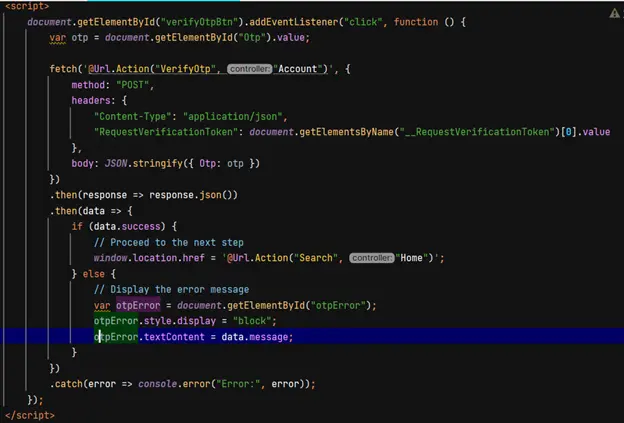
Take a one-time password (OTP) step after login. The user enters the code, and the page sends it to the server in a POST request. The server checks it and answers with success or “Invalid OTP”.
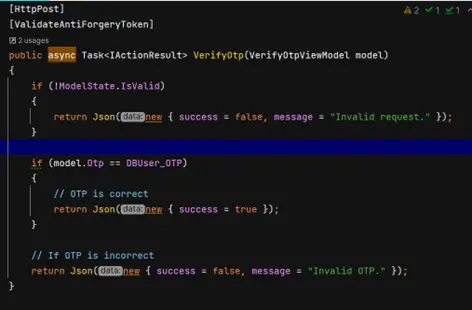
The page script reads that answer. On success it opens the dashboard, and on failure it shows an error.
How does an attacker bypass the OTP check?
Say the server accepts only “123456”. A wrong code shows the error, just as it should.
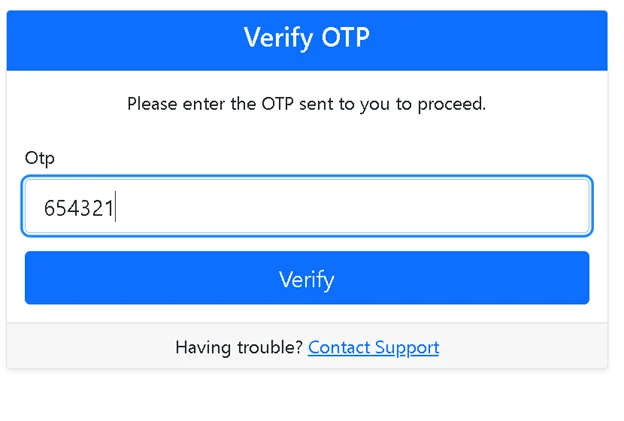
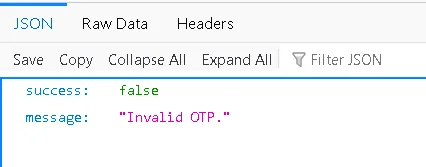
An attacker runs a proxy tool on their own machine and catches the server’s reply. They change it to say success and pass it on to the page.
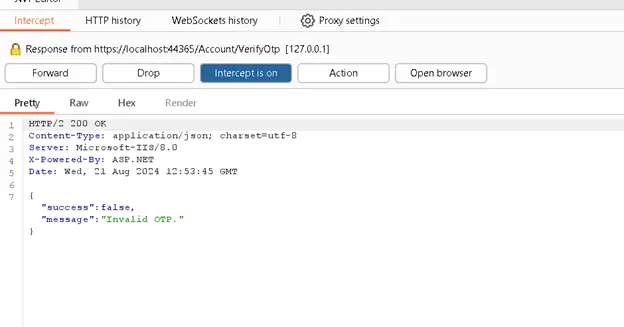
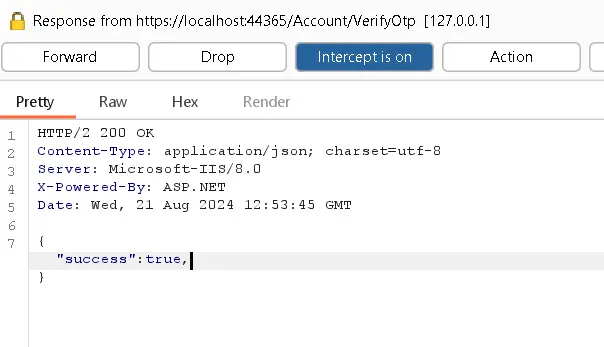
The page believes the edited reply and opens the dashboard. The OTP step now protects nothing.
How do you fix a trusted response?
Let the server own the next step. Every request after login should prove on the server that the user passed the check.
- Stop sending true or false for the page script to act on.
- Record a passed check in the server-side session.
- Serve the dashboard only when that session record exists.
How can a static cookie let attackers bypass two-factor authentication (2FA)?
A cookie that never changes can be copied and replayed. When it proves the user passed 2FA, a copy lets an attacker skip 2FA for good.
How is the flawed 2FA flow built?
The user logs in, then enters a 2FA code. A valid code earns a cookie that marks them as signed in.
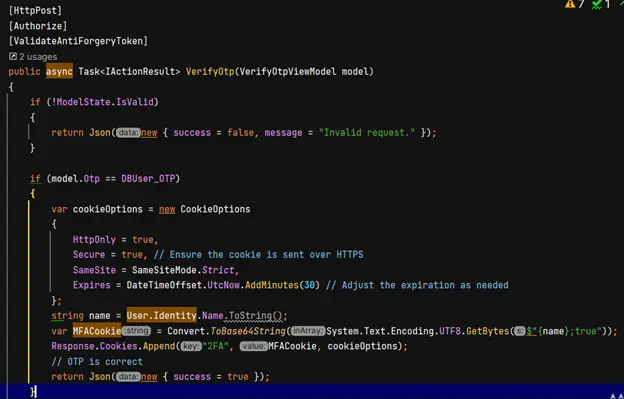
Middleware sends anyone without that cookie back to the 2FA page. So typing the dashboard address straight in does not work.
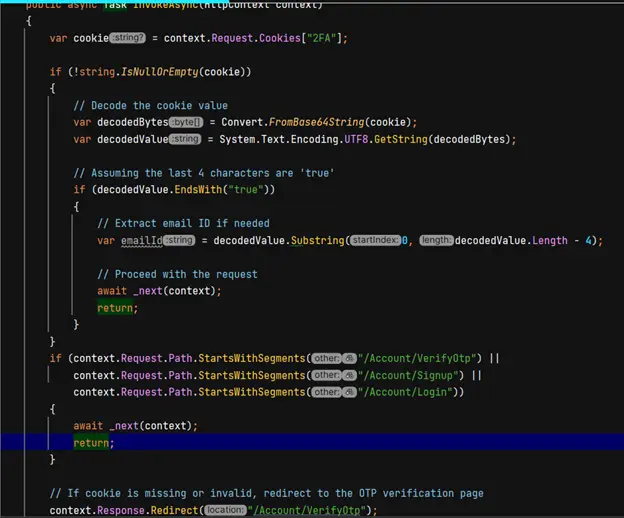
What makes the 2FA cookie unsafe?
The cookie value is the user name and the word “true”, encoded in base64. Base64 is not encryption, so anyone can read it and build the same value.
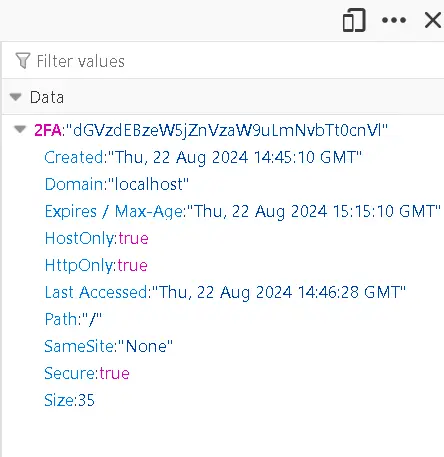
An attacker who learns the password can add that cookie and walk past 2FA. The second factor no longer counts.
How do you make session cookies safe?
Make the cookie value unguessable, and let the server decide what it means.
- Issue a long, random session ID and store the session details on the server.
- Or sign and encrypt cookie data with your framework’s data protection tools.
- Create a new value for every sign-in, and end it on sign-out.
- Set the Secure, HttpOnly and SameSite attributes on the cookie.
Why is sensitive data in URLs a security flaw?
URLs get copied, saved and logged in many places you do not control. Anything you put in one should be safe for strangers to see.
Picture a banking portal that lets users share an account page by link. To make that work, it puts the account details in the address:
https://www.bankportal.com/account-details?accountNumber=123456789&balance=5000&ssn=987-65-4321
Where do URLs end up?
The design looks handy, but each copy of that link holds the account number and more:
- Browser history and cache, open to anyone who uses that device.
- Server and proxy logs, open to anyone with log access.
- Messages and emails, when people share the link by mistake.
- The network itself, when the site uses plain HTTP and not Hypertext Transfer Protocol Secure (HTTPS).
How do you keep sensitive data out of URLs?
Send sensitive values in the request body and keep them off the address bar.
- Never put account details, personal details or tokens in query strings.
- Use
POSTrequests for sensitive data, so it travels in the body. - Serve every page over HTTPS.
- Limit who can read server logs.
- Send a Cache-Control header that stops browsers from caching sensitive pages.
What is the risk of leaving development comments in code?
Comments in page scripts and markup ship to every visitor’s browser. A comment that holds a key or password hands it to anyone who views the source.
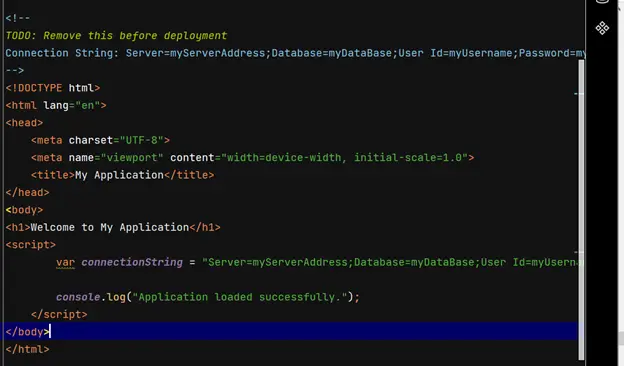
Why does removing a comment later not help?
A developer adds a key in a comment while testing and plans to delete it later. By then, copies may already exist.
- Web archives store snapshots of public pages. See how archived sites keep old copies.
- Scrapers and attackers watch sites and public code for exposed keys.
- Your version history keeps the old line after you delete it.
Treat any secret that reached production as leaked. Rotate it, then clean up the code.
How do you stop secrets reaching production?
Catch secrets before they leave your machine, and keep them out of source code entirely.
- Check for leftover comments and secrets in every code review.
- Run a secret scanner such as Gitleaks in your build pipeline.
- Keep keys in environment variables or a secrets manager.
- Strip comments from production builds with your bundler or minifier.
How do we protect the documents you send with BoldSign?
We apply the same habits to our own product. Our security policy page covers the details.
We encrypt stored documents with Advanced Encryption Standard (AES) 256-bit encryption, at the service level and again at the infrastructure level. Our controls have passed a System and Organization Controls (SOC) 2 Type 2 audit. Our in-house security team runs regular penetration tests, and outside security firms review our code too.
Where can you go next to build safer apps?
Security is a habit you build one feature at a time. These links help you take the next step:
- Start a 30-day free trial and see how we handle signed documents.
- Read our guide to secure sign-in tokens to set up and check them safely.
- Compare API keys and OAuth before you pick an authentication method.
Frequently asked questions
What are the most common security flaws in web applications?
Common flaws include unsanitized input that allows cross-site scripting, logic that trusts what the browser reports, guessable session cookies, sensitive data in URLs and secrets left in code comments.
What is the difference between input validation and output encoding?
Input validation checks that data looks the way you expect when it arrives. Output encoding makes data safe at the moment you show it on a page. You need both to stop cross-site scripting.
Why is Html.Raw risky in Razor views?
Html.Raw writes text to the page without encoding it. Any script inside user input then runs in the visitor's browser, so use it only for markup you control.
Can an attacker change a server response before the browser reads it?
Yes. A proxy tool on the attacker's own machine can catch and edit any response before the page script reads it. Keep every security decision on the server.
What should a secure session cookie contain?
A long random session ID that the server looks up, or data your framework signs and encrypts. Never store a readable user name and a true or false flag.
Is it safe to put an account number in a URL?
No. URLs are saved in browser history and server logs and are easy to share by mistake. Send sensitive values in the request body over HTTPS instead.
How do I find API keys left in my code?
Run a secret scanner such as Gitleaks on your repository and in your build pipeline. Rotate any key it finds, because deleting the line does not remove it from history or archives.
How does BoldSign protect the documents I send?
We encrypt stored documents with AES-256, and our controls have passed a SOC 2 Type 2 audit. Our in-house security team and outside firms test the product regularly.

Jackson Paul Thiraviaraj
Jackson Paul T is a product manager with over 5 years of experience in software development, specializing in application security. An expert in .NET and C#, he excels in managing the entire application security lifecycle, ensuring that products meet the highest standards of safety and reliability. Jackson’s proactive approach and dedication to security contribute significantly to the success of his organization. Connect with him on LinkedIn.
More posts by Jackson Paul Thiraviaraj