How to Build a Change Order Agent for Your Construction Business
 Meikanda Nayanar
TL;DR: A change order agent is a chat assistant that fills your approved change order template and sends it out for signature. You build it in five steps with Claude, our Model Context Protocol (MCP) server and one instruction file, with no code. Our eSignature agents page shows other agents built the same way.
A client asks for a different tile on the balcony. The crew could start today, but the change order is still a blank form in the truck. Work often begins before anyone signs, and that gap causes the arguments later.
This guide shows you how to build an agent that closes that gap from a chat. New to change orders? Read what a change order is and how an agent gets one signed first.
What is a change order agent?
A change order agent is an artificial intelligence (AI) assistant that does the paperwork around a change order. You describe the change in one sentence, and it sends your approved form out for signature.
Think of a site office assistant who knows your standard form by heart. You mention a balcony tile upgrade on the Maple Street job for Jordan. The assistant fills in the blanks, reads the details back to you and mails the form once you say yes.
The agent never signs anything. Your client gets a normal BoldSign signing request and signs it themselves. The agent does the typing and sending, and the people still do the agreeing.
What do you need before you build a change order agent?
You need four things, and all of them have a free starting point.
- A BoldSign account. A free API sandbox account is enough to build and test.
- Your change order form as a PDF.
- A Claude account on the web or in Claude Desktop.
- About an hour, most of it spent on the instruction file in Step 4.
The sandbox suits practice runs. Its signed documents carry a watermark and are deleted 14 days after creation, as our help article on trial and sandbox accounts explains.
How do you build a change order agent in five steps?
You make a template, connect Claude to BoldSign, write the agent’s rules and run one test. Each step below takes you one stage closer to a working agent.
Step 1: Turn your change order form into a BoldSign template
Upload your PDF to BoldSign and add form fields to make a template. A template is a reusable copy of your document with its fields already placed, so the agent fills the blanks each time.
Our help article on how to create a template covers every option. Four prefill fields are the whole intake.
| Field name | Filled by |
|---|---|
clientName |
The agent, from the chat |
clientEmail |
The agent, from the chat |
projectAddress |
The agent, from the chat |
changeOrderNo |
The agent, from the chat |
The changeOrderNo field takes your usual reference, a number or a short label such as “balcony tile upgrade”. Add the client signature and date signed fields for the signer to complete.
Keep every cost and schedule line in the prepared document, out of the agent’s reach. The agent fills only the four intake fields, so prices stay as you wrote them. Give the template a clear name, such as Change Order Form v1, because the agent finds it by name.
Step 2: Create a BoldSign OAuth app
OAuth is a standard way to let one app sign in to another without sharing your password. Claude uses it to reach your BoldSign account, and you set it up once.
- In BoldSign, go to API > OAuth Apps and select Create App.
- Enter a name, such as Claude change order agent.
- Add both redirect addresses from our Claude connector guide.
- Select Save, then copy the Client ID and Client Secret and keep them safe.
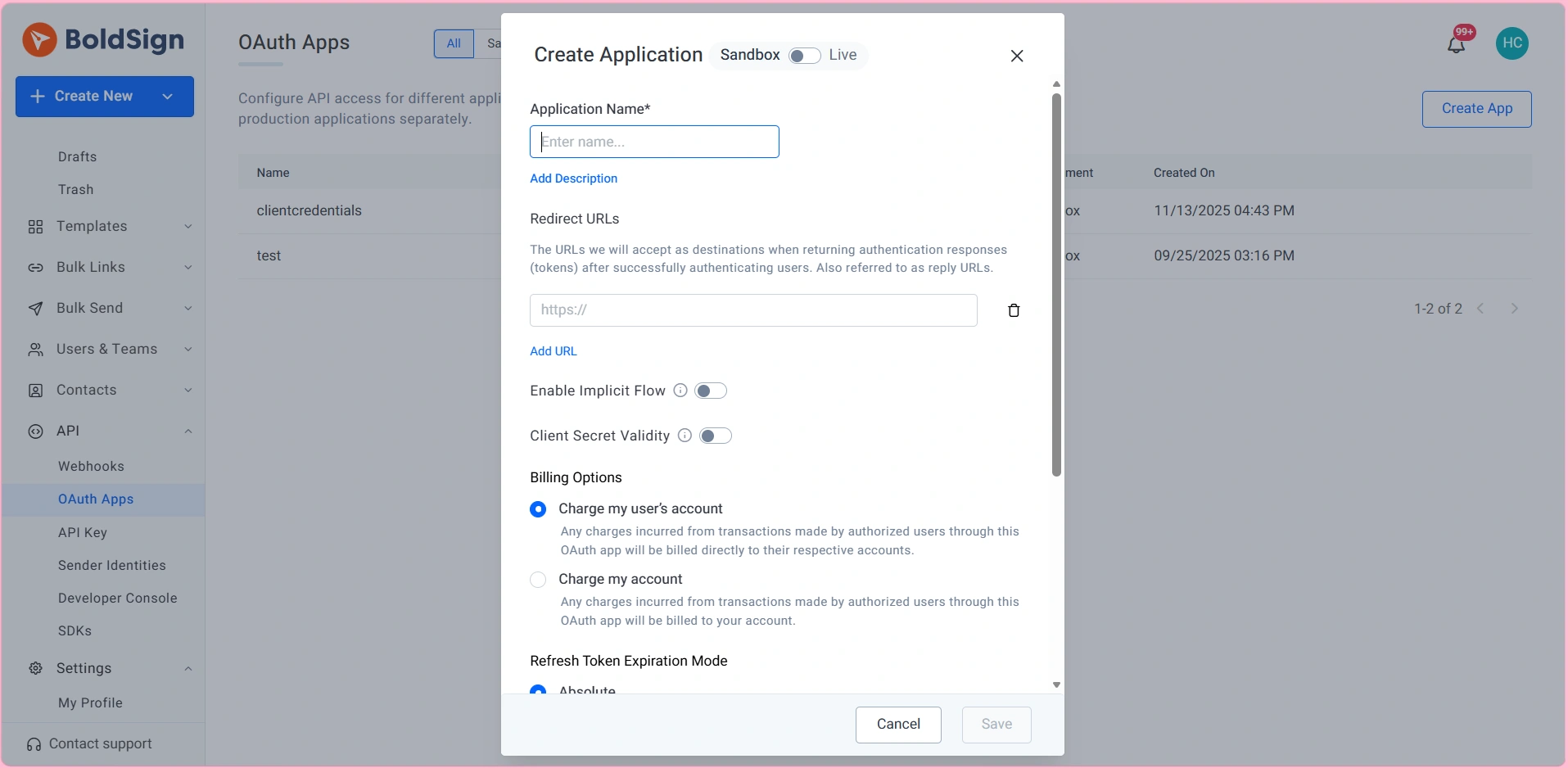
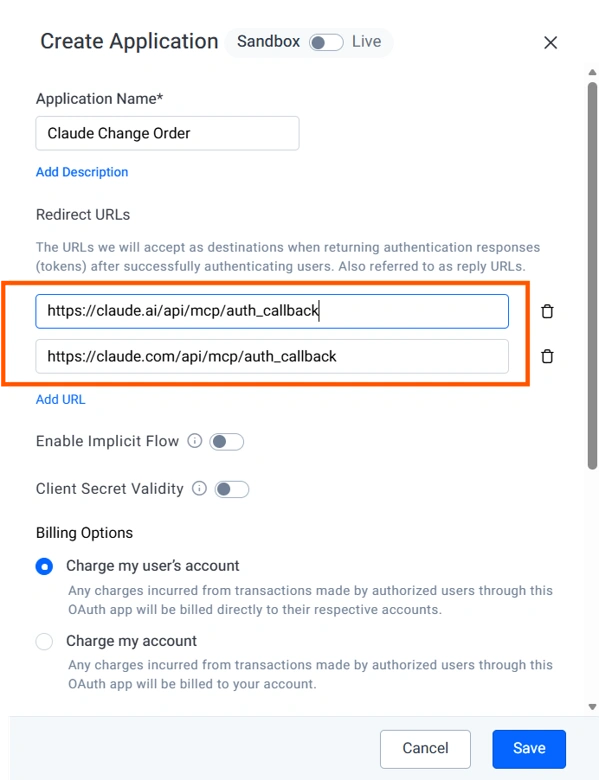
Create the OAuth app in the same region as your BoldSign account. A sandbox account can create sandbox OAuth apps, which are enough for building and testing.
Step 3: Add BoldSign as a connector in Claude
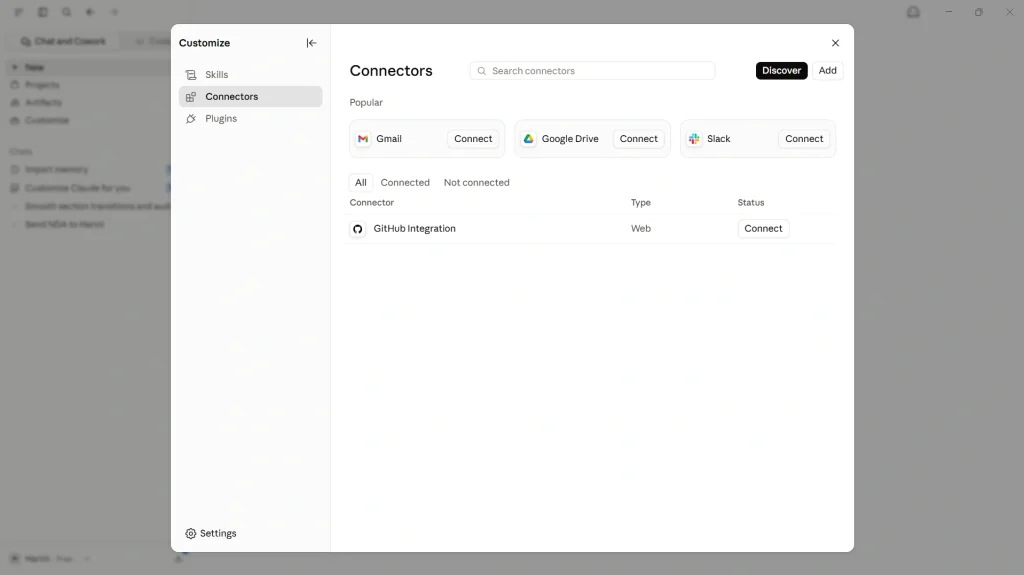
A connector lets your Claude chat create, send and track documents in BoldSign. On Claude Free, Pro or Max, you add it yourself in a few clicks.
- Open Settings from your name, then select Customize > Connectors.
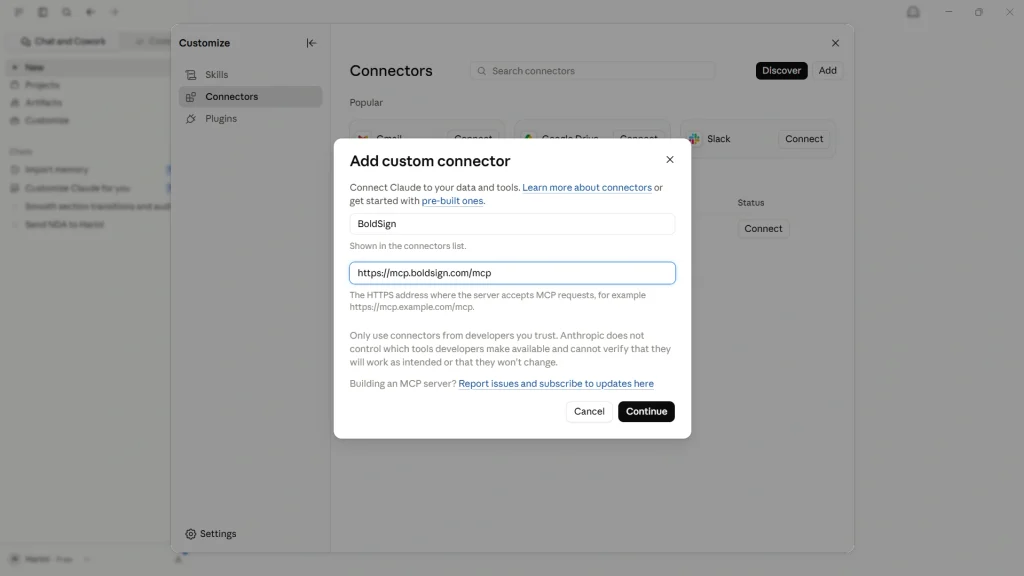
- Select Add, then Add custom connector.
- Enter a name and the MCP address for your region, such as
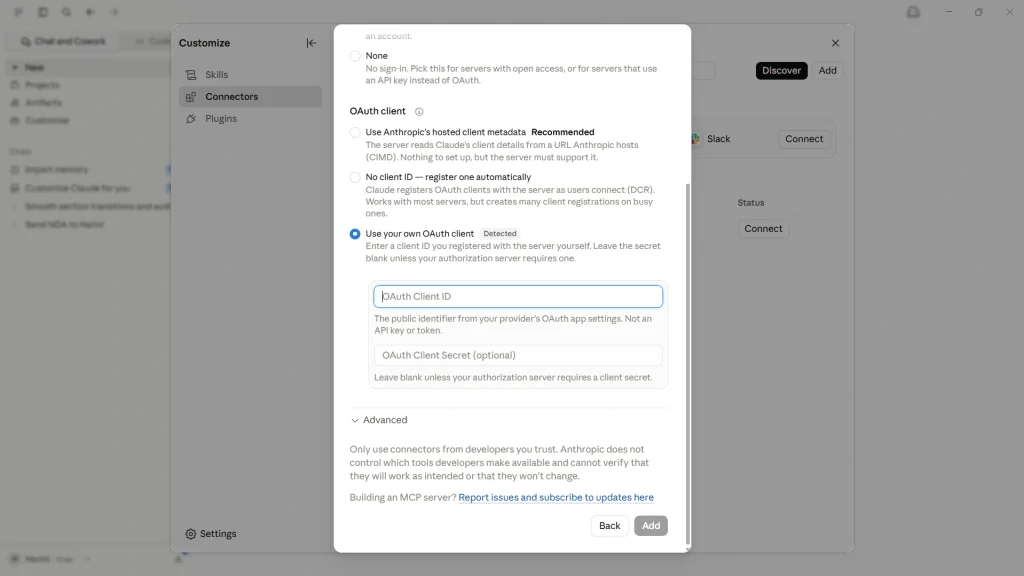
https://mcp.boldsign.com/mcpfor the US. - Select Continue, enter the Client ID and Client Secret in the OAuth Client section, and select Add.
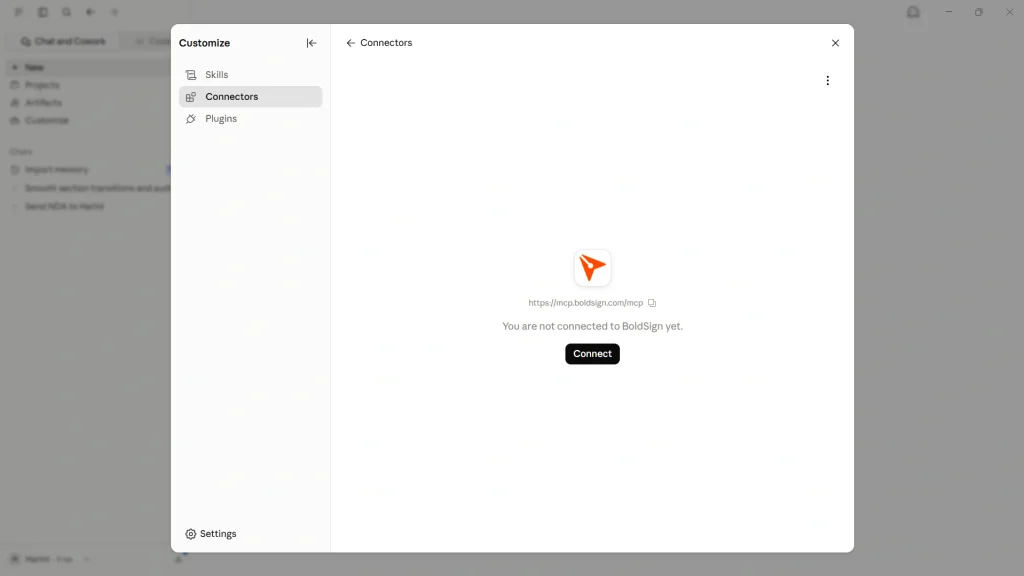
- Select Connect, then sign in to BoldSign and approve access for Claude.
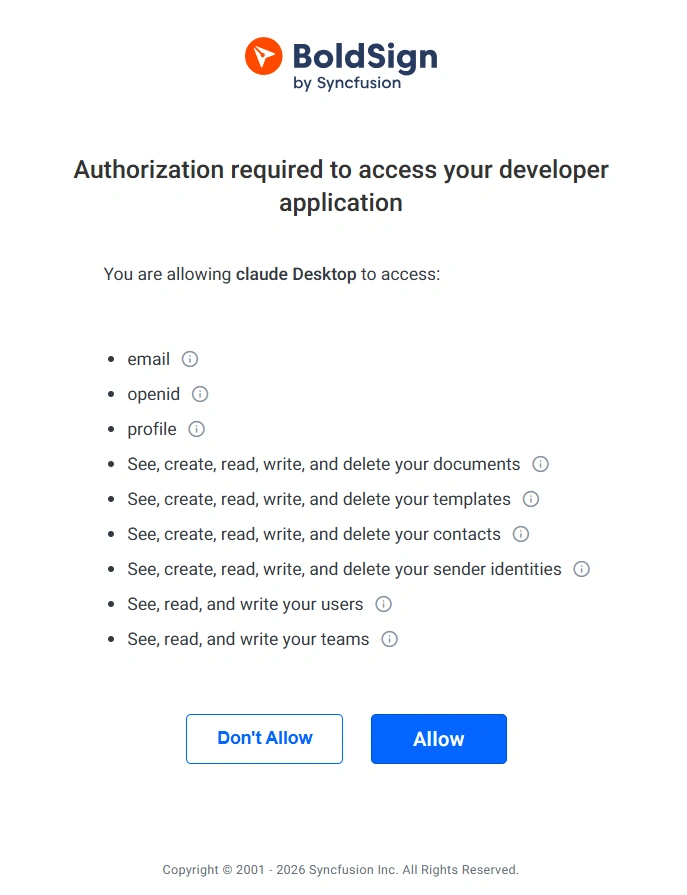
Accounts in the EU, Canada or Australia use their own MCP address. Our MCP server documentation lists each one.
How does a Claude Team or Enterprise owner set up the connector?
An owner adds the connector once under Organization settings > Connectors. Members then find BoldSign under Customize > Connectors and connect with their own BoldSign account.
Each person signs in with their own BoldSign details. The agent can reach only the documents and templates that person already has. Anthropic’s article on custom connectors lists which roles can add them.
Step 4: Write the instructions that make the agent trustworthy
Your written instructions turn a generic connection into a change order agent, so spend most of your time here.
Five rules do most of the work.
- Send from your approved change order template only, and never draft or edit its wording.
- Leave cost and schedule alone, and refer every price question to you.
- Show a summary of project, reference, name and email, then wait for a clear yes.
- Ask for four details only: project, change reference, name and email.
- Ask one question per message, with one short example the person can copy.
Add a safety rule too. Tell the agent to refuse Social Security numbers and bank details. Any request for payment inside a signing chat should make it pause and warn the person.
Our change order instruction file from the live demo puts all of this into words. Copy it and swap in your company name and template name.
Step 5: Test the agent with your own inbox
Run the whole flow once as if you were the client. Enter a sample project and describe a change.
Then give your own email address, confirm the summary and sign the document BoldSign sends you.
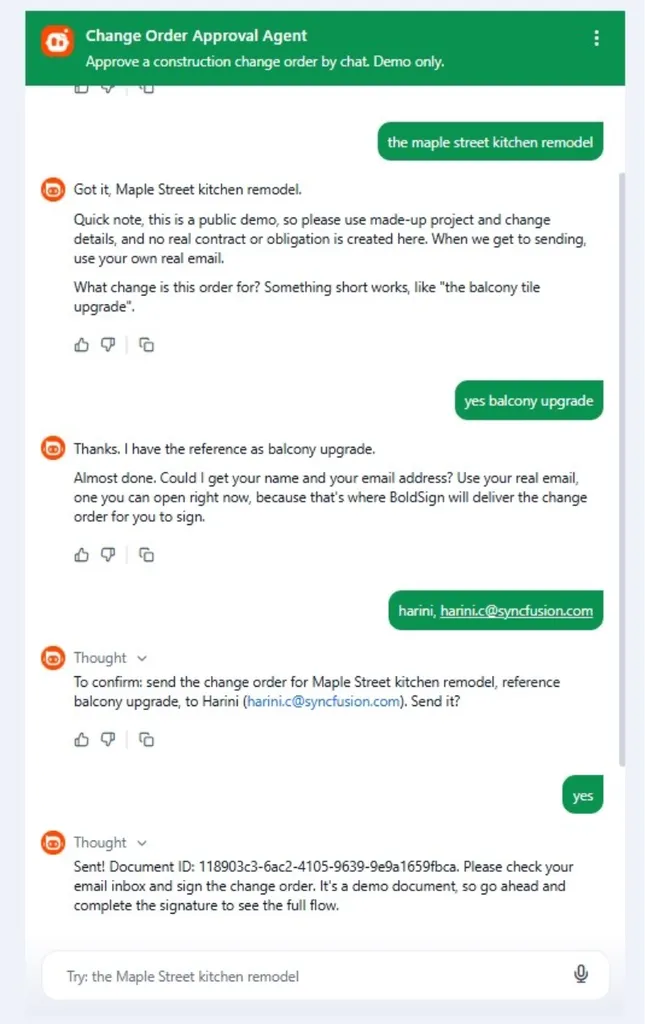
Check the signed document for empty fields. A blank field means the field name in your instructions differs from the name on your template. Make them match and run the test again.
What will a change order agent never do?
A chat about money in the middle of a job is where trust breaks and where scammers work. The limits below are part of the design.
- It never signs. The named signer signs in their own inbox.
- It never sets a price. Cost, scope and dates come from your prepared document.
- It never asks for deposits, wire transfers, gift cards or fees.
- It never collects Social Security numbers or bank details.
- It never gives legal advice. Questions about liens, permits or contract rights go to a person.
You can watch these limits at work in our Change Order Approval Agent demo. The demo runs the same pattern this guide builds, from the client’s side.
Does a change order signed through an agent hold up later?
Yes, when the client agrees to sign electronically and you keep the signed record. A person still signs, so the agent changes how the form travels, not how it is agreed.
In the US, electronic signatures rest on the Electronic Signatures in Global and National Commerce (ESIGN) Act and the Uniform Electronic Transactions Act (UETA). Our ESIGN Act and UETA compliance page explains both. In the EU, our simple electronic signature compliance page covers the electronic identification and trust services (eIDAS) Regulation.
Every signed document is tamper-evident and comes with an audit trail of when it was sent, viewed and signed. Read what an e-signature audit trail records, or see how to produce electronic signature evidence for a dispute.
What else can the same agent pattern handle?
Every recurring form in the job folder works the same way with a different template. Add the template and name it in your instruction file.
- Subcontractor onboarding packets
- Conditional and unconditional lien waivers tied to payment milestones
- Punch list sign-offs and completion certificates
Our eSignature for construction page shows the full set of construction documents. The same MCP server also runs our insurance claim, lease signing and patient check-in agents.
Only the template and the instruction file change between them. What is an AI eSignature agent explains how they work underneath.
Which BoldSign plan do you need for a change order agent, and what does it cost?
You can build and test the whole agent free in the API sandbox. Sending live change orders through the MCP server needs our Enterprise API plan.
The Enterprise API plan starts at $30 a month and includes 40 envelopes. Each extra envelope costs $0.75. Prices are in USD, as listed on our API pricing page in November 2026.
How do you start building your first change order agent?
Begin in the sandbox with one template and one test send. Connect your live account once the test works.
- Create a free API sandbox account and build your template.
- Try the Change Order Approval Agent demo as a client would.
- Book a demo to plan agents for your other construction forms.
Frequently asked questions
What is a change order agent?
A change order agent is a chat assistant that fills your approved change order template and sends it for signature. You describe the change in plain words, and your client signs from their own inbox.
Do I need a developer to build a change order agent?
No. You can build one with a BoldSign template, the BoldSign connector in Claude and a written instruction file. A developer helps only when you want the agent inside your own app.
Does the agent sign the change order for my client?
No. The agent prepares and sends the document. Your client opens the BoldSign email and signs it, and the audit trail records that step like any other signing request.
Can the agent change the price on a change order?
Not when you set it up as this guide shows. Cost and schedule live in the prepared document, and the instruction file tells the agent to refer every price question to you.
Which Claude plans support the BoldSign connector?
Custom connectors work on every Claude plan, from Free to Enterprise, according to Anthropic. A Free account holds one custom connector. On Team and Enterprise, an owner adds the connector once for everyone.
What does it cost to run a change order agent with BoldSign?
Building and testing is free in our API sandbox. Sending live change orders needs our Enterprise API plan, which starts at $30 a month with 40 envelopes, billed in USD.
Is an electronically signed change order legally binding?
Yes, when the client agrees to sign electronically and the signed record is kept. In the US, federal law and state electronic transaction laws give an electronic signature the same legal effect as ink.
What should I do if a signing chat asks me for a deposit?
Stop and call your contractor on a phone number you already have. Our change order agent is built to refuse any payment talk, so a payment request in a signing chat is a warning sign.

Meikanda Nayanar
A veteran product manager at BoldSign, boasting a decade-long journey as a .NET developer. With a rich history of leading product development across diverse technologies like Windows Forms, WPF, UWP, Xamarin.Forms, Flutter, and MAUI, Meikandan brings a unique blend of technical expertise and strategic insight to the table. Connect with him on LinkedIn.
More posts by Meikanda Nayanar