BoldSign Collaborative Fields API: Let Several Signers Edit One Field
 Evans Omondi Otieno
TL;DR: Collaborative fields are form fields that two or more signers can edit while they sign. With the BoldSign API, you add a
CollaborationSettingsobject to a field and list who may change it. You also choose whether a change needs initials or a fresh signature. Our collaborative field editing page shows the feature from the signer’s side.
Your app sends a services contract to a client and a project lead. Both must agree on the start date and the budget. With one field per signer, your code ends up comparing two values and chasing whoever got it wrong.
A collaborative field removes that work. This guide covers the request format, the endpoints that accept it, and what happens after someone edits a shared value. Our guide on improving document accuracy with collaborative fields covers the same feature in the web app.
What are collaborative fields in BoldSign?
Collaborative fields let several signers edit one form field during signing. You pick the signers, and we record each change.
Think of a shared notes page in a meeting room. The people you invite can correct a figure, and everyone sees the new one. Each collaborator edits during their own turn, so two people never type in the same box at once.
How do collaborative fields work through the API?
You set them up inside the field definition with a CollaborationSettings object. The object answers four questions:
- Who may edit the field?
- Must collaborators fill in the field?
- Must they add their initials when they change it?
- Must earlier signers approve the change and sign again?
Which field types support collaboration?
Five field types can be shared. Signature and date signed fields stay with their owner.
- Text box
- Radio button
- Checkbox
- Editable date
- Dropdown
How do you configure CollaborationSettings in an API request?
Add the object to any supported field in the FormFields list. Here is a text box with all four settings:
"FormFields": [
 {
    "FieldType": "TextBox",
    "PageNumber": 1,
    "Bounds": {
      "X": 50,
      "Y": 100,
      "Width": 400,
      "Height": 25
    },
    "CollaborationSettings": {
      "IsRequired": true,
      "RequireSignerApproval": true,
      "RequireInitial": true,
      "AllowedSigners": ["string"]
    }
 }
]
What does each property do?
Each property is optional. Our send document reference lists them in full.
IsRequired(Boolean): collaborators must fill in the field before they finish.RequireSignerApproval(Boolean): earlier signers must check and approve the document after a change.RequireInitial(Boolean): collaborators add their initials whenever they edit the field.AllowedSigners(string array): the signers who may edit the field.
Which API endpoints support collaborative fields?
These endpoints accept CollaborationSettings, as listed in our API reference. The right value for AllowedSigners depends on the endpoint.
| API endpoint | Value in AllowedSigners |
|---|---|
| POST /v1/document/send | Signer ID, such as 3ba7b810-9dad-11d1-50b4-00c04fd430c9 |
| POST /v1/template/create | Template role index, such as “1” or “2” |
| PUT /v1/template/edit | Template role index |
| POST /v1/template/send | Template role index |
| POST /v1/template/mergeAndSend | Template role index |
How do you control who can edit a collaborative field?
Put the IDs or role indexes of the chosen signers in AllowedSigners. Only those signers can change the shared value.
"AllowedSigners": ["signer ID" OR " role index 1,2..."]You can share a field between two signers or open it to every signer. The samples below send a document to David and Alice, with one text box that both can edit.
curl -X 'POST' \
  'https://api.boldsign.com/v1/document/send' \
  -H 'accept: application/json' \
  -H 'X-API-KEY: {your API key}' \
  -H 'Content-Type: application/json' \
  -d '{
  "DisableExpiryAlert": false,
  "ReminderSettings": {
    "ReminderDays": 5,
    "ReminderCount": 3,
    "EnableAutoReminder": true
  },
  "Message": "",
  "Signers": [
    {
      "Name": "David",
      "Id": "4ba7b810-3dad-11d1-80b4-00c04fd430c8",
      "EmailAddress": "david@example.com",
      "SignerType": "Signer",
      "FormFields": [
        {
          "FieldType": "Signature",
          "PageNumber": 1,
          "Bounds": {
            "X": 50,
            "Y": 50,
            "Width": 200,
            "Height": 25
          }
        },
        {
          "FieldType": "DateSigned",
          "PageNumber": 1,
          "Bounds": {
            "X": 50,
            "Y": 150,
            "Width": 200,
            "Height": 25
          },
          "IsRequired": true
        },
        {
          "FieldType": "TextBox",
          "PageNumber": 1,
          "Bounds": {
            "X": 50,
            "Y": 100,
            "Width": 400,
            "Height": 25
          },
          "CollaborationSettings": {
            "IsRequired": true,
            "RequireSignerApproval": true,
            "RequireInitial": true,
            "AllowedSigners": [
              "550e8400-e29b-41d4-a716-446655440000"
            ]
          }
        }
      ]
    },
    {
      "Name": "Alice",
      "Id": "550e8400-e29b-41d4-a716-446655440000",
      "EmailAddress": "alice@example.com",
      "SignerType": "Signer",
      "FormFields": [
        {
          "FieldType": "Signature",
          "PageNumber": 1,
          "Bounds": {
            "X": 50,
            "Y": 200,
            "Width": 200,
            "Height": 25
          }
        },
        {
          "FieldType": "DateSigned",
          "PageNumber": 1,
          "Bounds": {
            "X": 50,
            "Y": 250,
            "Width": 200,
            "Height": 25
          },
          "IsRequired": true
        }
      ]
    }
  ],
  "ExpiryDays": 30,
  "Files": [
    "data:application/pdf;base64,JVBERi0xLjcKJcfs..."
  ],
  "Title": "Sampledocument",
  "ExpiryDateType": "Days",
  "ExpiryValue": 60,
  "DisableEmails": false
}'
var apiClient = new ApiClient("https://api.boldsign.com", "Your API Key");
var documentClient = new DocumentClient(apiClient);
// ----- David's fields -----
var davidSignatureField = new FormField(
type: FieldType.Signature,
pageNumber: 1,
bounds: new Rectangle(x: 166, y: 645, width: 200, height: 25)
);
var davidDateField = new FormField(
id: "date",
type: FieldType.DateSigned,
pageNumber: 1,
bounds: new Rectangle(x: 134, y: 713, width: 200, height: 25),
isRequired: true
);
// Text box with collaboration settings limited to Alice (by signer ID)
var davidTextBoxField = new FormField(
id: "david_textbox",
type: FieldType.TextBox,
pageNumber: 1,
bounds: new Rectangle(x: 202, y: 446, width: 400, height: 25)
);
davidTextBoxField.CollaborationSettings = new CollaborationSettings
{
IsRequired = true,
RequireSignerApproval = true,
RequireInitial = true,
AllowedSigners = new List<string>
{
"550e8400-e29b-41d4-a716-446655440000", //Alice ID
}
};
// ----- Alice's fields -----
var aliceSignatureField = new FormField(
id: "signature",
type: FieldType.Signature,
pageNumber: 1,
bounds: new Rectangle(x: 553, y: 644, width: 200, height: 25)
);
var aliceDateField = new FormField(
id: "date",
type: FieldType.DateSigned,
pageNumber: 1,
bounds: new Rectangle(x: 527, y: 713, width: 200, height: 25),
isRequired: true
);
// ----- Signers (with explicit IDs so fields can target them) -----
var documentSignerDavid = new DocumentSigner(
signerName: "David",
signerEmail: "david@example.com",
signerType: SignerType.Signer,
formFields: new List<FormField> { davidSignatureField, davidDateField, davidTextBoxField }
);
documentSignerDavid.Id="6ba7b810-9dad-11d1-80b4-00c04fd430c8";
var documentSignerAlice = new DocumentSigner(
signerName: "Alice",
signerEmail: "alice@example.com",
signerType: SignerType.Signer,
formFields: new List<FormField> { aliceSignatureField, aliceDateField }
);
documentSignerAlice.Id = "550e8400-e29b-41d4-a716-446655440000"; // Ensure this ID is correct based on your BoldSign account
// ----- Document details -----
var documentDetails = new SendForSign
{
Title = "Agreement",
Signers = new List<DocumentSigner>
{
// You can control signing order by list order if needed
documentSignerDavid,
documentSignerAlice
},
Files = new List<IDocumentFile>
{
new DocumentFilePath
{
ContentType = "application/pdf",
FilePath = "You file path.pdf",
}
},
// Optional: set additional options like Message, EnableSigningOrder, Reminders, etc.
// EnableSigningOrder = true,
};
// Send
var documentCreated = documentClient.SendDocument(documentDetails);
Console.WriteLine($"Document ID: {documentCreated.DocumentId}");import boldsign
configuration = boldsign.Configuration(api_key="YOUR API KEY ")
with boldsign.ApiClient(configuration) as api_client:
document_api = boldsign.DocumentApi(api_client)
# David's fields
signature_field = boldsign.FormField(
fieldType="Signature",
pageNumber=1,
bounds=boldsign.Rectangle(x=166.6, y=645.1, width=200, height=25),
)
date_field = boldsign.FormField(
fieldType="DateSigned",
pageNumber=1,
bounds=boldsign.Rectangle(x=134.7, y=713.4, width=200, height=25),
isRequired=True,
)
textbox_field = boldsign.FormField(
fieldType="TextBox",
pageNumber=1,
bounds=boldsign.Rectangle(x=202, y=446.4, width=400, height=25),
collaborationSettings=boldsign.CollaborationSettings(
isRequired=True,
requireSignerApproval=True,
requireInitial=True,
allowedSigners=["450e8400-e29b-41d4-a416-446655440000"], # Alice's ID
),
)
document_signer_david = boldsign.DocumentSigner(
id="4ba7b810-3dad-11d1-80b4-00c04fd430c8",
name="David",
emailAddress="david@example.com",
signerType="Signer",
formFields=[signature_field, date_field, textbox_field],
)
# Alice's fields
signature_field_alice = boldsign.FormField(
fieldType="Signature",
pageNumber=1,
bounds=boldsign.Rectangle(x=553.2, y=644, width=200, height=25),
)
date_field_alice = boldsign.FormField(
fieldType="DateSigned",
pageNumber=1,
bounds=boldsign.Rectangle(x=527.5, y=713.4, width=200, height=25),
isRequired=True,
)
document_signer_alice = boldsign.DocumentSigner(
id="450e8400-e29b-41d4-a416-446655440000",
name="Alice",
emailAddress="alice@example.com",
signerType="Signer",
formFields=[signature_field_alice, date_field_alice],
)
send_for_sign = boldsign.SendForSign(
title="Non Disclosure Agreement",
files=["Your File Path.pdf"], # Replace with actual file path
signers=[document_signer_david, document_signer_alice],
)
document_created = document_api.send_document(send_for_sign)
print("Document sent successfully:", document_created)<?php
require_once "vendor/autoload.php";
use BoldSign\Configuration;
use BoldSign\Api\DocumentApi;
use BoldSign\Model\{
FormField,
Rectangle,
DocumentSigner,
SendForSign,
FileInfo,
EditableDateFieldSettings,
CollaborationSettings
};
$config = new Configuration();
$config->setApiKey(' Your API Key ');
$document_api = new DocumentApi($config);
// David's fields
$signature_field_david = new FormField();
$signature_field_david->setFieldType('Signature');
$signature_field_david->setPageNumber(1);
$signature_field_david->setBounds(new Rectangle(['x' => 50, 'y' => 50, 'width' => 200, 'height' => 25]));
$date_field_david = new FormField();
$date_field_david->setFieldType('DateSigned');
$date_field_david->setPageNumber(1);
$date_field_david->setBounds(new Rectangle(['x' => 50, 'y' => 150, 'width' => 200, 'height' => 25]));
$textbox_field_david = new FormField();
$textbox_field_david->setFieldType('TextBox');
$textbox_field_david->setPageNumber(1);
$textbox_field_david->setBounds(new Rectangle(['x' => 50, 'y' => 100, 'width' => 400, 'height' => 25]));
$textbox_field_david->setCollaborationSettings(new CollaborationSettings([
'is_required' => true,
'require_signer_approval' => true,
'require_initial' => true,
'allowed_signers' => ['550e8400-e29b-41d4-a716-446655440000'] // Alice's ID
]));
$document_signer_david = new DocumentSigner();
$document_signer_david->setName("David");
$document_signer_david->setId("6ba7b810-9dad-11d1-80b4-00c04fd430c8");
$document_signer_david->setEmailAddress("david@example.com");
$document_signer_david->setSignerType("Signer");
$document_signer_david->setFormFields([$signature_field_david, $date_field_david, $textbox_field_david]);
// Alice's fields
$signature_field_alice = new FormField();
$signature_field_alice->setFieldType('Signature');
$signature_field_alice->setPageNumber(1);
$signature_field_alice->setBounds(new Rectangle(['x' => 50, 'y' => 200, 'width' => 200, 'height' => 25]));
$date_field_alice = new FormField();
$date_field_alice->setFieldType('DateSigned');
$date_field_alice->setPageNumber(1);
$date_field_alice->setBounds(new Rectangle(['x' => 50, 'y' => 250, 'width' => 200, 'height' => 25]));
$date_field_alice->setIsRequired(true);
$document_signer_alice = new DocumentSigner();
$document_signer_alice->setName("Alice");
$document_signer_alice->setId("550e8400-e29b-41d4-a716-446655440000");
$document_signer_alice->setEmailAddress("alice@example.com");
$document_signer_alice->setSignerType("Signer");
$document_signer_alice->setFormFields([$signature_field_alice, $date_field_alice]);
// Prepare document
$send_for_sign = new SendForSign();
$files = new FileInfo();
$files = 'Your File path .pdf';
$send_for_sign->setFiles([$files]);
$send_for_sign->setSigners([$document_signer_david, $document_signer_alice]);
$send_for_sign->setTitle('Document SDK API');
$document_created = $document_api->sendDocument($send_for_sign);
print_r($document_created);ApiClient client = Configuration.getDefaultApiClient();
client.setApiKey("Your API Key ");
DocumentApi documentApi = new DocumentApi(client);
// ── David's fields
FormField signatureFieldDavid = new FormField();
signatureFieldDavid.setFieldType(FormField.FieldTypeEnum.SIGNATURE);
signatureFieldDavid.setPageNumber(1);
Rectangle boundsDavidSig = new Rectangle().x(166.6f).y(645.1f).width(200f).height(25f);
signatureFieldDavid.setBounds(boundsDavidSig);
FormField dateFieldDavid = new FormField();
dateFieldDavid.setFieldType(FormField.FieldTypeEnum.DATE_SIGNED);
dateFieldDavid.setPageNumber(1);
Rectangle boundsDavidDate = new Rectangle().x(134.7f).y(713.4f).width(200f).height(25f);
dateFieldDavid.setBounds(boundsDavidDate);
dateFieldDavid.setIsRequired(true);
FormField textBoxField = new FormField();
textBoxField.setFieldType(FormField.FieldTypeEnum.TEXT_BOX);
textBoxField.setPageNumber(1);
Rectangle boundsText = new Rectangle().x(202f).y(446.4f).width(400f).height(25f);
textBoxField.setBounds(boundsText);
textBoxField.setIsRequired(true);
textBoxField = new FormField();
textBoxField.setFieldType(FormField.FieldTypeEnum.TEXT_BOX);
textBoxField.setPageNumber(1);
textBoxField.setIsRequired(true);
textBoxField.setBounds(new Rectangle().x(202f).y(446.4f).width(400f).height(25f));
CollaborationSettings collabSettings = new CollaborationSettings();
// Make it required for collaborators (not just the assignee).
collabSettings.setIsRequired(true);
// If someone edits after another signer has signed, trigger reapproval.
collabSettings.setRequireSignerApproval(true);
// Require collaborators to initial when they change the value.
collabSettings.setRequireInitial(true);
// Add *other* signer IDs who can collaborate (assignee is auto-included).
collabSettings.setAllowedSigners(
Arrays.asList("550e8400-e29b-41d4-a716-446655440000" // Alice's signer ID
));
// Attach the collaboration settings to the field.
textBoxField.setCollaborationSettings(collabSettings);
// Alice's signer ID
DocumentSigner signerDavid = new DocumentSigner();
signerDavid.setId("6ba7b810-9dad-11d1-80b4-00c04fd430c8");
signerDavid.setName("David");
signerDavid.setEmailAddress("david@example.com");
signerDavid.setSignerType(DocumentSigner.SignerTypeEnum.SIGNER);
signerDavid.setFormFields(Arrays.asList(signatureFieldDavid, dateFieldDavid, textBoxField));
// ── Alice's fields
FormField signatureFieldAlice = new FormField();
signatureFieldAlice.setFieldType(FormField.FieldTypeEnum.SIGNATURE);
signatureFieldAlice.setPageNumber(1);
Rectangle boundsAliceSig = new Rectangle().x(553.2f).y(644f).width(200f).height(25f);
signatureFieldAlice.setBounds(boundsAliceSig);
FormField dateFieldAlice = new FormField();
dateFieldAlice.setFieldType(FormField.FieldTypeEnum.DATE_SIGNED);
dateFieldAlice.setPageNumber(1);
Rectangle boundsAliceDate = new Rectangle().x(527.5f).y(713.4f).width(200f).height(25f);
dateFieldAlice.setBounds(boundsAliceDate);
dateFieldAlice.setIsRequired(true);
DocumentSigner signerAlice = new DocumentSigner();
signerAlice.setId("550e8400-e29b-41d4-a716-446655440000");
signerAlice.setName("Alice");
signerAlice.setEmailAddress("alice@example.com");
signerAlice.setSignerType(DocumentSigner.SignerTypeEnum.SIGNER);
signerAlice.setFormFields(Arrays.asList(signatureFieldAlice, dateFieldAlice));
// ── Prepare and send the document.
SendForSign sendForSign = new SendForSign();
File file = new File("Your file path.pdf"); // Replace with actual path, e.g. "C:\\docs\\nda.pdf"
sendForSign.setFiles(Arrays.asList(file));
sendForSign.setSigners(Arrays.asList(signerDavid, signerAlice));
sendForSign.setTitle("Non Disclosure Agreement");
DocumentCreated documentCreated = documentApi.sendDocument(sendForSign);
// Optional: Print success info.
System.out.println("Document sent successfully: " + documentCreated);import { DocumentApi, DocumentSigner, FormField, Rectangle, SendForSign, CollaborationSettings } from "boldsign";
import * as fs from "fs";
async function sendDocument() {
const documentApi = new DocumentApi();
documentApi.setApiKey("YOUR API KEY");
// Signature field (David)
const davidSignatureBounds = new Rectangle();
davidSignatureBounds.x = 166.6;
davidSignatureBounds.y = 645.1;
davidSignatureBounds.width = 200;
davidSignatureBounds.height = 25;
const davidSignatureField = new FormField();
davidSignatureField.fieldType = FormField.FieldTypeEnum.Signature;
davidSignatureField.pageNumber = 1;
davidSignatureField.bounds = davidSignatureBounds;
// Date signed field (David)
const davidDateBounds = new Rectangle();
davidDateBounds.x = 134.7;
davidDateBounds.y = 713.4;
davidDateBounds.width = 200;
davidDateBounds.height = 25;
const davidDateField = new FormField();
davidDateField.fieldType = FormField.FieldTypeEnum.DateSigned;
davidDateField.pageNumber = 1;
davidDateField.bounds = davidDateBounds;
davidDateField.isRequired = true;
// TextBox field (David) - editable with collaboration settings
const davidTextboxBounds = new Rectangle();
davidTextboxBounds.x = 202;
davidTextboxBounds.y = 446.4;
davidTextboxBounds.width = 400;
davidTextboxBounds.height = 25;
const davidTextboxField = new FormField();
davidTextboxField.fieldType = FormField.FieldTypeEnum.TextBox;
davidTextboxField.pageNumber = 1;
davidTextboxField.bounds = davidTextboxBounds;
davidTextboxField.isEditable = true;
// Collaboration settings for David's text box.
const collab = new CollaborationSettings();
collab.isRequired = true;
collab.requireSignerApproval = true;
collab.requireInitial = true;
collab.allowedSigners = ["450e8400-e29b-41d4-a416-446655440000"]; // Alice Id
davidTextboxField.collaborationSettings = collab;
// David signer
const documentSignerDavid = new DocumentSigner();
documentSignerDavid.id ="4ba7b810-3dad-11d1-80b4-00c04fd430c8";
documentSignerDavid.name = "David";
documentSignerDavid.emailAddress = "david@example.com";
documentSignerDavid.signerType = DocumentSigner.SignerTypeEnum.Signer;
documentSignerDavid.formFields = [
davidSignatureField,
davidDateField,
davidTextboxField,
];
// Signature field (Alice)
const aliceSignatureBounds = new Rectangle();
aliceSignatureBounds.x = 553.2;
aliceSignatureBounds.y = 644;
aliceSignatureBounds.width = 200;
aliceSignatureBounds.height = 25;
const aliceSignatureField = new FormField();
aliceSignatureField.fieldType = FormField.FieldTypeEnum.Signature;
aliceSignatureField.pageNumber = 1;
aliceSignatureField.bounds = aliceSignatureBounds;
// Date signed field (Alice)
const aliceDateBounds = new Rectangle();
aliceDateBounds.x = 527.5;
aliceDateBounds.y = 713.4;
aliceDateBounds.width = 200;
aliceDateBounds.height = 25;
const aliceDateField = new FormField();
aliceDateField.fieldType = FormField.FieldTypeEnum.DateSigned;
aliceDateField.pageNumber = 1;
aliceDateField.bounds = aliceDateBounds;
aliceDateField.isRequired = true;
// Alice signer
const documentSignerAlice = new DocumentSigner();
documentSignerAlice.id ="450e8400-e29b-41d4-a416-446655440000";
documentSignerAlice.name = "Alice";
documentSignerAlice.emailAddress = "alice@example.com";
documentSignerAlice.signerType = DocumentSigner.SignerTypeEnum.Signer;
documentSignerAlice.formFields = [
aliceSignatureField,
aliceDateField,
];
const files = fs.createReadStream("./Your File Path.pdf");
const sendForSign = new SendForSign();
sendForSign.title = "Agreement";
sendForSign.signers = [documentSignerDavid, documentSignerAlice];
sendForSign.files = [files];
try {
const documentCreated = await documentApi.sendDocument(sendForSign);
console.log("Document sent successfully:", documentCreated);
} catch (error) {
console.error("Error sending document:", error);
}
}
sendDocument();What does a collaborator see when signing?
A collaborator who selects the shared text box sees a tooltip. It tells them they are a collaborator on that field.
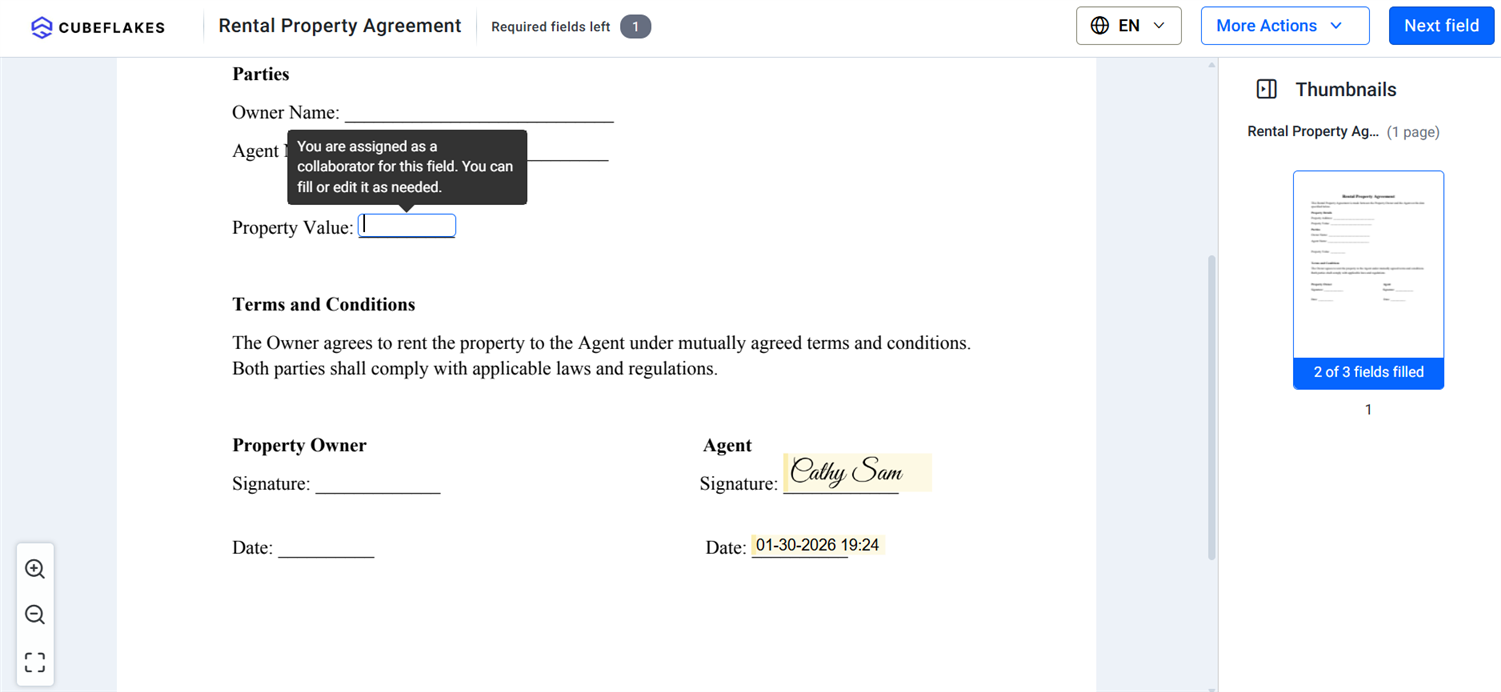
Both signers see any change to the field when they sign again.
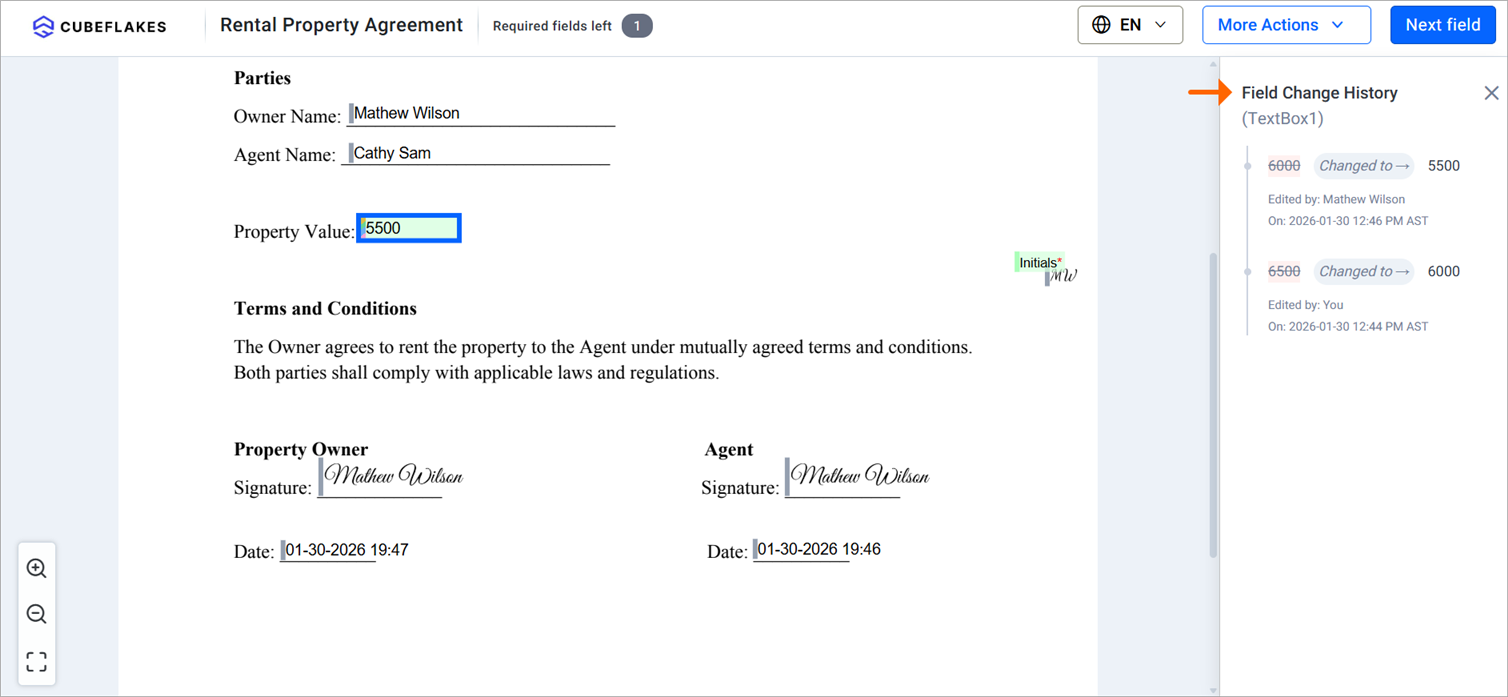
What happens when a collaborative field changes after someone has signed?
The result depends on your settings. Here is the flow when both RequireSignerApproval and RequireInitial are true:
- The collaborator edits the field and adds their initials.
- We email every signer who already finished and ask them to review the change.
- Each of them signs again, and only the shared fields can change while they do.
- The audit trail and Document History record the edit and the re-sign request.
How are collaborative field changes tracked?
Two records hold every change. The audit trail gives a summary, and Document History gives the detail.
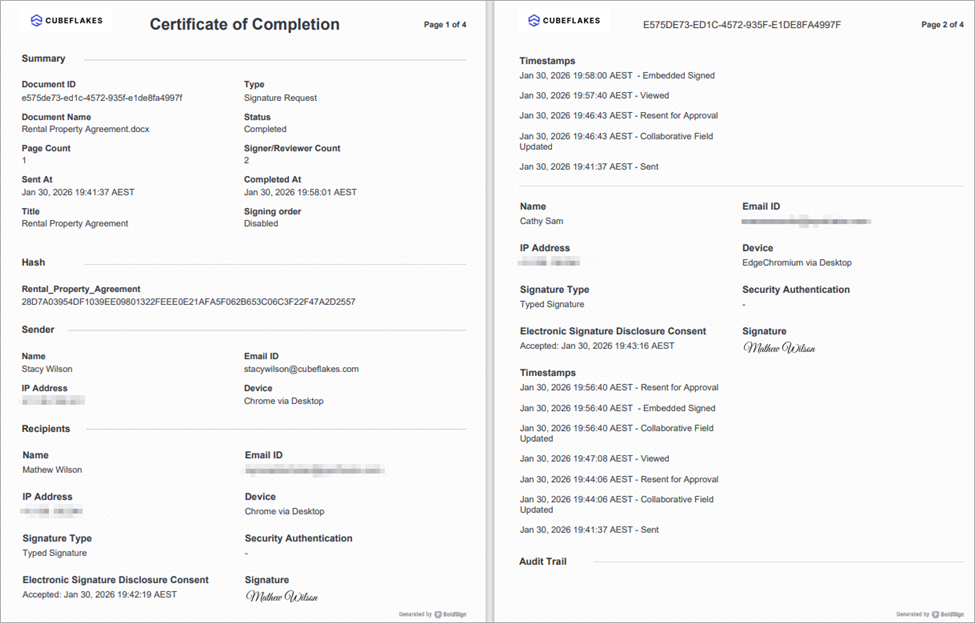
What does the audit trail show?
The audit trail logs each changed field with the person and the exact time. It also shows re-sign requests:
- The field that changed.
- The person who changed it and the time.
- Who started a re-sign request.
- The recipients asked to sign again.
Our post on why eSignature audit trails matter explains how these records help in a dispute.
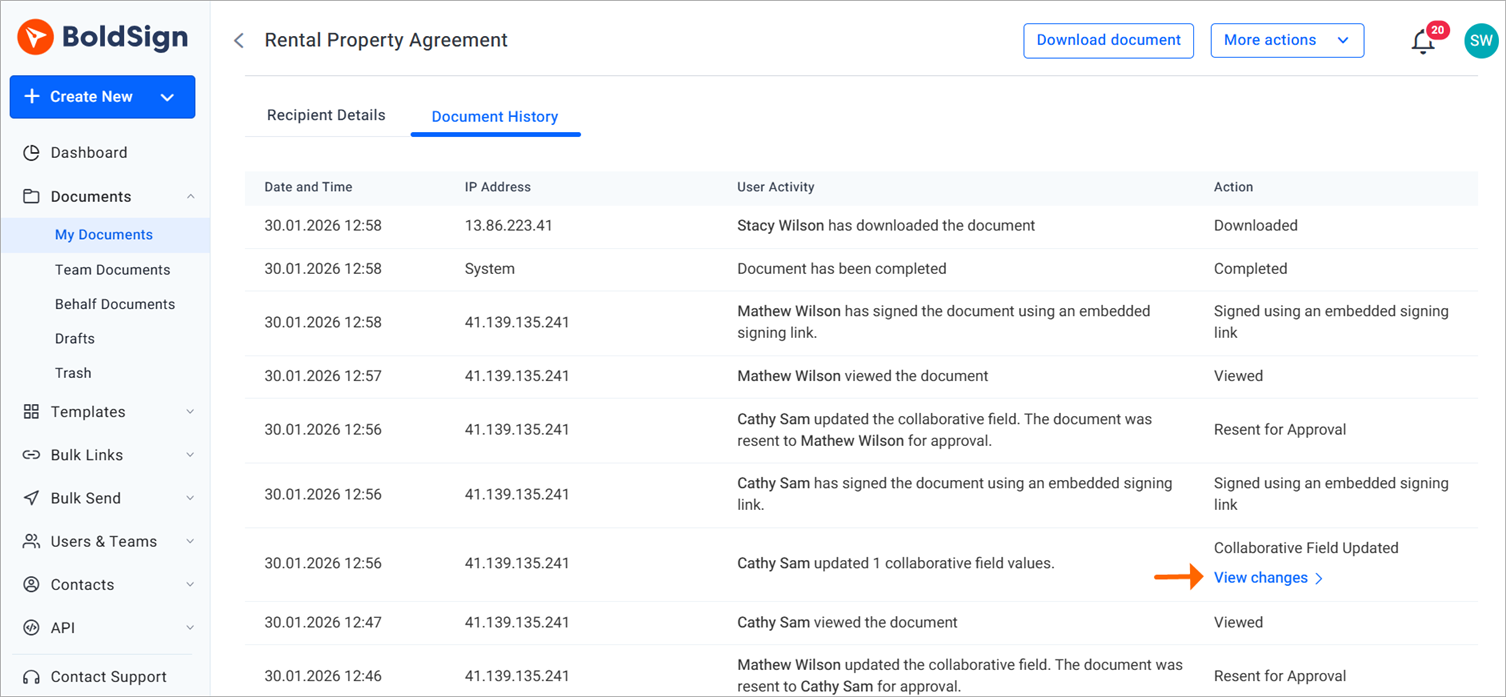
What does Document History show?
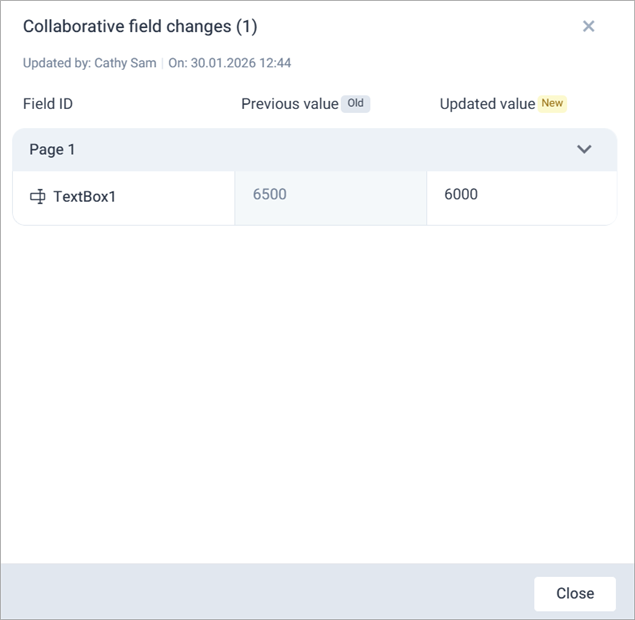
Document History lists each edit line by line. It adds the details the audit trail leaves out:
- The original value and the new value.
- The person who made each edit and the time.
- The recipients asked to sign again, and when we sent the request.
What notifications do signers receive after a change?
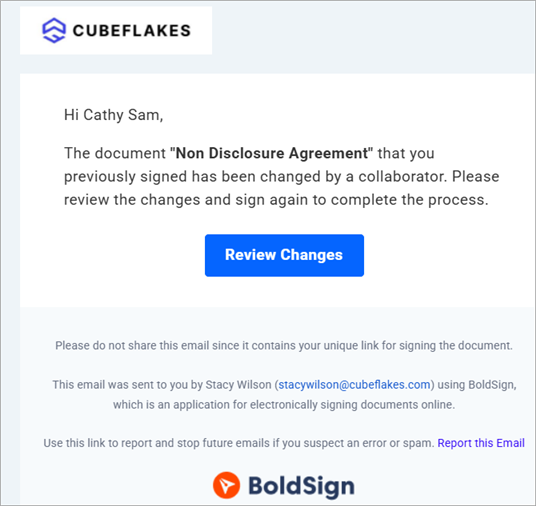
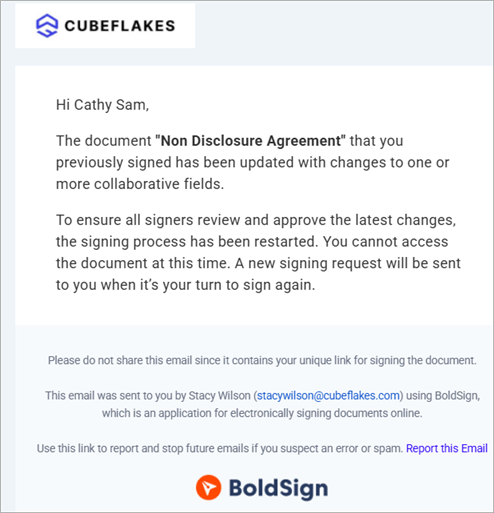
With approval turned on, earlier signers get an email asking them to sign again. The email names the document that changed.
How does signing order affect re-signing?
Re-signing follows your signing order when you have set one. The request goes to the first signer, and later signers learn that re-signing is pending. Each one can open the document once the signer before them is done.
What limits apply to collaborative fields?
A shared field needs a document with two or more recipients. Single-signer and self-signed documents cannot use them.
Collaborators must be regular signers. In-person signers, group signers and reviewers cannot be collaborators.
You also cannot add collaboration settings in these cases:
- Documents sent with Print and Sign.
- Fields with data sync tags.
- Fields with conditional logic.
- Formula fields, since a shared field cannot be part of a formula.
Our help article on collaborative field editing keeps this list current.
When should you use collaborative fields in an API workflow?
Use them when more than one party owns a value. Common cases:
- One signer fills in details, and another checks them.
- Terms change while the parties negotiate.
- Several departments supply parts of the same value.
Good examples are contract scope, quote amounts, loan application data and joint clauses.
Which plan do you need for collaborative fields through the API, and what does it cost?
You can build and test with a free API sandbox account at no cost. Live requests through the BoldSign API need the Enterprise API plan.
The Enterprise API plan starts at $30 a month with 40 envelopes, as listed on the BoldSign pricing page in November 2026. Each extra envelope costs $0.75. Prices are in USD, and the plan includes in-person signing.
How do you start building with collaborative fields?
Start with one contract where two parties keep correcting the same value, and make that field shared. Then pick your next step:
- Create a free API sandbox account and send a test document with one shared field.
- Read our developer documentation to set up your API key and first request.
- Book a demo to talk through your workflow, or visit our support portal with questions.
Frequently asked questions
How do I make a form field collaborative with the BoldSign API?
Add a CollaborationSettings object to the field in your request. List the signers who may edit it in AllowedSigners, then send the document as usual.
What goes in AllowedSigners, a signer ID or a role index?
Use signer IDs when you send a document directly with /v1/document/send. Use template role indexes, such as "1" or "2", for the template endpoints.
Which field types can be collaborative?
Text boxes, radio buttons, checkboxes, editable dates and dropdowns. Signature fields stay with the signer they belong to.
Can two signers edit a collaborative field at the same time?
No. Each collaborator edits the field during their own turn to sign, so the changes happen one after another and each one is logged.
Do earlier signers have to sign again after a change?
Only when RequireSignerApproval is true. Then anyone who already signed gets an email asking them to review the new value and sign again.
Is a document still legally binding after a collaborator changes a field?
Yes, when the usual eSignature rules are met and everyone affected approves the final value. Turning on RequireSignerApproval gives you that approval, and the audit trail records it.
Can an in-person signer be a collaborator?
No. A collaborator has to be a regular signer, so in-person signers, group signers and reviewers cannot be added to AllowedSigners.
Can I test collaborative fields before I pay for API access?
Yes. A free API sandbox account lets you send test documents with collaborative fields. Live requests need a paid API plan.

Evans Omondi Otieno
Evans Omondi Otieno is a customer support representative and writer at BoldSign, specializing in creating clear, insightful content to help users navigate eSignature solutions. As a blog author, Evans writes well-researched articles that simplify technical concepts, helping businesses and professionals understand how to use BoldSign effectively. With expertise in technical support and content creation, he ensures users have a seamless experience and gain valuable knowledge from his articles.
More posts by Evans Omondi Otieno