Electronic Signatures for Financial Aid and Scholarship Forms
 Lakshmi Priya Murugesan
TL;DR: You can send financial aid and scholarship forms for electronic signature, so students, parents and staff sign from any device in the right order. In BoldSign, you set the signing order, check who is signing, send reminders and track each form from one page. Our eSignature for educational institutions page shows how schools use it.
A financial aid office opens its scholarship round with 200 applicants. Each one needs a signed application, a parent signature and a sign-off from the office. Paper forms get lost in backpacks, and staff spend the week chasing missing pages.
This guide shows how to move those forms online. It covers the legal basics, then walks through sending, signing and tracking each form.
What are financial aid and scholarship forms?
Financial aid forms are the papers a student signs to apply for, accept or keep money for school. Common examples are award letters, scholarship applications, consent to release records and agreements to meet grade rules.
Think of a permission slip with more lines to sign. The student signs first, a parent or guardian often signs next, and the school signs last. Each signature has to land in the right place and the right order.
Can students and parents sign scholarship forms electronically?
Yes, in most cases, under the US Electronic Signatures in Global and National Commerce (ESIGN) Act. It says a signature cannot be denied legal effect solely because it is electronic.
Consent to share student records has its own rule. The Family Educational Rights and Privacy Act (FERPA) calls for written consent before a school discloses records from a student’s file.
That consent must be signed and show the date. The FERPA rule at section 99.30 allows it in electronic form.
The electronic record must identify and authenticate the person giving consent. It must also show that person’s approval of what the consent says. Signer authentication and an audit trail help you meet both points.
How do you send a scholarship form for signature with BoldSign?
Upload the form, add each signer and place the fields they fill in. The whole request takes a few minutes.
- Start a new document and upload the form.
- Add the student, parent and staff member as recipients.
- Turn on the Signing order toggle when people must sign in turn.
- Place signature, date and text fields for each signer.
- Select Send.
How do you set who signs first?
Drag each recipient into place once the Signing order toggle is on. We email the first signer, then each next signer after the one before them signs.
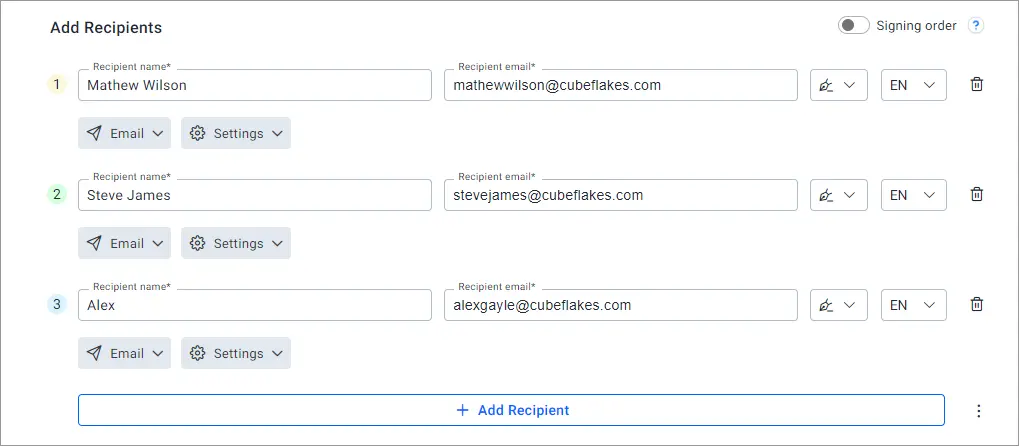
Leave the toggle off, and everyone gets the email at once and signs in any order. Our help article on how to set the signing order of the signers has the full steps.
How do you check who is signing?
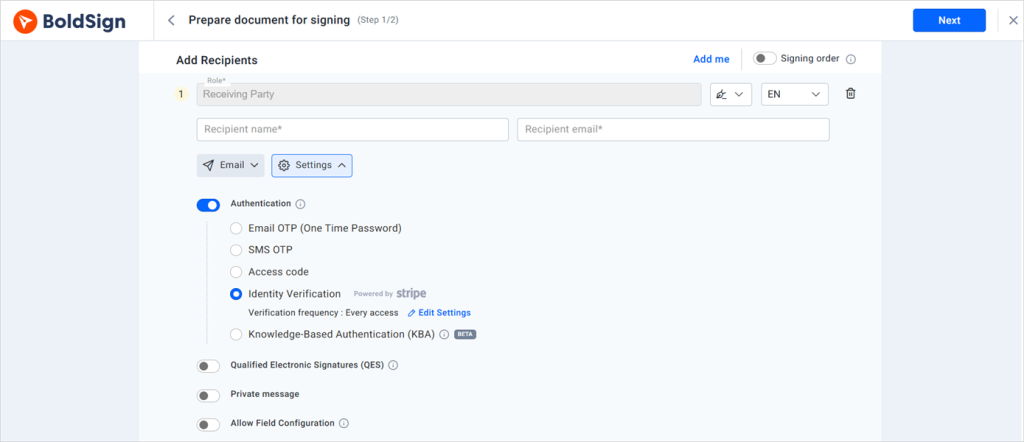
Add signer authentication to ask for proof before a signer can open the form. You can pick one method per signer:
- An email one-time passcode (OTP)
- An access code you share with the signer
- An SMS one-time passcode
- Knowledge-based authentication (KBA), for US signers only
- Identity verification with a photo ID
How do you reuse the same form every term?
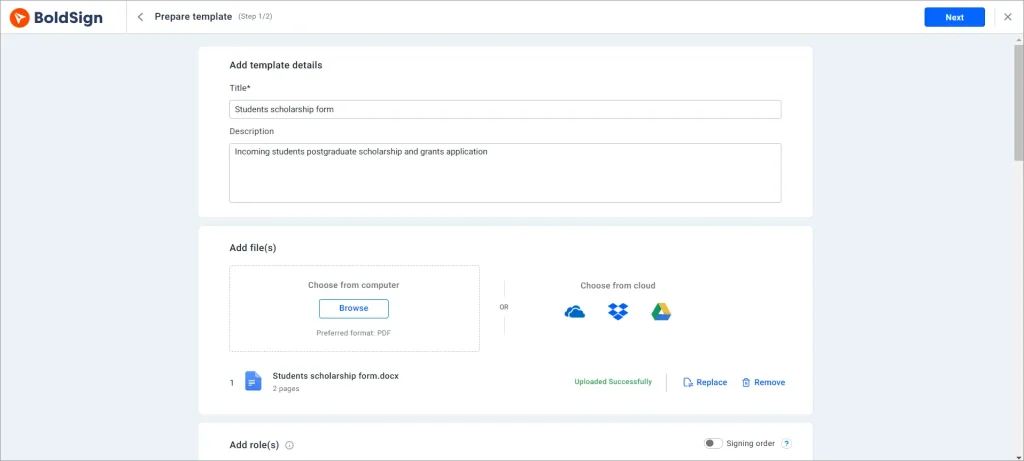
Save the form as a template with its fields and signer roles already in place. Each new term, you pick the template, add names and send.
A template keeps every application the same, so no form goes out with a missing field. You can edit it when the scholarship rules change. Our help article on how to create a template shows each step.
How do you send one form to many students?
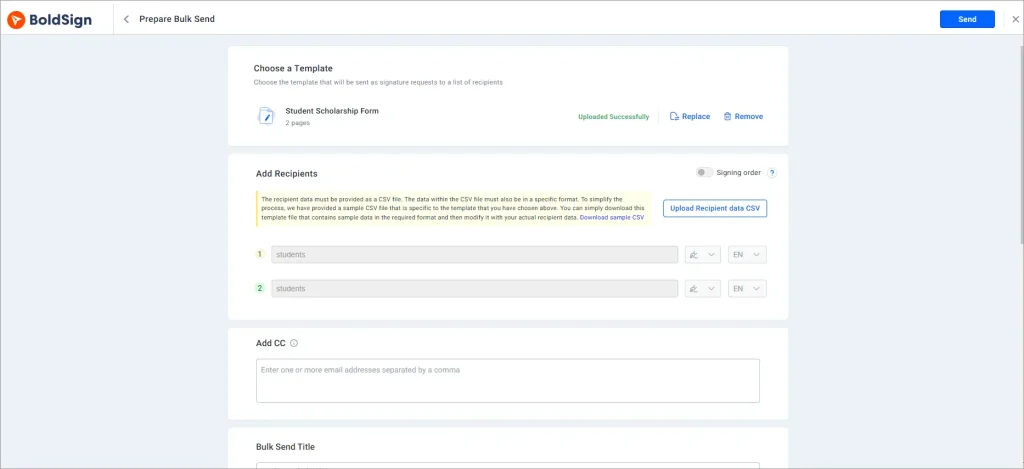
Use bulk send to send one template to a whole list of students at once. Each student gets a separate copy with their own details filled in.
This suits award letters or renewal forms that go to every student in a program. You upload one file of names and email addresses instead of building 200 requests by hand.
How do you keep forms moving before a deadline?
Turn on Auto reminder in the document settings before you send. You set Remind every for the days between reminders and Max. reminders for up to 5 in total.
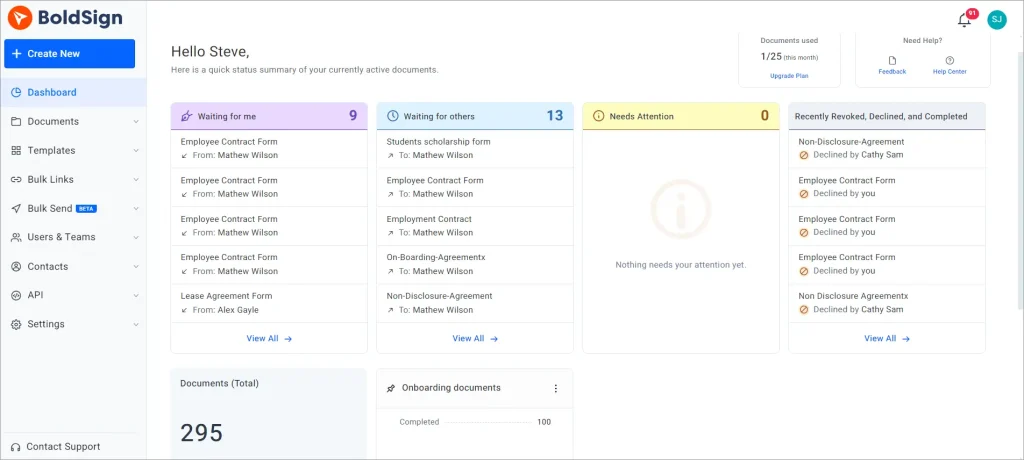
Then watch progress with document tracking. Each form shows whether it was sent, viewed or completed, so you know who to call.
How does a student sign the form?
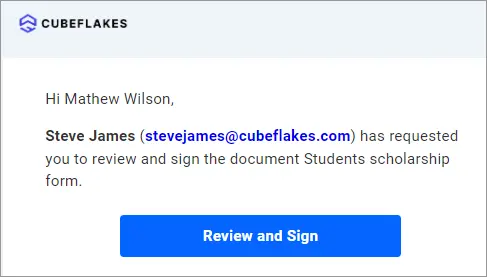
Signing takes a few clicks and needs no account. Students and parents follow the same steps on a laptop or a phone.
- Open the email and select Review and Sign.
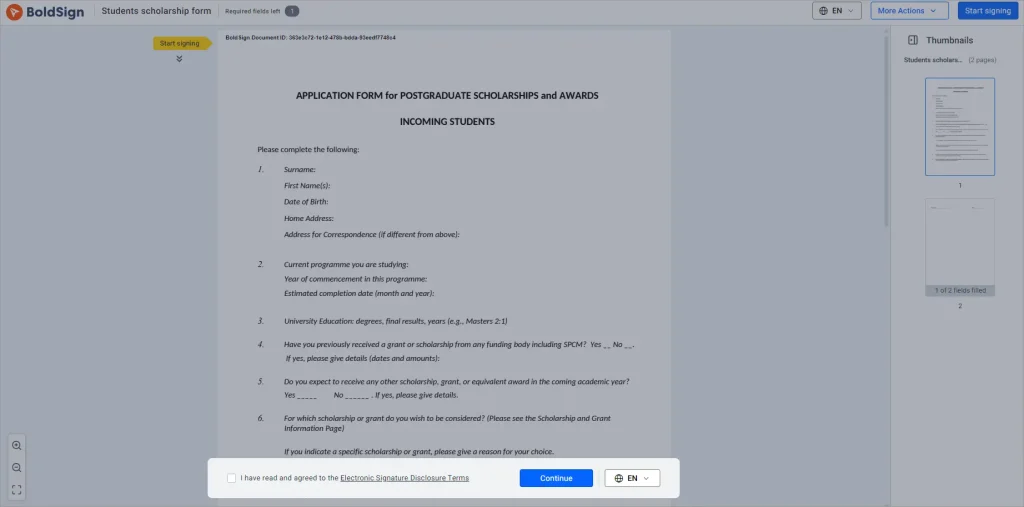
- Accept the terms, then select Continue.
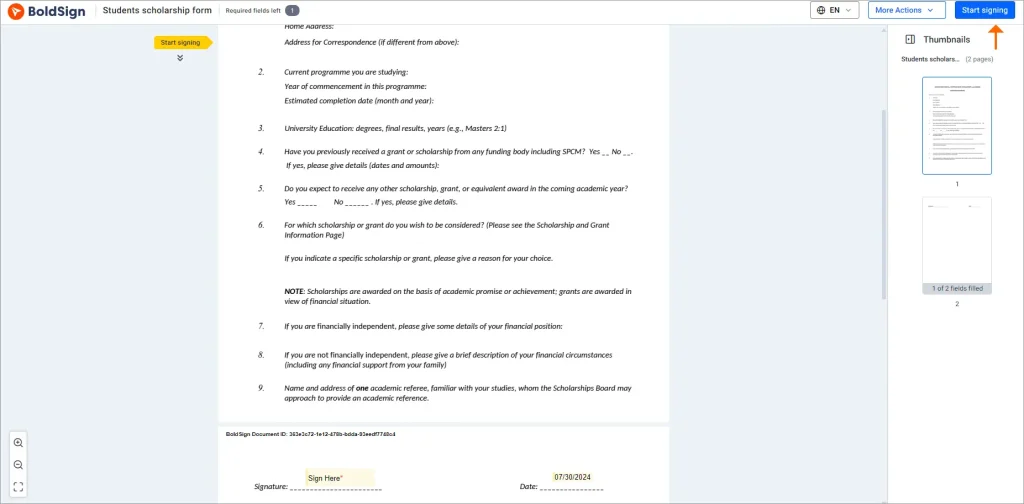
- Select Start signing and fill in each required field.
- Select Finish to complete the form.
Can students sign on a phone?
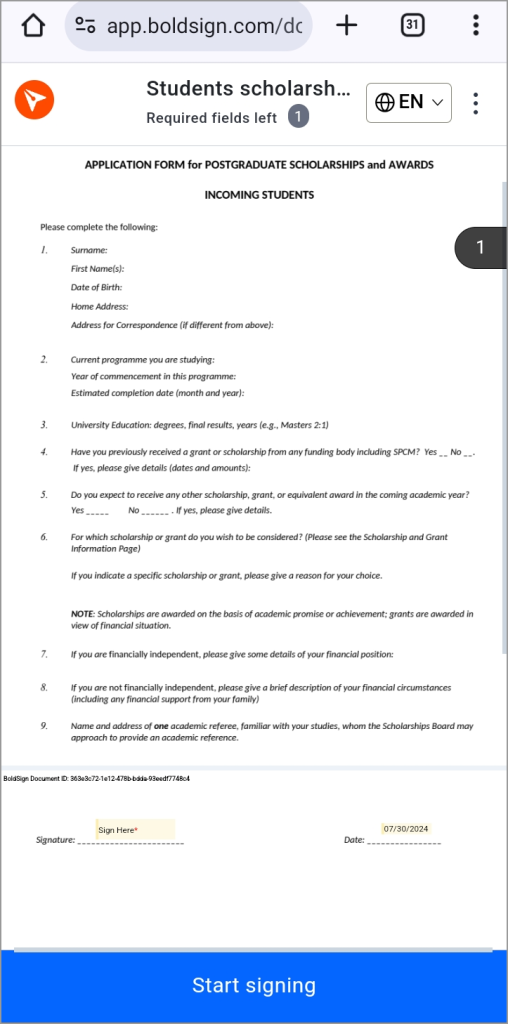
Yes. The signing page works in any phone or tablet browser, so signers download nothing. Staff who send forms away from a desk can use our mobile app.
How do you add your school’s logo to the forms?
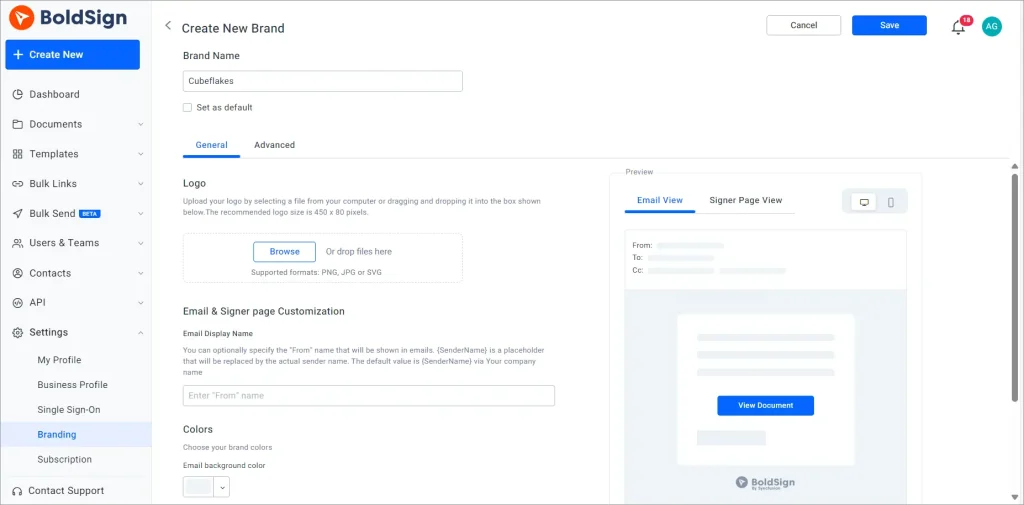
Create a brand with your logo and colors, then pick it when you send. Students then see your logo on the emails and the signing page.
A familiar logo helps students trust the email and open it. Our help article on how to create a brand in BoldSign walks through the settings.
How is student data kept safe?
Our security policy states that we completed a System and Organization Controls (SOC) 2 Type 2 audit. Our General Data Protection Regulation (GDPR) page covers how we handle personal data.
Each completed form also carries an audit trail. It records who opened and signed the form and when.
Which BoldSign plan do you need, and what does it cost?
Bulk send, SMS codes and identity verification start on the Business plan, as listed on the BoldSign pricing page in November 2026. Prices are in USD and billed yearly.
The Essential plan is free, with 2 templates and 1 brand. The Growth plan costs $5 per user a month, with 10 templates and 2 brands. Both include email OTP and access codes.
The Business plan costs $15 per user a month, and the Premium plan costs $99 a month for unlimited users. Both add unlimited templates and brands, bulk send, SMS codes and identity verification.
Bulk send costs $0.25 per envelope on top of the plan price. KBA is an add-on at $1.50 per attempt on the Business and Premium plans.
How can your financial aid office get started?
Pick one form, such as a scholarship application, and send it to a few test signers first.
- Start a 30-day free trial and send your first scholarship form.
- Book a demo to see signing order and reminders set up for your office.
- Read our guide to eSignature solutions for schools and universities for more ways to use it.
Frequently asked questions
Can scholarship forms be signed electronically?
Yes, when the signer agrees to sign electronically and the signed record is kept. The US Electronic Signatures in Global and National Commerce (ESIGN) Act says a signature cannot be denied legal effect only because it is electronic. Check any rule your funder or state sets for a given form.
Is an electronic signature valid for FERPA consent to release student records?
Yes, when the electronic record identifies and authenticates the person giving consent and shows their approval. The Family Educational Rights and Privacy Act (FERPA) rule at section 99.30(d) allows consent in electronic form on those terms.
Do students and parents need a BoldSign account to sign?
No. Signers open the link in their email, review the form and sign it in the browser. Only the person who sends the form needs an account.
Can a parent sign after the student on the same form?
Yes. Turn on the Signing order toggle and drag the student above the parent. We email the parent only after the student has signed.
How do I remind students who have not signed yet?
Turn on Auto reminder in the document settings before you send. You choose the days between reminders and up to 5 reminders in total, and you can also send one by hand.
Can students sign financial aid forms on their phones?
Yes. The signing page works in a phone or tablet browser, so students can sign without installing an app. Our mobile app is there for staff who send forms on the go.
How do I check that the right student signed the form?
Add signer authentication to the request. Email codes and access codes work on every plan, while SMS codes, knowledge-based questions and ID checks start on the Business plan.
How much does BoldSign cost for a financial aid office?
The Essential plan is free. Paid plans start at $5 per user a month for Growth and $15 per user a month for Business, billed yearly in USD.

Lakshmi Priya Murugesan
Lakshmi Priya Murugesan is a Technical writer at BoldSign. She excels in creating clear, concise documentation and guides across various tech fields. Lakshmi Priya is passionate about technology, she enjoys exploring new trends and sharing her insights through blogs and articles.
More posts by Lakshmi Priya Murugesan