Customized SMS Notifications for eSignature with the BoldSign API
 Meikanda Nayanar
TL;DR: There are two ways to text a signer from the BoldSign API. Our built-in SMS delivery sends a fixed message, while a custom setup lets you write the text yourself. For the custom route, turn off our emails and wait for the Sent webhook. Then request an embedded signing link and text it through a provider such as Twilio. Our eSignature API page shows what else the API covers.
Some signers rarely open email. A delivery driver, a site worker or a patient in a waiting room is more likely to read a text. Sending the signing link by SMS puts the request where they will see it.
You may also want the text to sound like your own app, or to alert the sender each time someone signs. This guide builds it in ASP.NET Core with our software development kit (SDK) for .NET and Twilio.
How does eSignature API SMS delivery work?
The BoldSign API can send signing requests by text on its own. Set a signer’s deliveryMode to SMS and add their phone number with the country code.
We then text the signer a link to sign. The send document reference lists the deliveryMode values Email, SMS and EmailAndSMS. Our guide to sending eSignature requests through SMS with the BoldSign API walks through that route.
Can you customize the SMS text?
The built-in SMS uses fixed wording. Our SMS signing page states that the text of the message cannot be customized.
A custom setup gives you that control. Your app sends the text through your own SMS provider, so you choose the wording, the sender number and who gets alerts. We still host the document, the signing page and the audit trail.
This guide is for teams comparing e signature APIs enabling real-time document creation with API integration and webhook support. The same pattern works with any SMS provider.
How do I automate SMS delivery for document signing instead of using email?
Turn off our emails, then let a webhook tell your app when to send the text. The whole flow takes five steps.
- Send the document with disableEmails set to true.
- Receive the Sent webhook event once we have processed the document.
- Request an embedded signing link for the signer.
- Text that link to the signer through Twilio.
- Use the Signed and Completed events to alert the sender.
How do you set up the project?
Create a web app, then add two packages. BoldSign.Api creates and sends the document, and Twilio sends the text messages.
- Create an
ASP.NET Coreproject.
dotnet new webapp -o ASPCoreEsignApp- Install the BoldSign.Api package, which creates, sends and tracks the signature request.
dotnet add package BoldSign.Api- Install the Twilio package, which sends the SMS messages.
dotnet add package TwilioHow do you add BoldSign services through dependency injection?
Register an API client with your API key and the API base address. Your pages and controllers then receive the document and template clients by injection.
Add the following code to the ConfigureServices() method in your startup.cs file.
var apiClient = new ApiClient("https://api.boldsign.com/","***API Key***");
services.AddSingleton(apiClient);
services.AddSingleton(new DocumentClient(apiClient));
services.AddSingleton(new TemplateClient(apiClient));
How do you send a document for signing without email?
Build the send request as usual and set DisableEmails to true. We create the document and return its document ID, but we send the signer no email.
Your app delivers the signing link by SMS instead. The sample loads a PDF, adds one signature field and assigns it to the signer.
private readonly IDocumentClient documentClient;
private readonly ITemplateClient templateClient;

public IndexModel(IDocumentClient documentClient, ITemplateClient templateClient, ILogger<IndexModel> logger)
{
    this.documentClient = documentClient;
    this.templateClient = templateClient;
}

public IActionResult SignDocument()
{
    // Read the document from local path as stream.
    using var fileStream = System.IO.File.OpenRead("doc-2.pdf");
    var documentStream = new DocumentFileStream
    {
        ContentType = "application/pdf",
        FileData = fileStream,
        FileName = "doc.pdf",
    };

    // Creating collection with the loaded document.
    var filesToUpload = new List<IDocumentFile>
    {
        documentStream,
    };

    // Creating signature field.
    var signatureField = new FormField(
        id: "Sign",
        type: FieldType.Signature,
        pageNumber: 1,
        isRequired: true,
        bounds: new Rectangle(x: 50, y: 50, width: 200, height: 30));

    // Adding the field to the collection.
    List<FormField> formFields = new List<FormField>();
    formFields.Add(signatureField);

    // Creating signer field.
    var signer = new DocumentSigner(
        name: "Alex",
        emailAddress: "alex@example.com",
        signerOrder: 1,
        authenticationCode: "851321",
        signerType: SignerType.Signer,
        privateMessage: "This is private message for signer",
        // Assign the created form fields to the signer.
        formFields: formFields);

    // Adding the signer to the collection.
    var documentSigners = new List<DocumentSigner>
    {
        signer
    };

    // Create send for sign request object.
    var sendForSign = new SendForSign
    {
        Title = "Sent from API SDK",
        Message = "This is document message sent from API SDK",
        EnableSigningOrder = false,

        // Assign the signers collection.
        Signers = documentSigners,

        // Assign the loaded files collection.
        Files = filesToUpload,

        // Disable sending the emails.
        DisableEmails = true,
    };

    // Send the document for signing.
    var createdDocumentResult = this.documentClient.SendDocument(sendForSign);

    // Pass the document ID to build the URL for the Signer.
    DocumentViewModel model = new DocumentViewModel()
    {
        DocumentId = createdDocumentResult.DocumentId,
    };

    return View(model);
}
How do you configure the webhook?
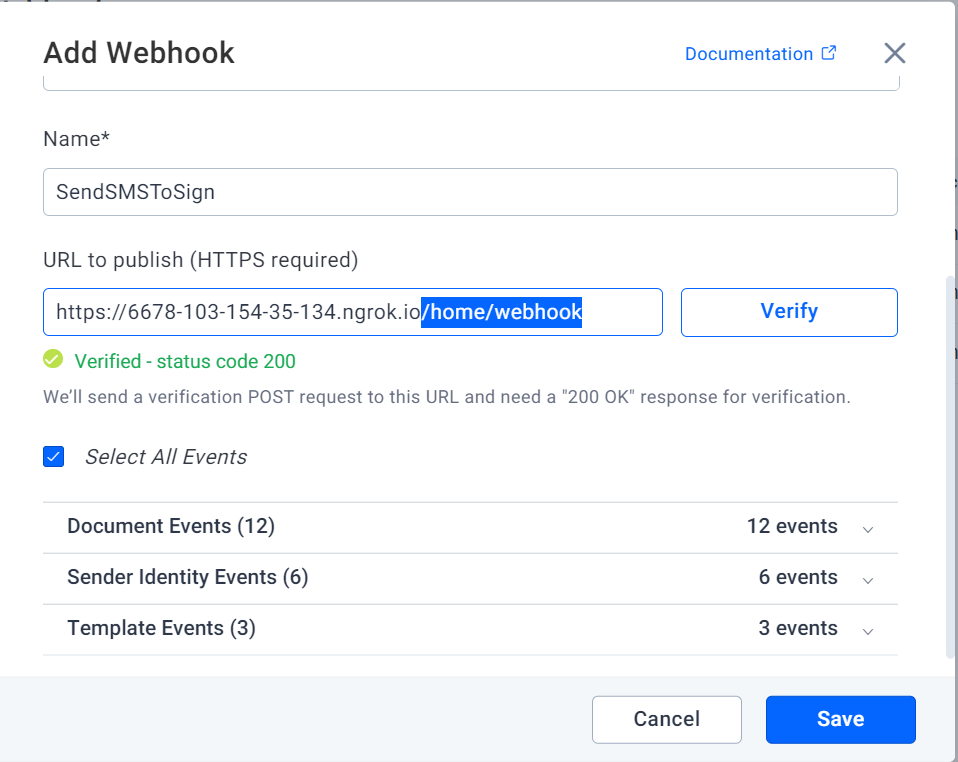
Subscribe your app to document webhooks so it knows when the document is ready. Sending is asynchronous, so we fire a Sent event when processing succeeds and SendFailed when it does not.
Our webhooks introduction explains how webhooks work. Create yours on the BoldSign API webhooks page in the web app.
This guide uses three of the document events:
- Sent: the signature request has gone out to the signers.
- Signed: one signer has signed the document.
- Completed: every signer has finished signing.
The available events list also covers Declined, Revoked, Reassigned, Expired and more. In our demo, the app subscribes to all document events. The address is https://mydomainname.com/home/webhook, and the Webhook action in HomeController handles it.
How do you build the signing link and send the SMS?
Check for the Sent event in your webhook action, then request an embedded signing link for the signer. Pass that link to Twilio in a message you write yourself.
The action first checks the request signature with your webhook secret key. The embedded signing link reference explains signLinkValidTill and redirectUrl.
[HttpPost]
// Action for Webhook
public async Task<IActionResult> Webhook()
{
    var sr = new StreamReader(this.Request.Body);
    var json = await sr.ReadToEndAsync();

    if (this.Request.Headers[WebhookUtility.BoldSignEventHeader] == "Verification")
    {
        return this.Ok();
    }

    var SECRET_KEY = "***SECRET_KEY***";
    try
    {
        WebhookUtility.ValidateSignature(json, this.Request.Headers[WebhookUtility.BoldSignSignatureHeader], SECRET_KEY);
    }
    catch (BoldSignSignatureException ex)
    {
        Console.WriteLine(ex);

        return this.Forbid();
    }

    var eventPayload = WebhookUtility.ParseEvent(json);
    var doc = eventPayload.Data as DocumentEvent;

    // Check whether the send event is completed
    if (eventPayload.Event.EventType == WebHookEventType.Sent)
    {
        var signerDetailsList = (eventPayload.Data as DocumentEvent)?.SignerDetails;
        if (signerDetailsList != null)
        {
            this. SendLinkToSigner(doc.DocumentId, signerDetailsList[0].SignerEmail);
        }

    }

    return this.Ok();
}

public async Task<IActionResult> SendLinkToSigner(string id, string signerEmail)
{
    // Generate the embedded signing link
    EmbeddedSigningLink embeddedSigningLink = await documentClient
        .GetEmbeddedSignLinkAsync(id, signerEmail, DateTime.Now.AddDays(30),
            "https://boldsign.com/").ConfigureAwait(false);

    this.SendSmsToSigner(embeddedSigningLink.SignLink);
    return this.Ok();
}

private async Task SendSmsToSigner(string signLink)
{
    // Replace these with your actual Twilio credentials
    string accountSid = "";
    string authToken = "";

    // Replace these with the phone numbers
    string twilioNumber = "";
    string recipientNumber = "";

    // Initialize Twilio client
    TwilioClient.Init(accountSid, authToken);

    // Send SMS
    var message = await MessageResource.CreateAsync(
        body: $"You can sign the document from this link: {signLink}",
        from: new Twilio.Types.PhoneNumber(twilioNumber),
        to: new Twilio.Types.PhoneNumber(recipientNumber)
    );

    Console.WriteLine($"Sent SMS to signer with link: {signLink}");
}
The code checks for WebHookEventType.Sent. Once that event arrives, it texts the signing link to the signer.
How do you tell the sender that the document is signed?
Handle the Completed event in the same Webhook action. When it fires, send the sender a short text through Twilio.
[HttpPost]
// Action for Webhook
public async Task<IActionResult> Webhook()
{
    // Same code as above.
    var eventPayload = WebhookUtility.ParseEvent(json);
    var doc = eventPayload.Data as DocumentEvent;

    // Check whether the send evet is completed
    if (eventPayload.Event.EventType == WebHookEventType.Sent)
    {
        // Send the SMS to signer
    }
    else if (eventPayload.Event.EventType == WebHookEventType.Completed)
    {
        this.UpdateCompletionStatus();
    }

    return this.Ok();
}

private async Task UpdateCompletionStatus()
{
    // Replace these with your actual Twilio credentials
    string accountSid = "";
    string authToken = "";

    // Replace these with the phone numbers
    string twilioNumber = "";
    string recipientNumber = "";

    // Initialize Twilio client
    TwilioClient.Init(accountSid, authToken);

    // Send SMS
    var message = MessageResource.Create(
        body: $"The document is signed successfully.",
        from: new Twilio.Types.PhoneNumber(twilioNumber),
        to: new Twilio.Types.PhoneNumber(recipientNumber)
    );
}
The flow so far covers one signer from send to completion. Next, extend the same flow to several signers.
How do you send SMS links to multiple signers?
Add one DocumentSigner and one signature field per person. A signing order is optional.
- Add more than one DocumentSigner to the collection.
- Add a separate signature field for each signer.
- Set EnableSigningOrder when people must sign in turn.
The following sample adds two signers.
// Creating signature field.
var signatureField1 = new FormField(
    id: "Sign1",
    type: FieldType.Signature,
    pageNumber: 1,
    isRequired: true,
    bounds: new Rectangle(x: 50, y: 50, width: 200, height: 30));

// Creating signature field.
var signatureField2 = new FormField(
    id: "Sign2",
    type: FieldType.Signature,
    pageNumber: 1,
    isRequired: true,
    bounds: new Rectangle(x: 150, y: 150, width: 200, height: 30));

// Creating signer field.
var signer1 = new DocumentSigner(
    name: "Alex",
    emailAddress: "alex@example.com",
    signerOrder: 1,
    authenticationCode: "12345",
    signerType: SignerType.Signer,
    privateMessage: "This is private message for signer",
    // Assign the created form fields to the signer.
    formFields: new List<FormField>() {signatureField1});

// Create signer field
var signer2 = new DocumentSigner(
    name: "Sam",
    emailAddress: "sam@example.com",
    signerOrder: 2,
    authenticationCode: "12345",
    signerType: SignerType.Signer,
    privateMessage: "This is private message for signer",
    // Assign the created form fields to the signer.
    formFields: new List<FormField>() {signatureField2});

// Adding the signer to the collection.
var documentSigners = new List<DocumentSigner>
{
    signer1,
    signer2
};

// Create send for sign request object.
var sendForSign = new SendForSign
{
    Title = "Sent from API SDK",
    Message = "This is document message sent from API SDK",
    EnableSigningOrder = true,

    // Assign the signers collection.
    Signers = documentSigners,

    // Assign the loaded files collection.
    Files = filesToUpload,

    DisableEmails = true,

};

// Send the document for signing.
var createdDocumentResult = documentClient.SendDocument(sendForSign);
How do you update the webhook for multiple signers?
Loop over the signers in the Sent event and text each one their own link. Then add a case for the Signed event so the sender hears about each signature.
The updated action handles three jobs:
- Send each signer their own signing link by SMS.
- Text the sender when any one signer signs.
- Text the sender when all signers have signed.
For the Signed event, the code picks the signer with the latest completed activity. It then sends that name to the sender.
public async Task<IActionResult> Webhook()
{
    var sr = new StreamReader(this.Request.Body);
    var json = await sr.ReadToEndAsync();

    if (this.Request.Headers[WebhookUtility.BoldSignEventHeader] == "Verification")
    {
        return this.Ok();
    }

    // TODO: Update your webhook secret key
    var SECRET_KEY = "***SECRET_KEY***";
    try
    {
        WebhookUtility.ValidateSignature(json, this.Request.Headers[WebhookUtility.BoldSignSignatureHeader],
            SECRET_KEY);
    }
    catch (BoldSignSignatureException ex)
    {
        Console.WriteLine(ex);

        return this.Forbid();
    }

    var eventPayload = WebhookUtility.ParseEvent(json);
    var doc = eventPayload.Data as DocumentEvent;
    switch (eventPayload.Event.EventType)
    {
        case WebHookEventType.Sent:
            {
                var signerDetailsList = (eventPayload.Data as DocumentEvent)?.SignerDetails;
                if (signerDetailsList != null)
                {
                    foreach (var signer in signerDetailsList)
                    {
                        this.SendLinkToSigner(doc.DocumentId, signer.SignerEmail);
                    }
                }

                break;
            }
        case WebHookEventType.Signed:
            {
                var signerList = (eventPayload.Data as DocumentEvent)?.SignerDetails;
                if (signerList != null)
                {
                    var signerDetail = signerList.Where(x=>x.Status == SignerStatus.Completed && x.LastActivityDate!=null).OrderByDescending(x=>x.LastActivityDate).FirstOrDefault();

                    if (signerDetail != null)
                    {
                        this.UpdateSignerStatus(signerDetail.SignerName);
                    }
                }

                break;
            }
        case WebHookEventType.Completed:
            this.UpdateCompletionStatus();
            break;
    }

    return this.Ok();
}

private async Task UpdateSignerStatus(string signerName)
{
    // Replace these with your actual Twilio credentials
    string accountSid = "";
    string authToken = "";

    // Replace these with the phone numbers
    string twilioNumber = "";
    string recipientNumber = "";

    // Initialize Twilio client
    TwilioClient.Init(accountSid, authToken);

    // Send SMS
    var message = MessageResource.Create(
        body: $"Document was now signed by : { signerName }",
        from: new Twilio.Types.PhoneNumber(twilioNumber),
        to: new Twilio.Types.PhoneNumber(recipientNumber)
    );
}
What does the e signature API cost for this setup?
Live use of the BoldSign API, with webhooks and embedded signing links, needs the Enterprise API plan. It starts at $30 a month with 40 envelopes, and each extra envelope costs $0.75, per our pricing page in November 2026.
You can build and test the whole flow in a free sandbox first. Sandbox documents carry a test watermark and are deleted after 14 days, and no card is needed.
Our built-in SMS delivery is an add-on at $0.20 per SMS on the Enterprise API plan. In the web app, SMS delivery starts on the Business plan at $15 per user a month, billed yearly. Prices are in USD, and your SMS provider bills its own texts.
Where do you go from here with SMS signing?
Start in the sandbox, send a test document to your own phone and watch the webhooks arrive.
- Create a free API sandbox account and run the sample.
- Book a demo to talk through your signing flow with our team.
- Ask our support team when a webhook or code sample does not behave as expected.
Frequently asked questions
Can I customize the SMS text that BoldSign sends to signers?
Not in our built-in SMS delivery, which uses fixed wording. To write your own text, turn off our notifications and text the signing link from your own SMS provider, as this guide shows.
Where to find API docs for adding SMS alerts to my custom app?
Start with the BoldSign developer docs at developers.boldsign.com. The send document reference covers deliveryMode and disableEmails, and the webhooks section lists every event your app can subscribe to.
Do I need a digital signature API that supports webhooks for this?
Yes. Sending a document is asynchronous, so your app needs the Sent webhook to know when the document is ready. Signed and Completed events then drive the alerts to the sender.
Which webhook events do SMS alerts use?
This setup uses three document events. Sent triggers the signing link, Signed marks each signature, and Completed fires once every signer has finished.
How long does the embedded signing link stay valid?
You decide. The signLinkValidTill value sets how long the signer can use the link, and the sample in this guide sets it 30 days ahead.
Can I send SMS signing links to more than one signer?
Yes. Add a DocumentSigner and a signature field for each person, then loop over the signer details in the Sent event and text each signer their own link.
Can I use another SMS provider instead of Twilio?
Yes. The BoldSign side only supplies the signing link and the webhook events. Any provider that can send a text from your server can deliver that link.
Do I pay the BoldSign SMS add-on when my own provider sends the texts?
Our $0.20 per SMS add-on covers texts we send. Here your provider sends and bills the texts, and each document still counts as one envelope on your API plan.

Meikanda Nayanar
A veteran product manager at BoldSign, boasting a decade-long journey as a .NET developer. With a rich history of leading product development across diverse technologies like Windows Forms, WPF, UWP, Xamarin.Forms, Flutter, and MAUI, Meikandan brings a unique blend of technical expertise and strategic insight to the table. Connect with him on LinkedIn.
More posts by Meikanda Nayanar