Send eSignature Requests via WhatsApp with BoldSign
 Yvone Atieno Odhiambo
TL;DR: To send a signature on WhatsApp, you send a secure signing link to the signer’s WhatsApp number, and they sign in their phone browser. In BoldSign, you turn on WhatsApp under Settings, choose WhatsApp in Delivery Options and send. Our WhatsApp delivery page lists what each message includes.
A client says they never check email, but they answer WhatsApp within minutes. You have a contract that needs their signature today. Or someone sent you a PDF in a chat, and you want to know how to sign a document on WhatsApp and send it back.
This guide covers both sides. First, how to sign a file you received. Then how to send e signature on WhatsApp to your own signers with BoldSign.
Can we add signature in WhatsApp?
You add the signature to the document, not to the chat itself. You sign the file with an eSignature tool, then share the signed file or a signing link in WhatsApp.
Think of WhatsApp as the envelope and the eSignature tool as the pen. The envelope carries the page to the right person, but the signing happens on the page.
A search for “signature whatsapp” can mean two things. You may want to sign a file someone sent you. Or you may want a signer to receive your request as a WhatsApp message and sign it there.
How to sign on PDF file sent through WhatsApp
Save the PDF from the chat, sign it in your browser, and send the signed copy back. Our free Sign PDF online tool needs no account and works on iPhone and Android.
- Open the chat and save the PDF to your phone.
- Open the Sign PDF online tool in your phone browser and upload the file.
- Place a signature field, then draw, type or upload your signature.
- Download the signed PDF.
- Attach the signed PDF in the chat as a document and send it.
The same steps answer how to sign a document on WhatsApp Android, including how to sign on WhatsApp using Samsung phone models. The tool runs in the browser, so you install nothing.
Whether you ask how to sign document on WhatsApp or how to sign a document in WhatsApp, the file is signed in the browser. WhatsApp only carries it back.
How to send my signature to someone on WhatsApp
Send the signed PDF, not a photo of your signature on its own. The signed file shows exactly which document you agreed to.
Searches like “how to send my signature on WhatsApp” and “how can I send my signature to someone” have the same answer.
Sign the file in your browser first to add a signature in a WhatsApp chat on Android or iPhone. Then share it in the chat as a document, which also sends your signed copy to a colleague.
How to send signature on WhatsApp with BoldSign
Turn on WhatsApp delivery once, then pick WhatsApp under Delivery Options for each signer. Your signer gets a WhatsApp message with a secure link and signs in the phone browser.
Sending a link is how to send digital signature in WhatsApp as a request, rather than a signed file. It is also how to send e signature in WhatsApp, or how to send electronic signature via WhatsApp to a client. The steps below follow our help article on how to send signature requests via WhatsApp.
Step 1: Turn on WhatsApp delivery
- From the Dashboard, open Settings and select Integration.
- Find the WhatsApp card and select Enable.
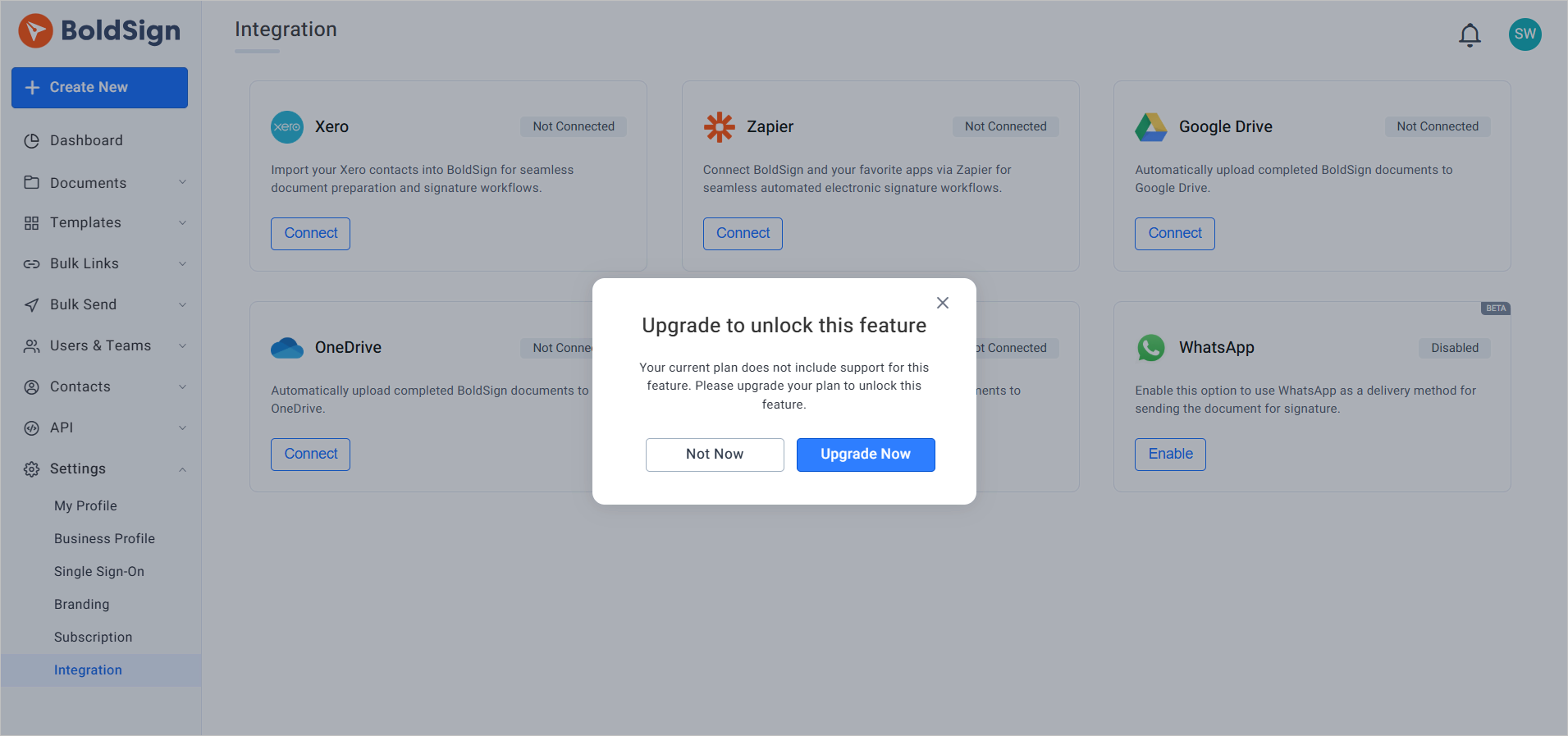
- Select Upgrade if the dialog asks you to change plans, then choose a plan that includes WhatsApp.
- In the Enable WhatsApp Feature dialog, read the instructions and select Enable.
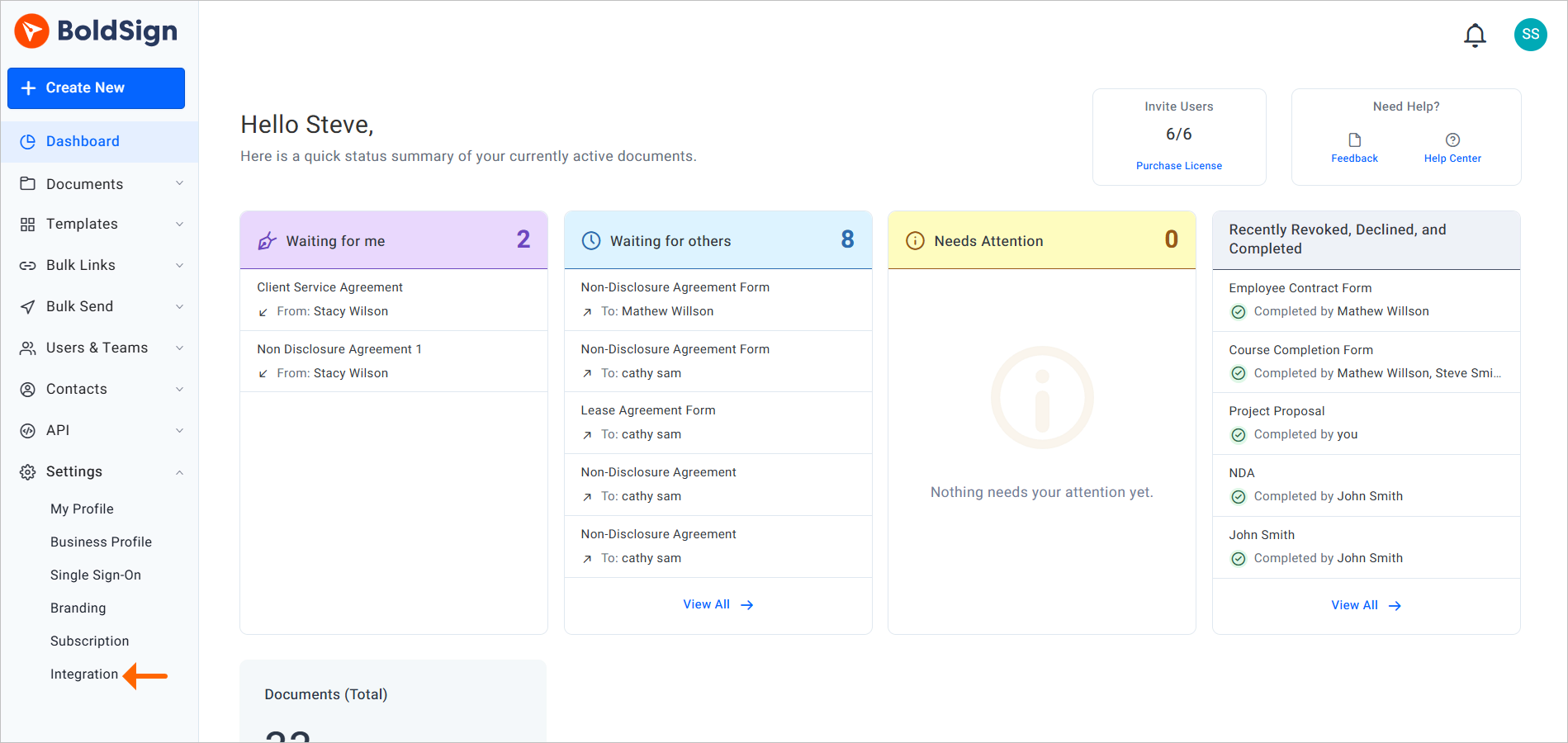
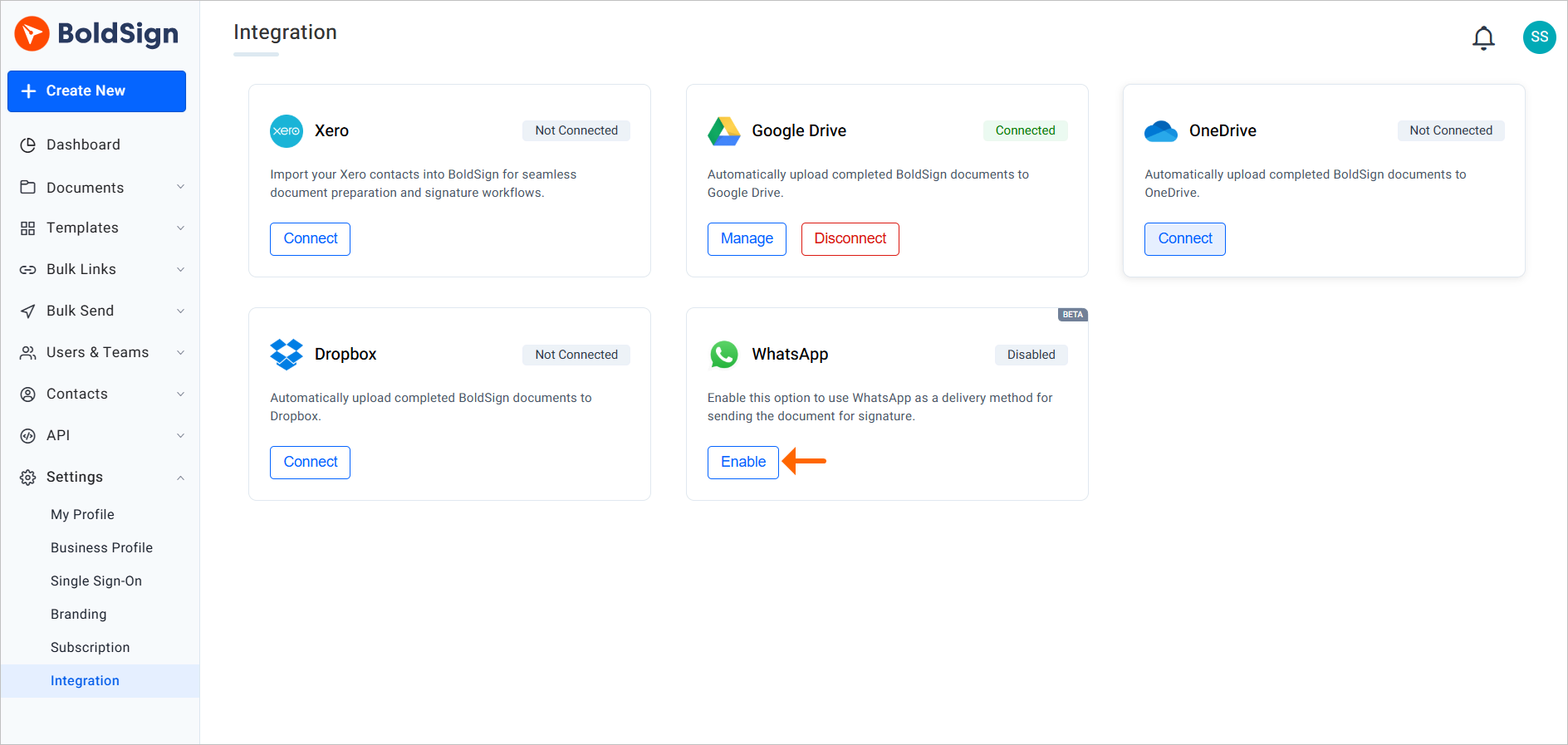
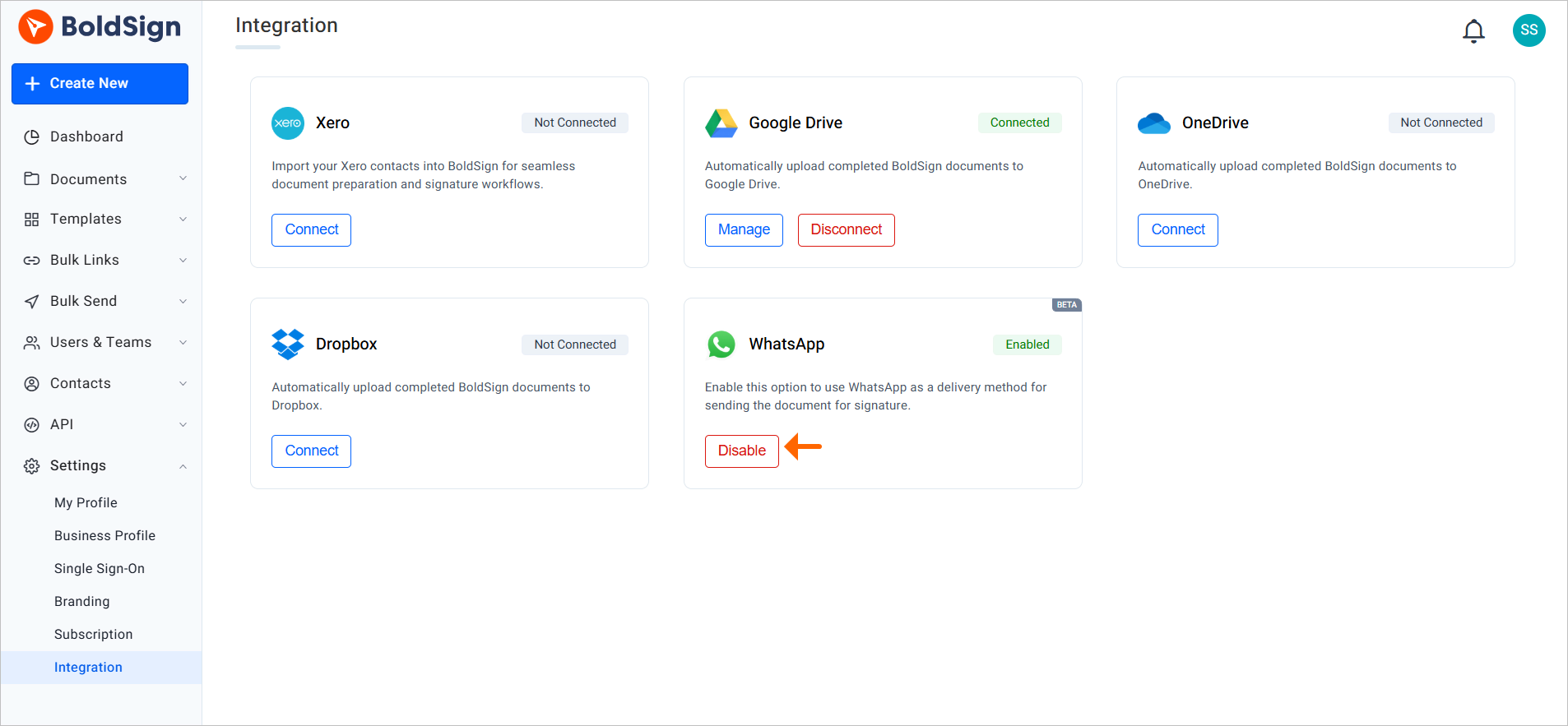
To turn the feature off later, select Disable on the same WhatsApp card.
Step 2: Send your first WhatsApp signature request
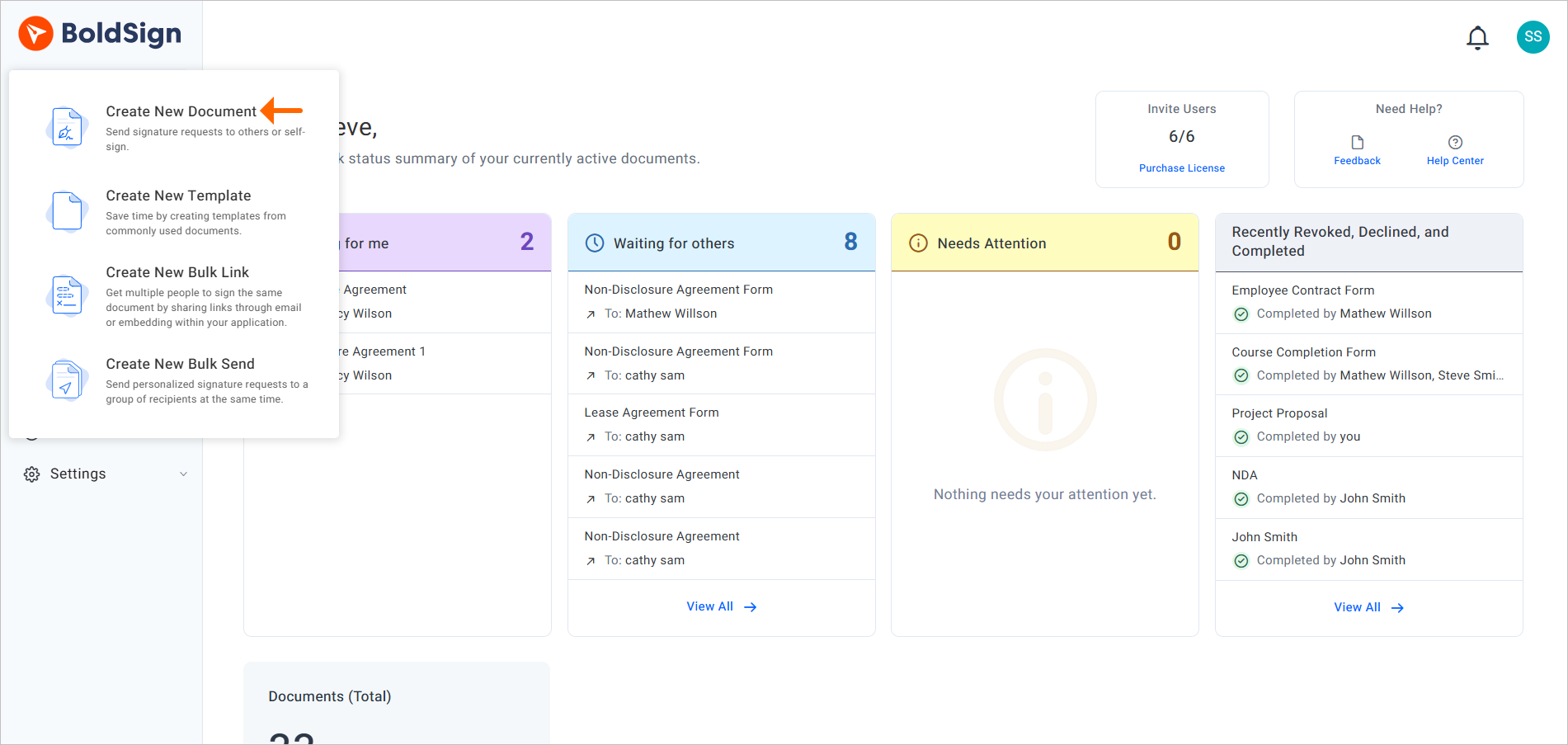
- Select Create New, then Create New Document.
- On the Prepare Document page, open Delivery Options and select WhatsApp. Email is the default.
- Enter the signer’s name, choose the country code and enter the phone number.
- Pick the signer’s language from the Language dropdown.
- Add the signature fields and other fields you need, then send.
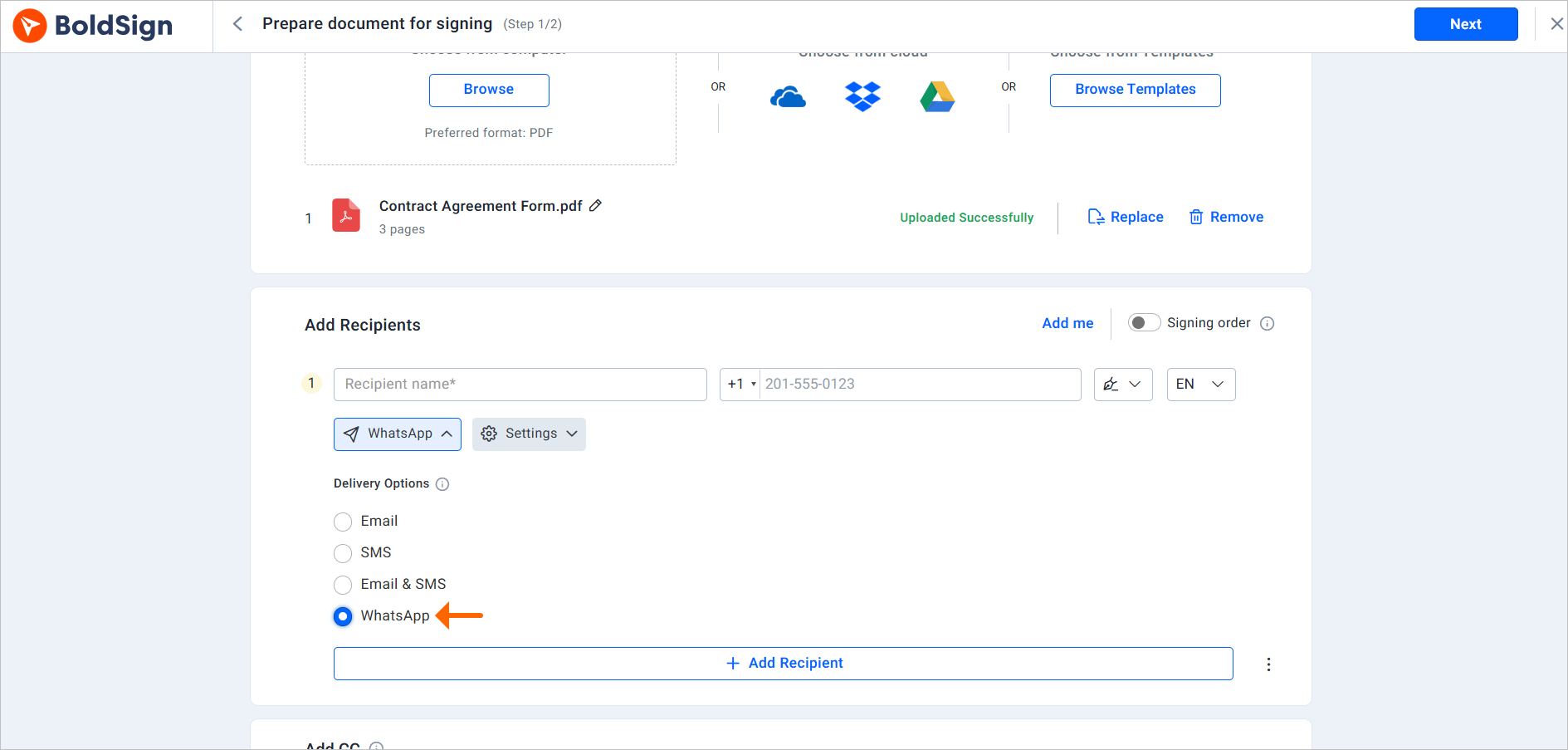
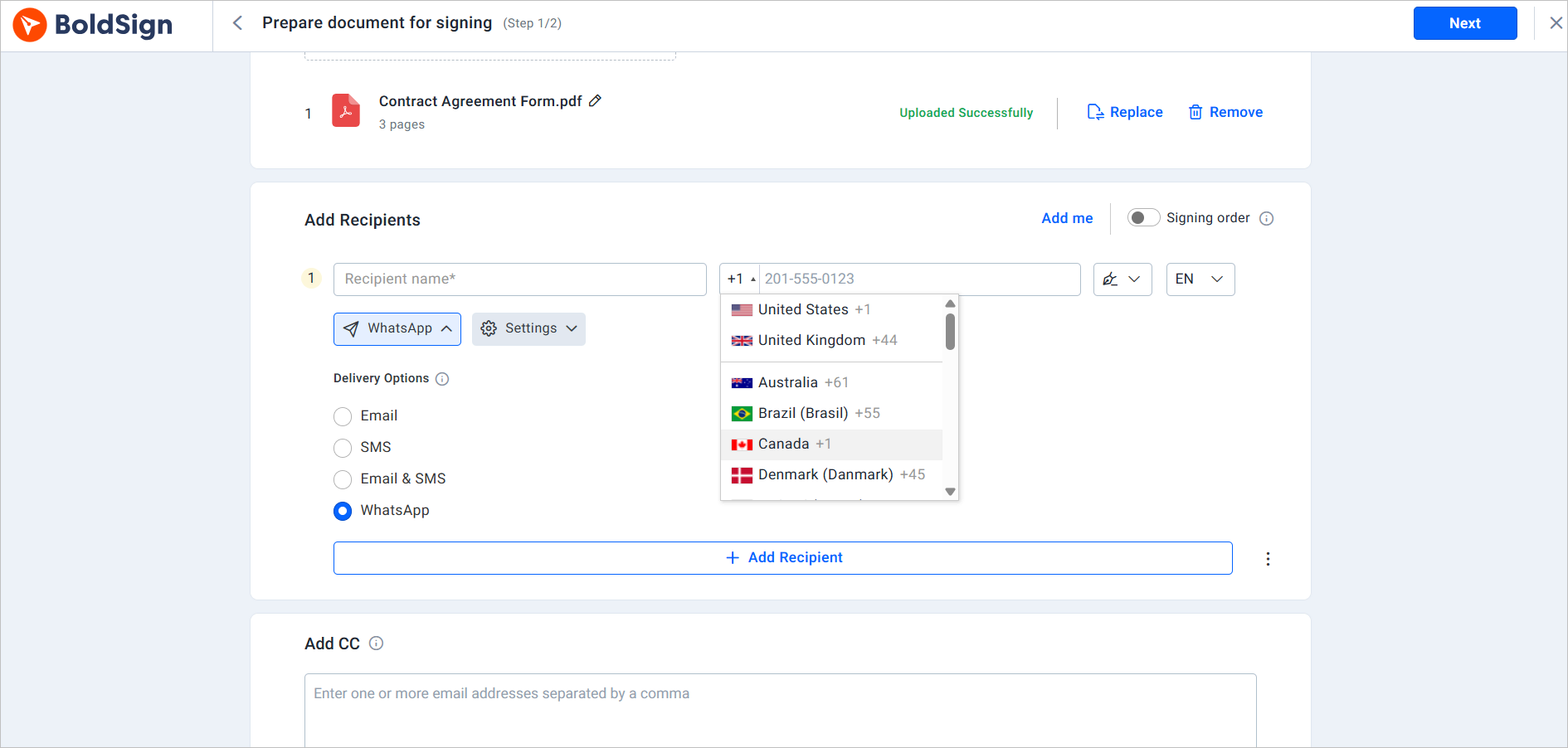
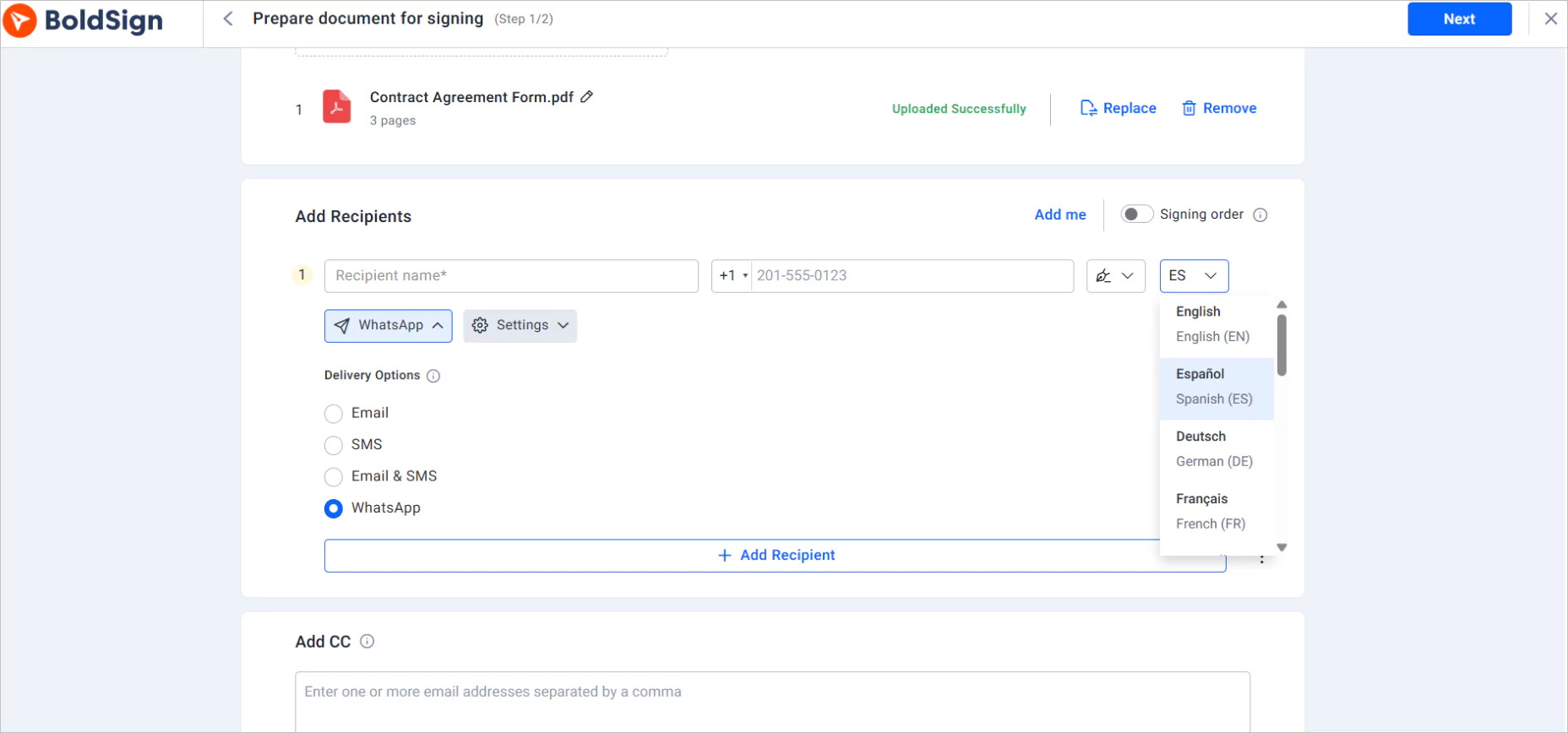
Those five steps are how to send signature in WhatsApp from the web app. A wrong country code is the usual reason a message does not arrive. Use +44 for the UK or +55 for Brazil, for example.
Our iOS and Android apps send WhatsApp requests too. Pick WhatsApp under Delivery Options when you add the signer in the BoldSign mobile app.
Which WhatsApp messages does the signer get?
Your signer gets five kinds of WhatsApp messages about the document. Each one counts as one notification.
- The signature request, with the signing link, document title and your name and email
- Expiration warnings as the deadline gets close
- Deletion warnings before a document is deleted
- Manual reminders each time you send one
- A completion notice with a link to view and download the signed document
Reminders on WhatsApp are manual only. Open the document, choose the signer and select Send Reminder to send a fresh link.
A signer can reply STOP or UNSUBSCRIBE to pause the messages, and START or SUBSCRIBE to resume. We do not read other replies, so signers should email you with questions.
Do you need WhatsApp Business to send a signature via WhatsApp Business?
You do not need your own WhatsApp Business account. We send every request from our own WhatsApp service, and your signer only needs WhatsApp on the number you enter.
So the question of how to add signature in WhatsApp Business has a short answer. We act as the WhatsApp signature sender for you.
You keep using BoldSign to send, and the message reaches your signer’s normal WhatsApp chat.
Which countries and languages work with WhatsApp eSignature requests?
WhatsApp requests reach phone numbers in 26 countries. Messages can arrive in 20 languages, which you pick per signer.
The countries are listed in our help article on WhatsApp delivery.
- Americas: United States, Canada, Mexico, Brazil and Puerto Rico
- Europe, part one: United Kingdom, Ireland, France, Germany, Italy, Spain and Portugal
- Europe, part two: Denmark, Finland, Sweden, Switzerland, Greece, Hungary and Poland
- Asia, Africa and the Middle East: Australia, Hong Kong, India, Israel, Japan, Singapore and South Africa
Languages include Spanish, French, Portuguese, German and Japanese. Our help article on how to change the language of WhatsApp requests lists all 20.
How do Spanish and Indonesian speakers send a signature on WhatsApp?
The steps in this guide work in any language. What changes is how the signer receives the request.
Spanish: como enviar firma digital por WhatsApp
Set the signer’s language to Spanish when you send from BoldSign, and our WhatsApp messages arrive in Spanish. To send your own signed file instead, sign the PDF with our Sign PDF online tool and share it in the chat.
Indonesian: cara kirim tanda tangan di wa
“Tanda tangan” means signature, and “wa” is short for WhatsApp. Indonesia is not on our WhatsApp delivery list today. Sign the PDF with the free Sign PDF online tool, then send the signed file in the chat.
What should you watch out for with WhatsApp signature requests?
WhatsApp suits one signer who acts alone. A few features from email delivery work differently here.
Delivery limits
- Each signer gets one channel, so WhatsApp cannot be combined with email or SMS for that signer.
- CC (carbon copy) recipients get no WhatsApp messages.
- Automatic reminders are off, so plan to send manual ones.
- Advance alerts for documents signed in a set order are not sent.
Signing limits
- Signing groups cannot receive WhatsApp requests.
- Signers cannot pass the document to someone else.
- Email one-time passcode (OTP) checks cannot be used, but an access code or ID verification can.
- WhatsApp delivery is off when Health Insurance Portability and Accountability Act (HIPAA) mode is on.
- We write the message text, and you cannot edit it.
Which BoldSign plan do you need, and what does WhatsApp delivery cost?
WhatsApp delivery starts on the Business plan, at $15 per user a month, billed yearly. Each WhatsApp notification then costs $0.10.
The Premium plan also includes WhatsApp, at $99 a month for unlimited users, billed yearly. SMS delivery sits on the same plans. Prices are in USD, as listed on the BoldSign pricing page in November 2026.
One request, one manual reminder and one completion notice for a single signer cost $0.30 in total. You can set a WhatsApp budget limit for your whole team. Sending pauses when you reach it, until you raise the limit.
Ready to send your first signature request on WhatsApp?
Now you know how to send a digital signature on WhatsApp. Start with a test send to your own phone number to see what signers see.
- Start a 30-day free trial and send a WhatsApp request to yourself.
- Book a demo to see WhatsApp, SMS and email delivery set up for your team.
- Read how multichannel delivery lets you pick a channel for each signer.
Frequently asked questions
How do I send my signature on WhatsApp?
Sign the document first, then share the signed PDF in the chat. Our free Sign PDF online tool lets you draw, type or upload a signature in your phone browser and download the signed file.
How to send digital signature on WhatsApp to a client?
Send your client a signing link on WhatsApp instead of a file. In BoldSign, choose WhatsApp under Delivery Options, enter the client's number with the country code and send. The client opens the link and signs in a browser.
Do I need a WhatsApp Business account to send signature requests?
No. We send each request from our own WhatsApp service. Your signer only needs an active WhatsApp account on the phone number you enter.
Does the signer need a BoldSign account or app?
No. The signer taps the secure link in the WhatsApp message and signs in the phone's web browser. Their number must be linked to an active WhatsApp account.
How much does a WhatsApp signature request cost?
Each WhatsApp notification costs $0.10 per notification on top of a plan that includes WhatsApp delivery. One request, one manual reminder and one completion notice for a single signer add up to $0.30.
Can signers stop WhatsApp signature notifications?
Yes. A signer replies STOP or UNSUBSCRIBE to pause the messages, and START or SUBSCRIBE to turn them back on. Other replies go unread, so signers should email the sender with questions.
Is a document signed through WhatsApp legally binding?
Yes, when it meets the same rules as any electronic signature: the signer agrees to sign electronically and the signed record is kept. WhatsApp only carries the link; the signing and the audit trail happen in BoldSign.
Why did my signer not get the WhatsApp signature request?
Check the phone number and country code on the document's overview page first. Then resend the request on WhatsApp, or switch the signer to email or SMS when you resend.

Yvone Atieno Odhiambo
Yvone is a Technical Assistant at BoldSign who specializes in creating clear documentation and engaging videos. She combines her technical skills and creativity to deliver user-focused solutions. Connect with her on LinkedIn.
More posts by Yvone Atieno Odhiambo