Send Signature Requests from Your Custom Email Domain
 Gopinath Kannusamy
TL;DR: A custom email domain lets your signature requests come from your own address, such as contracts@yourcompany.com. In BoldSign, you enter the domain in Business Profile, and our support team helps you verify it. Our custom branding page shows what else you can match to your brand.
A client gets an email asking them to sign a contract. The sender address is from a company they have never heard of. They may pause there, or delete the email unread.
Sending from your own domain removes that doubt. This guide explains what a custom email domain does and how to set one up in BoldSign.
What is a custom email domain for signature requests?
A custom domain is your own domain name on the emails we send for you. Without one, signing emails come from our default BoldSign domain.
Think of a letter in the post. A letter on your own letterhead feels more familiar than one in a plain envelope. Your domain does the same job for a signing email.
Why send signature requests from your own domain?
Signers trust a request more when it comes from a name they know. A familiar domain also helps your email stand apart from phishing messages that copy eSignature emails.
- Signers see your company name, so the request looks familiar.
- Your requests match the rest of your email, such as invoices and updates.
- Clients have one less reason to call and ask whether a request is real.
How do you set up a custom email domain in BoldSign?
You enter the domain in BoldSign, then our support team verifies it with you. Self-service verification is not available yet, so a support ticket is part of every setup.
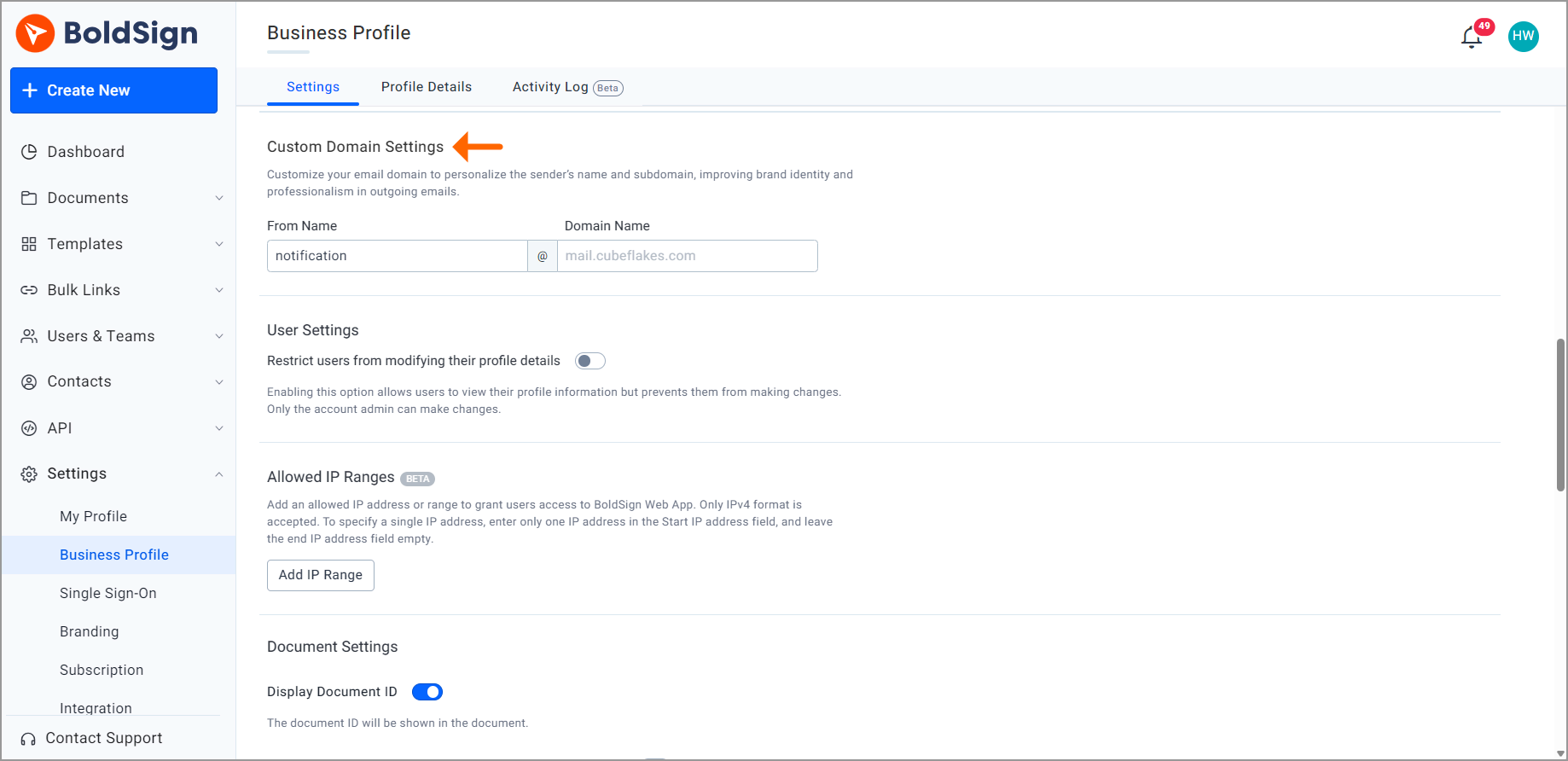
Enter your domain in Business Profile
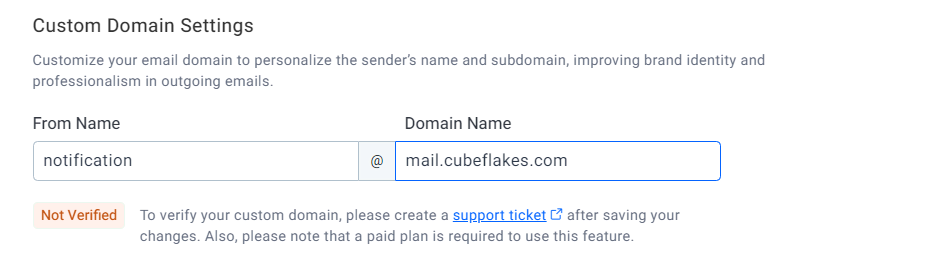
- Go to Settings, select Business Profile, and scroll to Custom Domain Settings.
- Enter the From name and the Domain Name.
- Select Save changes. The domain shows Not Verified for now.
Verify the domain with our support team
- Select the support ticket link below the domain name box.
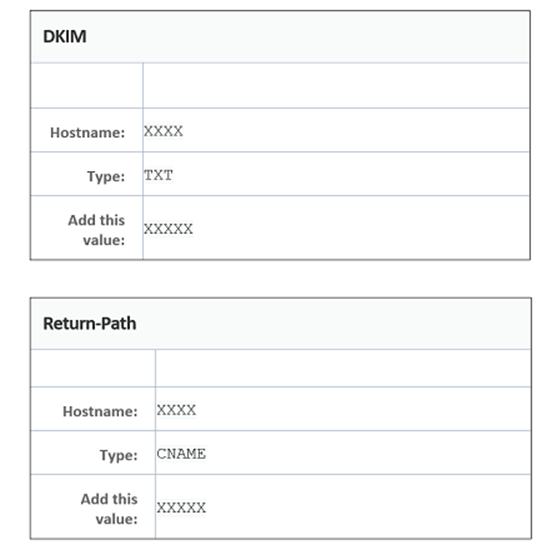
- We check the domain and send you a DomainKeys Identified Mail (DKIM) key and a Return-Path value.
- Add both to the Domain Name System (DNS) records for your domain.
- Reply in the ticket once the records are in place.
Mail servers use the DKIM key to check that an email really comes from your domain.
Check that the domain shows Verified
We activate the domain once your records are in place and tell you in the ticket. Your domain status in Business Profile then changes to Verified.
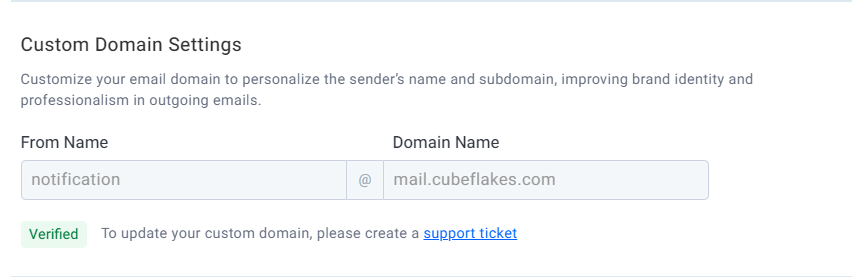
From then on, we send all transactional emails for your account from your domain.
How do you set email signature rules by domain/brand?
Your Business Profile holds one domain, and it applies to every email from your account. Teams that send for more than one brand can give each brand its own domain through the BoldSign API.
In the create brand request, the custom domain settings take a domain name and a From name. The domain uses a subdomain format, such as mail.yourcompany.com. You verify each brand’s domain with our support team, the same way as in Business Profile.
What should you check before you start?
A few details save time during setup. Plan them before you open the ticket.
- Make sure someone on your team can edit your domain’s DNS records.
- Pick a From name that signers will recognize, such as your company name.
- Expect to wait for our reply, because verification goes through a ticket.
Which BoldSign plan do you need, and what does a custom domain cost?
The Business plan, the Premium plan and the Enterprise API plan include a custom email domain, but the Essential and Growth plans do not. The BoldSign pricing page listed this in November 2026.
The Business plan costs $15 per user a month and the Premium plan costs $99 a month for unlimited users, both billed yearly in USD. Each includes one custom email domain, and extra domains cost $5 a month each.
The Business plan also includes unlimited brands. Setting a domain for each brand through the API needs the Enterprise API plan, from $30 a month with 40 envelopes.
How do you get started with a custom email domain?
Choose the step that fits where your team is today.
- Start a 30-day free trial and look at the Custom Domain Settings in Business Profile.
- Book a demo to see how branded signing emails look to your clients.
- Contact our support team to start verifying your domain.
Frequently asked questions
What is a custom email domain in eSignature?
It is your own domain, such as yourcompany.com, used as the sender address on signing emails. Signers see your name on the request instead of ours.
Can I verify a custom domain myself in BoldSign?
Not yet. You enter the domain in Business Profile, then open a support ticket. Our team checks the domain and sends you the records to add.
Which DNS records do I add for a BoldSign custom domain?
You add a DKIM key and a Return-Path record. Our support team sends you the exact values in your ticket after it checks the domain.
Can I send signature requests from multiple domains?
Yes. Your plan includes one custom email domain, and each extra domain costs $5 a month. With the BoldSign API, each brand can hold its own domain.
Which emails use my custom domain?
Once the domain shows Verified, we send all transactional emails for your account from it. Signers then see your domain on every email we send for you.
Does a custom email domain change how signers sign?
No. Signers open the email and sign the same way as before. Only the sender address and name on the email change.
Is a document sent from a custom domain still legally binding?
Yes, when the signing meets the usual electronic signature rules, such as consent and intent to sign. The sender address does not change the signature's legal standing.
Which BoldSign plan includes a custom email domain?
The Business plan, the Premium plan and the Enterprise API plan include it. The Essential and Growth plans do not.

Gopinath Kannusamy
Gopinath is a passionate software developer with 2 years of experience at BoldSign. He is an avid writer and enjoys sharing his insights on technology and development. In his free time, he enjoys exploring new technologies and learning new things. Connect with him on LinkedIn.
More posts by Gopinath Kannusamy