How to Speed Up Hiring with Electronic Signatures on Offer Letters
 Caroline Dolly
TL;DR: Electronic signatures speed up hiring because a candidate can sign an offer letter from a link, on any device, minutes after you send it. Build the offer letter once as a template, then send it to each new candidate with only their name and email. Our electronic signature for HR teams page shows the rest of the hiring paperwork we cover.
You have picked your candidate and agreed the salary on a call. Now the offer letter has to go out, come back signed and reach the hiring manager. With paper or a scanned PDF, that can take days of printing, posting and chasing.
This guide covers the offer stage of hiring. You will see how e-signatures fit into recruiting, then build and send an offer letter template in BoldSign.
What is electronic signature for recruitment?
Electronic signature for recruitment means candidates sign offer letters and hiring forms online instead of on paper. You send a link by email, and the candidate signs in a browser.
Think of signing for a parcel on a courier’s handheld screen. Nobody prints a form, and the record is saved the moment you sign. Recruitment e-signing works the same way for the documents that turn a candidate into a new hire.
Why do e-signatures speed up the hiring process?
E-signatures remove the wait between “we would like to offer you the job” and a signed letter. The candidate can sign the same day, often from a phone.
- The offer goes out by email the moment it is ready.
- The candidate signs in any phone or computer browser, with nothing to print or scan.
- You can see whether the candidate has viewed or signed the letter.
- An audit trail records who signed and when.
Paper costs also drop, since nothing needs printing, posting or a courier.
How do you integrate e-signature tools into hiring process workflows?
Start with the documents you send most, then turn each one into a template. Most recruiting teams begin with the offer letter.
- List the documents you send at the offer stage, such as the offer letter and a job application form.
- Decide who signs each one: usually the candidate, sometimes a hiring manager as well.
- Note who only needs a copy, such as the HR manager.
- Build one template per document, with roles in place of names.
- Send from the template for every new candidate.
Once the offer is accepted, the employment contract and onboarding forms come next. Our guide on employment contract signing for HR departments covers that stage.
How do you create an offer letter template in BoldSign?
You create an eSignature template once, with a role for the candidate in place of a name. Our help article on creating templates lists every option.
Add the title and file
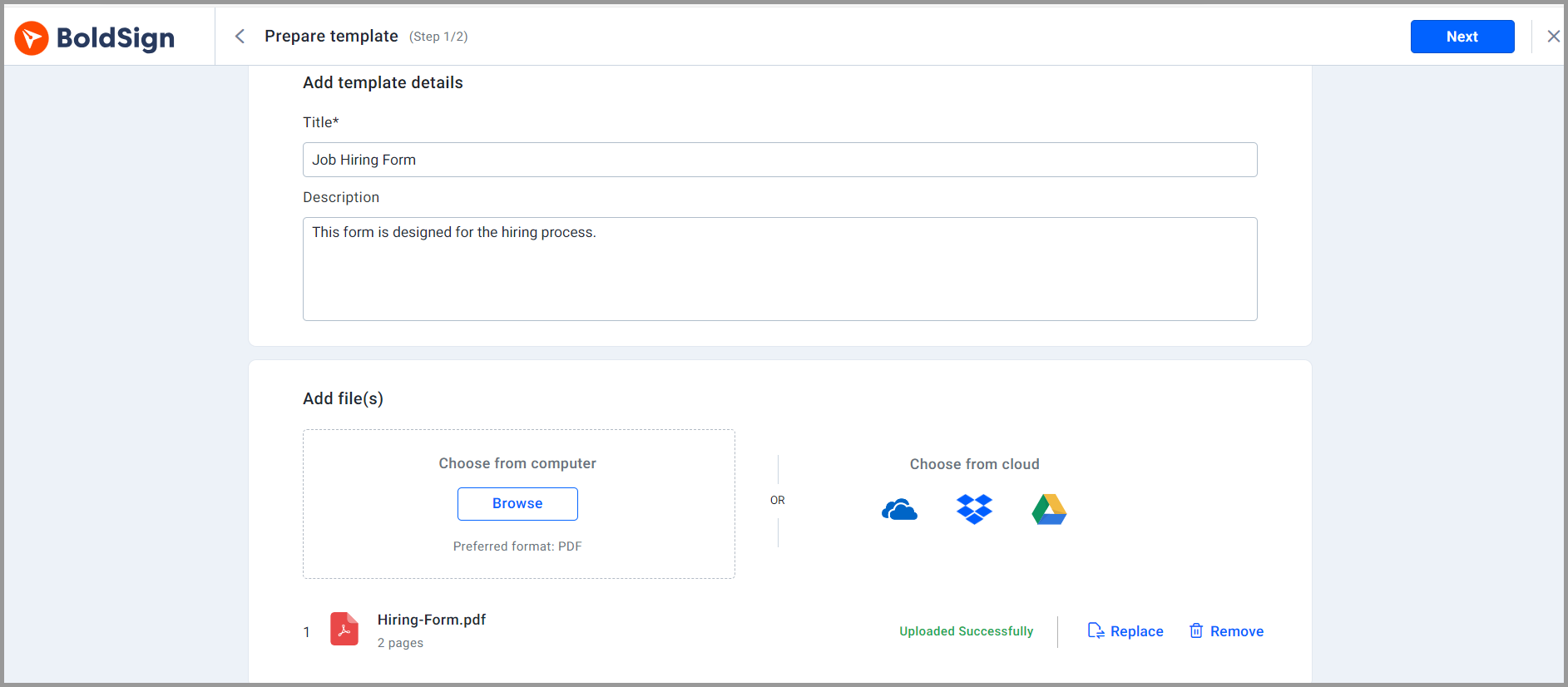
- Select Create New, then Create New Template.
- Enter a Title, such as Job Offer Letter, and a short Description.
- Upload your offer letter in the Add files section, from your computer or cloud storage.
Add the roles and message
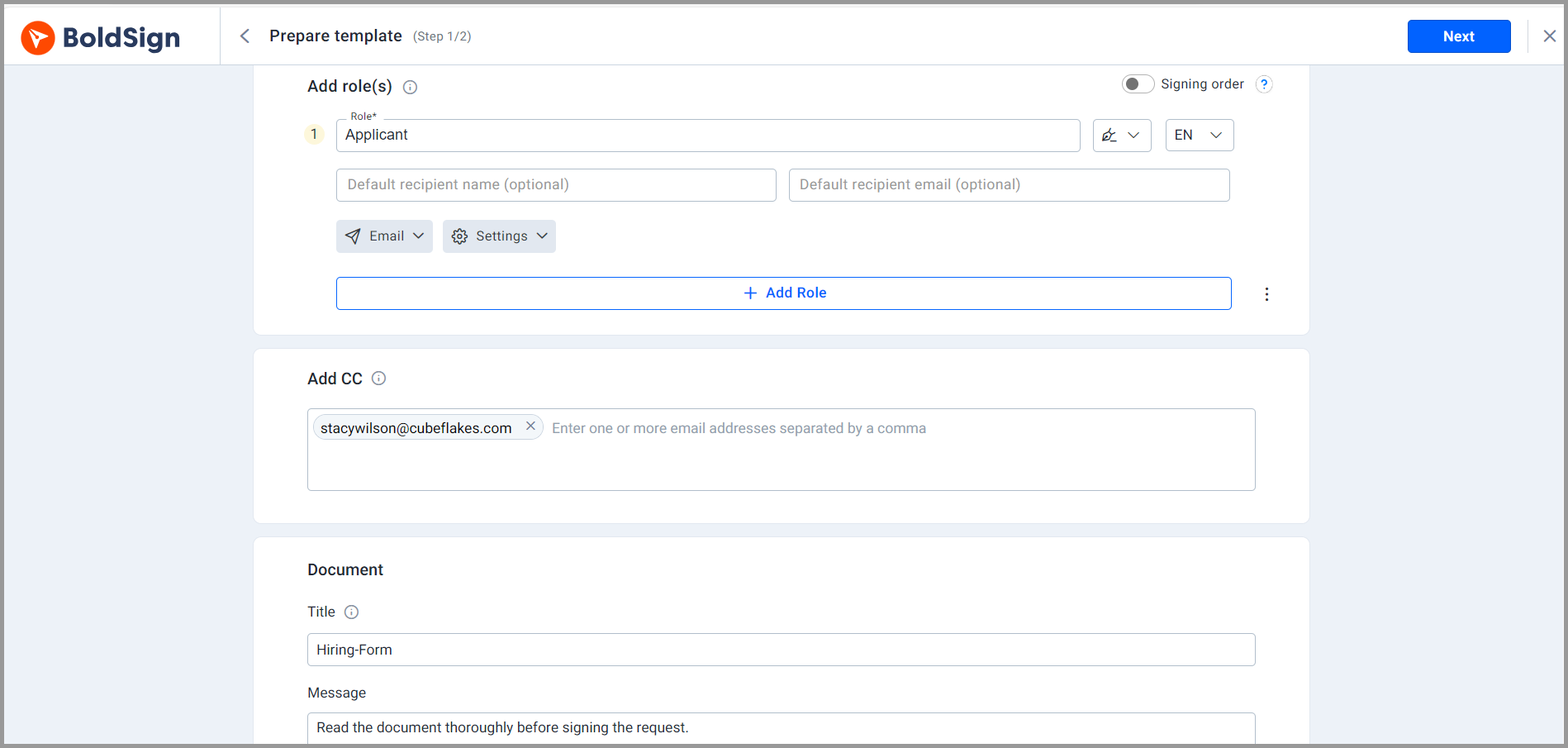
- In the Add role section, add a role named Applicant for the candidate.
- Add the HR manager as a CC (carbon copy) recipient, so they get a copy.
- Check the document title, which comes from the file name, and add a message for the candidate.
Set what senders can change
Template usage settings decide what a recruiter can change when they send. Turn on Allow sender to add more recipients when a second signer sometimes joins.
Leave Allow sender to edit the document message before sending off to keep one message for every candidate.
Place the fields and save
- Select Next to open the page where you place fields.
- Add signature, date and text fields, and assign each one to the Applicant role.
- Select Save template.
You can also let artificial intelligence (AI) field detection find the blanks in your letter and place the fields for you.
How do you send an offer letter to a candidate?
Once the template is saved, each offer takes a minute or two. You only add the candidate’s name and email address.
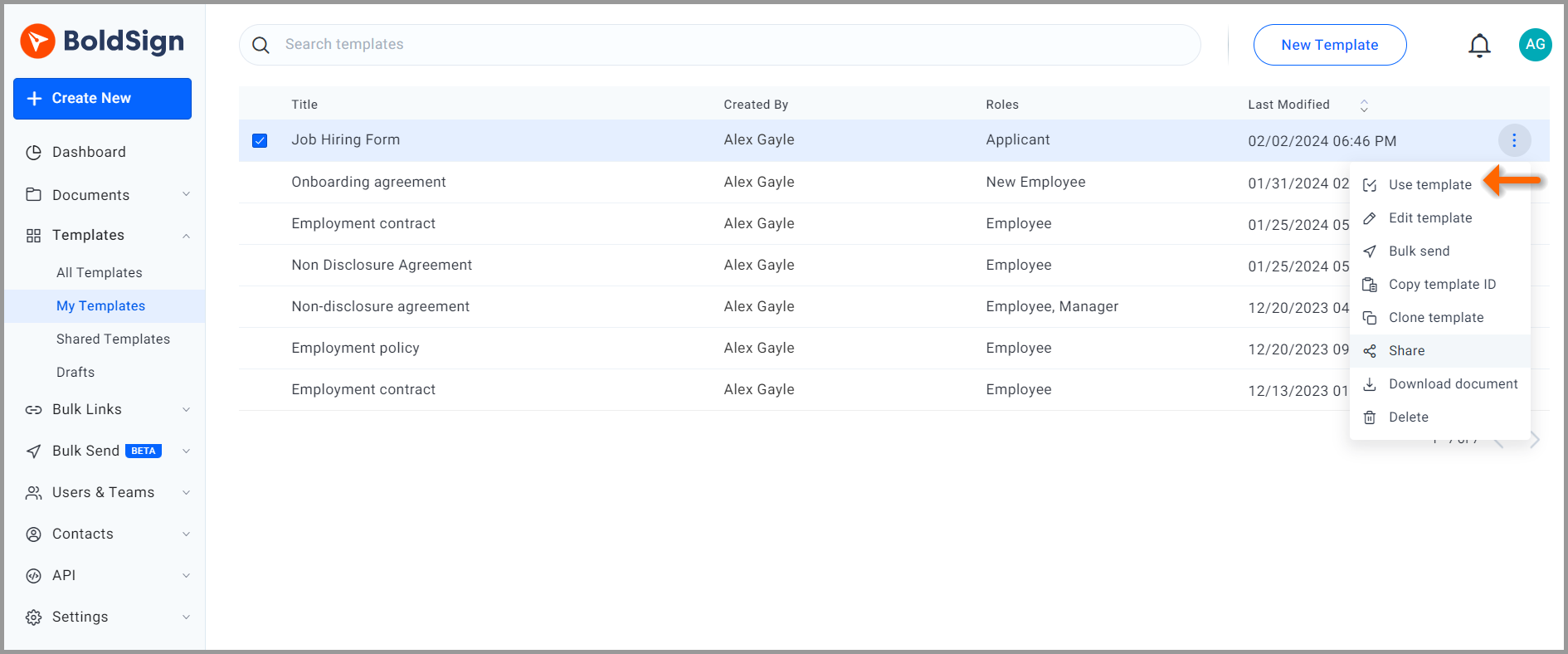
- Open the My Templates page and find your offer letter template.
- Hover over it and choose Use template from its menu.
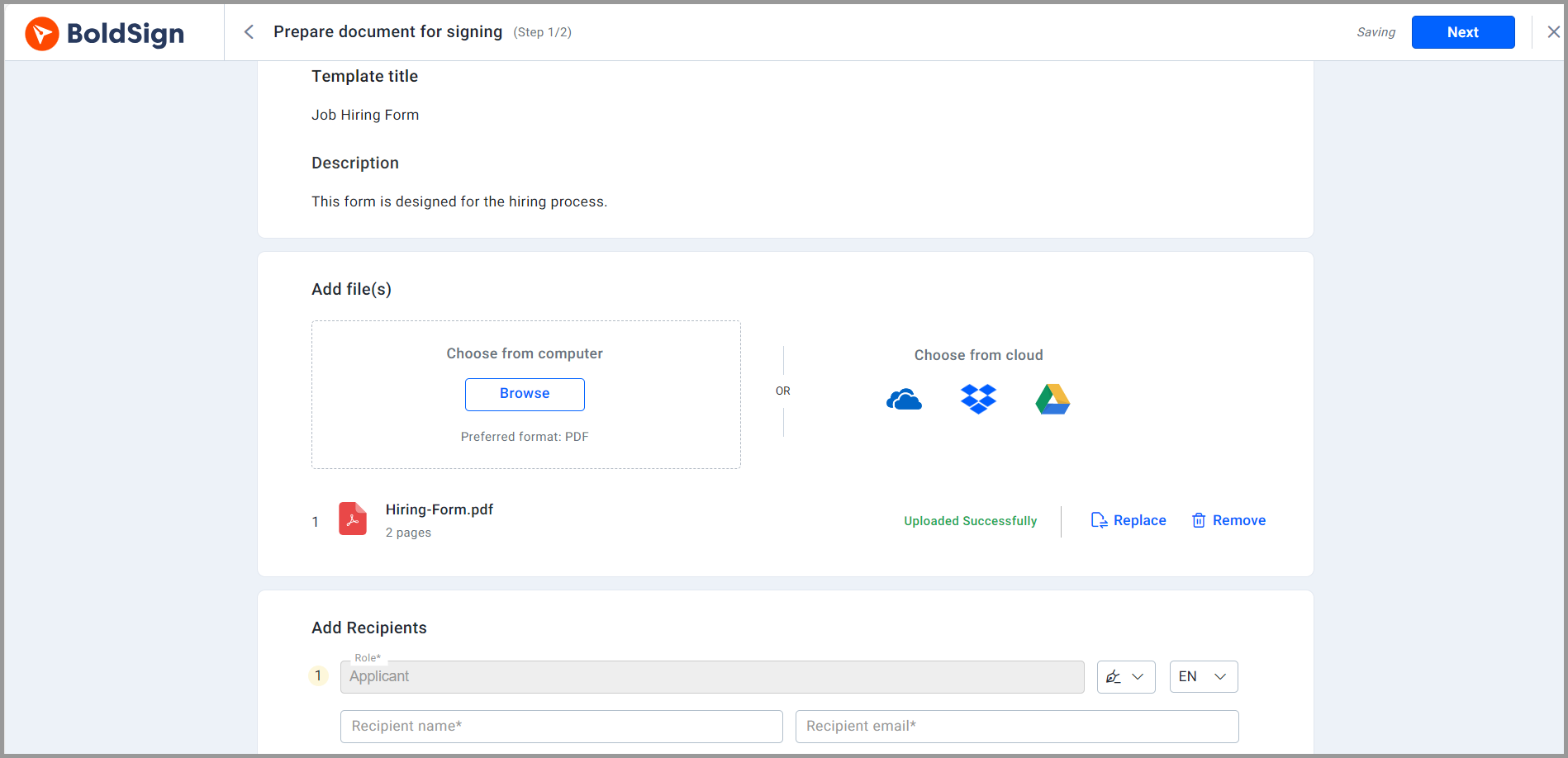
- Enter the candidate’s name and email address for the Applicant role.
- Review the fields and the message, then send.
Turn on automatic reminders before you send. You choose the days between them, up to 5 per document, and they stop once the candidate signs.
What should you watch out for with candidate e-signatures?
A fast offer still needs to be the right offer. Check the salary, start date and job title in the letter before you send it.
Keep one template per role type, so an old salary band never reaches a new candidate. The US Electronic Signatures in Global and National Commerce (ESIGN) Act says a contract cannot lose legal effect only because it was signed electronically. Ask your legal team about any hiring document with special signing rules where you work.
Which BoldSign plan do you need for hiring, and what does it cost?
Your plan sets how many templates you can save, as listed on our pricing page in November 2026. Prices are in USD and billed yearly.
The free Essential plan includes 2 templates, enough for an offer letter and one more form. The Growth plan costs $5 per user a month and includes 10 templates.
The Business plan costs $15 per user a month, with unlimited templates and AI-powered field detection. The Premium plan costs $99 a month for unlimited users, and also includes unlimited templates and AI field detection.
How do you send your first offer letter with BoldSign?
Pick the offer letter you send most and turn it into a template this week. These links help you start.
- Start a 30-day free trial and build your first offer letter template.
- Book a demo to see a hiring workflow set up for your team.
- Read our guide to saving time with templates for merging and sharing them.
Frequently asked questions
What is a candidate e-signature?
A candidate e-signature is the electronic signature a job candidate adds to an offer letter or hiring form. The candidate opens a link from an email, reviews the document and signs it online.
Is an electronically signed offer letter legally binding?
Yes, when the candidate agrees to sign electronically and the letter meets the usual rules for a contract. In the US, the ESIGN Act says a contract cannot lose legal effect only because it was signed electronically.
Does the candidate need a BoldSign account to sign?
No. The candidate signs from the link in our email, in a browser on a phone or a computer.
Which hiring documents can I send for e-signature?
Most recruiters start with the offer letter. Job application forms, confidentiality agreements and policy acknowledgements work the same way, each from its own template.
How do I remind a candidate who has not signed yet?
Turn on automatic reminders when you send. You choose the days between reminders and can set up to 5 per document, and they stop once the candidate signs.
Can a hiring manager get a copy of the signed offer?
Yes. Add the hiring manager as a CC (carbon copy) recipient in the template. They get a copy of the document without having to sign it.
How is a hiring template different from an employment contract template?
A hiring template covers the offer stage, before the candidate accepts. The employment contract and onboarding forms usually follow once they say yes, often with more signers.
How much does BoldSign cost for a recruiting team?
The Essential plan is free with 2 templates. The Growth plan is $5 per user a month and the Business plan is $15 per user a month, billed yearly.

Caroline Dolly
Caroline Dolly is a technical writer at BoldSign who simplifies complex concepts into clear, engaging content. She creates tutorials, help articles, and product documentation, ensuring information is accurate and accessible. Connect with her on LinkedIn.
More posts by Caroline Dolly