How Identity Verification Methods and Audit Trails Prevent "I Didn't Sign This" Claims
 Stephen Otieno Okoth
TL;DR: You can answer an “I didn’t sign this” claim when you show who signed, that they meant to sign and that the document is unchanged. Identity checks before the document opens prove the first two. A sealed audit trail proves all three. Our signer identity verification page shows the strongest check.
A customer signs a loan agreement on a Monday. Three months later, a payment is due and they write back, “I never signed that.” Now you have to prove they did.
Your proof is thin when all you have is a link sent to an email address. Anyone with access to that inbox could have clicked it. This guide shows how to build a stronger record, one that answers the claim before anyone makes it.
What is repudiation in electronic signatures?
Repudiation is a signer denying a signature that carries their name. They may say it was forged, that someone else used their link or that their email account was hacked.
Think of a parcel left on a doorstep. If the driver only knocked, the buyer can say it never came. That claim gets much harder when the driver took a photo and asked for a code sent to the buyer’s phone.
Non-repudiation is the opposite: a record strong enough that the signer cannot credibly deny it.
What does non-repudiation require?
A signature resists denial when your record proves three things. Each one answers a different part of the claim.
- Identity: the person who signed is the person you sent it to.
- Intent: they chose to sign, rather than click by accident.
- Integrity: the document has not changed since they signed it.
In the US, the Electronic Signatures in Global and National Commerce (ESIGN) Act says a signature cannot lose legal effect solely because it is electronic. The law does not prove who signed for you. Your own evidence does that.
Why are email-only signing workflows easy to dispute?
An email link proves only that someone opened a certain inbox. Shared, forwarded and hacked inboxes all break that link to one person.
- The signer forwards the email to a colleague who signs for them.
- A team shares the inbox the request went to.
- Someone gets into the signer’s email account.
A check before the document opens closes these gaps. Read how to choose a signer authentication method for a full guide to picking a check by risk.
Which identity verification methods can you choose in BoldSign?
We offer five checks that a signer passes before the document opens. Codes prove access to an inbox or phone, while the last two prove who the person is.
Code checks prove access
- Email one-time password (OTP): we email a code that the signer types in.
- SMS OTP: we text a code to the signer’s phone, a second channel apart from the inbox.
- Access code: you create a code and give it to the signer yourself, by phone or in person.
With authentication frequency settings, you can ask for these codes on every access, until signing or once per document.
Identity checks prove who signed
Knowledge-based authentication (KBA) asks a US signer questions drawn from public records, with no ID upload. Our knowledge-based authentication page explains the flow.
ID verification goes further. The signer photographs a passport, driver’s license or national ID card and takes a live selfie. We match the two through Stripe Identity.
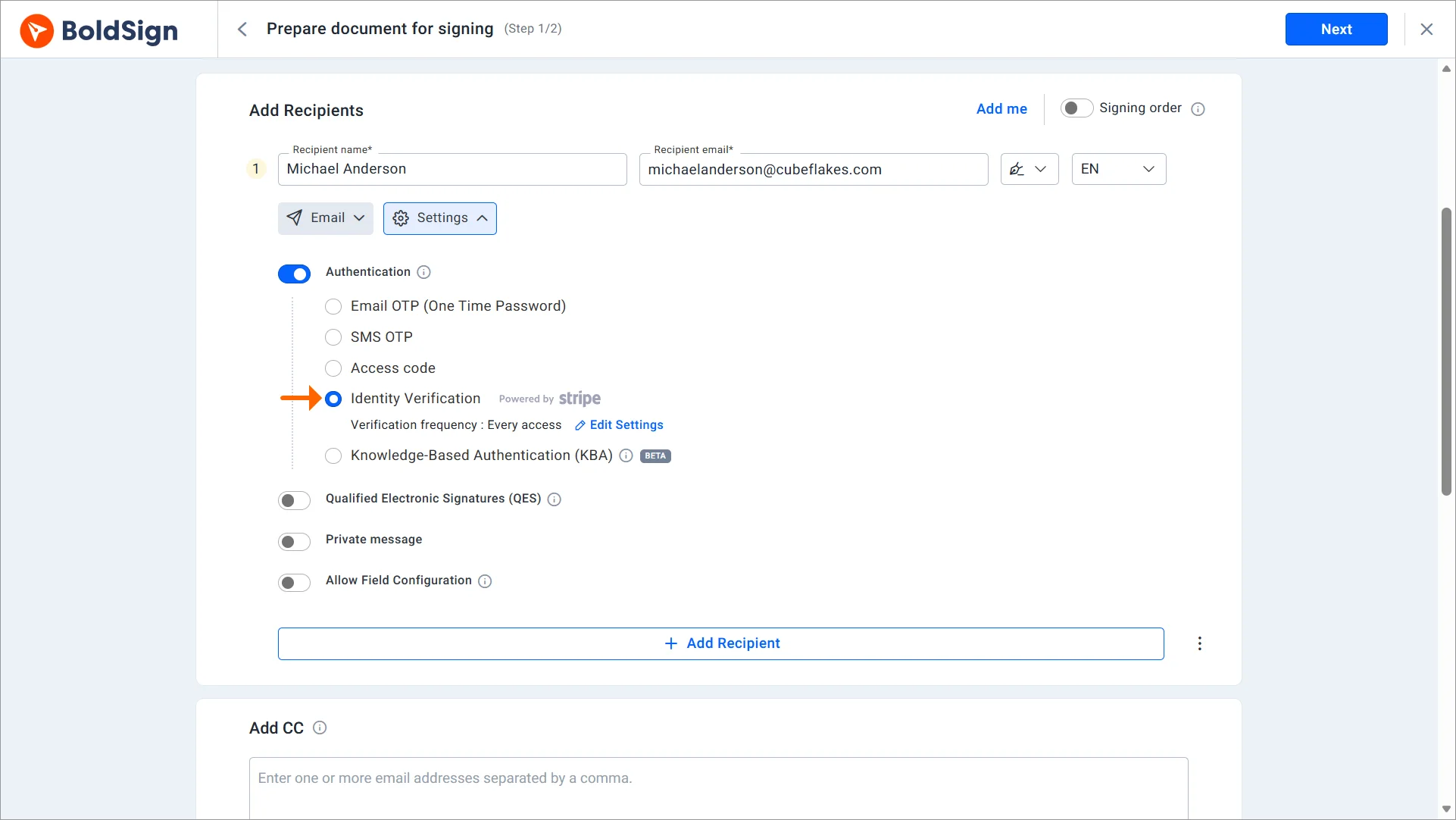
You can set the name-match tolerance to Strict, Moderate or Lenient, and keep the selfie check and live capture on. Live capture stops a signer from uploading an old photo or a photocopy.
What does an audit trail prove?
The audit trail is the record of everything that happened to the document. It ties each step to a person, a device and a time.
Our help article on what the audit trail contains lists these parts:
- Document details, such as its ID, name, signing order and the times it was sent and completed.
- Sender and recipient names, email addresses, internet protocol (IP) addresses and devices.
- The authentication each signer passed before opening or signing.
- The signature type (typed, drawn or image) and every action with its time.
The audit trail is ready to download once every signer has signed. For more on how to read one, see why eSignature audit trails matter.
How does a sealed document prove nothing changed?
We digitally sign the final document and its audit trail with an Adobe Approved Trust List (AATL) certificate. Any later change breaks that seal, so the edit shows up.
Our security policy describes this tamper proofing. Together with the identity check and the audit trail, it gives you all three proofs in one file.
How do you set up a signing flow that resists denial?
Plan the check before you send, based on how likely a signer is to dispute the document. These steps work for most teams.
- List the documents that carry money, legal duty or personal data.
- Use email OTP for routine internal forms.
- Add SMS OTP or an access code for outside parties.
- Require KBA or ID verification for loans, high-value contracts and regulated forms.
- Save the check in a template so every sender uses it.
Not sure which tier fits a document? Our guide to document authentication levels gives a simple risk framework for internal and external approvals.
What should you watch out for?
A strong check can still leave gaps if you set it up loosely. Check these points before your first send.
- Code checks prove access only, so a shared phone or inbox weakens them.
- KBA works only for signers based in the US.
- A signer who runs out of attempts gets locked out until the sender unlocks the document.
- Enter the signer’s legal name with care, since ID checks compare it to the ID.
Which BoldSign plan do you need, and what does each check cost?
Email OTP and access codes come with every plan, including the free Essential plan. SMS OTP, KBA and ID verification need the Business plan, at $15 per user a month billed yearly, or the Premium plan.
The Business plan is the lowest-priced plan with those three checks.
Each use of those three costs extra, as listed on our pricing page in November 2026. An SMS code costs $0.20, a KBA attempt costs $1.50 and an ID verification costs $2.
The Premium plan, at $99 a month for unlimited users billed yearly, includes the same checks. Prices are in USD, and every plan includes the audit trail.
How do you start protecting your signed documents?
Pick one document that a signer could dispute, then send it with a stronger check.
- Start a 30-day free trial and send yourself a document with an email code.
- Book a demo to plan a check for each of your document types.
- Contact our support team with questions about your setup.
Frequently asked questions
What does repudiation mean for an electronic signature?
Repudiation is when a signer denies that they signed, or says someone else used their link or account. Your answer to that claim is the record of who opened the document and how they proved who they were.
Can a signer deny an eSignature after signing?
A signer can always make the claim, but strong evidence makes it hard to sustain. A record of an ID check, a code sent to their phone and a sealed audit trail shows the court or the other party what really happened.
Is an electronic signature legally binding if the signer later denies it?
Yes, when the signature meets the usual rules, such as the signer agreeing to sign electronically. The US ESIGN Act says a signature cannot lose legal effect only for being electronic. Proving who signed is still up to you.
Which identity verification method gives the strongest proof?
ID verification gives the strongest proof of identity. The signer photographs a government ID and takes a live selfie, and the match is recorded in the audit trail.
Is an email one-time password enough to prove who signed?
An email one-time password proves control of the inbox, not who the person is. That suits routine forms. For documents a signer might dispute, add an SMS code, an access code, KBA or ID verification.
Does the BoldSign audit trail show which check a signer passed?
Yes. The audit trail records the authentication each signer passed, with times, IP addresses and devices. For ID verification it also records the outcome of the check.
Can someone change a signed document without anyone noticing?
Changes show up. We digitally sign the final document and its audit trail with an Adobe Approved Trust List certificate, so any later edit breaks the seal.
Can I use a different check for each signer on one document?
Yes. You choose the check for each signer, so an internal approver can use an email code while an outside party on the same document uses ID verification.

Stephen Otieno Okoth
Stephen is a Technical Assistant at BoldSign who specializes in creating clear documentation and engaging videos. He combines his technical skills and creativity to deliver user-focused solutions. Connect with him on LinkedIn.
More posts by Stephen Otieno Okoth