Preethi Loganathan
TL;DR: A bulk link is one reusable URL that any number of people can open to sign your online waiver form. Each person signs a separate copy, so you never need a list of names in advance. Our bulk links page shows what each link includes.
Ten minutes before a yoga class, four walk-ins are at the desk, and none of them has signed a waiver. One staff member hunts for a clean printout. Another types email addresses into signature requests, one person at a time.
The class starts late. Two of those waivers end up in a drawer instead of a file anyone can search.
Why does online waiver collection break down at check-in?
Waivers break down because they reach the signer too late. Staff collect them during check-in, the busiest moment of the day.
Paper is only part of the trouble. Someone still has to match signed sheets against a roster, scan them and find them again months later.
Separate signature requests remove the paper but keep the delay. You need a name and an email address before you can send one, and a walk-in gives you both only at the desk.
A shared PDF or a plain form link is weaker still. You get files back with no record of who opened the document or when they signed it.
Who needs a reusable waiver signing link?
Any team that collects the same waiver from people it cannot name in advance needs one. The pattern shows up in many places:
- Gyms, studios and climbing walls collecting a liability release at a first visit
- Event and race organizers handling day-of registration
- Nonprofits onboarding volunteers who signed up the night before
- Schools collecting parental consent for trips and after-school programs
- Clinics, wellness businesses and training providers running open sessions
What is a bulk link for waiver signing?
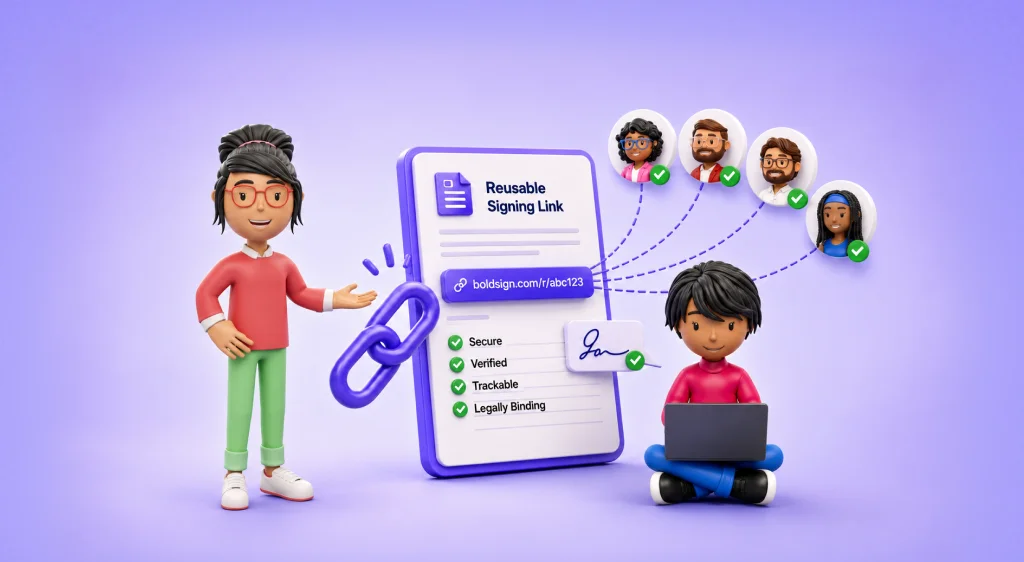
A bulk link is one signing URL that many people use to sign the same document. Each person gets a separate copy once they finish.
Think of a sign-in sheet on a clipboard at the front desk. Anyone can walk up and add their name. A bulk link works the same way, except each person signs a private copy.
You publish the link once. It then serves three people this week or three hundred over a season.
Bulk send works the other way round. You upload a list of names and email addresses, and we send each person a request. Our guide on when to use bulk links compares the two in more detail.
Why does a bulk link suit waiver signing?
A bulk link suits waivers because the document is ready before the signer arrives. Nobody on your team builds a new request for each person.
Each response becomes a separate document with its own audit trail. You can share one participant’s waiver without handing over anyone else’s.
You also keep control of the link. A response limit and an expiry date close it when your event or season ends.
Signers confirm a one-time code sent to their email address before they sign. For most waivers, that check is enough to show who signed.
Is an electronically signed waiver legally binding?
An electronic signature can make a waiver binding, when the waiver itself is valid where it applies. The signature method and the waiver’s terms are two separate questions.
The US Electronic Signatures in Global and National Commerce Act (ESIGN) says a signature or record cannot lose legal effect only because it is electronic. Where a law says you must keep a record, an electronic copy counts. It must stay accurate and open to the people entitled to see it.
Whether a specific release of liability holds up depends on its wording and on your state’s law. Ask your lawyer to review the waiver text before you publish the link.
What should you check in a waiver signing tool?
Most eSignature tools offer some kind of reusable signing link. The details decide whether it copes with a busy Saturday:
- Can you cap responses and set an expiry date?
- Does each signer confirm their email address before signing?
- Can you place the waiver on your own website?
- Can you fill in details your registration system already holds?
- Can you export responses along with each audit trail?
How do you set up an online waiver form with BoldSign bulk links?
You build a template, turn it into a bulk link and share the URL. The steps below follow the order of the screens.
1. Build the waiver template
A template stores the waiver file, the signer role and the position of every field. The version people sign in March is the same one they sign in November.
Add fields for the name, date and signature. Then add what your waiver needs, such as an emergency contact or a risk acknowledgment check box.
For a minor, add a second role for the parent or guardian.
2. Create the bulk link
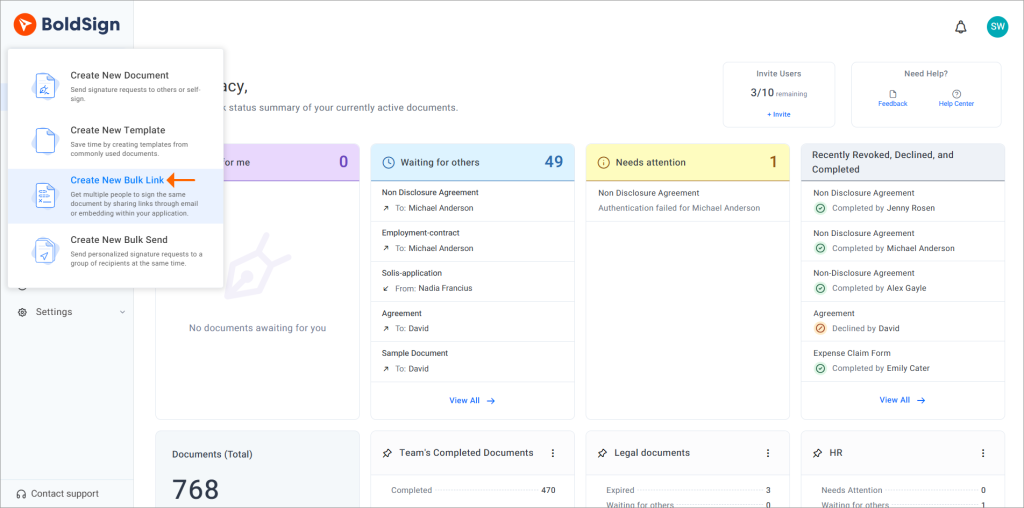
Go to Templates, select your waiver template and choose Create Bulk Link. You can also select Create New, then Create New Bulk Link, and pick a template there.
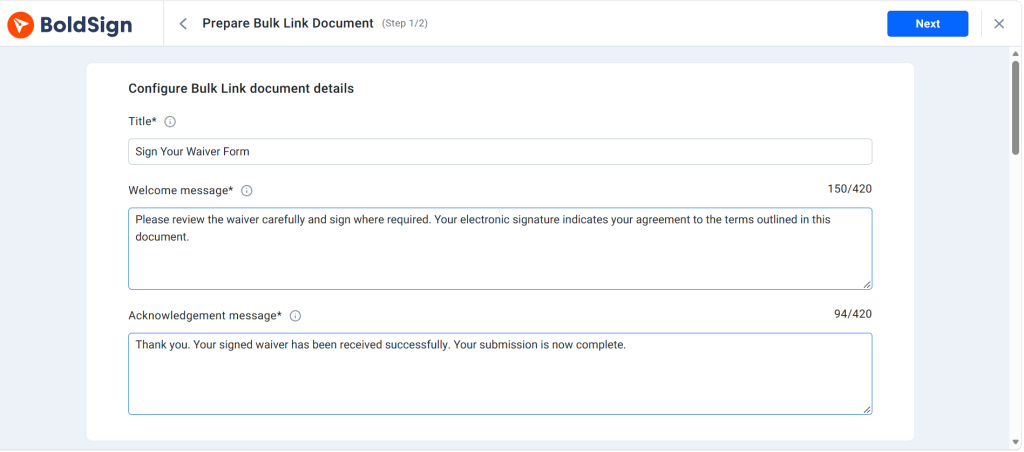
3. Write the welcome and acknowledgment messages
The welcome message tells signers what they are about to sign. The acknowledgment message confirms that their response went through.
A clear acknowledgment cuts down on repeat submissions from people unsure whether the first attempt worked.
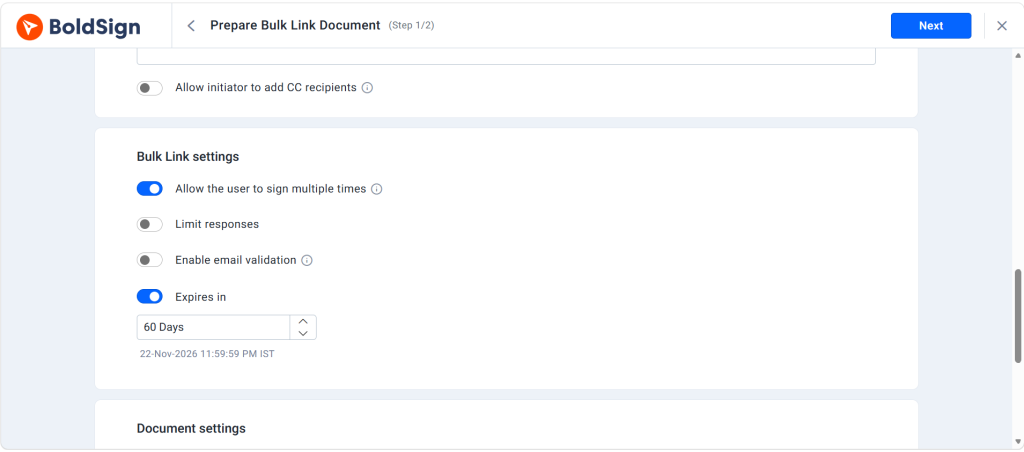
4. Set response limits, expiry and email verification
Cap the number of responses and set an expiry date so the link closes after your event. Keep email verification on, so each signer confirms a code before the document opens.
Email validation is also available. It accepts only addresses that match a pattern you set, such as your company’s domain for staff training sign-offs.
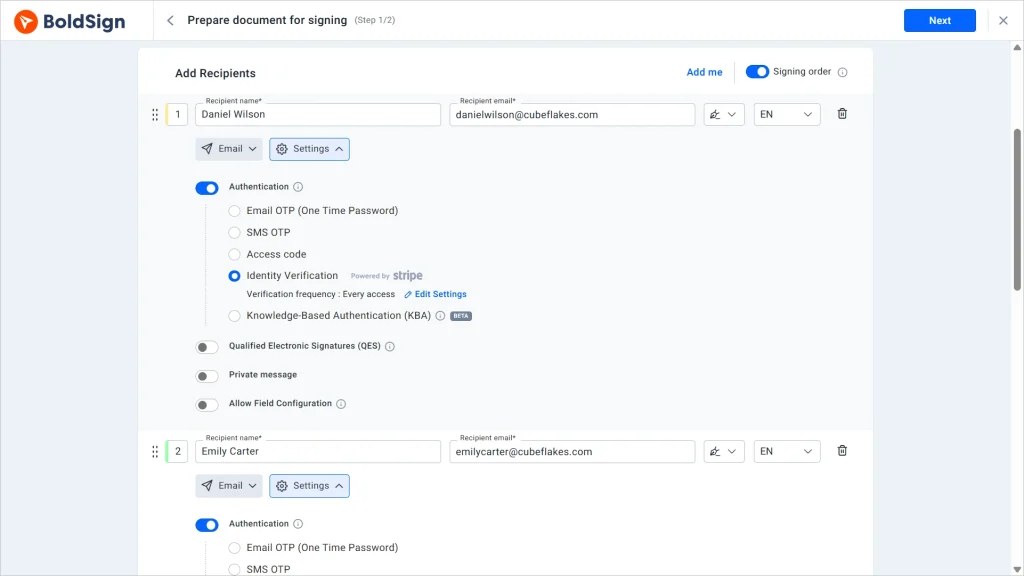
Our signer authentication page lists the other identity checks we offer for signature requests.
5. Share the link, a Quick Response (QR) code or the embed code
Send the URL by email or message, or paste the embed code into a page on your website. Visitors then sign without leaving your site.
For a front desk, turn the URL into a QR code with our free link QR code generator. Print it on a desk sign or a race packet.
Signers scan the code and sign in their phone browser. They sign without an account or an app.
6. Fill in details you already hold
Your registration system may already hold each person’s name and email address. Add those values to the link’s query parameters, and the signer opens a partly completed form.
Our integrations page shows which tools already connect to BoldSign.
Email verification can be turned off when people already sign in to your own site first. Keep it on for any link the public can open.
7. Track and export the signed waivers
Open My Bulk Links and select your link to see every response as it arrives. In the Responders section, select Export To CSV to download each signer’s details.
You can download signed waivers one at a time or together. Each one carries its own audit trail, the record you need if a participant later disputes the waiver.
Which BoldSign plan do you need for waiver bulk links, and what does it cost?
Bulk links start on the Business plan, as listed on the BoldSign pricing page in November 2026. Prices are in USD.
The Business plan costs $15 per user a month, billed yearly. The Premium plan costs $99 a month for unlimited users, billed yearly, and the Enterprise API plan also includes bulk links.
The pricing page lists bulk links as an add-on at $0.25 per envelope on each of these plans. Check that figure against your expected number of signers before a large event.
You can try bulk links with a 30-day free trial first.
How do you start collecting waivers online?
Start with the waiver you collect most often. Build its template, create the bulk link and test it with two or three colleagues.
- Start a 30-day free trial and create your first waiver bulk link.
- Book a demo to see a bulk link set up for your waiver.
- Read how to create bulk links with templates for documents you reuse.
Frequently asked questions
Are online waivers legally binding?
Yes, when the waiver itself holds up under the law where it applies. Under the US ESIGN Act, a signature cannot lose legal effect only because it is electronic. Whether the release terms hold up is a question for your lawyer.
How do I create an online waiver form?
Upload your waiver file and save it as a template. Then add fields for the participant's details, a risk acknowledgment and a signature.
Can I send one waiver link to many people?
Yes. A bulk link is one URL that any number of people can open. Each person signs a separate copy with its own audit trail.
What should an electronic waiver form include?
It needs the participant's name, a plain account of the risks, the release terms and a signature with a date. Ask a lawyer to review the wording for your state.
Can customers sign a waiver on their phone?
Yes. Signers open the link in a phone browser and sign. They sign without an account or an app.
What is the difference between bulk send and bulk links?
Is there a free way to collect online waiver signatures?
You can test bulk links free for 30 days with our free trial. After the trial, bulk links come with the Business plan and higher plans.
How should signed waivers be stored and tracked?
Keep each signed waiver with its audit trail. In BoldSign, the bulk link's overview page lists every responder, and you can export their details to a CSV file.

Preethi Loganathan
Preethi is a Digital Marketing Executive at BoldSign who develops precise, research-driven content on eSignatures, compliance, and digital signing workflows. She works closely with product and engineering teams to ensure every article is accurate, validated, and aligned with industry best practices. Connect with her on LinkedIn.
More posts by Preethi Loganathan