Reusable Signing Links: When to Use Them and What to Check First
 Preethi Loganathan
TL;DR: A reusable signing link is one URL that lets each person sign their own copy of the same document. Use it for rolling onboarding, event waivers, sign-ups and policy forms, where you cannot name signers in advance. Our bulk links page shows the controls that keep a public link in check.
Picture an office manager who has sent the same waiver to fifty people, one email at a time. Names get typed wrong. Links land in the wrong inbox, and half the people never open the email.
A reusable signing link fixes that kind of job. You share one link, and each person who opens it enters their own name and email, then signs. This guide walks through the use cases where it fits, where it does not, and what to check before you share it.
What is a reusable signing link?
A reusable signing link is one URL that any number of people can open to sign their own copy of a document. Each signer works alone, and each completed copy comes back to you as its own record.
Think of a sign-up sheet on a clipboard by the door, except every visitor gets a fresh sheet. Nobody sees what the person before them wrote. In BoldSign this is called a bulk link.
Which use cases suit a reusable signing link?
A reusable link suits any job where you prepare one document once and many people sign it. The common thread is that you do not know every signer’s name when you share it.
Rolling HR onboarding
New hires often join a few at a time across the month. Put the onboarding form behind one link and share it with each new starter. You prepare the form once, and you never rebuild a request per person.
Event and activity waivers
Attendance at a class, race or trip changes until the day itself. A link on the booking page or a printed code at check-in lets each person sign on arrival. Our guide to online waiver signing with bulk links covers this case in depth.
Volunteer and membership sign-ups
Nonprofits and clubs take members all year. One link on the join page collects the same terms from everyone. A response limit closes the link once a program is full.
Policy acknowledgments for a whole team
Staff often need to confirm they read a new handbook or security policy. Share one link in the team channel. Email validation can then accept only addresses on your company domain.
Intake and registration forms
Schools, property managers and service businesses collect the same intake form from each new client. A link on the website lets people start when they are ready. Fields you already know can arrive prefilled.
When should you use a different signing method?
Pick another method when you must know each signer, the signing order or each person’s details. A public link gives every signer the same document.
Three signs point away from a reusable link:
- You already hold a list of named recipients.
- Each copy needs its own salary, address or account number.
- People must sign in a set order.
Send a named request instead for a negotiated deal between two known parties. That request gives you tracking and control over one specific signer.
How does a reusable link compare with bulk send and a one-off request?
The difference comes down to how well you know your signers. A reusable link serves unknown signers, while bulk send and one-off requests serve people you can name.
| Question | Reusable (bulk) link | Bulk send | One-off signing request |
|---|---|---|---|
| Who signs | Unknown or self-service | Known, on a CSV list | One named recipient |
| Details per signer | Same document for all | Filled in per CSV row | Set for that one person |
| Setup | Create one link, share anywhere | Upload a list, check previews | Send each request |
| Good fit | Public or high-volume collection | Groups needing personal copies | Single, tracked agreements |
A reusable link also differs from the signing link on a request you already sent. That second kind points to one person’s existing request. Strangers cannot use it to start their own copy.
How is a reusable link different from embedded signing?
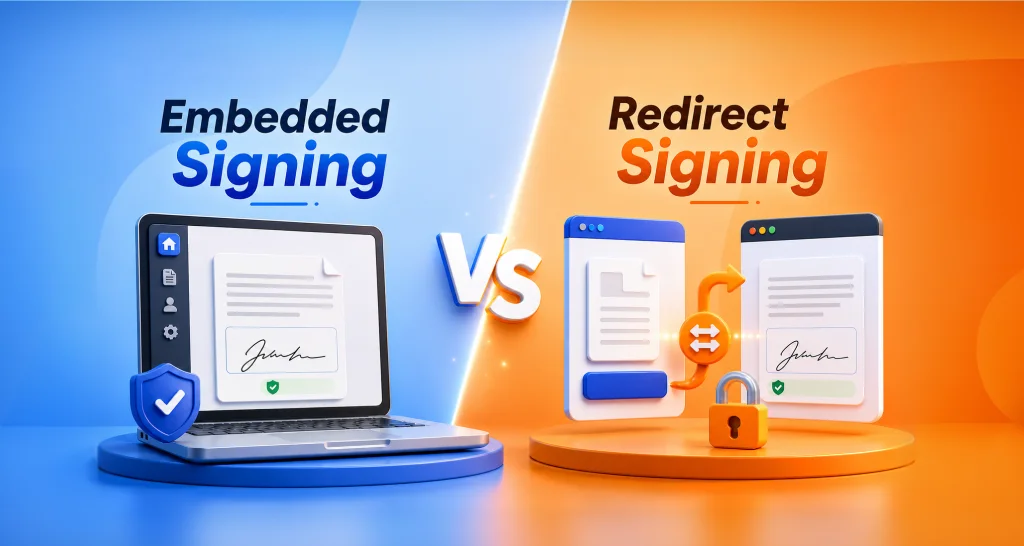
A reusable link is something you share for people to click, wherever they are. Embedded signing places the signing step inside your own app, so the signer never leaves your product.
The real split is who checks identity. With a public link, the link’s own settings do that work. With embedded signing, your app confirms the signer before it opens the document.
Choose a reusable link for reach and simple sharing. Choose embedded signing when signing should feel like one step in your product.
What security controls should you check before you share a link?
Anyone with the URL can reach a public link, so its controls matter more than on a named request. Set them before the link goes out.
We offer these settings on each bulk link:
- An email code check that signers pass before they sign.
- Email validation, which accepts only addresses that match a pattern you set.
- A response limit that caps how many people can sign.
- An expiry date, after which signers cannot open the document.
Our help articles show how to set an expiry date and limit responses. Another explains how to write a regular expression (regex) for email validation.
Match the controls to the risk. A consent form tied to sensitive data needs a firmer identity check. For that kind of document, send a named request with signer identity verification rather than a public link.
Are signatures from a reusable link legally valid?
Yes, when the process shows intent to sign and you keep the records. US law says a signature may not be denied legal effect solely because it is electronic.
That rule comes from the Electronic Signatures in Global and National Commerce (ESIGN) Act.
Most states apply the same rule through the Uniform Electronic Transactions Act (UETA). Cornell Law’s overview of electronic signatures explains the wording behind it.
That legal floor still leaves work for you. Keep clear evidence of intent, tie each signature to the right person and store the completed documents with their audit trails. A link with weak checks can still yield a valid signature, but you have less proof if someone disputes it.
What should you look for in a reusable signing link tool?
Look for controls you can set and change, not only a bare link. This short checklist covers the basics:
- Build the link from a reusable template so fields and roles stay the same.
- Prefill fields that are the same for every signer.
- Paste an embed code into a web page without writing code.
- Set verification, response limits and expiry on the link itself.
- Edit, extend or deactivate a link after it goes live.
A tool with all five gives you a link you control. A shared document with a signature box gives you a workaround.
How do reusable signing links work in BoldSign?
You start from a document or a template, set the link’s controls and share the URL. Starting from an existing template keeps fields and roles the same for every signer.
Responses arrive in one place, each with its own audit trail. Download signed copies one at a time or all together. Use bulk send from the same account once your signer list becomes fixed.
How do you create a reusable signing link in BoldSign?
Creating a link takes a few minutes in the web app. Our guide on when to use bulk links covers each screen in more detail.
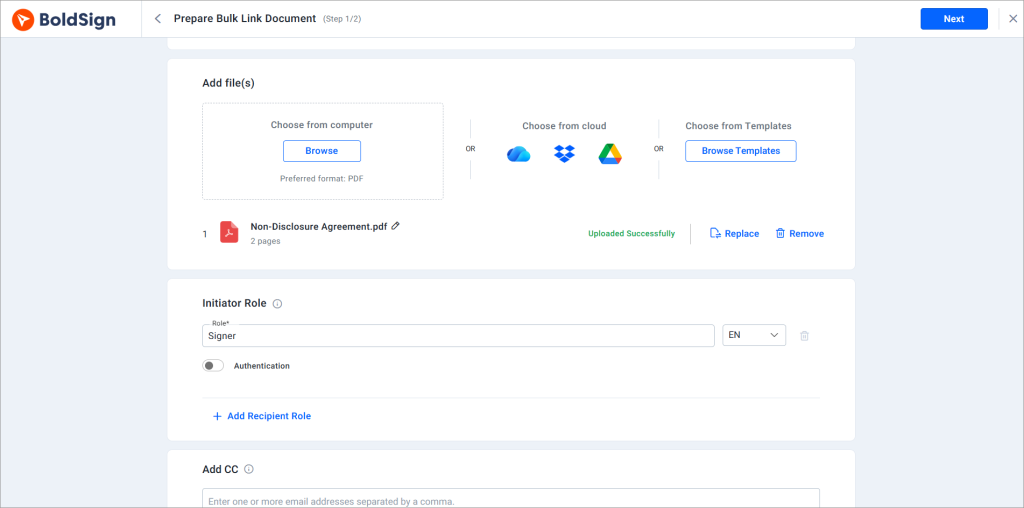
- Select Create New, then Create New Bulk Link.
- Upload a document or choose a saved template to reuse its fields and signer roles.
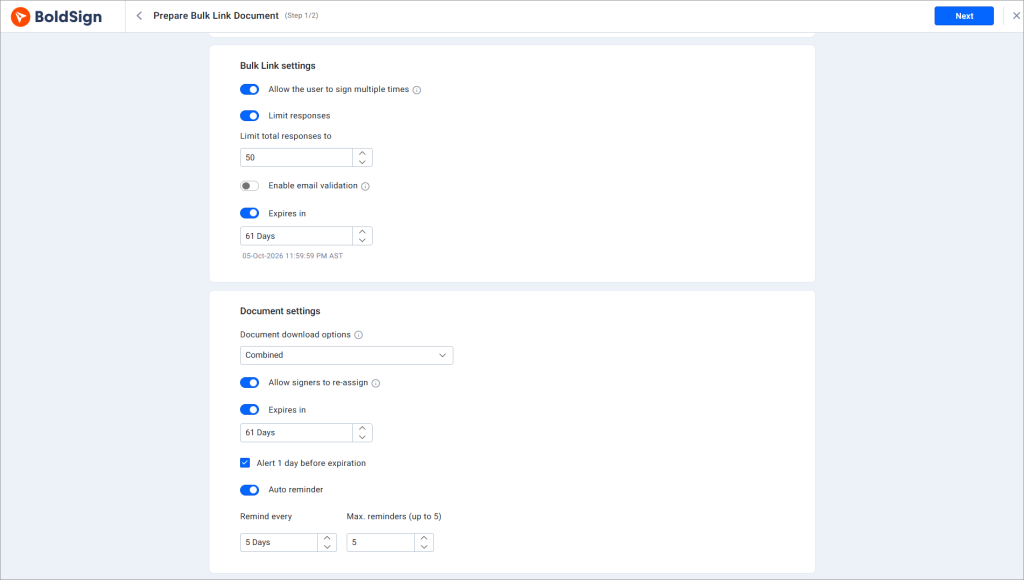
- Under Bulk Link Settings, set the response limit, email validation, expiry and repeat signing.
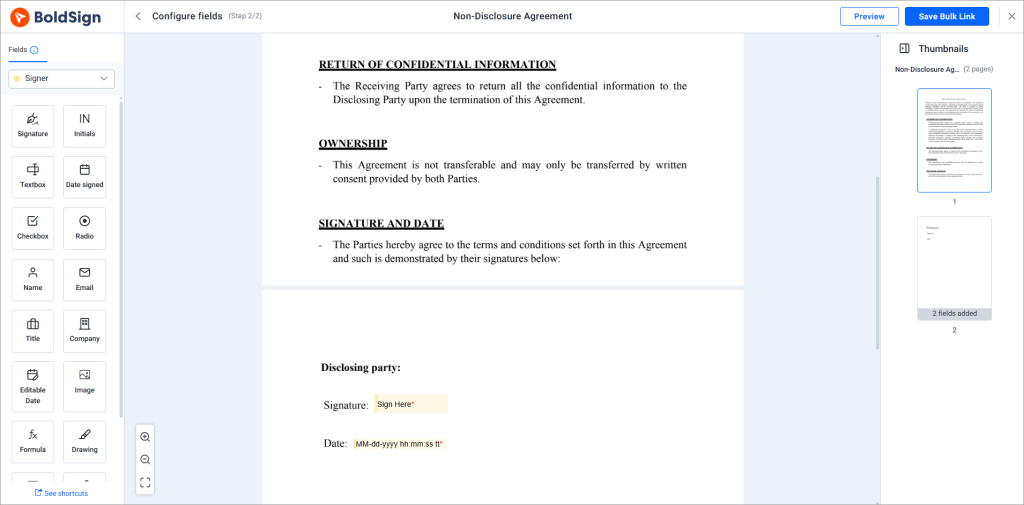
- Place the signature, name, date and other fields each signer must fill in.
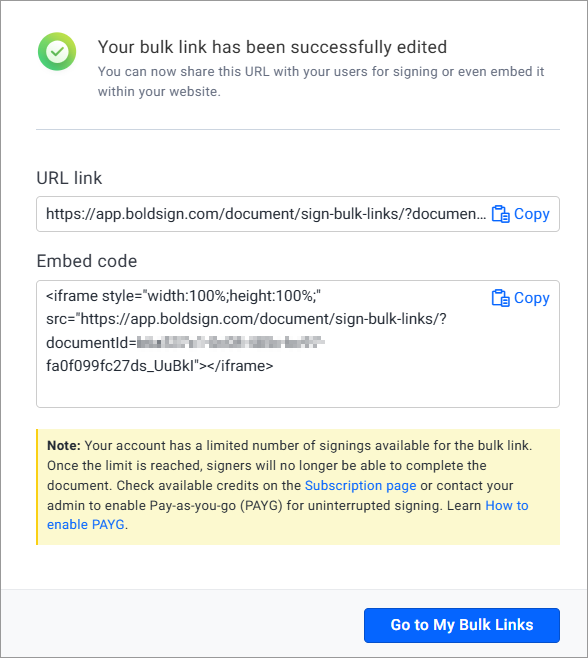
- Select Create Bulk Link, then share the URL or paste the embed code into your website.
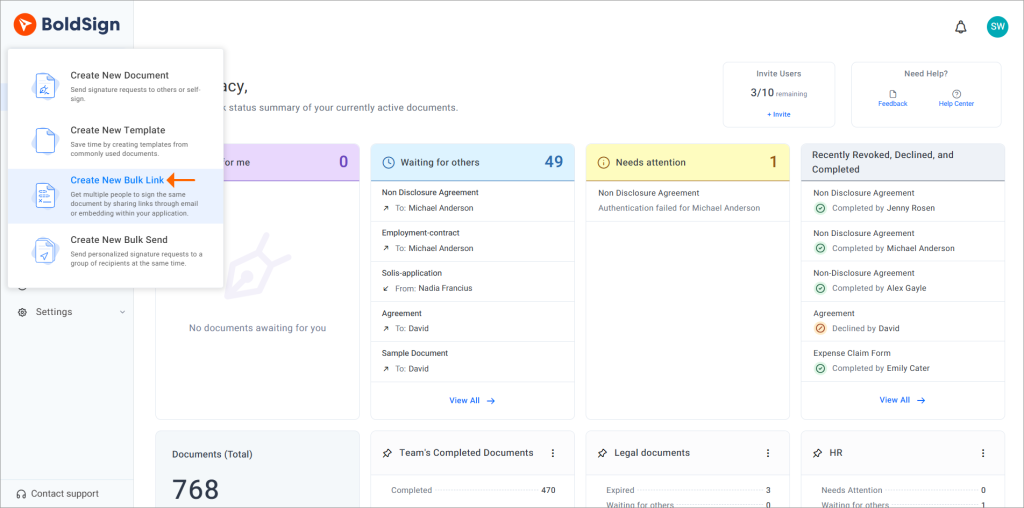
Then open the My Bulk Links page to view each response, download signed copies and review audit trails.
How do you get more people to finish signing?
Short forms and clear wording keep more signers going to the end. A few habits help:
- Ask only for the fields you truly need.
- Say what the document is and what the signer agrees to.
- Test the full signing flow on a phone before you share it.
- Show a short thank-you message after signing so people know it worked.
Compare the link with bulk send again once you have a named list. Bulk send may suit that list better.
Which BoldSign plan includes reusable signing links, and what do they cost?
Bulk links come with the Business plan and higher, as the BoldSign pricing page listed in November 2026. The pricing page also lists bulk links as an add-on at $0.25 per envelope.
The Business plan costs $15 per user a month, billed yearly, and includes bulk send and ID verification. The Premium plan costs $99 a month for unlimited users, billed yearly. Prices are in USD.
The Essential plan is free with 25 envelopes a month and 2 templates. The Growth plan costs $5 per user a month, billed yearly, with 10 templates. Embedded signing needs the Enterprise API plan, from $30 a month with 40 envelopes.
Where do you go from here with reusable signing links?
Pick the method that matches how well you know your signers. Then test it on one real document.
- Start a 30-day free trial and share a test link with your team.
- Book a demo to see a reusable link set up for your forms.
- Read about bulk links to see every link setting in one place.
Frequently asked questions
What is a reusable signing link?
A reusable signing link is one URL that many people can open to sign their own copy of a document. You add no names in advance, and each signer fills in their own details.
How is a reusable signing link different from bulk send?
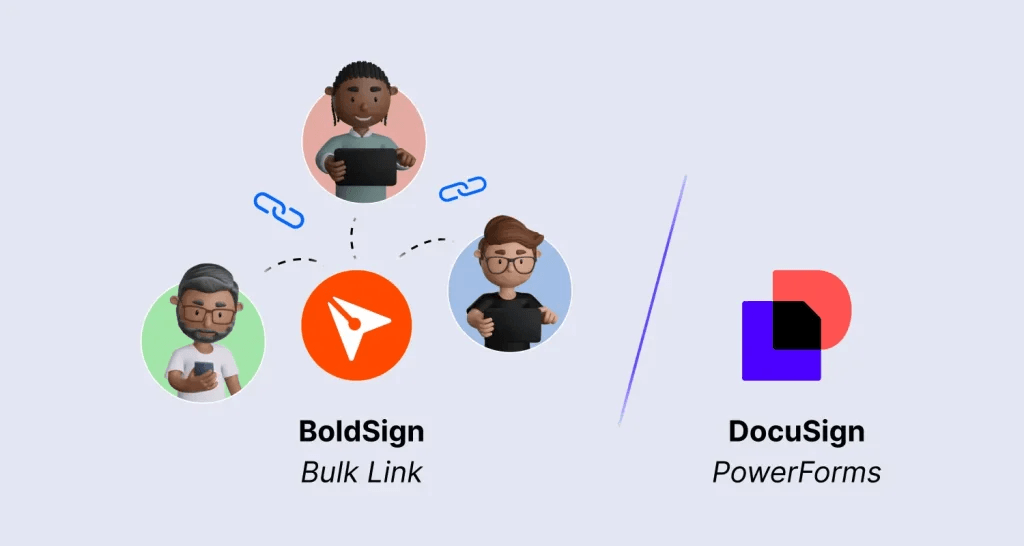
A reusable link serves signers you cannot name in advance, all using the same URL. Bulk send serves a known list, with each copy filled in from a CSV row. We offer both, so you pick per document.
Can anyone with the link sign the document?
Anyone who has the URL can open it unless you add limits. An email code check, an email pattern, a response cap and an expiry date narrow who signs and for how long.
Are reusable signing links legally binding?
Yes, when the process shows the signer meant to sign and you keep the signed record. In the US, the ESIGN Act says a signature may not be denied legal effect only because it is electronic.
Can I embed a signing link on my website?
Yes. Each bulk link comes with an embed code and a URL, so you can paste it into a page without writing code. Embedded signing is the choice when signing must happen inside your own app.
Can I prefill fields in a reusable signing link?
Yes. You can pass a name, an email and field values through the link's query parameters. Fields that change per person stay open for each signer.
Do reusable signing links support audit trails?
Yes. Each response becomes its own document with its own audit trail. You can export the signer list to CSV and download the signed copies one at a time or together.
How do e-signature plans differ in sending limits, reusable templates, and team controls?
Our plans differ in monthly envelopes, template count and team features. Essential gives 25 envelopes and 2 templates, Growth gives 50 envelopes per user and 10 templates, and Business adds unlimited templates with custom roles.

Preethi Loganathan
Preethi is a Digital Marketing Executive at BoldSign who develops precise, research-driven content on eSignatures, compliance, and digital signing workflows. She works closely with product and engineering teams to ensure every article is accurate, validated, and aligned with industry best practices. Connect with her on LinkedIn.
More posts by Preethi Loganathan