Simplifying Credit Card Application Signatures Using BoldSign
 Jeba Emerenshia
TL;DR: A credit card electronic signature lets an applicant fill in and sign a card application online, with no branch visit. With BoldSign, you send a ready-made application form, the applicant signs on any device, and you keep a signed copy with its audit log. Our eSignature for banking page shows how banks use it.
A paper card application means booking a branch visit, printing forms and chasing missing pages. Each delay gives the applicant time to pick another card.
This guide explains how electronic signatures work for card applications. Then it walks through the steps in BoldSign, from the form to the signed copy. The same flow also suits account openings in banking.
What is a credit card electronic signature?
A credit card electronic signature is the applicant’s signature on a card application, given online instead of on paper. The applicant reviews the form, fills in their details and signs in a browser.
Think of it like signing for a parcel on the courier’s tablet. You still agree to something, and there is still a record of it. The pen and paper are simply gone.
Is an electronic application signature legal?
Yes, when the applicant agrees to sign electronically and you keep an accurate record. In the US, the Electronic Signatures in Global and National Commerce (ESIGN) Act backs this up.
Section 7001 of that Act says a signature or contract is not denied legal effect only because it is electronic.
Consumer records have one more step. Under the same section, a consumer must agree to get records electronically after a clear notice. That notice covers their right to paper copies and the hardware and software they need.
Card products also carry their own disclosure rules. Ask your compliance team which ones apply to your forms and country.
How does a bank collect card application signatures online?
The bank sends the form, the applicant signs it, and both sides keep a copy. Here is the flow in BoldSign.
- Build the application form once as a template.
- Send it to the applicant by email, in their language.
- The applicant reviews, fills in and signs the form.
- A bank officer signs next, when the form needs a second signature.
- Everyone gets the completed document, and you keep its audit log.
The sections below cover each step.
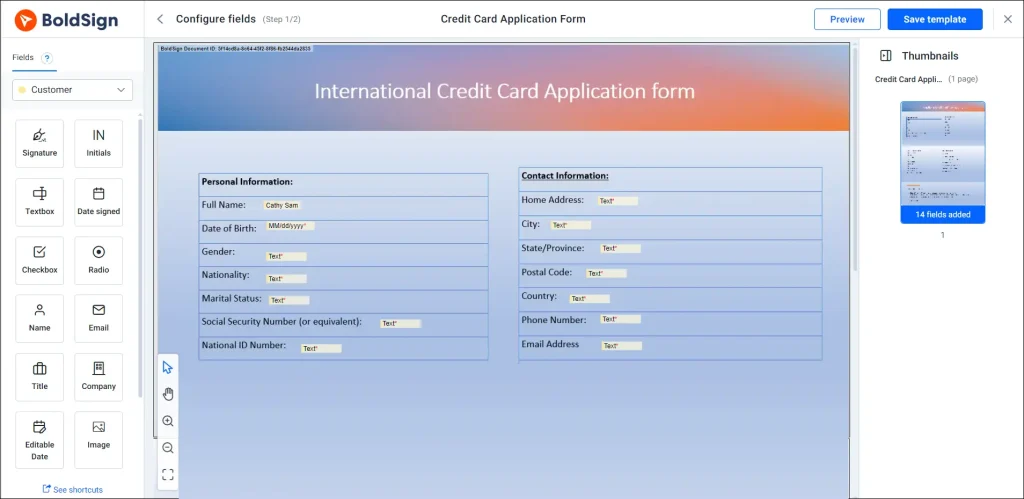
How do you build a credit card application form template?
Create the form once as a template, then reuse it for every applicant. Place the fields for personal, financial and contact details, and mark the ones applicants must fill in.
Every applicant then sees the same form with the same required fields. Our guide on how to save time with eSignature templates walks through setting one up.
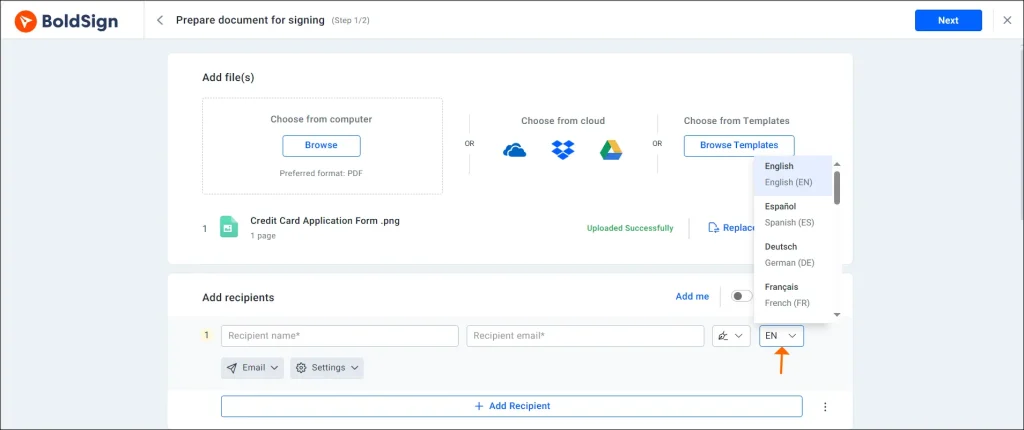
Can applicants sign in their own language?
Yes. You pick a language for each signer when you add recipients, and the email and signing page appear in it.
Our help article on sending a signature request in different languages lists 15 languages. These include German, Spanish, French and Polish.
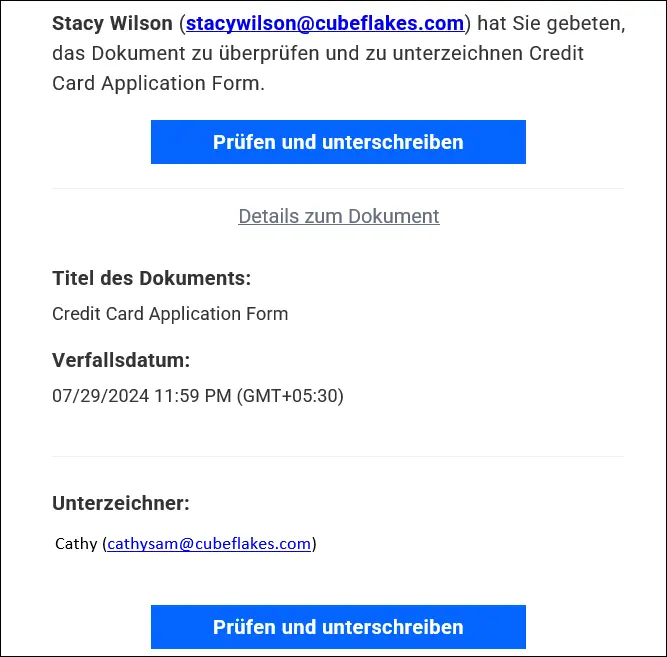
Here is the signature request email in German:
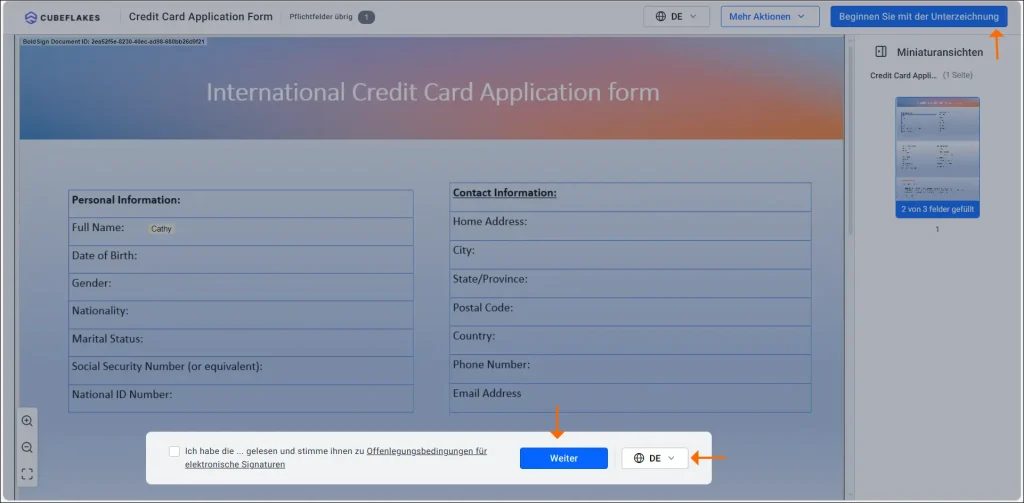
The signing page follows the same language:
How do you set who signs first?
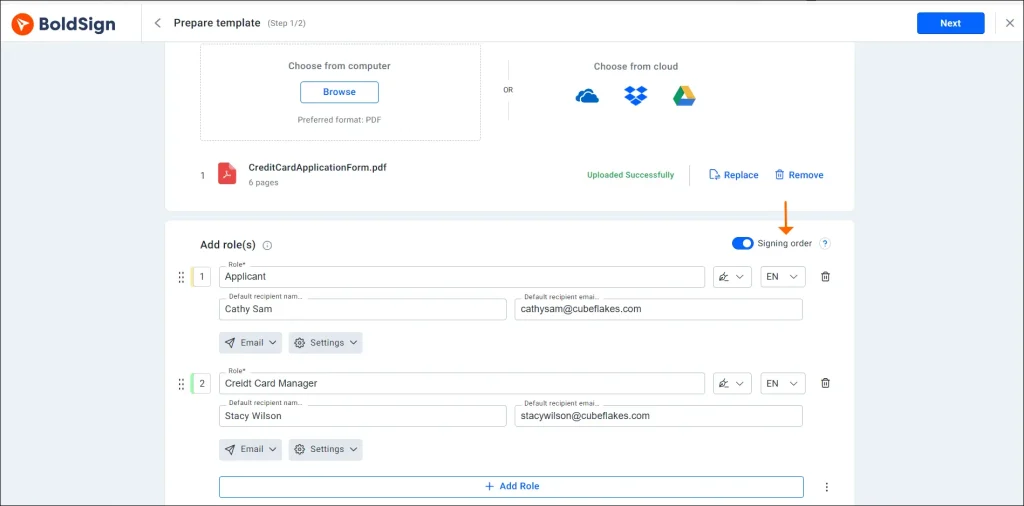
Turn on signing order and put the signers in sequence. The applicant signs first, and the bank officer gets the form only after that.
Nobody has to guess whose turn it is. You can also send to everyone at once when the order does not matter.
How does the applicant review and sign the form?
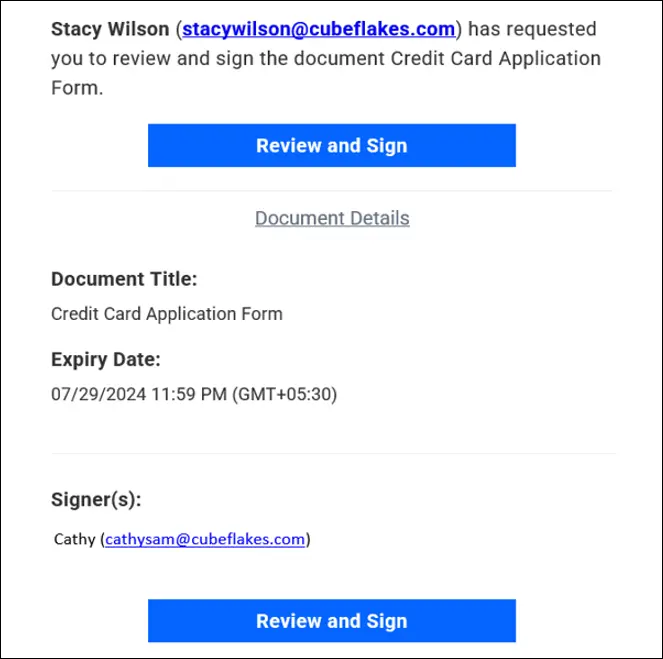
The applicant selects Review and Sign in the email to open the form. They can do this on a laptop, phone or tablet with an internet connection.
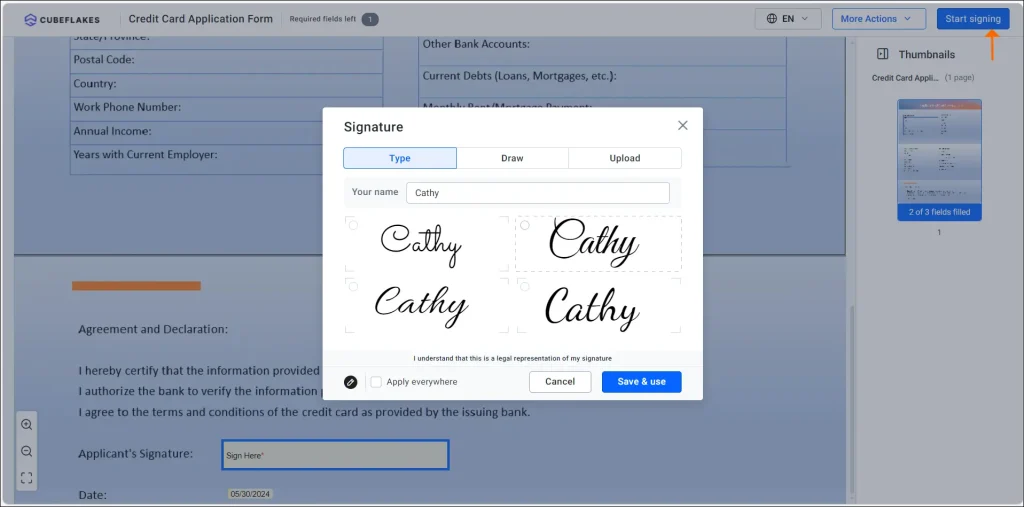
On the form, they select Start Signing and fill in each field. They add their signature, then select Complete Signing.
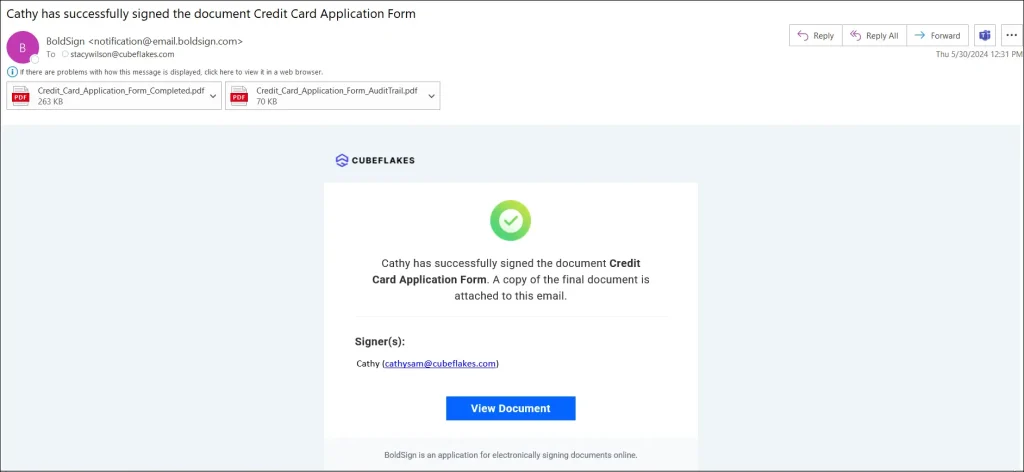
Everyone on the request then gets an email to say the document is complete. Applicants on the go can also use our mobile app.
Can the signing emails carry your bank’s brand?
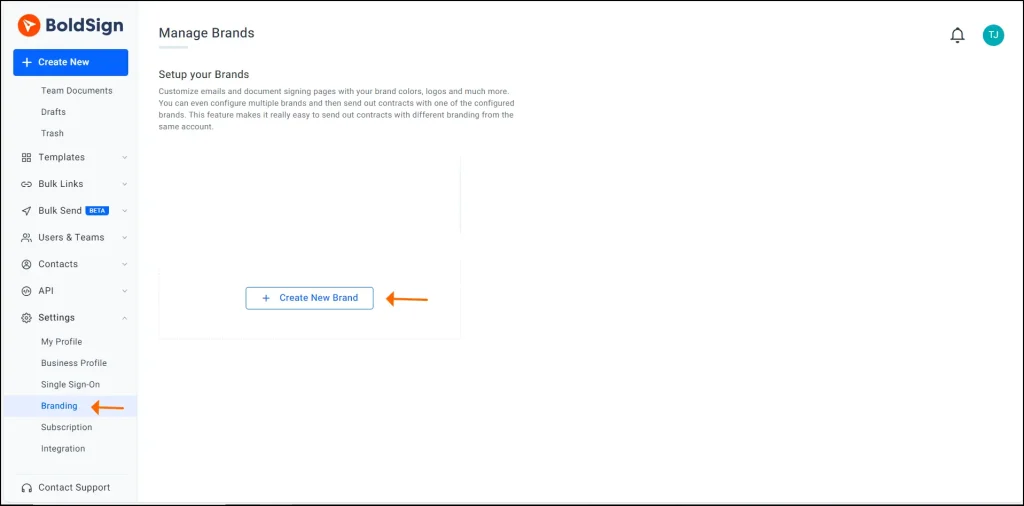
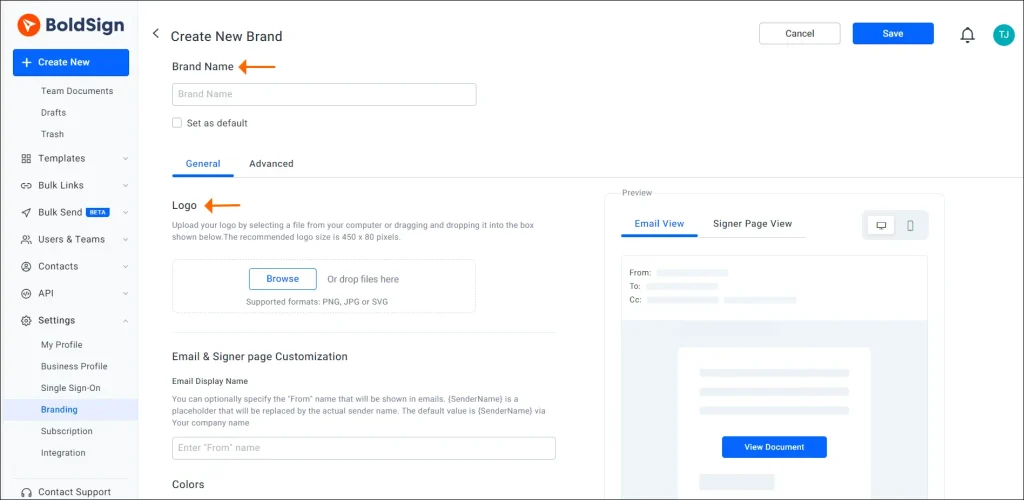
Yes. With branding, you add your logo, colours and sender name to the emails and signing pages applicants see.
Applicants then recognise the request as coming from your bank. Signing links still use a BoldSign web address. Our post on how to personalize your eSignature requests with your brand identity covers each setting.
How secure are e-signatures for banking applications?
We protect applicant data with encryption and a full record of each document. Our security policy lists these measures:
- Documents are encrypted while they move between the app and our servers.
- Stored documents are encrypted with Advanced Encryption Standard (AES) 256-bit encryption, at two levels.
- We have completed a System and Organization Controls (SOC) audit, SOC 2 Type 2.
- We comply with the General Data Protection Regulation (GDPR).
Every document also has an audit trail. It logs each action with the user, Internet Protocol (IP) address and time.
How does an online application compare with paper?
The main gains are time, tracking and storage. Here is how each step changes.
| Step | Paper application | Online application |
|---|---|---|
| Getting the form | Branch visit or post | Email link |
| Signing | In person, by pen | On any device with internet |
| Sending it back | Post or hand delivery | Done when the applicant signs |
| Tracking | Phone calls and notes | Audit log for every action |
| Storage | Filing cabinets | Stored and encrypted online |
Which BoldSign plan do you need, and what does it cost?
Every plan includes templates, branding, signer languages and an audit trail. The plan sets how many templates and brands you keep.
Prices are in USD, billed yearly.
- The Essential plan is free, with 2 templates and 1 brand.
- The Growth plan costs $5 per user a month, with 10 templates and 2 brands.
- The Business plan costs $15 per user a month, with unlimited templates and brands.
- The Premium plan costs $99 a month for unlimited users, with unlimited templates and brands.
The BoldSign pricing page lists every limit. Applicants sign without a seat on your account.
How do you start collecting card applications online?
Try it with one application form and one test applicant first. Then roll it out to your branch teams.
- Start a 30-day free trial and send a test application.
- Book a demo to see the card application flow set up for your bank.
- Visit our support portal with a question about your setup.
Frequently asked questions
Can a credit card application be signed electronically?
Yes, when the applicant agrees to sign electronically and the bank keeps an accurate record. The US ESIGN Act says a signature is not denied legal effect only because it is electronic. Check the rules for your products and country with your compliance team.
Do applicants need a BoldSign account to sign?
No. Applicants open the signing link in their email and sign there. Only the people who send documents need a seat on your account.
Can applicants sign a card application on a phone?
Yes. The signing page opens in a mobile browser, so applicants can fill in and sign the form on a phone or tablet. We also offer a mobile app.
What languages can the signing email and page use?
Our help article lists 15 signer languages, including English, German, Spanish and French. You pick a language for each signer when you add recipients.
How is applicant data protected in BoldSign?
We encrypt documents in transit, and we store them encrypted with AES-256 at two levels. We have completed a SOC 2 Type 2 audit, and every document carries an audit log.
Can the bank sign after the applicant?
Yes. Turn on signing order and put the applicant first. The bank officer gets the document only after the applicant has signed.
Can the signing email show our bank's logo?
Yes. A brand holds your logo, colours and sender name, and we use it on the emails and signing pages your applicants see. Signing links still use a BoldSign web address.
How much does BoldSign cost for a bank team?
The Essential plan is free. Growth costs $5 per user a month and Business costs $15 per user a month, billed yearly in USD. Every paid plan starts with a 30-day free trial.

Jeba Emerenshia
As a Product Manager in Syncfusion, Jeba is instrumental in providing assistance and guidance to users, ensuring they make the most out of BoldSign’s features and capabilities.She plays a pivotal role in developing comprehensive documentation and user-friendly content. Her commitment to quality and efficiency guarantees that users receive clear, helpful information, ensuring a seamless and informative experience with BoldSign. Connect with her on LinkedIn.
More posts by Jeba Emerenshia