Volunteer Onboarding Checklist for Nonprofits: 8 Steps to Sign Online
 Preethi Loganathan
TL;DR: A volunteer onboarding checklist lists every form, consent and sign-off a new volunteer completes before their first shift. Send those forms to sign online and you skip the printing, chasing and filing. Our eSignature for nonprofit organizations page shows the nonprofit pricing and how to apply.
A youth sports charity takes on 40 new coaches before the spring season. Each one needs an application, a code of conduct, a photo consent form and a safety sign-off. One missing form can keep a coach off the field on opening day.
A clear volunteer onboarding checklist keeps those forms in order. This guide lists what to include at each stage and shows how to get each form signed online with BoldSign.
What is a volunteer onboarding checklist?
A volunteer onboarding checklist is a list of the forms and steps each new volunteer completes before they start. It tells your team what to collect and tells the volunteer what comes next.
Think of a packing list for a school trip. Each item gets a tick as it goes in the bag, so nothing is left at home. Your checklist does the same for waivers, policies and training records.
A nonprofit onboarding checklist covers the same ground for any new helper, from a one-day event volunteer to a long-term mentor.
Why does volunteer onboarding matter for nonprofits?
Good volunteer onboarding gets people ready to help sooner and keeps your records in order. A clear start also shows volunteers that you value their time.
- Volunteers finish their forms faster, with less back and forth.
- Signed policies on conduct, privacy and consent are on file before day one.
- Staff spend less time printing, scanning and chasing signatures.
- You keep a clear record for audits, reports and future staff.
Small gaps add up without a set process. Forms go missing, messages differ from one coordinator to the next, and remote volunteers wait longer.
What goes on a volunteer onboarding checklist?
Most checklists follow the same eight stages, from the first application to yearly renewals. Mark an item “if required” when it depends on the role or your local rules.
1. Application and registration
Start with the details you need to judge interest and fit.
- Volunteer application form
- Contact details and an emergency contact
- Availability and preferred roles
- Skills and interests
Send the application as a form the volunteer fills in and signs online. Each signed copy is stored in one place.
2. Screening and approval
Screening helps you place volunteers in the right roles and lower risk.
- Background check authorization, if required
- Reference checks, if required
- Age check or parental consent for minors, if required
A parent or guardian can sign a consent form from their phone. You see which forms are signed and which are still waiting.
3. What goes on a volunteer orientation checklist?
Orientation covers your mission, what you expect from volunteers and what happens next.
- Welcome letter
- Mission, vision and values overview
- Volunteer handbook
- Orientation schedule
Send these together and ask each volunteer to confirm they have read the handbook. Their sign-off becomes part of the record.
4. Agreements and policies
Signed agreements protect both your organization and your volunteers.
- Volunteer agreement
- Code of conduct
- Confidentiality agreement, if the role needs one
- Data protection and privacy policy
- Media or photo consent form
Each signed document comes with an audit trail of who signed and when. Our guide to volunteer agreement signatures covers that form in detail.
5. Role training sign-off
Once a volunteer has a role, they confirm they understand its duties and safety rules.
- Role description
- Safety guidelines
- Training completion sign-off
Use the same form for every team and site, so each record looks the same.
6. Access and resources
Give volunteers the tools and contacts they need before the first shift.
- System or tool access, if required
- ID badge or sign-in details, if required
- Group chats, schedules and a contact list
Hand out access only after the agreement and policies are signed. Your list of signed documents shows who is ready.
7. First-week check-in
The first week is a good time to spot gaps and answer questions.
- Role clarity check
- Schedule sign-off
- Name of a support contact
Automatic reminders go to anyone who has not signed yet, so you spend less time chasing.
8. Ongoing records and renewals
Onboarding often continues after the first month. Policies change, and agreements may need a fresh signature each year.
- Policy updates
- Agreement renewals
- Thank-you letters or certificates
Save each form as a template, so next year’s round starts from the saved form.
How does an electronic signature for nonprofit teams speed up onboarding?
An electronic signature for nonprofit teams lets volunteers sign each checklist form from a phone or computer. You send, track and store the forms in one place instead of on paper.
- Upload your volunteer agreement or other form.
- Add signature, date and text fields for each signer.
- Save it as a template for the next volunteer.
- Send it by email and watch the status change as people sign.
- Download the signed PDF with its audit trail.
Your volunteers sign without making a BoldSign account.
How do you reach many volunteers at once?
Send one form to a large group before an event with bulk send. Each volunteer gets their own copy to sign.
Share one reusable signing link by email or on your website when you do not know who will sign. Each person who opens it signs their own copy.
You can also reach volunteers by SMS or WhatsApp as well as email.
How do you check who signs and collect supporting files?
Some roles need more proof than a signature. We give you a few ways to add it.
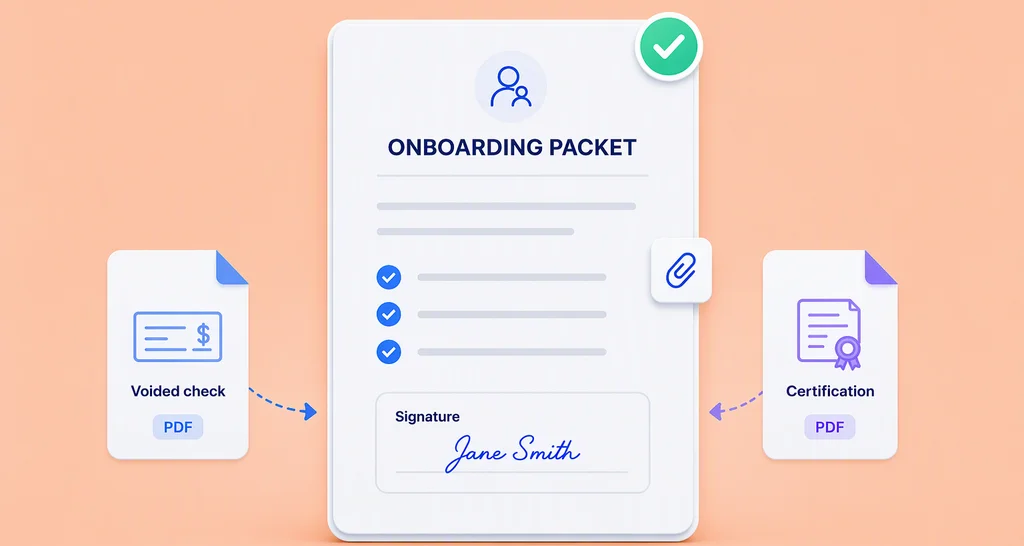
- Ask volunteers to attach files, such as a certificate or a copy of an ID.
- Add knowledge-based authentication (KBA) for sensitive roles with US signers.
- Let artificial intelligence (AI) detect form fields when you upload a new form.
- Use AI search to find a signed form fast.
You can also connect an AI assistant to your signing work through Model Context Protocol (MCP). The assistant can send forms from your templates and send reminders.
What should you watch out for when onboarding volunteers?
Check which forms your local rules require before you build the checklist. Rules on background checks, minors and privacy differ by country and state.
- Keep each form short and ask only for what the role needs.
- Get parental consent for minors where the law requires it.
- Store personal data where only the right staff can see it.
- Review your forms each year so they match current policy.
In the US, the Electronic Signatures in Global and National Commerce (ESIGN) Act covers this. A signature cannot be denied legal effect just because it is electronic. Some documents fall outside the Act, so check yours.
Which BoldSign plan do you need, and what does it cost?
Most volunteer checklists run well on a free or low-cost plan. Verified nonprofits also get a discount on top of our regular prices.
What do our plans cost?
Our regular prices are in USD and billed yearly. The Essential plan is free with 25 envelopes a month, and the Growth plan is $5 per user a month.
The Business plan is $15 per user a month, and the Premium plan is $99 a month for unlimited users. You can try them first with a 30-day free trial.
What do verified nonprofits get?
The Growth plan is free for one user at a verified nonprofit, with 50 envelopes a month. The Business and Premium plans are 50% off.
Our guide to free software for nonprofit organizations explains the offer and how to apply.
Which plan fits your checklist?
- The Essential plan includes 2 templates, and the Growth plan includes 10.
- The Business plan adds bulk send, unlimited templates, SMS and WhatsApp delivery, and ID verification.
- The Business plan also adds KBA at $1.50 per attempt, AI field detection and AI search.
- Bulk links start on the Business plan as an add-on, at $0.25 per envelope.
- Connecting an AI assistant through MCP needs the Enterprise API plan, from $30 a month with 40 envelopes.
How do you start your volunteer onboarding checklist today?
Pick the form your team sends most, often the volunteer agreement, and move it online first. Add the next stage once that one runs well.
- Start a 30-day free trial and send your first volunteer form.
- Book a demo to see your onboarding forms set up live.
- Visit our support portal for step-by-step help articles.
Frequently asked questions
What is a volunteer onboarding checklist?
It is a list of the forms and steps each new volunteer completes before their first shift. It usually covers an application, an agreement, policy sign-offs and training records.
What should a nonprofit onboarding checklist include?
Most include an application, screening consent, orientation papers, a signed agreement, training sign-off and a first-week check-in. Long-term volunteers also need yearly renewals.
What should onboarding software for non profits include?
Look for online forms, signatures, reminders and saved templates, plus a record of who signed and when. Volunteers should be able to sign from a phone without making an account.
Is an electronic signature for nonprofit volunteer forms legally binding?
Yes, when the signer agrees to sign electronically and you keep a record of the signed form. US federal law gives most electronic signatures the same legal effect as ink, but check the rules for your form and country.
What goes on a volunteer orientation checklist?
A welcome letter, an overview of your mission and values, the volunteer handbook and the orientation schedule. Ask each volunteer to sign that they have read the handbook.
Can volunteers sign onboarding forms on their phone?
Yes. They open the link in the email and sign in their browser, with no BoldSign account needed.
How do I send the same form to many volunteers at once?
Use bulk send to email each volunteer their own copy, or share one reusable signing link when you do not know who will sign. Both start on our Business plan.
Do nonprofits get a discount on BoldSign?
Yes. Verified nonprofits get the Growth plan free for one user and 50% off the Business and Premium plans. You apply with proof of your nonprofit registration.

Preethi Loganathan
Preethi is a Digital Marketing Executive at BoldSign who develops precise, research-driven content on eSignatures, compliance, and digital signing workflows. She works closely with product and engineering teams to ensure every article is accurate, validated, and aligned with industry best practices. Connect with her on LinkedIn.
More posts by Preethi Loganathan