Request eSignature via SMS Text Messages: Easy Steps with BoldSign
 Gopinath Kannusamy
TL;DR: To request an eSignature via SMS, choose SMS as the signer’s delivery option, add their phone number and send. The signer gets a text with a secure link and signs in their phone’s browser, with no app or account. Our eSignature via SMS page lists what the feature includes.
A customer is on the phone and ready to sign, but your email sits unread in a crowded inbox. Or a field worker has a phone and no laptop. A text message reaches both people where they already are.
This guide explains SMS delivery for electronic signatures, then shows how to send a signature over text in the BoldSign web app and the API.
What is an electronic signature using text?
An electronic signature using text is a signature request that arrives as an SMS. The signer taps a link in the message and signs the document on their phone.
Think of a parcel delivery text. The message holds a link, and the link opens the page you need. An electronic signature text works the same way, only the page is your document.
A signature on text messages can also mean a sign-off line at the end of your texts. That is a phone setting, and the FAQ below explains it.
Can you send documents via text for signature?
Yes. You can send a document via text by choosing SMS as the delivery option for each signer.
The signer never gets the file itself in the message. The text holds an encrypted link to their own copy, and the audit trail logs every view.
So, can you send a document via text to someone with no email address? Yes, a phone number is all the signer needs. Our multi-channel delivery page shows email, SMS and WhatsApp side by side.
How to send a signature over text in BoldSign
Set the delivery option to SMS while you prepare the document. The rest of the request works like an email request.
- Log in to your BoldSign account.
- Select Create New, then Create New Document.
- Open the delivery options dropdown, which shows Email by default, and select SMS.
- Choose the signer’s country code and enter their phone number.
- Add your fields as usual, then send the document for signature.
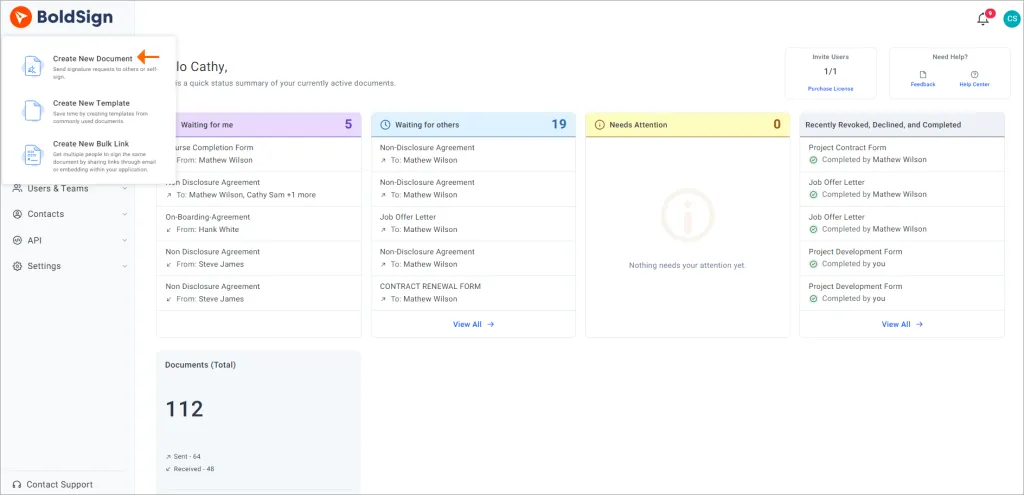
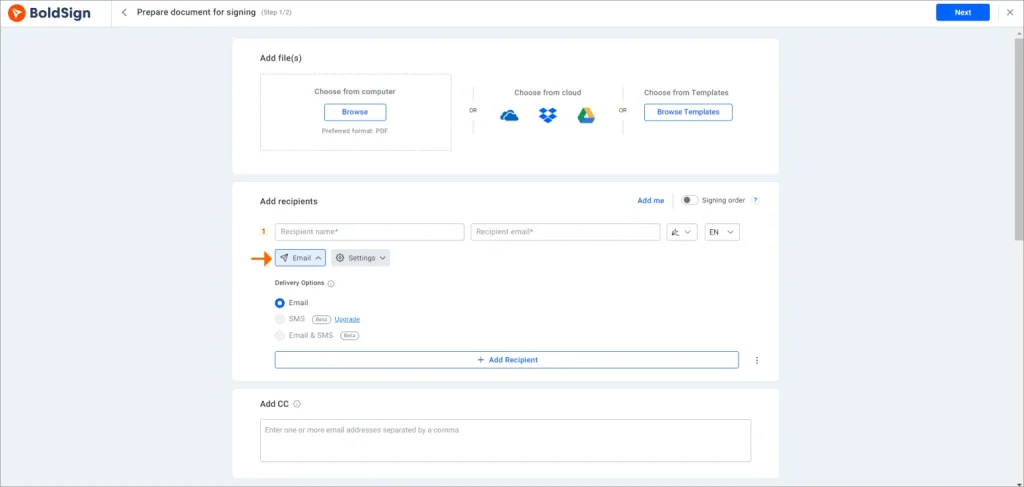
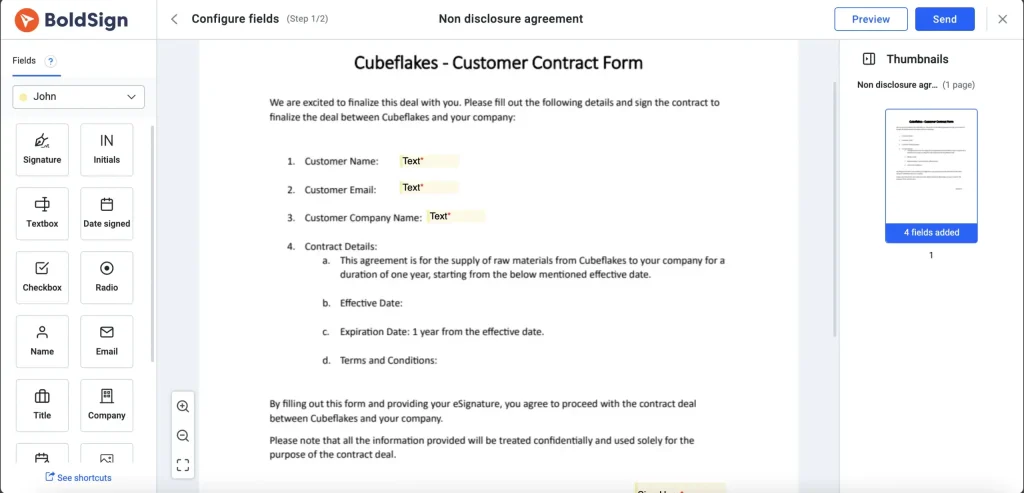
The first time you pick SMS, select Activate and then Enable to turn on the SMS add-on. You can also set the signer’s language so the text arrives in it.
Moving a signature to text delivery changes only how the link travels. Our help article on how to send signature requests via SMS covers each option.
What does the signer see in an SMS sign request?
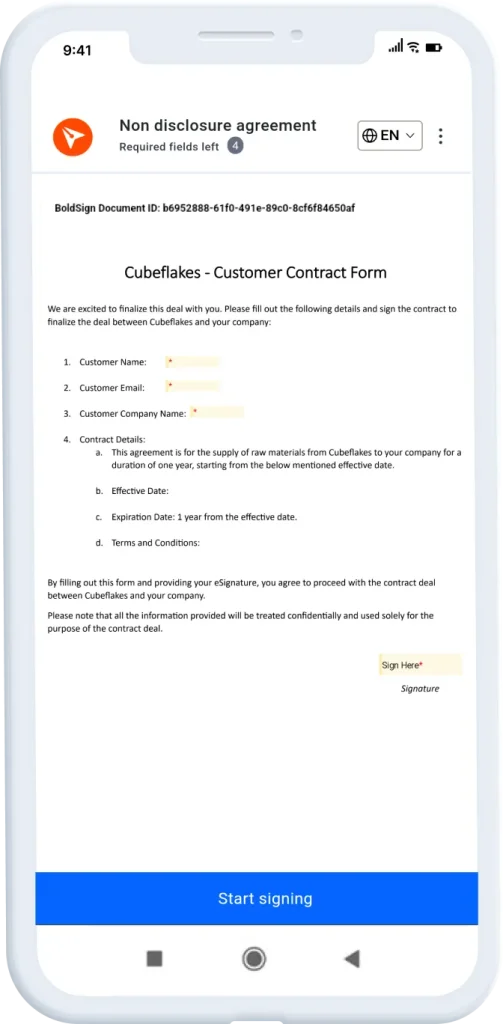
The signer gets a short text with a secure link. Tapping it opens the document in the phone’s browser.
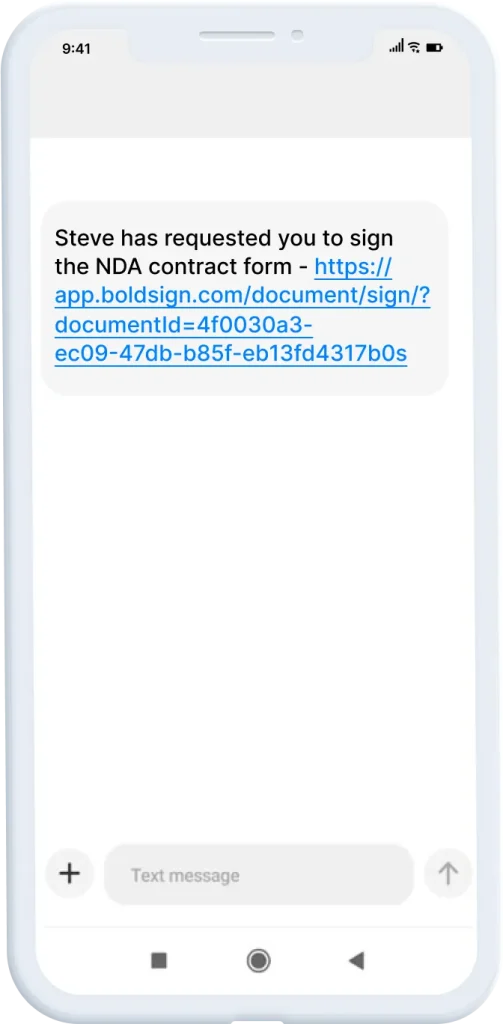
From there the signer reviews the document, fills in the fields and signs. That is how to sign a text message request from start to finish, with no app to install.
Which SMS notifications do signers get?
Signers get a text at each main step of the request. These texts go to signers only, and CC (carbon copy) recipients keep getting email.
- A request for their signature
- A warning before the document expires
- A warning before the document is deleted
- A manual reminder that you send
- A note once the signature is complete
That last note is the fully signed text message that tells the signer the document is done. Automatic reminders go by email, so send a manual reminder to nudge an SMS signer.
Tools for sending a signing link via SMS while the customer is still on the call
SMS sign requests suit phone sales and support desks. Teams comparing SMS-based e-signature tools for bank contact centers want the same thing: the agent texts the link, and the customer signs before hanging up.
You can also turn on SMS authentication for these calls. The signer then enters a one-time code from a text before the document opens.
The audit trail logs each view and signature, whichever channel carried the link. That record helps when a customer later asks what they agreed to.
Can you send an esign request to many people by text?
Yes. Bulk send works with SMS, so it acts as a mass SMS platform with e-signature feature built in.
Start from a template with SMS turned on for each signer role. The CSV file then has columns for name, country code and phone number.
Our guide on how to bulk send documents walks through the CSV file and tracking.
How does eSignature API SMS delivery work?
In the BoldSign API, you set deliveryMode to SMS for each signer and add their phone number. The signer then gets the same text with a signing link.
An API call lets your own app decide when to send the esignature request, with no one opening the web app. Our developer guide on how to request an eSignature via SMS has code in several languages.
Salesforce teams can send from their records with our Salesforce integration. The API post on SMS requests through the BoldSign API goes deeper.
How to send electronic signature via Messenger or WhatsApp
WhatsApp is a separate delivery option next to SMS. You pick it per signer in the same dropdown.
One request can go by email and SMS together, so it reaches the inbox and the phone. WhatsApp stands alone for its signer, so pick it for people who read WhatsApp first. Our guide to send eSignature requests via WhatsApp shows the steps.
Readers who search “cara minta tanda tangan digital” or “cara meminta tanda tangan online” can follow the same steps. The process for how to send esign requests is the same in any language.
Email eSignature vs SMS eSignature completion rates comparison: what to expect
We have yet to publish an email eSignature vs SMS eSignature completion rates comparison, so this guide gives no figure. What differs is where the request lands.
- Email suits long documents that people read at a desk.
- SMS suits short forms and signers who live on their phones.
- Email and SMS together give a signer two ways to find the link.
Pick the channel your signer opens first, and use the status page to see who still needs a reminder.
What to watch out for with SMS delivery
A few limits shape how you plan an SMS sign request. Check them before you send.
- SMS works in a set list of supported countries.
- Signing groups cannot receive requests by SMS.
- The text of the SMS cannot be edited in the web app.
- Email one-time codes do not work with SMS delivery, so use SMS authentication.
Which BoldSign plan do you need for SMS, and what does it cost?
SMS and WhatsApp delivery start on the Business plan at $15 per user a month, billed yearly. The Premium plan, at $99 a month for unlimited users billed yearly, includes them too.
On top of the plan, each SMS costs $0.20, charged for each message sent, as listed on our pricing page in November 2026. Prices are in USD.
Bulk send and the Salesforce integration, a paid add-on, also start on the Business plan. Live API sending, including Zapier, needs the Enterprise API plan, from $30 a month with 40 envelopes. You can test the API in a free sandbox first.
How do you start sending signature requests via text?
Try one request to your own phone first. You will see exactly what your signers see.
- Start a 30-day free trial and send an SMS request to yourself.
- Schedule a demo to see SMS delivery set up for your team.
- Contact our support team with a question about SMS in your country.
Frequently asked questions
How do I automate SMS delivery for document signing instead of using email?
Save SMS as the delivery option in a template, or set each signer's delivery mode to SMS in the BoldSign API. Every request from that template or call then goes out by text.
How do I create a signature for my text messages?
A sign-off line for your texts is set in your phone's messaging app, so check its settings. This guide covers a different task: getting a document signed from a link sent by text.
What platforms send an SMS signing link during a call?
BoldSign sends a signing link by SMS as soon as you send the request. An agent can send it while the customer stays on the line and see the status change once they sign.
Which electronic signature software uses email, SMS, and WhatsApp to improve completion rates?
BoldSign sends signature requests by email, SMS or WhatsApp, and can send one request by email and SMS at once. You pick the channel each signer is most likely to open.
How do I sign a request in the app?
Tap the link in the text message. The document opens in your phone's browser, where you fill in the fields and sign, so you need no app or account.
Can I sign contracts using SMS verification?
Yes. The sender can add SMS authentication, so you get a one-time code by text and enter it before the contract opens for signing.
Which countries can receive BoldSign SMS signature requests?
SMS requests reach phone numbers in 26 countries, including the US, Canada, the UK, Germany, India, Australia and Brazil. Our help article lists the countries that support SMS.
Is an eSignature via text message legally binding?
Yes, when the signer agrees to sign electronically and the signed record is kept, as the US Electronic Signatures in Global and National Commerce Act (ESIGN) requires. The delivery channel does not change that, and each document keeps an audit trail.

Gopinath Kannusamy
Gopinath is a passionate software developer with 2 years of experience at BoldSign. He is an avid writer and enjoys sharing his insights on technology and development. In his free time, he enjoys exploring new technologies and learning new things. Connect with him on LinkedIn.
More posts by Gopinath Kannusamy